JavaScript is disabled. For a better experience, please enable JavaScript in your browser before proceeding.
You are using an out of date browser. It may not display this or other websites correctly.
You should upgrade or use an
alternative browser .
Solved How do I start a program at boot without UAC prompt?
New member
Power User
VIP
So I followed a tutorial on howtogeek here:
Create Administrator Mode Shortcuts Without UAC Prompts in Windows 7 or Vista
I want to start RealTemp at startup, but I don't want to have to deal with the UAC every single time it startsup.
CCleaner is able to do the same thing with Task Scheduler. However, when I create the Task for RealTemp it doesn't work. RealTemp runs on startup, process manager shows that it's running but it doesn't show up anywhere. There's no GUI and it's not in the System Tray where I expect it to be.
How do I accomplish this task?
Alternatively, if there is other software that will display system temps (except SpeedFan) and start in the system tray sans UAC I'll happily switch, I'm in no way attached to RealTemp.
Computer type Laptop Computer Manufacturer/Model Number HP OS Dual Boot Win 8.1 x64; Win 7 SP1 x64 CPU i7-3610QM @ 2.3 GHz Motherboard Hewlett-Packard 181C (U3E1) Memory 8 GB Dual-Channel DDR3 @ 798MHz Graphics Card(s) Intel HD Graphics 4000 Hard Drives Hitachi HTS547575A9E384 SCSI Disk Device;
WD Elements 1042 USB Device Antivirus Microsoft Security Essentials; Comodo Firewall w/ Defense +
New member
Guru
Gold Member
VIP
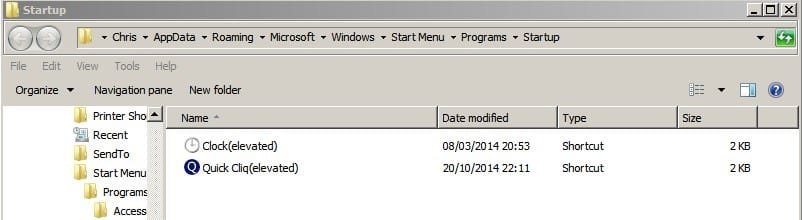
Startup folder
If the app is set to auto-start from within the GUI you can try unchecking that option then copy the shortcut into your startup folder:
Or you can use a batch file using the scheduled task name and place the batch file in the same startup folder:
http://www.sevenforums.com/general-discussion/324485-launch-program-boot-delayed-no-uac.html
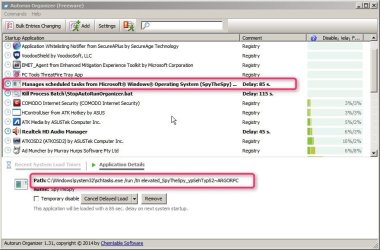
Although currently I've ditched that method and use
Autorun Organizer instead. Only recommended for advanced users.
As you can see the elevated task name has been added and set to start delayed on boot.
Computer type Laptop Computer Manufacturer/Model Number ASUS OS Microsoft Windows 7 Home Premium 64-bit 7601 Multiprocessor Free Service Pack 1 CPU AMD C-60 APU with Radeon(tm) HD Graphics Motherboard ASUSTeK COMPUTER INC. X501U Memory 4.00 GB Graphics Card(s) AMD Radeon HD 6290 Graphics Sound Card (1) AMD High Definition Audio Device (2) Realtek High Defi Screen Resolution 1366 x 768 x 32 bits (4294967296 colors) @ 60 Hz Hard Drives Hitachi HTS545050A7E380 SATA Disk Device Antivirus Comodo CIS & FW, SecureAplus App Whitelisting, Threatfire Browser Cyberfox 64bit, Opera 64bit, Airfox Other Info Spy-The-Spy, HitmanPro.Alert, Norton Connect Safe, MJRegWatcher, BitDefender TrafficLight, Voodoo Shield, Zemana AntiMalware
New member
Guru
Gold Member
VIP
Will PM you with a suggestion
Computer type Laptop Computer Manufacturer/Model Number ASUS OS Microsoft Windows 7 Home Premium 64-bit 7601 Multiprocessor Free Service Pack 1 CPU AMD C-60 APU with Radeon(tm) HD Graphics Motherboard ASUSTeK COMPUTER INC. X501U Memory 4.00 GB Graphics Card(s) AMD Radeon HD 6290 Graphics Sound Card (1) AMD High Definition Audio Device (2) Realtek High Defi Screen Resolution 1366 x 768 x 32 bits (4294967296 colors) @ 60 Hz Hard Drives Hitachi HTS545050A7E380 SATA Disk Device Antivirus Comodo CIS & FW, SecureAplus App Whitelisting, Threatfire Browser Cyberfox 64bit, Opera 64bit, Airfox Other Info Spy-The-Spy, HitmanPro.Alert, Norton Connect Safe, MJRegWatcher, BitDefender TrafficLight, Voodoo Shield, Zemana AntiMalware
New member
Power User
VIP
Thread Starter
Thanks Callender.
As soon as I saw your reply I realized that I made a very big mistake.
I need to ask this question on 8 Forums. I need this help on Windows 8.1.
My fault.
Computer type Laptop Computer Manufacturer/Model Number HP OS Dual Boot Win 8.1 x64; Win 7 SP1 x64 CPU i7-3610QM @ 2.3 GHz Motherboard Hewlett-Packard 181C (U3E1) Memory 8 GB Dual-Channel DDR3 @ 798MHz Graphics Card(s) Intel HD Graphics 4000 Hard Drives Hitachi HTS547575A9E384 SCSI Disk Device;
WD Elements 1042 USB Device Antivirus Microsoft Security Essentials; Comodo Firewall w/ Defense +
New member
Guru
Gold Member
VIP
Windows 8 Startup Folder?
Thanks Callender.
As soon as I saw your reply I realized that I made a very big mistake.
I need to ask this question on 8 Forums. I need this help on Windows 8.1.
My fault.
No problem. As far as I know creating an elevated shortcut in Windows 8 Startup folder should do the trick!
Computer type Laptop Computer Manufacturer/Model Number ASUS OS Microsoft Windows 7 Home Premium 64-bit 7601 Multiprocessor Free Service Pack 1 CPU AMD C-60 APU with Radeon(tm) HD Graphics Motherboard ASUSTeK COMPUTER INC. X501U Memory 4.00 GB Graphics Card(s) AMD Radeon HD 6290 Graphics Sound Card (1) AMD High Definition Audio Device (2) Realtek High Defi Screen Resolution 1366 x 768 x 32 bits (4294967296 colors) @ 60 Hz Hard Drives Hitachi HTS545050A7E380 SATA Disk Device Antivirus Comodo CIS & FW, SecureAplus App Whitelisting, Threatfire Browser Cyberfox 64bit, Opera 64bit, Airfox Other Info Spy-The-Spy, HitmanPro.Alert, Norton Connect Safe, MJRegWatcher, BitDefender TrafficLight, Voodoo Shield, Zemana AntiMalware
New member
Power User
VIP
Thread Starter
Thank you. As always you were spot on.
Have some recs!
Computer type Laptop Computer Manufacturer/Model Number HP OS Dual Boot Win 8.1 x64; Win 7 SP1 x64 CPU i7-3610QM @ 2.3 GHz Motherboard Hewlett-Packard 181C (U3E1) Memory 8 GB Dual-Channel DDR3 @ 798MHz Graphics Card(s) Intel HD Graphics 4000 Hard Drives Hitachi HTS547575A9E384 SCSI Disk Device;
WD Elements 1042 USB Device Antivirus Microsoft Security Essentials; Comodo Firewall w/ Defense +