how do I stop a program from going to background processes when closed

rocketman122

New member
Member
VIP
Local time
2:29 PM
Messages
106
so I use acdsee (pic editor) and after I close the program it stays in memory and that has to stop


it stays in background processes and I dont want that. also it has some other nonsense it runs

any way to not allow programs to run in background, besides opening task manager and removing?
 

My Computers

System One System Two

  • Computer type
    PC/Desktop
    Computer Manufacturer/Model Number
    custom
    OS
    win 7 pro 64
    CPU
    8320fx
    Memory
    8gb
    Graphics Card(s)
    gtx 660
    Hard Drives
    ssd hdd
    Antivirus
    none
  • Computer type
    PC/Desktop
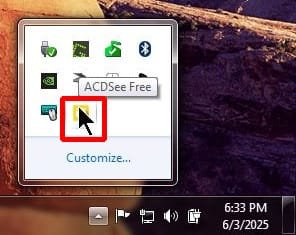
When it is running you can see it in the system tray

ac1.jpg

It is running in the Task Manager

ac2.jpg

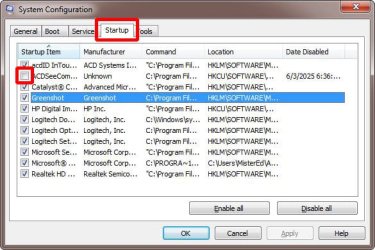
You can stop it from starting automatically by using Msconfig

  1. Go to Start
  2. Select Run
  3. Enter Msconfig
  4. Select Startup tab
  5. Uncheck box for acdsee
  6. Select OK

Msconfig_startup.jpg
 

My Computers

System One System Two

  • Computer type
    PC/Desktop
    Computer Manufacturer/Model Number
    Custom build
    OS
    Windows 7 Home Premium 64-bits
    CPU
    AMD FX-8350
    Motherboard
    Gigabyte GA-990FXA-UD3 (AM3+)
    Memory
    GSKILL Ripjaw-X PC3 12800 8GB (2x4GB)
    Graphics Card(s)
    ASUS ROG STRIX GTX 1060 6GB
    Sound Card
    Integrated
    Monitor(s) Displays
    Asus VE228H (21.5-in)
    Screen Resolution
    1920x1080 60Hz
    Hard Drives
    SAMSUNG 870 EVO 2.5 Inch SATA SSD (1TB)
    SAMSUNG 870 EVO 2.5 Inch SATA SSD (1TB)
    SAMSUNG 870 EVO 2.5 Inch SATA SSD (1TB)
    PSU
    Corsair RM750x (750 watts)
    Case
    Corsair Carbide Series 200R
    Cooling
    Corsair Hydro Series H60 (CWCH60)
    Keyboard
    Logitech Elite
    Mouse
    Logitech M510 Wireless Mouse
    Internet Speed
    Comcast Gigabit Extra (1200Mbps down / 35Mbps up)
    Antivirus
    Malwarebytes
    Browser
    Firefox, Edge, Chrome
    Other Info
    ASUS DRW-24B1ST DVD-RW (24X) optical drive
    Seagate Expansion Desk (5TB) external SATA/USB HDD
    Comcast XB8 Internet Gateway
  • Computer type
    PC/Desktop
    System Manufacturer/Model Number
    Custom
    OS
    Windows 7 Pro (64-bit)
    CPU
    AMD Phenom II 960T X4
    Motherboard
    ASUS M4N82 Deluxe
    Memory
    Corsair XMS2 DDR2-800 8GB (4x2GB)
    Graphics Card(s)
    ASUS ENGTX560 DCII OC/2DI/1GD5 1GB
    Monitor(s) Displays
    Samsung 930B 19-inch LCD
    Screen Resolution
    1280x1024
    Hard Drives
    Samsung SSD 870 EVO 1000 GB (Windows 10)
    Seagate ST1000DM003 1000 GB (Windows 7)
    PSU
    Antec TruePower (new) TP-650
    Case
    Antec Three Hundred
    Cooling
    AMD stock cooler from FX8350
    Mouse
    Logitech M100
    Internet Speed
    Xfinity Gigabit Extra 1200/35 Mbps
thanks for the help

the issue isnt startup/boot

the issue is when I use the program, finish using it, then close it and it still stays in system tray and in background processes.

I want it to close and not stay in memory.

any way to block that?

I already have it blocked on boot startup
 

My Computers

System One System Two

  • Computer type
    PC/Desktop
    Computer Manufacturer/Model Number
    custom
    OS
    win 7 pro 64
    CPU
    8320fx
    Memory
    8gb
    Graphics Card(s)
    gtx 660
    Hard Drives
    ssd hdd
    Antivirus
    none
  • Computer type
    PC/Desktop
I've had a look around yesterday, and so far as I can see there's no way to force this system-wide. Your only option is to see if the software itself has a 'Do not minimize to Tray, on clicking Exit' switch in its 'Settings' or 'Options'.
 

My Computers

System One System Two

  • Computer type
    PC/Desktop
    OS
    Windows 7 Ultimate x64 SP3
    CPU
    Xeon
  • Computer type
    PC/Desktop
Back
Top