How do I use ISO dowloads to repair W7 without removing programs?

Hymek7076

New member
Local time
4:48 PM
Messages
14
Location
Ramsbottom, UK
I have had problems with the current installation of Windows and I'm not sure how to download ISO files without
removing any programs or interrupting network devices. I didn't get any repair disks when I got the computer and I am
trying to find the serial key which I think might be on the side of the original PSU which was put in my sisters
computer so I'll have to check there unless it is located somewhere else on my computer.

Which is the best way to download it onto a disk and restore the Windows without damaging any programs installed?

Operating System
MS Windows 7 Home Premium 64-bit SP1


CPU
Intel Core i5 650 @ 3.20GHz 33 °C
Clarkdale 32nm Technology


RAM
8.00 GB Dual-Channel DDR3 @ 665MHz (9-9-9-24)


Motherboard
Acer Predator G5900 (CPU 1) 30 °C


Graphics
AMD Radeon HD 7800 Series


Thanks,
Hymek7076.
 

My Computer My Computer

At a glance

Windows 7 (64)Intel I5 6508GB DDR3AMD Radeon HD7850
Computer type
PC/Desktop
Computer Manufacturer/Model Number
Acer G5900
OS
Windows 7 (64)
CPU
Intel I5 650
Motherboard
Acer G5900
Memory
8GB DDR3
Graphics Card(s)
AMD Radeon HD7850
Hard Drives
Western Digital WDC WD5000AAKS-22V1A0
Antivirus
Avast
Browser
IE10
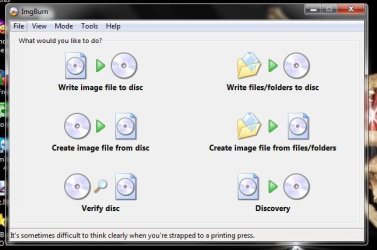
DownLoad the correct valid .iso version for your computer to your HD. Burn it to a blank DVD with FREEWARE ImgBurn
at 4x speed with verify ON.
 

Attachments

  • ImgBurn.JPG
    ImgBurn.JPG
    40.3 KB · Views: 28
  • ImgBurn_Verify.JPG
    ImgBurn_Verify.JPG
    54.5 KB · Views: 30
Last edited:

My Computer My Computer

At a glance

Win7 Enterprise, Win7 x86 (Ult 7600), Win7 x6...AMD fx8350 4ghz, AMD-32 2400mhz, AMD-64 3200m...2gb, 4gb on the Ult 7600, 4gb on Technet RTM,...Draw my own Graphics, several nVidia cards
Computer type
PC/Desktop
Computer Manufacturer/Model Number
Built them myself, Science Experiments !
OS
Win7 Enterprise, Win7 x86 (Ult 7600), Win7 x64 Ult 7600, TechNet RTM on AMD x64 (2.8Ghz)
CPU
AMD fx8350 4ghz, AMD-32 2400mhz, AMD-64 3200mhz, AMDx64 2.8G
Motherboard
SIS 755, ECS-K8M890M-M (Ult 7600), GigaByte & others
Memory
2gb, 4gb on the Ult 7600, 4gb on Technet RTM, 32gb on FX8350
Graphics Card(s)
Draw my own Graphics, several nVidia cards
Sound Card
on motherboard
Monitor(s) Displays
19" flat scr, 28" I-Inc widescr,22" Emprex Widescr, 23" Acer
Screen Resolution
1280 x 1024, 1440 x 900, 1920 x 1080
Hard Drives
6 pata Ide HD's & 2 Sata HD's
added 80gb external on Ult 7600 computer,
numerous extra 1tb, 2TB, 3Tb SATA HD's
A collection of ext HD Docks w/ HDs
PSU
430w, 550w, 600w, 700, 800, etc
Case
All Generic Full Towers
Cooling
Open Air & a few fans, some w/ colored LEDs
Keyboard
Compaq & Dell recycled from GoodWill
Mouse
Made in China Optical Wired Mouse
Internet Speed
Fast Cable InterNet
Antivirus
AVG Free on 24 different Desktops, NO Problems!
Browser
IE 8 is preferred, but use FireFox sometimes
Other Info
Linksys Routers, switches, & Hubs
Too Many USB Flash Drives to count, Biggest is 64GB !
Eight computers in my home network.
Sixteen computers at my business network.
Linked via TeamViewer !
Lots of old used spare computer parts everywhere!
There is no way you can do this and not affect some programs. Anti-virus and Firewall for sure, probably others as well.

You can download a legal copy with SP1 integrated from here:

Windows 7 Direct Download Links

Make sure you get the same version you have, Home Premium, Pro or Ultimate and 32 or 64 bit. Note that Basic or Starter is not available.

I recommend using ImgBurn at 4X speed (or the slowest available) to create the DVD from the downloaded .iso file.

You can do this on any computer capable of burning a DVD.

YOU MUST HAVE A VALID KEY TO INSTALL THIS .ISO. The one on the COA sticker on your computer will work.

You can also create a bootable USB Flash drive (4GB or larger) to install Windows 7 from.

  1. Download and run Universal USB Installer – Easy as 1 2 3
  2. Select Windows 7 from the first drop down list, all the way to the bottom
  3. Select the downloaded Windows 7 iso file
  4. Select your USB flash drive
  5. Click Create

For techies or folks who work on computers: Create Windows 7 Universal ISO With All Editions Selection On Install with ei.cfg Removal Utility.
This will fit on a 6GB flash drive or can be burned to a DVD.

Then follow these instructions: http://www.sevenforums.com/tutorials/3413-repair-install.html
 

My Computer My Computer

At a glance

Windows 10 Pro X64Intel Quad Core i7-4770 @ 3.4Ghz16.0GB PC3-12800 DDR3 SDRAM 1600 MHzIntel Integrated HD Graphics
Computer type
PC/Desktop
Computer Manufacturer/Model Number
Lenovo IdeaCenter 450
OS
Windows 10 Pro X64
CPU
Intel Quad Core i7-4770 @ 3.4Ghz
Memory
16.0GB PC3-12800 DDR3 SDRAM 1600 MHz
Graphics Card(s)
Intel Integrated HD Graphics
Sound Card
Realtek HD Audio
Monitor(s) Displays
HP 22" LCD
Screen Resolution
1680 x 1050
Hard Drives
250GB Samsung EVO SATA-3 SSD
2TB Seagate ST2000DM001 SATA-2
1.5TB Seagate ST3150041AS SATA
Keyboard
Dell USB
Mouse
Lenovo USB
Internet Speed
Cable via Road Runner 3MB Upload, 30MB Download
Antivirus
Windows Defender, MBAM Pro, MBAE
Browser
Seamonkey
Other Info
UEFI/GPT
PLDS DVD-RW DH16AERSH
How long does it normally take when running the ISO from a CD-ROM and will it change any programs or files?

Thanks,
Hymek7076.
 

My Computer My Computer

At a glance

Windows 7 (64)Intel I5 6508GB DDR3AMD Radeon HD7850
Computer type
PC/Desktop
Computer Manufacturer/Model Number
Acer G5900
OS
Windows 7 (64)
CPU
Intel I5 650
Motherboard
Acer G5900
Memory
8GB DDR3
Graphics Card(s)
AMD Radeon HD7850
Hard Drives
Western Digital WDC WD5000AAKS-22V1A0
Antivirus
Avast
Browser
IE10
A Repair Install will leave your data intact but some programs will have to be reinstalled, like anti-virus and firewall. I don't know which other ones though.

http://www.sevenforums.com/tutorials/3413-repair-install.html

A Clean Install wipes the drive so you lose everything.

http://www.sevenforums.com/tutorials/1649-clean-install-windows-7-a.html
http://www.sevenforums.com/tutorials/219487-clean-reinstall-factory-oem-windows-7-a.html#post1839164

If it were me, I would backup everything first before doing any kind of reinstall.
 

My Computer My Computer

At a glance

Windows 10 Pro X64Intel Quad Core i7-4770 @ 3.4Ghz16.0GB PC3-12800 DDR3 SDRAM 1600 MHzIntel Integrated HD Graphics
Computer type
PC/Desktop
Computer Manufacturer/Model Number
Lenovo IdeaCenter 450
OS
Windows 10 Pro X64
CPU
Intel Quad Core i7-4770 @ 3.4Ghz
Memory
16.0GB PC3-12800 DDR3 SDRAM 1600 MHz
Graphics Card(s)
Intel Integrated HD Graphics
Sound Card
Realtek HD Audio
Monitor(s) Displays
HP 22" LCD
Screen Resolution
1680 x 1050
Hard Drives
250GB Samsung EVO SATA-3 SSD
2TB Seagate ST2000DM001 SATA-2
1.5TB Seagate ST3150041AS SATA
Keyboard
Dell USB
Mouse
Lenovo USB
Internet Speed
Cable via Road Runner 3MB Upload, 30MB Download
Antivirus
Windows Defender, MBAM Pro, MBAE
Browser
Seamonkey
Other Info
UEFI/GPT
PLDS DVD-RW DH16AERSH
When I try to write the DVR is full, and I can only us 6 speed and 8 speed.

Thanks,
LH.
 

My Computer My Computer

At a glance

Windows 7 (64)Intel I5 6508GB DDR3AMD Radeon HD7850
Computer type
PC/Desktop
Computer Manufacturer/Model Number
Acer G5900
OS
Windows 7 (64)
CPU
Intel I5 650
Motherboard
Acer G5900
Memory
8GB DDR3
Graphics Card(s)
AMD Radeon HD7850
Hard Drives
Western Digital WDC WD5000AAKS-22V1A0
Antivirus
Avast
Browser
IE10
Use a new DVD+R or create a bootable flash drive.

What program are you using to burn the DVD. Give Imgburn a try as DocBrown suggested. Burn at the slowest speed available.
 

My Computer My Computer

At a glance

Windows 10 Pro X64Intel Quad Core i7-4770 @ 3.4Ghz16.0GB PC3-12800 DDR3 SDRAM 1600 MHzIntel Integrated HD Graphics
Computer type
PC/Desktop
Computer Manufacturer/Model Number
Lenovo IdeaCenter 450
OS
Windows 10 Pro X64
CPU
Intel Quad Core i7-4770 @ 3.4Ghz
Memory
16.0GB PC3-12800 DDR3 SDRAM 1600 MHz
Graphics Card(s)
Intel Integrated HD Graphics
Sound Card
Realtek HD Audio
Monitor(s) Displays
HP 22" LCD
Screen Resolution
1680 x 1050
Hard Drives
250GB Samsung EVO SATA-3 SSD
2TB Seagate ST2000DM001 SATA-2
1.5TB Seagate ST3150041AS SATA
Keyboard
Dell USB
Mouse
Lenovo USB
Internet Speed
Cable via Road Runner 3MB Upload, 30MB Download
Antivirus
Windows Defender, MBAM Pro, MBAE
Browser
Seamonkey
Other Info
UEFI/GPT
PLDS DVD-RW DH16AERSH
It is a new disc and larger than all flash drives I have. (I only have 1/2GB flash drives)

Thanks,
LH.
 

My Computer My Computer

At a glance

Windows 7 (64)Intel I5 6508GB DDR3AMD Radeon HD7850
Computer type
PC/Desktop
Computer Manufacturer/Model Number
Acer G5900
OS
Windows 7 (64)
CPU
Intel I5 650
Motherboard
Acer G5900
Memory
8GB DDR3
Graphics Card(s)
AMD Radeon HD7850
Hard Drives
Western Digital WDC WD5000AAKS-22V1A0
Antivirus
Avast
Browser
IE10
What burning software are you using?

Which ISO did you download and what is it's size on your hard drive?
 

My Computer My Computer

At a glance

Windows 10 Pro X64Intel Quad Core i7-4770 @ 3.4Ghz16.0GB PC3-12800 DDR3 SDRAM 1600 MHzIntel Integrated HD Graphics
Computer type
PC/Desktop
Computer Manufacturer/Model Number
Lenovo IdeaCenter 450
OS
Windows 10 Pro X64
CPU
Intel Quad Core i7-4770 @ 3.4Ghz
Memory
16.0GB PC3-12800 DDR3 SDRAM 1600 MHz
Graphics Card(s)
Intel Integrated HD Graphics
Sound Card
Realtek HD Audio
Monitor(s) Displays
HP 22" LCD
Screen Resolution
1680 x 1050
Hard Drives
250GB Samsung EVO SATA-3 SSD
2TB Seagate ST2000DM001 SATA-2
1.5TB Seagate ST3150041AS SATA
Keyboard
Dell USB
Mouse
Lenovo USB
Internet Speed
Cable via Road Runner 3MB Upload, 30MB Download
Antivirus
Windows Defender, MBAM Pro, MBAE
Browser
Seamonkey
Other Info
UEFI/GPT
PLDS DVD-RW DH16AERSH
I have to download it again because the old one went but the size is about 3.09 GB I downloaded W7 (x64) SP1 (X17-58997) but the old one currently installed is X16-96072. I don't think the old one is available.

How do I get speed 4?

Thanks,
LH.
 

My Computer My Computer

At a glance

Windows 7 (64)Intel I5 6508GB DDR3AMD Radeon HD7850
Computer type
PC/Desktop
Computer Manufacturer/Model Number
Acer G5900
OS
Windows 7 (64)
CPU
Intel I5 650
Motherboard
Acer G5900
Memory
8GB DDR3
Graphics Card(s)
AMD Radeon HD7850
Hard Drives
Western Digital WDC WD5000AAKS-22V1A0
Antivirus
Avast
Browser
IE10
It's saying the disk is unusable, I don't know if it's because I don't have 4 speed or not.

Is there any way to install it?

Thanks,
LH.
 

My Computer My Computer

At a glance

Windows 7 (64)Intel I5 6508GB DDR3AMD Radeon HD7850
Computer type
PC/Desktop
Computer Manufacturer/Model Number
Acer G5900
OS
Windows 7 (64)
CPU
Intel I5 650
Motherboard
Acer G5900
Memory
8GB DDR3
Graphics Card(s)
AMD Radeon HD7850
Hard Drives
Western Digital WDC WD5000AAKS-22V1A0
Antivirus
Avast
Browser
IE10
The lowest speed available will depend on your optical burner hardware, just use the lowest one.

The one you downloaded is:
Windows 7 Home Premium x64 SP1 U (media refresh) X17-58997.iso X17-59009.iso
On my hard drive it's:

X64-X17-58997iso.jpg
 

My Computer My Computer

At a glance

Windows 10 Pro X64Intel Quad Core i7-4770 @ 3.4Ghz16.0GB PC3-12800 DDR3 SDRAM 1600 MHzIntel Integrated HD Graphics
Computer type
PC/Desktop
Computer Manufacturer/Model Number
Lenovo IdeaCenter 450
OS
Windows 10 Pro X64
CPU
Intel Quad Core i7-4770 @ 3.4Ghz
Memory
16.0GB PC3-12800 DDR3 SDRAM 1600 MHz
Graphics Card(s)
Intel Integrated HD Graphics
Sound Card
Realtek HD Audio
Monitor(s) Displays
HP 22" LCD
Screen Resolution
1680 x 1050
Hard Drives
250GB Samsung EVO SATA-3 SSD
2TB Seagate ST2000DM001 SATA-2
1.5TB Seagate ST3150041AS SATA
Keyboard
Dell USB
Mouse
Lenovo USB
Internet Speed
Cable via Road Runner 3MB Upload, 30MB Download
Antivirus
Windows Defender, MBAM Pro, MBAE
Browser
Seamonkey
Other Info
UEFI/GPT
PLDS DVD-RW DH16AERSH
It will not burn to a disk (DVD-RW) it just keeps saying it is no longer usable. Is there any way to get it to work as I don't have an external drive big enough.

Thanks,
LH.
 

My Computer My Computer

At a glance

Windows 7 (64)Intel I5 6508GB DDR3AMD Radeon HD7850
Computer type
PC/Desktop
Computer Manufacturer/Model Number
Acer G5900
OS
Windows 7 (64)
CPU
Intel I5 650
Motherboard
Acer G5900
Memory
8GB DDR3
Graphics Card(s)
AMD Radeon HD7850
Hard Drives
Western Digital WDC WD5000AAKS-22V1A0
Antivirus
Avast
Browser
IE10
If you can boot into your current installation ( and you must be able to if you want to do a repair install), you can mount the iso and run setup from the mounted iso.

Any of the iso handling programs will do - free/trial versions, will be fine. Ultraiso should do the job:

BIN to ISO converter, ISO CD image editor and creator - Ultraiso Download Page

You need a fair bit of space on your HD to do a repair install.
 

My Computers My Computers

  • At a glance

    7 X64i5 84002x8gb 3200mhz
    Computer type
    PC/Desktop
    OS
    7 X64
    CPU
    i5 8400
    Motherboard
    gigabyte b365m ds3h
    Memory
    2x8gb 3200mhz
    Hard Drives
    various
    PSU
    pure power 11 400w cm
    Case
    Coolermaster
    Cooling
    cryorig m9i
  • At a glance

    7x64g54008gb ddr4 2400
    Computer type
    PC/Desktop
    OS
    7x64
    CPU
    g5400
    Motherboard
    ga b365m ds3h
    Memory
    8gb ddr4 2400
    PSU
    xfx pro 450w
How would I use these to run the ISO and how much space is required for it to run?

Thanks,
LH.
 

My Computer My Computer

At a glance

Windows 7 (64)Intel I5 6508GB DDR3AMD Radeon HD7850
Computer type
PC/Desktop
Computer Manufacturer/Model Number
Acer G5900
OS
Windows 7 (64)
CPU
Intel I5 650
Motherboard
Acer G5900
Memory
8GB DDR3
Graphics Card(s)
AMD Radeon HD7850
Hard Drives
Western Digital WDC WD5000AAKS-22V1A0
Antivirus
Avast
Browser
IE10
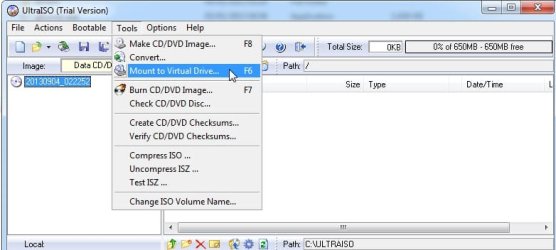
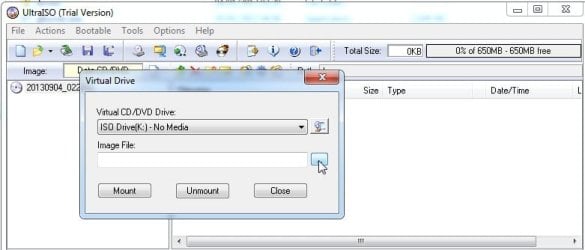
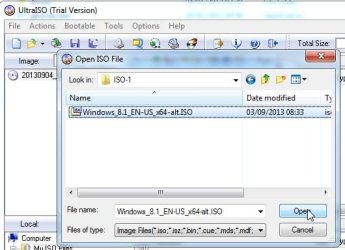
You d/l ultraiso and install it. Then you start up ultraiso.

UI-1.jpg

UI-2.jpg

UI-3.jpg

UI-4.jpg


Shockingly enough, you click on the button called mount.

There is a file in the mounted iso called setup.exe.

Run that and it will tell you if don't have enough space.
 

My Computers My Computers

  • At a glance

    7 X64i5 84002x8gb 3200mhz
    Computer type
    PC/Desktop
    OS
    7 X64
    CPU
    i5 8400
    Motherboard
    gigabyte b365m ds3h
    Memory
    2x8gb 3200mhz
    Hard Drives
    various
    PSU
    pure power 11 400w cm
    Case
    Coolermaster
    Cooling
    cryorig m9i
  • At a glance

    7x64g54008gb ddr4 2400
    Computer type
    PC/Desktop
    OS
    7x64
    CPU
    g5400
    Motherboard
    ga b365m ds3h
    Memory
    8gb ddr4 2400
    PSU
    xfx pro 450w
I am having problems with saving and loading file types in some programs. I can't get ultraISO to work as it says there is no drive, a similar message also appears in GTA 4 and will not let me load any saved games so it is unlikely that it is a problem in the program itself.

Is this a problem with windows not recognising the hard drive and is there any way to load the ISO file?

Thanks,
LH.
 

My Computer My Computer

At a glance

Windows 7 (64)Intel I5 6508GB DDR3AMD Radeon HD7850
Computer type
PC/Desktop
Computer Manufacturer/Model Number
Acer G5900
OS
Windows 7 (64)
CPU
Intel I5 650
Motherboard
Acer G5900
Memory
8GB DDR3
Graphics Card(s)
AMD Radeon HD7850
Hard Drives
Western Digital WDC WD5000AAKS-22V1A0
Antivirus
Avast
Browser
IE10
What are the exact problems you're having with Win7? Maybe we can help fix them.

You said you couldn't find the COA sticker with a readable Product Key. Did you find it, attached to the tower or on bottom of laptop? You'd need to have it or use the Factory Recovery run from it's partition or Disks - make the DIsks first either way. Acer eRecovery Management - Restore Using ALT - F10 - YouTube
Acer eRecovery Management - Restore from OS - YouTube
Acer Support: Frequently Asked Questions list for Recovery media and Restoring a system to factory load

If you have a readable Product Key then follow the steps in Clean Reinstall - Factory OEM Windows 7 using the latest official installer ISO for your licensed version with SP1 and Media Refresh, burned to a new DVD with the tool provided in Step 2.
 
I am missing several parts of Windows and features, command prompt missing, accessories missing, graphics problems, programs not loading as they should, some file formats will not load or save (ISO, GTA 4 saves, XLS & DOC files no longer work with Microsoft office).

I have found the serial key but I can't mount ISO files on anything.

Thanks,
LH.
 

My Computer My Computer

At a glance

Windows 7 (64)Intel I5 6508GB DDR3AMD Radeon HD7850
Computer type
PC/Desktop
Computer Manufacturer/Model Number
Acer G5900
OS
Windows 7 (64)
CPU
Intel I5 650
Motherboard
Acer G5900
Memory
8GB DDR3
Graphics Card(s)
AMD Radeon HD7850
Hard Drives
Western Digital WDC WD5000AAKS-22V1A0
Antivirus
Avast
Browser
IE10
Did you read the links in blue I provided above which show exactly how to run Factory Recovery or do the superior Clean Reinstall - Factory OEM Windows 7?

Nothing is said in any of them about mounting an image. If you want to do the reinstall download the ISO provided and burn to DVD or write to flash stick with the tool provided. Then boot the disk, during Clean Install Windows 7 delete all partitions as shown in Steps 7 and 8, Create and Format new partition(s) or just click Next to have the installer do it for you.

Make sure you stick with the steps in the first tutorial above to get and keep a perfect install.
 
Back
Top