How do I work out who connects to what application?

Bernard46

New member
Member
Local time
1:45 AM
Messages
50
Location
Harbury, Warwickshire, UK
I have Win 7 Home Premium and I run Netgadget which tells me amongst other things what active connections there are on my system at the moment. I have often been curious about this information and wondered about how legitimate some of these connections are.

For instance right now I have a connection established to IP address 62.103.65.80 and netGadget says this is "dulac--r.static.otenet.gr". If I do a Whois search on the IP address I'm told it belongs to OTENET who are "Multiprotocol Service Provider to other ISP's and End Users located in Greece and having nodes in 63 cities".

Now I have no reason to believe this isn't a genuine site, but to the best of my knowledge there is no reason why I should have any connection right now to a site in Greece. I have my Hotmail account open and 2 IE tabs open to WHOIS and this forum. In addition I have several other gadgets open to the BBC, the UK Met office, Airmiles (a UK rewards company) and Skype.

So my question is does anyone know how I might track down which application on my system is holding the connection to the OTENET user?

By the way whilst I was writing this entry the Greek connection went away and I now see I have a connection to a site in Russia (83.149.3.64 ip-83-149-3-64.nwgsm.ru on port 57104) - I'm getting quite worried (paranoid, even) about these even though I have a good firewall etc all up to date.
 

My Computer My Computer

At a glance

Windows 7 Home Premium 64 bitCore 2 Quad Q66006 GB
Computer Manufacturer/Model Number
Dell XPS420
OS
Windows 7 Home Premium 64 bit
CPU
Core 2 Quad Q6600
Motherboard
Dell
Memory
6 GB
Monitor(s) Displays
Dell E228WFP
Screen Resolution
Max
Hard Drives
Western Digital 500GB x 1, 1TB x 2
Cooling
Air
Internet Speed
8 mbit
Nwgsm.ru - Nw Gsm :confused:
Are you downloading anything? It could also be just a cyberspace ping.
 

My Computer My Computer

At a glance

Windows 7 Ultimate 32bit SP1Intel(R) Core(TM)2 Quad CPU @ 2.40GHz, 2400 MHz4 GBATI Radeon HD 2600 Pro
Computer type
PC/Desktop
Computer Manufacturer/Model Number
Bruce ... somewhere in his 40's
OS
Windows 7 Ultimate 32bit SP1
CPU
Intel(R) Core(TM)2 Quad CPU @ 2.40GHz, 2400 MHz
Motherboard
INTEL/D975XBX2
Memory
4 GB
Graphics Card(s)
ATI Radeon HD 2600 Pro
Monitor(s) Displays
Samsung SyncMaster 914v
Screen Resolution
1280 x 1024
Hard Drives
2/500GB each ... ST3500630AS ATA Device.
One is not connected
PSU
Rocketfish 700 W
Case
G.Skill Gigabyte Chassis
Keyboard
Standard PS/2 Keyboard
Mouse
Microsoft PS/2 Mouse
Internet Speed
DSL
Antivirus
Avira Internet Security
Browser
IE 11
Other Info
ATI HDMI Audio

My Computer My Computer

At a glance

Windows 7 Ult, Windows 8.1 Pro,Q9650-4.275GHz, E8600 4.5GHz, E6750-3.8GHzG.Skill PC2 9600 1200Mhz 5 5 5 15 2TGTX480
Computer type
PC/Desktop
Computer Manufacturer/Model Number
Home built
OS
Windows 7 Ult, Windows 8.1 Pro,
CPU
Q9650-4.275GHz, E8600 4.5GHz, E6750-3.8GHz
Motherboard
Evga 780i FTW
Memory
G.Skill PC2 9600 1200Mhz 5 5 5 15 2T
Graphics Card(s)
GTX480
Sound Card
Asus Xonar D2
Monitor(s) Displays
HannsG
Screen Resolution
1680X1050
Hard Drives
GSkill Phoenix Pro 120GB SSD
PSU
ThermalTake Toughpower 1000Watt modular
Case
ThermalTake XaserV
Cooling
Xigmatek S1283
Keyboard
Logitech G15
Mouse
Logitech G9
Internet Speed
T1
So my question is does anyone know how I might track down which application on my system is holding the connection to the OTENET user?

Hi Bernard,

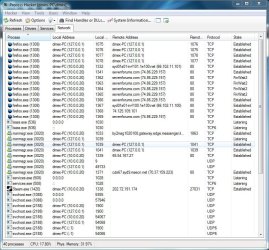
A tool I develop called Process Hacker should do exactly what you need, You can grab it from here: http://www.sevenforums.com/projects/18338-processhacker.html

Just click the network tab to view all processes network activity, you can also right-click a connection and ping/tracert/whois the connection directly from PH.
If you spot any processes with suspicious network connections, right-click them on the Processes tab and goto Miscellaneous > Upload to VirusTotal and have that executable scanned by over 30 different anti-virus engines ;)

(FYI: The latest versions don't have four tabs, this does since Im working on a new interface ;))

PH.JPG

Hope it helps

Steven
 
Fantastic

That's a great tool Steven - just what I needed and way beyond what I was expecting. You have yourself a donation - not a lot, but enough to buy yourself a beer or two when the sun gets too hot down there.

Can I make one suggestion? How about allowing a choice of colour coding based on the state of network connections (ala Process view) - say pastel shades which could be permanent (not go away after a few seconds) to enable one to monitor estblished or listening etc?

regards, Bernard
 

My Computer My Computer

At a glance

Windows 7 Home Premium 64 bitCore 2 Quad Q66006 GB
Computer Manufacturer/Model Number
Dell XPS420
OS
Windows 7 Home Premium 64 bit
CPU
Core 2 Quad Q6600
Motherboard
Dell
Memory
6 GB
Monitor(s) Displays
Dell E228WFP
Screen Resolution
Max
Hard Drives
Western Digital 500GB x 1, 1TB x 2
Cooling
Air
Internet Speed
8 mbit
From a command prompt:

netstat -abno

Wireshark is very good too. Process Hacker seems like a cool deal, although I never used it.
 

My Computer My Computer

At a glance

7600.20510 x86P4 550 3.4 GHz HT running at 3.5 GHzOCZ 2 GB(2x1GB) DDR400mHz running @ 414 mHzHIS Radeon HD 3850 IceQ 3 Turbo HDMI Dual DL-...
Computer Manufacturer/Model Number
self built
OS
7600.20510 x86
CPU
P4 550 3.4 GHz HT running at 3.5 GHz
Motherboard
MSI PM8M3-V (MS-7211 v1.x) Micro-ATX mainboard
Memory
OCZ 2 GB(2x1GB) DDR400mHz running @ 414 mHz
Graphics Card(s)
HIS Radeon HD 3850 IceQ 3 Turbo HDMI Dual DL-DVI AGP
Sound Card
MOTU Traveler firewire studio interface 192 kHz 24 bit
Monitor(s) Displays
22" widescreen Acer X223W LCD, 17" Compaq P75 CRT
Screen Resolution
1680x1050 and 1280x1024
Hard Drives
SATA I x2 WD, 400 GB and 120 GB, SATA 2 WD Caviar Black 1 TB
PSU
350W generic
Case
Cybertronpc, it glows blue
Cooling
stock cpu fan, Ice-Q 3 gpu and system, many case fans
Keyboard
Logitch Classical Keyboard 200
Mouse
Logitech Mediaplay cordless
Internet Speed
1792/448 kbits/sec
Other Info
SATA II PCI fake RAID adapter, 1 GB Readyboost, original ATI Remote Wonder (even works with WMC perfectly), Logitech Rumblepad 2 game controller x2
Back
Top