How do I?

rocknroller

New member
Local time
5:34 AM
Messages
10
I just want the icons that came from the individual websites....e.g. ebay, google, cnet...etc.

I am running windows 7 ultimate O/S.

I would greatly appreciate any help with this as I have tried to find the answer but do not see anything specifically addressing this issue....Thanks...rocknroller...:party:
 

My Computer

Computer Manufacturer/Model Number
custom
OS
windows 7 ultimate
CPU
amd 6000+
Motherboard
Asus
Memory
2gig ddr2
Graphics Card(s)
onboard
Sound Card
onboard
Monitor(s) Displays
dell lcd
Hard Drives
wd 500 sata lll

My Computer

Computer type
PC/Desktop
Computer Manufacturer/Model Number
Made by Dixon Butz
OS
Win7 Win 10, Win 8.1
CPU
AMD FX-8350, Corsair H100i
Motherboard
ASUS Crosshair V Formula-Z
Memory
16GB G.SKILL Ripjaws DDR3
Graphics Card(s)
EVGA GTX 980, EVGA GTX 860
Sound Card
Denon x4200 Dolby AMOS!
Monitor(s) Displays
65" Samsung 4K, +3 27inch
Screen Resolution
4K, 1080x3
Hard Drives
2TB Samsung hd204ui

1X Samsung 850 SSD
PSU
1000w EVGA, 2000VA UPS, 1000VA UPS and many others
Case
Lian Li
Cooling
Corsair H100i
Keyboard
Logitech K800
Mouse
Logitech Couch Mouse
Internet Speed
Gigabit!
Antivirus
Defender
Browser
Slimjet Chrome
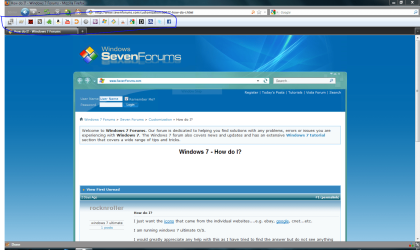
Is this what you mean the snipped area?

Capture.PNG
 

My Computer

Computer Manufacturer/Model Number
gigabyte technology
OS
windows 7 32 bit home premium
CPU
Intel core 2 duo [email protected]
Motherboard
G31m-s2l
Memory
2 gb ddr2
Graphics Card(s)
On board graphics
Sound Card
On board
Monitor(s) Displays
17" wide screen
Screen Resolution
1440x900
Hard Drives
Hitachi sata 500 Gb internal
Seagate 1 Tb external
PSU
400 watt psu
Case
Stock
Keyboard
Stock
Mouse
Stock
Internet Speed
o2 20Mb
Thanks for responding....I am trying to keep the original icons that are distinctive to the site such as the Yahoo, ebay, google icons....etc...

The process I use to place the choosen icon is to click on the file menu and drop down to the "send to" choice and choose send to desktop or in the case of Windows 7 "do you want to place a shortcut on the desktop?"

After I have placed the icon on my desktop windows will change it to a windows default icon....the latest one looks like a green ball....it is not unattractive but I simply want to keep the icons that are associated with the different web sites....

Sometimes the icon I want will remain on the desktop for a day or so but shortly, it will change to a Windows default (green ball) icon....
 

My Computer

Computer Manufacturer/Model Number
custom
OS
windows 7 ultimate
CPU
amd 6000+
Motherboard
Asus
Memory
2gig ddr2
Graphics Card(s)
onboard
Sound Card
onboard
Monitor(s) Displays
dell lcd
Hard Drives
wd 500 sata lll
Ahhh, I get it now. When you save a shortcut, it will use the websites favicon for it's image. The favicon is stored in your temp files. Whenever your temp files are removed, you will get the default icon. Find the icons you want to show, for instance,

Yahoo

Make a folder called favicons (or icons, or whatever you like), and put the yahoo icon in the folder

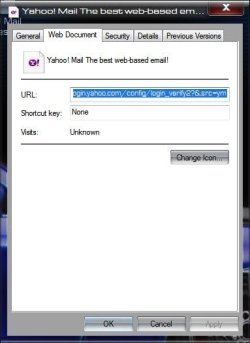
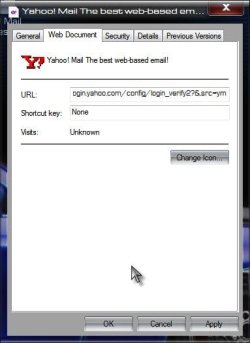
Then right click the Yahoo shortcut on your desktop and select properties:

Options.jpg

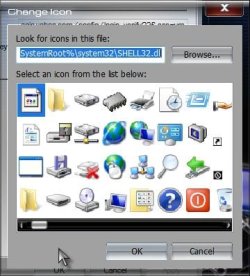
Click on Change Icon button

Click on Browse button

Browse.jpg

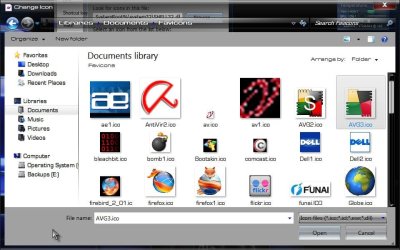
Navigate to the folder where you put your icons

Choose.jpg

Click on the correct icon

Click on OK

OK.jpg

Click on Apply

Apply.jpg

Now you have your shortcut with an icon that will not change when your temp files are deleted.

A Guy
 

My Computer

Computer type
PC/Desktop
OS
Windows 10 Home x64
CPU
INTEL Core i5-750 Quad-Core 3.37GHz
Motherboard
ASUS P7P55D
Memory
HyperX Fury Black Series 8GB (2 x 4GB) 1866Mhz
Graphics Card(s)
EVGA GeForce GTX 750 Superclocked 1GB 128-Bit GDDR5
Monitor(s) Displays
LG 32MA68HY 32" IPS
Screen Resolution
1920 x 1080
Hard Drives
Samsung 840 Evo 120GB, SEAGATE 500GB Barracuda® 7200.12, SATA 3 Gb/s, 7200 RPM, 16MB cache
PSU
ANTEC TruePower New TP-550, 80 PLUS, 550W
Case
ANTEC Three Hundred Illusion
Cooling
COOLER MASTER Hyper 212 Plus, 4 x 120mm 1 x 140mm Noctua's
Internet Speed
85 + Mbps
Antivirus
Avast
Browser
Vivaldi
Omg NICE!
 

My Computer

Computer Manufacturer/Model Number
Mc Donald's
OS
Mc Donald OS Version Beta
CPU
Awesome Beef Patty
Motherboard
Lettuce (It's green!)
Memory
Pro 1 KB Memory
Graphics Card(s)
Tomato FX10
Sound Card
The Box
Monitor(s) Displays
Yummy 5-D Touch
Screen Resolution
20 x 20
Hard Drives
The Top Bun and the Bottom Buns
PSU
Um.
Case
The Box With Pics!
Cooling
That's Why i Have a Refrigerator
Keyboard
N/A
Mouse
N/A
Internet Speed
Same as McDonald's Wi-fi
Other Info
Note : This is not real. (Hope You Knew That)
Dear A Guy,

Thank you so very much for your assistance. This appears to be the answer I've been seaching for.

Sincerely....rocknroller....
 

My Computer

Computer Manufacturer/Model Number
custom
OS
windows 7 ultimate
CPU
amd 6000+
Motherboard
Asus
Memory
2gig ddr2
Graphics Card(s)
onboard
Sound Card
onboard
Monitor(s) Displays
dell lcd
Hard Drives
wd 500 sata lll
You are very welcome, glad I could help. And BTW, welcome to the forum, hope to see you become a regular. A Guy
 

My Computer

Computer type
PC/Desktop
OS
Windows 10 Home x64
CPU
INTEL Core i5-750 Quad-Core 3.37GHz
Motherboard
ASUS P7P55D
Memory
HyperX Fury Black Series 8GB (2 x 4GB) 1866Mhz
Graphics Card(s)
EVGA GeForce GTX 750 Superclocked 1GB 128-Bit GDDR5
Monitor(s) Displays
LG 32MA68HY 32" IPS
Screen Resolution
1920 x 1080
Hard Drives
Samsung 840 Evo 120GB, SEAGATE 500GB Barracuda® 7200.12, SATA 3 Gb/s, 7200 RPM, 16MB cache
PSU
ANTEC TruePower New TP-550, 80 PLUS, 550W
Case
ANTEC Three Hundred Illusion
Cooling
COOLER MASTER Hyper 212 Plus, 4 x 120mm 1 x 140mm Noctua's
Internet Speed
85 + Mbps
Antivirus
Avast
Browser
Vivaldi
Back
Top