When an app places an icon in the system tray upon insatllation...is it possible to edit or alter the message displayed when the icon is highlighted ?
Having a problem with my A/V's new version.
It appears to install OK...but I'm getting a services are loading message in the default icon in system tray ?
However the system seems to be running OK and all features of the new A/V version seem to be functioning...only issue seems to be the system icon keeps saying "services are loading" ?
AV teck support so far hasn't a clue on what's wrong...other than maybe it's a hardware issue.
Can I delete or revise a system tray icon appearing at startup...other than the "customization" screen in the task screen ?
If "Hide icon and notifications" doesn't work then I don't think there is anything you can do other than making the program/service that controls the icon innactive which will likely of course stop ether the AV service or the UI that you need to controll it or tell you about virus activity.
My Computer
Computer Manufacturer/Model Number
Scratch built
OS
Windows 7 x64 Ultimate
CPU
i7 960
Motherboard
Asus P6X58D
Memory
12 Gig Corsair Dominator
Graphics Card(s)
Nvidia 480
Sound Card
Maudio Delta 44 + breakout box
Monitor(s) Displays
Dell UltraSharp U2410 24in and Samsung 21 dual monitors
Thanks...one other thougt...if it is somehow related to "hardware" and/or maybe an error/corruption in the Registry...would a system repair be helpful ?
Thanks guys...tried the icon reset and made progress...sort of ?
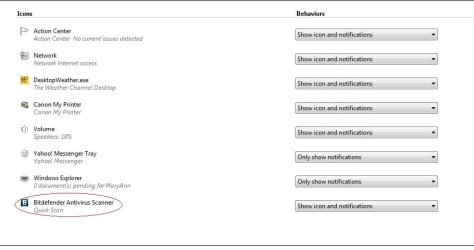
Attached is a new jpg showing the customization screen after reset. The old "Bitdefender Services are Loading.....icon is gone...but there's a new Bitdefender icon in the attached jpg
However...when running any scans...the icon does not appear...now there is nothing re Bitdefender in the system tray...but
All features of the program seem to be working...updates...v-scans...firewall settings...etc...just no system tray notifications of anything related to Bitdefender ?
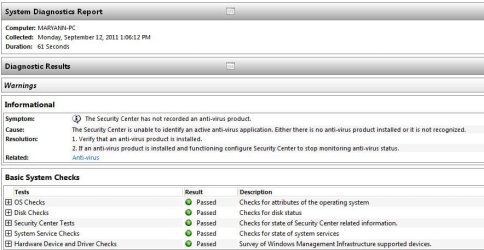
Also...ran Win 7 system performance check and have an interesting "warning" regarding a/v...windows reports nothing installed ? (attachment icon_change3.jpg)
Any further suggestions on how to get the Bitdefender icons to show up ?
Don't worry about the system performance check it doesn't even recognise Microsofts own MSE antivirus. I've never used Bitdefender, is there an option in the program to enable/disable the system tray icon maybe it's switched off.
Sometimes it can take a couple of reboots before the system tray organises itself properly especially after running the reset.Try a couple of reboots and see if it shows.