How do you add more than 1 text box in Windows Live Movie Maker??

NoGoodNamesLeft

IE9 Supporter
Power User
Local time
5:47 PM
Messages
185
Location
Missouri
Hey,
Ive been having this problem for awhile, and i just cant believe that
i cant find how to add a simple text box to picture/title page.
I have two questions:
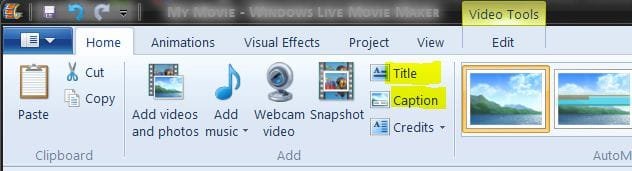
Where do you add a text box?
Can you add more than one?
Im sure its probably something simple, but i just cant figure it out!

-Thank you.
;)
 

My Computer My Computer

At a glance

Windows 7 Home Premium 64bitAMD Athlon 645 II Quad Core 3.2MHz6GB DDR3 1333MHzRadeon HD 4200
Computer Manufacturer/Model Number
HP Pavillion P7-1054
OS
Windows 7 Home Premium 64bit
CPU
AMD Athlon 645 II Quad Core 3.2MHz
Motherboard
Foxconn 2AB1
Memory
6GB DDR3 1333MHz
Graphics Card(s)
Radeon HD 4200
Sound Card
Realtek HD Audio
Monitor(s) Displays
HP S2031 20'
Screen Resolution
1600 x 900
Hard Drives
1TB
Internet Speed
18mb/s Down 2mb/s Up
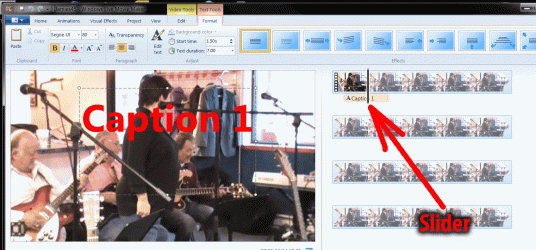
You can add and caption too. Just drag the slider to the place where you want to add text (select caption).
Capture.JPG
 

My Computer My Computer

At a glance

Windows 7 Ultimate x32DualCore Intel Pentium E2200, 2218 MHz (11 x ...2 GB DDR2-800 DDR2 SDRAMnVIDIA GeForce 9500GT 1GB
Computer Manufacturer/Model Number
Micro-Star International/MS-7529
OS
Windows 7 Ultimate x32
CPU
DualCore Intel Pentium E2200, 2218 MHz (11 x 202)
Motherboard
MSI G31M3 V2 (MS-7529) (2 PCI, 1 PCI-E x16,2 DDR2 DIMM)
Memory
2 GB DDR2-800 DDR2 SDRAM
Graphics Card(s)
nVIDIA GeForce 9500GT 1GB
Sound Card
Realtek ALC888/1200 @ Intel 82801GB ICH7
Monitor(s) Displays
Samsung SyncMaster 2253BW (Digital) 22'' LCD
Screen Resolution
1680x1050
Hard Drives
SAMSUNG HD322IJ ATA Device (298 GB , IDE)
Have you updated to WLMM 2011 ??
 

My Computer My Computer

At a glance

XP MCE .... XP Pro 64 .... W7 U x64E6750, 2.67GHz C2D4GB, PC2 6400GeForce 9400GT
Computer Manufacturer/Model Number
HP d4996t (upgraded)
OS
XP MCE .... XP Pro 64 .... W7 U x64
CPU
E6750, 2.67GHz C2D
Memory
4GB, PC2 6400
Graphics Card(s)
GeForce 9400GT
Monitor(s) Displays
Twin Samsung 2443BWT
Screen Resolution
1920x1200
Hard Drives
Many .. 3 Installed
PSU
460W
Internet Speed
Cable
You can add and caption too. Just drag the slider to the place where you want to add text (select caption).
View attachment 111661

I know that you can add a caption like that, but how do you add TWO captionS to one page?
Ive tried just pressing Caption again, but it just highlights the caption i already have.
 

My Computer My Computer

At a glance

Windows 7 Home Premium 64bitAMD Athlon 645 II Quad Core 3.2MHz6GB DDR3 1333MHzRadeon HD 4200
Computer Manufacturer/Model Number
HP Pavillion P7-1054
OS
Windows 7 Home Premium 64bit
CPU
AMD Athlon 645 II Quad Core 3.2MHz
Motherboard
Foxconn 2AB1
Memory
6GB DDR3 1333MHz
Graphics Card(s)
Radeon HD 4200
Sound Card
Realtek HD Audio
Monitor(s) Displays
HP S2031 20'
Screen Resolution
1600 x 900
Hard Drives
1TB
Internet Speed
18mb/s Down 2mb/s Up
Ive tried just pressing Caption again, but it just highlights the caption i already have.
That's because the slider selector is in the area of the first caption.

Move the slider to a new area where you want to add the new caption
 

Attachments

  • Clipboard.gif
    Clipboard.gif
    345.8 KB · Views: 905

My Computer My Computer

At a glance

XP MCE .... XP Pro 64 .... W7 U x64E6750, 2.67GHz C2D4GB, PC2 6400GeForce 9400GT
Computer Manufacturer/Model Number
HP d4996t (upgraded)
OS
XP MCE .... XP Pro 64 .... W7 U x64
CPU
E6750, 2.67GHz C2D
Memory
4GB, PC2 6400
Graphics Card(s)
GeForce 9400GT
Monitor(s) Displays
Twin Samsung 2443BWT
Screen Resolution
1920x1200
Hard Drives
Many .. 3 Installed
PSU
460W
Internet Speed
Cable
You cant put two captions on top of each other .. That would not look good.

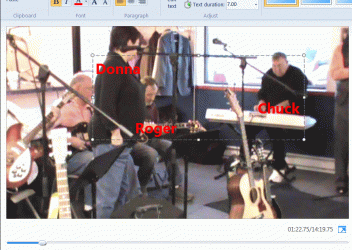
You can Click on the text box handles .. Stretch the text box ..
Then edit the text to include more text .. like a second caption ..
Is this want you're looking for.
WLMM is a little limited in that you can't add a second text box (that I've found)

Your other option is to move the slider .. and add another caption ..
Side by Side in the time line.
 

My Computer My Computer

At a glance

XP MCE .... XP Pro 64 .... W7 U x64E6750, 2.67GHz C2D4GB, PC2 6400GeForce 9400GT
Computer Manufacturer/Model Number
HP d4996t (upgraded)
OS
XP MCE .... XP Pro 64 .... W7 U x64
CPU
E6750, 2.67GHz C2D
Memory
4GB, PC2 6400
Graphics Card(s)
GeForce 9400GT
Monitor(s) Displays
Twin Samsung 2443BWT
Screen Resolution
1920x1200
Hard Drives
Many .. 3 Installed
PSU
460W
Internet Speed
Cable
Are you trying to do something like this ???
 

Attachments

  • Clipboard.gif
    Clipboard.gif
    255.4 KB · Views: 497

My Computer My Computer

At a glance

XP MCE .... XP Pro 64 .... W7 U x64E6750, 2.67GHz C2D4GB, PC2 6400GeForce 9400GT
Computer Manufacturer/Model Number
HP d4996t (upgraded)
OS
XP MCE .... XP Pro 64 .... W7 U x64
CPU
E6750, 2.67GHz C2D
Memory
4GB, PC2 6400
Graphics Card(s)
GeForce 9400GT
Monitor(s) Displays
Twin Samsung 2443BWT
Screen Resolution
1920x1200
Hard Drives
Many .. 3 Installed
PSU
460W
Internet Speed
Cable
You cant put two captions on top of each other .. That would not look good.

You can Click on the text box handles .. Stretch the text box ..
Then edit the text to include more text .. like a second caption ..
Is this want you're looking for.
WLMM is a little limited in that you can't add a second text box (that I've found)

Your other option is to move the slider .. and add another caption ..
Side by Side in the time line.
Yes, stretching the text box is kind of same as adding two or more captions, one can put text where ever he wants.
 

My Computer My Computer

At a glance

Windows 7 Ultimate x32DualCore Intel Pentium E2200, 2218 MHz (11 x ...2 GB DDR2-800 DDR2 SDRAMnVIDIA GeForce 9500GT 1GB
Computer Manufacturer/Model Number
Micro-Star International/MS-7529
OS
Windows 7 Ultimate x32
CPU
DualCore Intel Pentium E2200, 2218 MHz (11 x 202)
Motherboard
MSI G31M3 V2 (MS-7529) (2 PCI, 1 PCI-E x16,2 DDR2 DIMM)
Memory
2 GB DDR2-800 DDR2 SDRAM
Graphics Card(s)
nVIDIA GeForce 9500GT 1GB
Sound Card
Realtek ALC888/1200 @ Intel 82801GB ICH7
Monitor(s) Displays
Samsung SyncMaster 2253BW (Digital) 22'' LCD
Screen Resolution
1680x1050
Hard Drives
SAMSUNG HD322IJ ATA Device (298 GB , IDE)
Ive tried just pressing Caption again, but it just highlights the caption i already have.
That's because the slider selector is in the area of the first caption.

Move the slider to a new area where you want to add the new caption

Ohhh,
I see now. Thank you so much!
Ive been trying to figure it out for awhile now.

-Thanks again
;)
 

My Computer My Computer

At a glance

Windows 7 Home Premium 64bitAMD Athlon 645 II Quad Core 3.2MHz6GB DDR3 1333MHzRadeon HD 4200
Computer Manufacturer/Model Number
HP Pavillion P7-1054
OS
Windows 7 Home Premium 64bit
CPU
AMD Athlon 645 II Quad Core 3.2MHz
Motherboard
Foxconn 2AB1
Memory
6GB DDR3 1333MHz
Graphics Card(s)
Radeon HD 4200
Sound Card
Realtek HD Audio
Monitor(s) Displays
HP S2031 20'
Screen Resolution
1600 x 900
Hard Drives
1TB
Internet Speed
18mb/s Down 2mb/s Up
Back
Top