How do you confirm USB3 is operational

Reggie49

New member
Local time
8:28 AM
Messages
34
G'Day All,
I have an fairly new ASUS laptop that has a USB 3 port onboard. In preparation for buying a WD passport USB 3 drive I decided to downloaded the latest USB 3 driver from the ASUS website. When I tried to install it the installation ceased and gave an error code.

I rang ASUS tech support, they gave me a link to another driver which I downloaded and the same problem occurred. After many follow up calls I came to the conclusion they were of no help at all, especially when they finally suggested formatting the hard drive and doing a fresh installation, which I wasn't prepared to do seeing everything else seemed to be humming along okay!

Okay so what's the problem I hear you ask:
Seeing this driver wouldn't install correctly, could the original USB3 driver have been corrupted, because when I connected my WD passport drive, I'm not convinced it's operating as a USB3 device and with my limited knowledge I have no way of telling if it is.

I've checked the BIOS and the only option for USB3 is to change from 2 switching modes, which I don't want to fiddle with yet until I hopefully hear from someone with some suggestions.

When I checked under the USB Heading in Device Manager there are USB 3 options listed along with a Composite driver. On checking the Drives heading in Device Manager for the WD passport drive, the driver shows the date of 2006 which is the same date as that used for the Composite USB.

This didn't seem right to me so I tried to do a driver update from both the software that came with the WD passport drive, and from the net. Windows reports the latest driver is already installed installed.

I found a thread here about USB3 ports not working, (http://www.sevenforums.com/hardware-devices/120199-usb-3-0-ports-not-working.html) But I'm not sure whether this is relevant to me as I my USB listings don't show any errors with the drivers, I just don't seem to be able to access the USB 3 setting.

Hoping somone is able to help. Cheers Ron
 

My Computer My Computer

OS
Win7 64 bit Home Premium
Hi Ron,

This is an area I am also interested in pursuing ie. how much faster is USB3.0 v USB2.0. My understanding is it has to be enabled in the BIOS for some motheboards. Anyway....

This is perhaps a crude method, but should give you a definitive answer:

1. Copy a file of known size (preferbaly a large file) onto a classic USB2.0 device.
2. Copy the same file to your new USB3.0 device

and then compare the time it takes to do that.

Regards,
Golden
 

My Computer My Computer

Computer type
PC/Desktop
Computer Manufacturer/Model Number
Golden Mk. I.4
OS
Windows 10 Pro x64 ; Xubuntu x64
CPU
Intel i7 860 @ 2.80 GHz O/C'ed to 4.0GHz
Motherboard
Gigabyte P55A-UD3R Rev.1. Award BIOS F13
Memory
16GB Corsair Vengance DDR3 @ 661 MHz Dual Channel (9-9-9-24)
Graphics Card(s)
EVGA NVidia GTX 560 1024MB
Sound Card
Realtek Integrated
Monitor(s) Displays
Dual Samsung SyncMaster 2494HS
Screen Resolution
1920*1080 and 1920*1080
Hard Drives
1*Samsung 840 EVO 120GB SSD;
1*OCZ Vertex 2 60GB SSD;
2*Samsung F3 SpinPoint 1TB in RAID0;
1*Samsung F1 SpinPoint 1TB;
2*Western Digital 1TB External USB 3.0
1*Western Digital 500GB External USB 3.0
1*Seagate 500GB External USB 2.0
PSU
Thermaltake ToughPower QFan 750W
Case
Thermaltake Element S VK60001W2Z
Cooling
Corsair H60 Water Cooling, 2*230mm and 2*80mm case fans
Keyboard
Logitech G110
Mouse
Logitech MX518
Hi Ron,

This is an area I am also interested in pursuing ie. how much faster is USB3.0 v USB2.0. My understanding is it has to be enabled in the BIOS for some motheboards. Anyway....

This is perhaps a crude method, but should give you a definitive answer:

1. Copy a file of known size (preferbaly a large file) onto a classic USB2.0 device.
2. Copy the same file to your new USB3.0 device

and then compare the time it takes to do that.

Regards,
Golden

My friend was just over and he brought his external 700gb 3.0 USB and its a ton faster i copped a 902MB file in about 15 seconds.
 

My Computer My Computer

Computer Manufacturer/Model Number
Lenovo
OS
Windows 7 Home Premium 32bit
CPU
Intel(R) Core(TM)2 Quad CPU
Memory
3GB DDR2
Graphics Card(s)
Geforce 9800GTX+
Monitor(s) Displays
Dell 22"
Screen Resolution
1440x900
Hard Drives
1TB, 120GB External
Mouse
Razer Death Adder
Doing just that is what made me think I wasn't being connected as a USB3 device.

I saved a 3Gb folder from the laptop to the WD passport and it took 2+minutes to save. I then copied the same folder from the passport drive to my desktop computer via a USB2 port and it took just over 2 minutes.

Any comments guys on how to verify this please :(
 

My Computer My Computer

OS
Win7 64 bit Home Premium
First thing if to be sure you have the proper cable. Then after the unit is plugged in go to Device Manager and right click on the USB Hub and look at the Advanced Tab.

USB1.PNG


Low Speed = USB 1.0
Full Speed = USB 1.1
High Speed = USB 2.0
Super Speed = USB 3.0

Jim :geek:
 

My Computer My Computer

Computer type
PC/Desktop
Computer Manufacturer/Model Number
Home Built
OS
Windows 8.1 Pro w/Media Center 64bit, Windows 7 HP 64bit
CPU
Phenom II X6 1100T
Motherboard
ASUS M5A99X EVO
Memory
Crucial Balistic 8gb DDR3-1866 CL9
Graphics Card(s)
MSI R6850 Cyclone IGD5 PE
Sound Card
On Board
Monitor(s) Displays
ASUS VE258Q 25" LED with DVI-HDMI-DisplayPort
Screen Resolution
1920 x 1080
Hard Drives
Two WD Cavier Black 2TB Sata III, WD My Book Essential 2TB USB 3.0
PSU
Seasonic X650 80 Plus GOLD Modular
Case
Corsair 400R
Cooling
Antec Kuhler H2O 620, Two 120mm and four 140mm
Keyboard
Logitech K120
Mouse
Logitech Marble Mouse USB, Logitech Precision Game Pad
Internet Speed
15MB
Antivirus
Norton IS 2013, Malwarebytes Pro Beta 2
Browser
IE-11, FF-27
Other Info
APC UPS ES 750, Netgear WNR3500L Gigabit & Wireless N Router with SamKnows Test Program, Motorola SB6120 Gigabit Cable Modem. Brother HL-2170W Laser Printer, Epson V300 Scanner
Thanks for the reply Jim.
Checked the device manager, in the list there are 2 Generic Root Hubs and 2 Universal Root hubs, none of them seem to be associated with the WD passport HDD, and all indicate they are running at high speed. So as I guessed the drive isn't operating at the right speed

As the drive is packaged as a USB3 drive from Western Digital, I'm assuming the lead they supplied is correct for this purpose. A wrong assumption do you think?

Any clues as to how to get the drive to connect as a USB3?
 

My Computer My Computer

OS
Win7 64 bit Home Premium

My Computer My Computer

Computer type
PC/Desktop
Computer Manufacturer/Model Number
Home Built
OS
Windows 8.1 Pro w/Media Center 64bit, Windows 7 HP 64bit
CPU
Phenom II X6 1100T
Motherboard
ASUS M5A99X EVO
Memory
Crucial Balistic 8gb DDR3-1866 CL9
Graphics Card(s)
MSI R6850 Cyclone IGD5 PE
Sound Card
On Board
Monitor(s) Displays
ASUS VE258Q 25" LED with DVI-HDMI-DisplayPort
Screen Resolution
1920 x 1080
Hard Drives
Two WD Cavier Black 2TB Sata III, WD My Book Essential 2TB USB 3.0
PSU
Seasonic X650 80 Plus GOLD Modular
Case
Corsair 400R
Cooling
Antec Kuhler H2O 620, Two 120mm and four 140mm
Keyboard
Logitech K120
Mouse
Logitech Marble Mouse USB, Logitech Precision Game Pad
Internet Speed
15MB
Antivirus
Norton IS 2013, Malwarebytes Pro Beta 2
Browser
IE-11, FF-27
Other Info
APC UPS ES 750, Netgear WNR3500L Gigabit & Wireless N Router with SamKnows Test Program, Motorola SB6120 Gigabit Cable Modem. Brother HL-2170W Laser Printer, Epson V300 Scanner
One thing to consider is that just because a device is USB 3 compatible that doesn't necessarily mean it will run at the full USB 3 speed. A lot of them don't even come close to USB 2 speed. You need to read the fine print. If you compare your two external hard drives you may find that one is basically a laptop drive that runs at 5400 RPM and the other is a desktop drive that runs at 7200 RPM. Those thin small external drives usually have a 2.5 inch form factor drive inside and the larger ones a 3.5 inch drive. In any case if the drive inside the case is a mechanical drive with platters you'll never get close to USB 3 speeds from it.
 

My Computer My Computer

Computer type
PC/Desktop
Computer Manufacturer/Model Number
Home Built
OS
Windows 10 Education 64 bit
CPU
AMD Phenom II X4 980 Black Edition Deneb 3.7GHz
Motherboard
Asus M4N68T-M V2 µATX Motherboard
Memory
8GB 4GBx2 Kingston PC10600 DDR3 1333 Memory
Graphics Card(s)
Zotac NVIDIA Geforce GT640 2 Gig DDR3 PCIe
Sound Card
VIA VT1708s High Definition Audio 8-channel Onboard
Monitor(s) Displays
22" LG E2242 1080p and 2 19" I-INC AG191D
Screen Resolution
1280x1024 - 1920x1080 - 1280x1024
Hard Drives
Crucial M100 256 GB SSD and 500 GB WD Blue SATA
PSU
Thermaltake TR 620
Case
Power Up Black ATX Mid-Tower Case
Cooling
Stock heatsink and fan
Keyboard
Logitech Wireless K350 Wave
Mouse
Logitech Wireless M570 Trackman Wheel
Internet Speed
80 Mbps Down 30 Mbps Up
Antivirus
Windows Defender
Browser
Internet Explorer 11
Other Info
HP DVD1040e Lightscribe - External USB2

My Computer My Computer

Computer Manufacturer/Model Number
Self Built
OS
Windows 7 ultimate 64 bit / XP Home sp3
CPU
intel Core 2 Duo E8400 3.0ghz
Motherboard
Asus P5ND bios 1401
Memory
8 gigs 1066 OCZ Fata1ty
Graphics Card(s)
EVGA GTX 580 Call of Duty Black Ops Edition
Sound Card
Creative Soundblaster Audigy 2zs
Monitor(s) Displays
Asus 24in LCD's 2MS X2
Screen Resolution
1920x1080p @60Hz
Hard Drives
WD Caviar 500 Black/ WD Caviar 200 Blue
PSU
OCZ 700W GameXtreme
Case
NZXT Apollo
Cooling
Corsair H50 CPU/120mm x3 /60mm x2 /Corsair Dominator Ram
Keyboard
Logitech Bluetooth Wireless MX5000
Mouse
Logitech Bluetooth Wireless MX1000
Internet Speed
Download 19.83 Upload 0.97
Other Info
Logitech Z2300 Speakers/ Bose Noise Cancelling Headphones/Avermedia PCI-e Hybrid TV Bravo/Epson NX415 all in one/ 4 Port Powered USB Hub/ LG 10x Bluray Burner /TSST Corp DVDRW External
Thanks for your comments guys, but I'm beginning to think that there's no easy way to determine the drive is connecting to the laptop as a USB 3 device.

Does anyone know of a checklist procedure to be able to verify this.

The cable is USB 3 compliant, according to WD, so that's one step I can cross off but the others?
 

My Computer My Computer

OS
Win7 64 bit Home Premium
If you connect it to a usb 2.0 port, you should get a pop up on your desktop saying 'this device can perform faster'. You can also transfer the same file from your friends computer to your external and see how long it takes.
 

My Computers My Computers

System One System Two

  • Computer type
    PC/Desktop
    Computer Manufacturer/Model Number
    ALWAYS UNDER CONSTRUCTION
    OS
    Windows 11 Pro
    CPU
    Ryzen 9 5900X
    Motherboard
    Asus X570 Crosshair Viii Hero
    Memory
    32GB G Skill DDR4-3600
    Graphics Card(s)
    EVGA RTX 3080 FTW 3 Ultra
    Sound Card
    On Board/Sennheiser PC37X Headset
    Monitor(s) Displays
    3 X Asus 27"
    Screen Resolution
    2560x1440
    Hard Drives
    2 X 1 TB NVME drives
    PSU
    EVGA 850
    Case
    Phanteks Eclipse P400A
    Cooling
    EVGA 280 AIO
    Keyboard
    Logitech G510s/ Logitech G13
    Mouse
    Logitech G502
    Internet Speed
    24/1
    Antivirus
    ESET/MBAM Pro/SAS Pro
    Browser
    Chrome/ Firefox/ Edge
  • Computer type
    Laptop
    System Manufacturer/Model Number
    Dell 16 Plus
    OS
    Windows 11 Pro
    CPU
    Intel Ultra 9 288V
    Memory
    32 GB LPDDR5X 8533
    Monitor(s) Displays
    16" Mini-LED HDR600 Touch 90 Hz
    Screen Resolution
    2560X1600
    Hard Drives
    1 TB NVME
I think there is a lot of hype regarding USB3 for spinning disks. Lets look at the facts:

-- USB2 has a maximum transfer rate of 480 Mbps
-- USB3 has a theoritical transfer rate of up to 6 Gbps

However, let's look at the disks

-- Spinning disks (5.400 and 7.200 Rpm) have a transfer rate of 500 to 800 Mbps ( some Raptors may be faster)

So for those disks you will see at best a 60% performance improvement. In fact I made a 22GB image to a USB2 external in 12 minutes and to a USB3 external in 9 minutes. So it was relatively unexciting.

But once we get large SSDs that are affordable for storage, that will be another story.
 

My Computer My Computer

Computer Manufacturer/Model Number
HP, Dell, Gateway, Toshiba - 4 laptops and 2 desktops
OS
Vista, Windows7, Mint Mate, Zorin, Windows 8
CPU
from 1.6GHz Duo to i7
Monitor(s) Displays
2x HP w2207
Hard Drives
5x HDD, 7x SSD, 12x Externals
Keyboard
with trackball - no mices
Mouse
Trackball mice
Internet Speed
DSL 6000
If they had designed USB 3.0 to be only twice as fast as USB 2.0 it would get maxed out before it got going. With a 6Gbps speed it has lots of room for future growth.

Jim :geek:
 

My Computer My Computer

Computer type
PC/Desktop
Computer Manufacturer/Model Number
Home Built
OS
Windows 8.1 Pro w/Media Center 64bit, Windows 7 HP 64bit
CPU
Phenom II X6 1100T
Motherboard
ASUS M5A99X EVO
Memory
Crucial Balistic 8gb DDR3-1866 CL9
Graphics Card(s)
MSI R6850 Cyclone IGD5 PE
Sound Card
On Board
Monitor(s) Displays
ASUS VE258Q 25" LED with DVI-HDMI-DisplayPort
Screen Resolution
1920 x 1080
Hard Drives
Two WD Cavier Black 2TB Sata III, WD My Book Essential 2TB USB 3.0
PSU
Seasonic X650 80 Plus GOLD Modular
Case
Corsair 400R
Cooling
Antec Kuhler H2O 620, Two 120mm and four 140mm
Keyboard
Logitech K120
Mouse
Logitech Marble Mouse USB, Logitech Precision Game Pad
Internet Speed
15MB
Antivirus
Norton IS 2013, Malwarebytes Pro Beta 2
Browser
IE-11, FF-27
Other Info
APC UPS ES 750, Netgear WNR3500L Gigabit & Wireless N Router with SamKnows Test Program, Motorola SB6120 Gigabit Cable Modem. Brother HL-2170W Laser Printer, Epson V300 Scanner
The easiest way to test it to simply time the transfer of a large file. Get yourself an ISO file or something else which is 1GB or 2GB in size. Copying those files via USB 2.0 would results in about 25 MB/sec. So, a 1GB file would take about 40 seconds to transfer over USB2. A 2GB file would take about 80 seconds to transfer.

If you are using a USB3 device, I would expect that you would get at least 50MB/sec...so a 1GB file would be done in about 20 seconds and a 2GB file would be done in about 40 seconds. If you are going this fast, or faster...it's certainly working.

Most USB 3 devices are limited by the speeds of the hard drive itself...not the bus speeds.
 

My Computer My Computer

Computer Manufacturer/Model Number
Self-Built in July 2009
OS
Windows 7 Ultimate x64
CPU
Intel Q9550 2.83Ghz OC'd to 3.40Ghz
Motherboard
Gigabyte GA-EP45-UD3R rev. 1.1, F12 BIOS
Memory
8GB G.Skill PI DDR2-800, 4-4-4-12 timings
Graphics Card(s)
EVGA 1280MB Nvidia GeForce GTX570
Sound Card
Realtek ALC899A 8 channel onboard audio
Monitor(s) Displays
23" Acer x233H
Screen Resolution
1920x1080
Hard Drives
Intel X25-M 80GB Gen 2 SSD
Western Digital 1TB Caviar Black, 32MB cache. WD1001FALS
PSU
Corsair 620HX modular
Case
Antec P182
Cooling
stock
Keyboard
ABS M1 Mechanical
Mouse
Logitech G9 Laser Mouse
Internet Speed
15/2 cable modem
Other Info
Windows and Linux enthusiast. Logitech G35 Headset.
The maximum throughput rate for USB 2.0 is 480Mb/s, or 60MB/s; the maximum throughput rate for the USB 3.0 4.8Gb/s, or 600MB/s.

There's no USB 2.0 device that can achive maximum transfer rate, even the best of them max out at around 320Mb/s, or 40MB/s. That's 2/3 of the maximum transfer rate; the chances are that the USB 3.0 devices will not reach the maximum transfer rate either. They probably will top out at 3.2Gb/s, or 400MB/s. Still an awesome speed and would be faster than the best SATA 3.0, or 6G, SSD drives.

The maximum transfer rate for the SATA 3.0 is 6Gb/s, or 750MB/s. Similarly to the USB devices, the current SSD devices don't even come close to the maximum transfer rate. For example the Crucial C300 series SSD (256GB) has a maximum read speed of 355MB/s and write speed of 215MB/s; not even close to 50% of the SATA 3.0 specification. Don't take me wrong, the SSD devices are a lot faster than any single mechanical drive can ever be, that's not the point.

The point is that neither the USB, nor the SATA devices live up to the specification defined speed. The actual transfer rate is anywhere from less than 50 to about 70 percentile of the specification defined speed. It sort of reminds me of buying 2x4 in the US, that has an actual size of 1.5x3.5...
 

My Computer My Computer

Computer type
PC/Desktop
Computer Manufacturer/Model Number
Custom built at Home
OS
Windows 7 64-bit, Windows 8.1 64-bit, OSX El Capitan, Windows 10 (VMware)
CPU
Intel i5-3350P 3.1 GHz
Motherboard
Gigabyte GA-Z77X-UP5 TH
Memory
16 GBs GSkill Sniper
Graphics Card(s)
Radeon HD 7850
Sound Card
VIA HD Audio
Monitor(s) Displays
Dell U2410 24"
Screen Resolution
1920x1200
Hard Drives
1 x Intel 520 240 GBs
1 x Seagate 1TBs SATA 2.0,
1 x Seagate 1TBs eSATA 2.0
PSU
Thermaltake 850W
Case
Antec P183
Cooling
Noctua NH-D14 Heatsink 2 x 120mm fans, 4 x 120mm case fans
Keyboard
Dell Multimedia keyboard
Mouse
Logitech Trackball
Internet Speed
28.5 Mb/s
The maximum throughput rate for USB 2.0 is 480Mb/s, or 60MB/s; the maximum throughput rate for the USB 3.0 4.8Gb/s, or 600MB/s.

There's no USB 2.0 device that can achive maximum transfer rate, even the best of them max out at around 320Mb/s, or 40MB/s. That's 2/3 of the maximum transfer rate; the chances are that the USB 3.0 devices will not reach the maximum transfer rate either. They probably will top out at 3.2Gb/s, or 400MB/s. Still an awesome speed and would be faster than the best SATA 3.0, or 6G, SSD drives.

The maximum transfer rate for the SATA 3.0 is 6Gb/s, or 750MB/s. Similarly to the USB devices, the current SSD devices don't even come close to the maximum transfer rate. For example the Crucial C300 series SSD (256GB) has a maximum read speed of 355MB/s and write speed of 215MB/s; not even close to 50% of the SATA 3.0 specification. Don't take me wrong, the SSD devices are a lot faster than any single mechanical drive can ever be, that's not the point.

The point is that neither the USB, nor the SATA devices live up to the specification defined speed. The actual transfer rate is anywhere from less than 50 to about 70 percentile of the specification defined speed. It sort of reminds me of buying 2x4 in the US, that has an actual size of 1.5x3.5...
Your point is well taken. The reason why the max. can normally not be achieved is because the max. refers to the optimal blocksize that is being transferred. But normally the operations do not use these blocksizes.

The best example is the system itself which use a 4k blocksize in many cases. And that is usually far from being optimal - even for a SSD. If you look at the Atto Benchmarks in this thread, you can clearly see that.
 

My Computer My Computer

Computer Manufacturer/Model Number
HP, Dell, Gateway, Toshiba - 4 laptops and 2 desktops
OS
Vista, Windows7, Mint Mate, Zorin, Windows 8
CPU
from 1.6GHz Duo to i7
Monitor(s) Displays
2x HP w2207
Hard Drives
5x HDD, 7x SSD, 12x Externals
Keyboard
with trackball - no mices
Mouse
Trackball mice
Internet Speed
DSL 6000
Thanks

From this information, it seems that my USB 3 port is working as after doing some more tests on the HDD with HD Tune. I'm realising 24Mb/Sec at USB 2 and 50Mb/sec through the USB 3.

I've now got another issue, (for those who might be able to help there please see: "Can't update to latest USB 3 Driver") I downloaded and tried to update the USB 3 driver and now have other issues.

Thanks to all who have given me the benefit of their wisdom, most appreciated. :D
 

My Computer My Computer

OS
Win7 64 bit Home Premium
If we compare MAX design speed, all the devices fall short. However when you compare operation speeds between USB 2.0 and 3.0, the 3.0 does perform better. I believe the protocol of 3.0 was tweaked to handle the overhead better and this is where the difference shows up. Here is a link to my post from last year. Same external drives tested on 2.0 and 3.0 so the only difference was the interface.

http://www.sevenforums.com/hardware-devices/75945-usb-3-0-vs-2-0-a.html

If your auto has a max speed of 50mph and mine is 70mph it does not matter if they raise the speed limit from 75mph to 100mph since neither one of us can reach either limit, but my auto still goes faster.

Jim :D
 

My Computer My Computer

Computer type
PC/Desktop
Computer Manufacturer/Model Number
Home Built
OS
Windows 8.1 Pro w/Media Center 64bit, Windows 7 HP 64bit
CPU
Phenom II X6 1100T
Motherboard
ASUS M5A99X EVO
Memory
Crucial Balistic 8gb DDR3-1866 CL9
Graphics Card(s)
MSI R6850 Cyclone IGD5 PE
Sound Card
On Board
Monitor(s) Displays
ASUS VE258Q 25" LED with DVI-HDMI-DisplayPort
Screen Resolution
1920 x 1080
Hard Drives
Two WD Cavier Black 2TB Sata III, WD My Book Essential 2TB USB 3.0
PSU
Seasonic X650 80 Plus GOLD Modular
Case
Corsair 400R
Cooling
Antec Kuhler H2O 620, Two 120mm and four 140mm
Keyboard
Logitech K120
Mouse
Logitech Marble Mouse USB, Logitech Precision Game Pad
Internet Speed
15MB
Antivirus
Norton IS 2013, Malwarebytes Pro Beta 2
Browser
IE-11, FF-27
Other Info
APC UPS ES 750, Netgear WNR3500L Gigabit & Wireless N Router with SamKnows Test Program, Motorola SB6120 Gigabit Cable Modem. Brother HL-2170W Laser Printer, Epson V300 Scanner
  • Like
Reactions: whs
G'Day Jim,
Thanks for your analogy, puts things into perspective.

My problem is, I think I bought a Ferrari, it's running a bit better than a Model T, and I'm wondering if the new USB 3 drivers can ever be installed, (Getting error 1605), if the performance will get me to at least a Shelby Mustang! :confused:

Cheers Ron
 

My Computer My Computer

OS
Win7 64 bit Home Premium
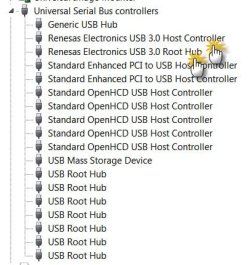
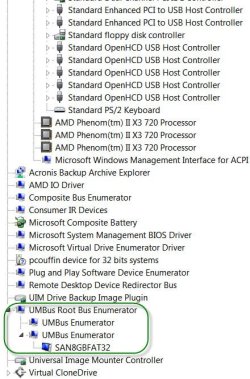
Talking of USB3, I have plugged in a SYBA USB 3.0 two-port PCIe card into the only slot in my GigaByte motherboard. (didn't want to spend on a new motherboard with USB3 :) )

These PCIe cards and as I believe most other motherboards, use the NEC/Renesas USB 3.0 Host Controller chip UPD 720200/720200A.

Though I have a Seagate GoFlex 500GB portable External drive, I haven't yet purchased the the USB3 cable/adapter for it.

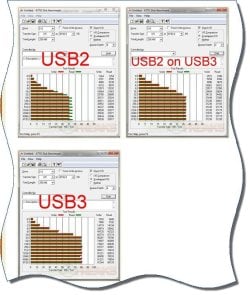
The following info may be pertinent here.

Device Manager - View devices by type

1Renesas USB3 HC.jpg

Device Manager - view devices by connection (showing a pendrive plugged into the USB3 port of the card )

2thumbinUSB3.jpg

Benchmarking the USB 3.0 performance of the Seagate GoFlex

Source:Seagate FreeAgent GoFlex 500Gb Ultra-portable Drive Review

3USB3 BMark.jpg
 

My Computer My Computer

Computer Manufacturer/Model Number
self-assembled
OS
Windows 7 Ultimate 32bit
CPU
AMD Phenom II X3 720 Processor
Motherboard
Gigabyte GA-MA78GM-S2H Revision 1.0
Memory
Transcend DDR2 (PC2 6400) 4 X 1GB
Graphics Card(s)
Integrated + ATI Radeon 4550
Sound Card
Integrated Realtek ALC 889A
Monitor(s) Displays
DELL 1704 FPT
Screen Resolution
1280 x 1024
Hard Drives
Western Digital Caviar SE16 250 GB x2 in RAID 0
PSU
Coolermaster 400 W
Case
Zebronics Cube
Cooling
stock
Keyboard
Microsoft - wired
Mouse
Microsoft - wired
Internet Speed
ADSL 256-512Kbps
Back
Top