How do you confirm USB3 is operational

The Atto benchmarks show that the disk drives the speed, not the port.
 

My Computer My Computer

At a glance

Vista, Windows7, Mint Mate, Zorin, Windows 8from 1.6GHz Duo to i7
Computer Manufacturer/Model Number
HP, Dell, Gateway, Toshiba - 4 laptops and 2 desktops
OS
Vista, Windows7, Mint Mate, Zorin, Windows 8
CPU
from 1.6GHz Duo to i7
Monitor(s) Displays
2x HP w2207
Hard Drives
5x HDD, 7x SSD, 12x Externals
Keyboard
with trackball - no mices
Mouse
Trackball mice
Internet Speed
DSL 6000

My Computer My Computer

At a glance

Several, including Windows 7 x64 Ultimate
OS
Several, including Windows 7 x64 Ultimate
You are going to forgive my lack of knowledge Ponmayilal, but does it mean if you have an entry under the heading of "UMBUS Root Bus Enumerator", for the drive in the Device Manager, that the drive is operating as a USB3 device?

When my WD Passport drive is plugged in, it showed up in the listing for hard drives - never noticed the other heading. I'll have to check it to see if it exists when the WD is plugged in.

BTW thanks for the info, it appears a USB2 device function slightly better on a USB3 port. But I'm not convinced that my USB3 drive is operating as a USB3 device. It would be nice to know where to look to confirm that yes the drive is connecting at USB3 standards. I'd then be satisfied that either the drive isn't performing at my expectations as a USB 3 device, or I could then investigate what needs to happen to get it to connect as a USB3 device. :)
 

My Computer My Computer

At a glance

Win7 64 bit Home Premium
OS
Win7 64 bit Home Premium
Okay I know some of you are going to think I'm a thick head, but when I just checked out the laptop to see if there was an entry under "UMBUS Enumerator" and there isn't. But I checked the disk drive section again and checked the driver details for the WD Passport USB3 drive.

While it doesn't state that the USB driver is USB3 it does provide a date, which is 2006!!! So I think I can confidently say that the drive is connecting as a USB2 device.

So the 6 million dollar question is, what do you have to do to get it to update the driver to a USB3 version. I've tried the option Update Driver but it tells me that the latest driver is installed. So some how I've got to it it to recognise the WD drive as a USB3 device, then we might be in business - but for me, easier said than done! :(
 
Last edited:

My Computer My Computer

At a glance

Win7 64 bit Home Premium
OS
Win7 64 bit Home Premium
All you can do right now is to contact the maker and ask for a USB.3.0 driver for the device you own. This is then installed as usual for any device driver.

The device must actually be a USB 3.0 Device , and you must have the proper cables etc.

Windows does not yet support USB 3.0 with "generic" drivers.

There are quite a few places which also have driver downloads for various devices. Like this one;

USB 3.0 driver download 2.0.4.0 for Windows XP, Windows 7, Windows Vista running on Asus motherboards with NEC USB 3.0 controller chip

If you google your device you may be able to find a driver on-line for it.

Some "Passport" drivers here;

http://support.wdc.com/product/download.asp?level1=2&lang=en

Regards....Mike Connor
 

My Computer My Computer

At a glance

Several, including Windows 7 x64 Ultimate
OS
Several, including Windows 7 x64 Ultimate
In Device manager under USB Controllers there should be an entry for usb 3.0 host controller and another entry for USB 3.0 root hub controller. If USB is integrated in your Motherboard, you should find the latest driver on the MB site.
 

My Computers My Computers

  • At a glance

    Windows 11 ProRyzen 9 5900X32GB G Skill DDR4-3600EVGA RTX 3080 FTW 3 Ultra
    Computer type
    PC/Desktop
    Computer Manufacturer/Model Number
    ALWAYS UNDER CONSTRUCTION
    OS
    Windows 11 Pro
    CPU
    Ryzen 9 5900X
    Motherboard
    Asus X570 Crosshair Viii Hero
    Memory
    32GB G Skill DDR4-3600
    Graphics Card(s)
    EVGA RTX 3080 FTW 3 Ultra
    Sound Card
    On Board/Sennheiser PC37X Headset
    Monitor(s) Displays
    3 X Asus 27"
    Screen Resolution
    2560x1440
    Hard Drives
    2 X 1 TB NVME drives
    PSU
    EVGA 850
    Case
    Phanteks Eclipse P400A
    Cooling
    EVGA 280 AIO
    Keyboard
    Logitech G510s/ Logitech G13
    Mouse
    Logitech G502
    Internet Speed
    24/1
    Antivirus
    ESET/MBAM Pro/SAS Pro
    Browser
    Chrome/ Firefox/ Edge
  • At a glance

    Windows 11 ProIntel Ultra 9 288V32 GB LPDDR5X 8533
    Computer type
    Laptop
    System Manufacturer/Model Number
    Dell 16 Plus
    OS
    Windows 11 Pro
    CPU
    Intel Ultra 9 288V
    Memory
    32 GB LPDDR5X 8533
    Monitor(s) Displays
    16" Mini-LED HDR600 Touch 90 Hz
    Screen Resolution
    2560X1600
    Hard Drives
    1 TB NVME
^ Yes, and that is what I have highligted in the first screen shot in my previous post.

And @ Reggie49, a pendrive will appear as shown in my second screenshot.

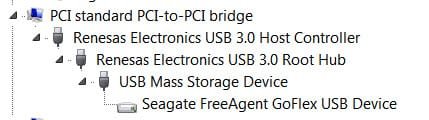
A USB HDD plugged into a USB3 port will appear like this
04-01-2011 16-10-43.jpg

Since I only have the USB2 cable/adapter, I can expect only a marginally improved performance as in the screenshot 3 (USB2 into USB3) in my previous post.

But if and when I buy the USB3 cable and adapter from Seagate and use it to connect to my USB3 port I will without doubt get a vastly improved performance again as indicated in screenshot 3 (USB3).

If your WD USB device is truly a USB3 HDD that came with an USB 3 cable ( sorry, I do not know) and your View by connection shows like above, then you need not have any doubts . It will give you the improved performance. Whether it is upto your expectations is different.

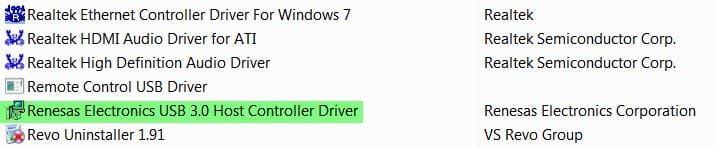
As regards the driver, you only have to look for the latest USB 3 Host controller driver. As I understand most ASUS and Gigabyte MBs use NEC/Renesas UPD 72200/72200A chip.

If you can find out whether the driver is listed like in the screenshot below (Control Panel> Programs and Features), you only have to uninstall it from here and install the new driver.
04-01-2011 16-20-08.jpg

You can download the latest driver from here. Gigabyte, ASUS NEC/RENESAS USB 3.0 Controller Driver 2.0.32.0 WHQL Available - Free device drivers Download

E. & O. E. (Errors and Omissions Excepted):)
 

My Computer My Computer

At a glance

Windows 7 Ultimate 32bitAMD Phenom II X3 720 ProcessorTranscend DDR2 (PC2 6400) 4 X 1GBIntegrated + ATI Radeon 4550
Computer Manufacturer/Model Number
self-assembled
OS
Windows 7 Ultimate 32bit
CPU
AMD Phenom II X3 720 Processor
Motherboard
Gigabyte GA-MA78GM-S2H Revision 1.0
Memory
Transcend DDR2 (PC2 6400) 4 X 1GB
Graphics Card(s)
Integrated + ATI Radeon 4550
Sound Card
Integrated Realtek ALC 889A
Monitor(s) Displays
DELL 1704 FPT
Screen Resolution
1280 x 1024
Hard Drives
Western Digital Caviar SE16 250 GB x2 in RAID 0
PSU
Coolermaster 400 W
Case
Zebronics Cube
Cooling
stock
Keyboard
Microsoft - wired
Mouse
Microsoft - wired
Internet Speed
ADSL 256-512Kbps
If you have the Renasis drivers, there should be an entry in start - all programs. Under that it will tell you which driver is installed. At least that is the way mine is.
 

My Computers My Computers

  • At a glance

    Windows 11 ProRyzen 9 5900X32GB G Skill DDR4-3600EVGA RTX 3080 FTW 3 Ultra
    Computer type
    PC/Desktop
    Computer Manufacturer/Model Number
    ALWAYS UNDER CONSTRUCTION
    OS
    Windows 11 Pro
    CPU
    Ryzen 9 5900X
    Motherboard
    Asus X570 Crosshair Viii Hero
    Memory
    32GB G Skill DDR4-3600
    Graphics Card(s)
    EVGA RTX 3080 FTW 3 Ultra
    Sound Card
    On Board/Sennheiser PC37X Headset
    Monitor(s) Displays
    3 X Asus 27"
    Screen Resolution
    2560x1440
    Hard Drives
    2 X 1 TB NVME drives
    PSU
    EVGA 850
    Case
    Phanteks Eclipse P400A
    Cooling
    EVGA 280 AIO
    Keyboard
    Logitech G510s/ Logitech G13
    Mouse
    Logitech G502
    Internet Speed
    24/1
    Antivirus
    ESET/MBAM Pro/SAS Pro
    Browser
    Chrome/ Firefox/ Edge
  • At a glance

    Windows 11 ProIntel Ultra 9 288V32 GB LPDDR5X 8533
    Computer type
    Laptop
    System Manufacturer/Model Number
    Dell 16 Plus
    OS
    Windows 11 Pro
    CPU
    Intel Ultra 9 288V
    Memory
    32 GB LPDDR5X 8533
    Monitor(s) Displays
    16" Mini-LED HDR600 Touch 90 Hz
    Screen Resolution
    2560X1600
    Hard Drives
    1 TB NVME

My Computer My Computer

At a glance

Windows 7 Ultimate 32bitAMD Phenom II X3 720 ProcessorTranscend DDR2 (PC2 6400) 4 X 1GBIntegrated + ATI Radeon 4550
Computer Manufacturer/Model Number
self-assembled
OS
Windows 7 Ultimate 32bit
CPU
AMD Phenom II X3 720 Processor
Motherboard
Gigabyte GA-MA78GM-S2H Revision 1.0
Memory
Transcend DDR2 (PC2 6400) 4 X 1GB
Graphics Card(s)
Integrated + ATI Radeon 4550
Sound Card
Integrated Realtek ALC 889A
Monitor(s) Displays
DELL 1704 FPT
Screen Resolution
1280 x 1024
Hard Drives
Western Digital Caviar SE16 250 GB x2 in RAID 0
PSU
Coolermaster 400 W
Case
Zebronics Cube
Cooling
stock
Keyboard
Microsoft - wired
Mouse
Microsoft - wired
Internet Speed
ADSL 256-512Kbps
Ponmayilal, in the thought that I might have been on the right track over this USB3 driver I've posted two other threads regarding problems I've had trying to upgrade the driver. (http://www.sevenforums.com/drivers/135089-error-1605-a.html & http://www.sevenforums.com/hardware-devices/134683-cant-update-latest-usb-3-driver.html).

Following you last comment could it be that the reason for the Error 1605, is that you have to unistall the driver before you can install the new one? Mike (Hopalong X), suggested that I should do this but I was reluctant to do so, in case when I tried to reinstall the new driver the same error occurred and the original driver would now be removed!
 

My Computer My Computer

At a glance

Win7 64 bit Home Premium
OS
Win7 64 bit Home Premium
While I cannot categorically state that it (installing the new driver over the existing one) is the cause for the error, I had always thought it prudent to uninstall the existing driver and then install the new driver and haven't experienced any problems. Your fear that something may happen if you uninstall the existing driver has no basis.

Even in case of other software, unless the software author categorically states that the new version can be installed over the existing version, I always scrub the old version clean with Revo uninstaller and then install the new version.

So try it and then report. If you still get the error message, it will then be for the best heads here to put on their cap. I have none. :)
 

My Computer My Computer

At a glance

Windows 7 Ultimate 32bitAMD Phenom II X3 720 ProcessorTranscend DDR2 (PC2 6400) 4 X 1GBIntegrated + ATI Radeon 4550
Computer Manufacturer/Model Number
self-assembled
OS
Windows 7 Ultimate 32bit
CPU
AMD Phenom II X3 720 Processor
Motherboard
Gigabyte GA-MA78GM-S2H Revision 1.0
Memory
Transcend DDR2 (PC2 6400) 4 X 1GB
Graphics Card(s)
Integrated + ATI Radeon 4550
Sound Card
Integrated Realtek ALC 889A
Monitor(s) Displays
DELL 1704 FPT
Screen Resolution
1280 x 1024
Hard Drives
Western Digital Caviar SE16 250 GB x2 in RAID 0
PSU
Coolermaster 400 W
Case
Zebronics Cube
Cooling
stock
Keyboard
Microsoft - wired
Mouse
Microsoft - wired
Internet Speed
ADSL 256-512Kbps
Ok, I've tried the uninstall of the NEC USB3 drivers, rebooted and windows7 reinstalled them again.

Uninstalled them again, no reboot, tried the latest driver update and still getting the Error 1605.

Apart from a fresh install, which I'm not going to do as everything else is humming along nicely, does anyone have any clues?
 

My Computer My Computer

At a glance

Win7 64 bit Home Premium
OS
Win7 64 bit Home Premium
Don't know if it will help you, but it works on ASUS desktop motherboards ( I have not installed an ASUS laptop).

Make sure all cables are disconnected before you try to update as otherwise it wont work.

Download this new NEC driver for ASUS motherboards;

http://thesp.pcdriversheadqu.revenuewire.net/driver-detect/download?usb3

Install drivers. Reconnect cables.

Regards....Mike Connor
 

My Computer My Computer

At a glance

Several, including Windows 7 x64 Ultimate
OS
Several, including Windows 7 x64 Ultimate
^ that link downloads DriverDetective.exe and not any NEC driver. :huh:

@Reggie49, today I downloaded and installed the latest firmware 3.0.2.7.0.8 for uPD 72200. Check whether installing it helps. Download from SONY/NEC firmwares
 

My Computer My Computer

At a glance

Windows 7 Ultimate 32bitAMD Phenom II X3 720 ProcessorTranscend DDR2 (PC2 6400) 4 X 1GBIntegrated + ATI Radeon 4550
Computer Manufacturer/Model Number
self-assembled
OS
Windows 7 Ultimate 32bit
CPU
AMD Phenom II X3 720 Processor
Motherboard
Gigabyte GA-MA78GM-S2H Revision 1.0
Memory
Transcend DDR2 (PC2 6400) 4 X 1GB
Graphics Card(s)
Integrated + ATI Radeon 4550
Sound Card
Integrated Realtek ALC 889A
Monitor(s) Displays
DELL 1704 FPT
Screen Resolution
1280 x 1024
Hard Drives
Western Digital Caviar SE16 250 GB x2 in RAID 0
PSU
Coolermaster 400 W
Case
Zebronics Cube
Cooling
stock
Keyboard
Microsoft - wired
Mouse
Microsoft - wired
Internet Speed
ADSL 256-512Kbps
Back
Top
