How do you delete Windows.old files

Paul80

New member
Local time
2:59 PM
Messages
10
Hi Guys

Got a bit of an odd problem I am looking for help with

After giving up with Windows7 because of the number of Vista compatible programs that wouldn't run I re-installed Vista64

I now have a folder called Windows.old which contains the old Windows7 instalation.

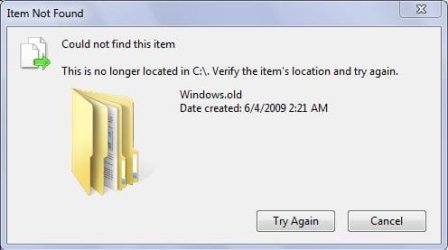
Trouble is I cannot delete this Windows.old folder.

I have tried it in safe mode and at the command prompt but it will not delete and as its 18.1 GB I would like to delete it.

Anyone got any tips

This is the message I get, I am logged on as Admin

Capture-1.jpg
 

My Computer

OS
Windows7

My Computer

Computer Manufacturer/Model Number
self built
OS
7600.20510 x86
CPU
P4 550 3.4 GHz HT running at 3.5 GHz
Motherboard
MSI PM8M3-V (MS-7211 v1.x) Micro-ATX mainboard
Memory
OCZ 2 GB(2x1GB) DDR400mHz running @ 414 mHz
Graphics Card(s)
HIS Radeon HD 3850 IceQ 3 Turbo HDMI Dual DL-DVI AGP
Sound Card
MOTU Traveler firewire studio interface 192 kHz 24 bit
Monitor(s) Displays
22" widescreen Acer X223W LCD, 17" Compaq P75 CRT
Screen Resolution
1680x1050 and 1280x1024
Hard Drives
SATA I x2 WD, 400 GB and 120 GB, SATA 2 WD Caviar Black 1 TB
PSU
350W generic
Case
Cybertronpc, it glows blue
Cooling
stock cpu fan, Ice-Q 3 gpu and system, many case fans
Keyboard
Logitch Classical Keyboard 200
Mouse
Logitech Mediaplay cordless
Internet Speed
1792/448 kbits/sec
Other Info
SATA II PCI fake RAID adapter, 1 GB Readyboost, original ATI Remote Wonder (even works with WMC perfectly), Logitech Rumblepad 2 game controller x2
Thanks torrentg for your reply to Paul!

Quick question...after I merge the ownership.reg file into the registry can I delete it from my desktop?

Thanks!
 

My Computer

OS
Windows 7 X64 RTM
CPU
Athlon 64 X2 Dual Core 4800
Motherboard
MSI - K9N SLI Platinum
Memory
4 Gigs Kingston Hyper X
Graphics Card(s)
ATI X1650 XT
Sound Card
SB Audigy
Monitor(s) Displays
ViewSonic VX924 LCD
Screen Resolution
1280 X 1024
PSU
Ultra XFinity 600W ATX
Case
Antec
Keyboard
MS Natural Ergonomic KB 4000
Mouse
X7 Optical Mouse
Internet Speed
Fios Fiber Optics
so how does one resolve this little message?

crap.JPG

i deleted everything out of it. i have full ownership, which i guess is irrelevant to this particular case. i think theres some stubborn file thats messed up from when it got moved there during install.
 

My Computer

Computer Manufacturer/Model Number
eMachines W3502
OS
Windows 7 Ultimate x32
CPU
Intel Celeron D 3.2 Ghz 533 fsb (LGA 775)
Motherboard
Intel D101GGC
Memory
1 GB (2x512MB) PC-3200 DDR @ 200Mhz
Graphics Card(s)
Nvidia GeForce 9400GT- 1GB
Sound Card
Sound Blaster X-Fi Xtreame Gamer
Monitor(s) Displays
19" LCD HDtv
Screen Resolution
1360x768 @ 60Htz
Hard Drives
SeaGate Barracuda 750GB
SeaGate Barracuda 100GB
Toshiba CD/DVDW/ TS-H552D [DVD+R, DL]
PSU
stock (idk)
Case
The busted remains of the stock case
Cooling
Dust cooled, waitwut?
Keyboard
Stock. Missing a few keys.
Mouse
Logitech LX8 5-btn mouse (wireless)
Internet Speed
TWC 10Mb
Other Info
Keeps going, and going, and going.......
so how does one resolve this little message?

View attachment 13366

i deleted everything out of it. i have full ownership, which i guess is irrelevant to this particular case. i think theres some stubborn file thats messed up from when it got moved there during install.

I deleted it but some of the content would not delete the first time. I had to go back and do it again, the second time I opened it up and did one file at a time (most of the files deleted on the first run) and then deleted windows.old. Your right, something was being stubborn....but now it is gone!!
 

My Computer

OS
Windows 7 X64 RTM
CPU
Athlon 64 X2 Dual Core 4800
Motherboard
MSI - K9N SLI Platinum
Memory
4 Gigs Kingston Hyper X
Graphics Card(s)
ATI X1650 XT
Sound Card
SB Audigy
Monitor(s) Displays
ViewSonic VX924 LCD
Screen Resolution
1280 X 1024
PSU
Ultra XFinity 600W ATX
Case
Antec
Keyboard
MS Natural Ergonomic KB 4000
Mouse
X7 Optical Mouse
Internet Speed
Fios Fiber Optics
Is there any problem with deleting $WINDOWS.~Q and $INPLACE.~TR if you are using Windows 7?

Many thanks,
 

My Computer

Computer Manufacturer/Model Number
MSI 782
OS
Windows 7 Ultimate 64 Bit
CPU
Intel Core I7 2860
Motherboard
Intel 67
Memory
12 GB
Graphics Card(s)
Nvidia 560M
Sound Card
Realtek HD
Monitor(s) Displays
Dell 2405
Screen Resolution
1920x1600
Hard Drives
2 120 Gb OCZ Vertex MaxOPS Raid 0, 1 256 Gb Crucial 300, 1 2000 Gb WD eSata.
Keyboard
Logitech
Mouse
MS Wireless Optical
Internet Speed
Cable
Is there any problem with deleting $WINDOWS.~Q and $INPLACE.~TR if you are using Windows 7?

Many thanks,
No! You could try using Windows 7 disk cleanup utility! I removed those inplace... folders using this tool, I dont know if it detects the windows.old files also but it worth the try!

"cleanmgr.exe"
 

My Computer

Computer Manufacturer/Model Number
ME, myself & Irene / 001
OS
Windows 7 x64 :)
CPU
Intel Core 2 Duo E8400 @ 3.6 Ghz
Motherboard
Asus P5NE-SLI
Memory
4 GB KingMax 800 Mhz DDR2
Graphics Card(s)
Asus GeForce 8800GT
Sound Card
onboard Realtek
Monitor(s) Displays
Samsung 22'
Screen Resolution
1980x1080
Hard Drives
1x40GB WD IDE |
2x80GB WD Sata 2 Raid 0 Stripe |
1x640GB Samsung
PSU
Coolmaster 550W
Case
?
Cooling
?
Keyboard
?
Mouse
Genius
Internet Speed
6Mpbs

My Computer

OS
XP, Vista, W7 64bit Home Premium
CPU
Intel Core Duo 6850 3.0 ghz @ 3.7 ghz
Motherboard
Asus P5E
Memory
4GB Corsair DDR 2 PC-6400
Graphics Card(s)
Ati 4870 1ghz
Sound Card
Supreme FX 11
Monitor(s) Displays
View Sonic VX1962wm
Screen Resolution
1680 X1050
Hard Drives
3 Seagate Sata Drives 160gb 250gb 500gb
PSU
Thermaltake 600 watt
Case
NZXT Alpha
Cooling
3X120cm Fans
Keyboard
Microsoft Digital Media Pro Keyboard
Mouse
Microsoft Wheel Mouse Optical
Internet Speed
1.5Mb to 8Mb/384k
Back
Top