Solved How do you get rid of the start menu "tasks" option when hovering?

CZ Eddie

New member
Local time
9:50 AM
Messages
12
How do you get rid of the start menu "tasks" option when hovering?

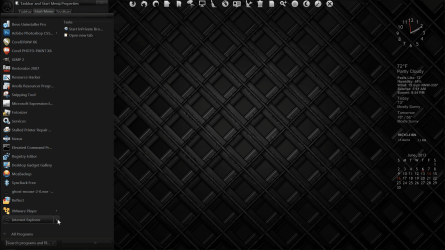
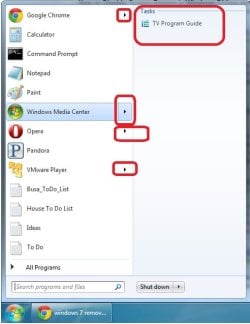
Anyone know how to get rid of the tasks pop-out when I hover my mouse over a program that I'm about to select? It drives me nuts because I have to wait for it to pop-out before I click my program (If I'm not fast enough to click it right away).

See the attached picture where I've circled in red the part I want to get rid of.
My googling on this has been futile.
 

Attachments
  • tasks_preview.jpg
    tasks_preview.jpg
    30.8 KB · Views: 10

My Computer My Computer

At a glance

Win7Ux64
OS
Win7Ux64
Welcome to the Seven Forums

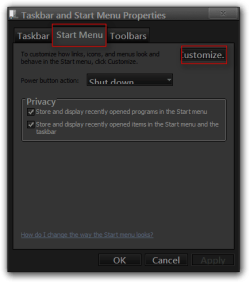
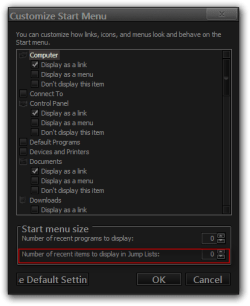
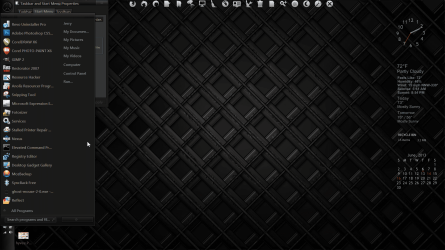
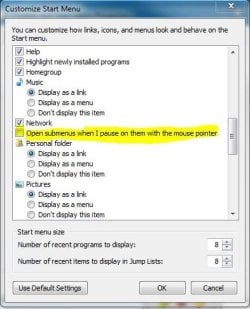
Go to the start menu properties and click on the start menu tab then click on the customize button and at the bottom of that window set the Number of recent items to display and Jump Lists to 0 that should remove that arrow.

Jerry
Taskbar and Start Menu Properties.png

Customize Start Menu.png
 

My Computer My Computer

At a glance

Win 7 Pro x64 / Win 10 ProIntel(R) Core(TM) i7-3630QM CPU @ 2.40GHz12 GB(1) Intel(R) HD Graphics 4000 (2) NVIDIA GeFo...
Computer type
Laptop
Computer Manufacturer/Model Number
Sager NP9170
OS
Win 7 Pro x64 / Win 10 Pro
CPU
Intel(R) Core(TM) i7-3630QM CPU @ 2.40GHz
Motherboard
CLEVO P170EM
Memory
12 GB
Graphics Card(s)
(1) Intel(R) HD Graphics 4000 (2) NVIDIA GeForce GTX 675M
Sound Card
(1) Realtek High Definition Audio (2) Intel(R) Display Aud
Monitor(s) Displays
17.3
Screen Resolution
1920x1080
Hard Drives
(1) Samsung 860 EVO 500GB(OS) (1) Samsung 860 EVO 500GB(Data)
Keyboard
Backlite
Antivirus
MSE, Malwarebytes Pro
Browser
Firefox
Other Info
DESKTOP: Custom-built.
OS: Win 10 Pro x64.
CASE: Rosewill R5.
CPU: Intel I5 4670K CPU @ 3.40GHz.
CPU COOLER: Cool Master Hyper 212 EVO.
MOTHERBOARD: Asus Z87-A.
MEMORY: Kingston HyperX 2x4 GB.
GPU: Nvidia Geforce 650 TI.
PSU: Corsair TX750.
DRIVES: (1) Samsung 840 120 GB SSD (2) Western Digital blue 500 GB 7200 RPM.
Thanks, I just tried that but it did not work. :(
The "tasks" part of the jump list shows. It looks like your method just removes the "recents" part of the jump list. I want the whole dang jump list to go away.

Btw, this is Win7x64 Ultimate with all the latest updates.

But your terminology "jump list" is making my google searching more productive. Thanks!
Still not making any progress though.
 

Attachments

  • results.jpg
    results.jpg
    49.7 KB · Views: 5
Last edited:

My Computer My Computer

At a glance

Win7Ux64
OS
Win7Ux64
Did you OK and Apply your way out of the property Windows?

Try rebooting and see what happens.

Jerry

Here is what I get when I set those 2 values to 4
6_6_2013 , 2_10_03 PM , 6_6_2013 , 2_10_03 PM - local date_time.png

Here is what I get when they are set to 0
6_6_2013 , 2_10_38 PM , 6_6_2013 , 2_10_38 PM - local date_time.png
 

My Computer My Computer

At a glance

Win 7 Pro x64 / Win 10 ProIntel(R) Core(TM) i7-3630QM CPU @ 2.40GHz12 GB(1) Intel(R) HD Graphics 4000 (2) NVIDIA GeFo...
Computer type
Laptop
Computer Manufacturer/Model Number
Sager NP9170
OS
Win 7 Pro x64 / Win 10 Pro
CPU
Intel(R) Core(TM) i7-3630QM CPU @ 2.40GHz
Motherboard
CLEVO P170EM
Memory
12 GB
Graphics Card(s)
(1) Intel(R) HD Graphics 4000 (2) NVIDIA GeForce GTX 675M
Sound Card
(1) Realtek High Definition Audio (2) Intel(R) Display Aud
Monitor(s) Displays
17.3
Screen Resolution
1920x1080
Hard Drives
(1) Samsung 860 EVO 500GB(OS) (1) Samsung 860 EVO 500GB(Data)
Keyboard
Backlite
Antivirus
MSE, Malwarebytes Pro
Browser
Firefox
Other Info
DESKTOP: Custom-built.
OS: Win 10 Pro x64.
CASE: Rosewill R5.
CPU: Intel I5 4670K CPU @ 3.40GHz.
CPU COOLER: Cool Master Hyper 212 EVO.
MOTHERBOARD: Asus Z87-A.
MEMORY: Kingston HyperX 2x4 GB.
GPU: Nvidia Geforce 650 TI.
PSU: Corsair TX750.
DRIVES: (1) Samsung 840 120 GB SSD (2) Western Digital blue 500 GB 7200 RPM.
Did you OK and Apply your way out of the property Windows?

Try rebooting and see what happens.

Jerry

I did, yes.
The option you mentioned seems to be for removing the "recents" from the jump list and does not remove the jump list itself.
So it seems there can be more than one category of type of items found in the jump list. Like "recent documents", "tasks", and "related items" and maybe other things.
 

My Computer My Computer

At a glance

Win7Ux64
OS
Win7Ux64
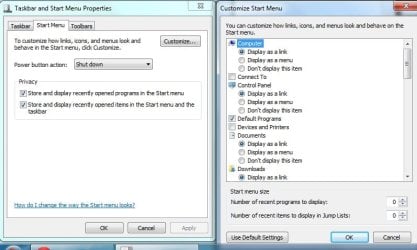
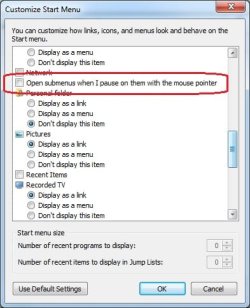
Go to the same place but instead uncheck the box 'Open sub menus when I pause over them...'

submenu.JPG

Edit: The arrows will still be there however they wont expand until you click on them

Hope This Helps,
Josh :)
 
Last edited:

My Computer My Computer

At a glance

Windows 7 Professional x64 SP1 ; Windows Serv...Intel Core i5 2400 @ 3.10GHz8.0GB DDR3 @ 665MHz (2GBx4)AMD Radeon HD 6870
Computer type
PC/Desktop
Computer Manufacturer/Model Number
Custom Built
OS
Windows 7 Professional x64 SP1 ; Windows Server 2012 R2 Standard
CPU
Intel Core i5 2400 @ 3.10GHz
Motherboard
Foxconn H67MP-S/-V/H67MP
Memory
8.0GB DDR3 @ 665MHz (2GBx4)
Graphics Card(s)
AMD Radeon HD 6870
Sound Card
Realtek High Definition Audio
Monitor(s) Displays
AOC 2243W & SMB1930NW
Screen Resolution
1440x900 & 1920x1080
Hard Drives
977GB Seagate ST31000524AS ATA Drive (SATA)
250GB WD iSCSI attached Drive
PSU
750W Gaming PSU
Case
Novatech Night
Cooling
Fan
Keyboard
Dell Standard PS/2 Keyboard
Mouse
R.A.T 07 Gaming Mouse
Internet Speed
Download: 10 Mbps Ping: 30ms Upload: 0.81 Mbps
Browser
Google Chrome
Other Info
Optiarc DVD RW AD-5260S ATA Device
Did you OK and Apply your way out of the property Windows?

Try rebooting and see what happens.

Jerry

I did, yes.
The option you mentioned seems to be for removing the "recents" from the jump list and does not remove the jump list itself.
So it seems there can be more than one category of type of items found in the jump list. Like "recent documents", "tasks", and "related items" and maybe other things.

I edited my last post if you look at it you can see it most certainly does remove that.

Jerry
 

My Computer My Computer

At a glance

Win 7 Pro x64 / Win 10 ProIntel(R) Core(TM) i7-3630QM CPU @ 2.40GHz12 GB(1) Intel(R) HD Graphics 4000 (2) NVIDIA GeFo...
Computer type
Laptop
Computer Manufacturer/Model Number
Sager NP9170
OS
Win 7 Pro x64 / Win 10 Pro
CPU
Intel(R) Core(TM) i7-3630QM CPU @ 2.40GHz
Motherboard
CLEVO P170EM
Memory
12 GB
Graphics Card(s)
(1) Intel(R) HD Graphics 4000 (2) NVIDIA GeForce GTX 675M
Sound Card
(1) Realtek High Definition Audio (2) Intel(R) Display Aud
Monitor(s) Displays
17.3
Screen Resolution
1920x1080
Hard Drives
(1) Samsung 860 EVO 500GB(OS) (1) Samsung 860 EVO 500GB(Data)
Keyboard
Backlite
Antivirus
MSE, Malwarebytes Pro
Browser
Firefox
Other Info
DESKTOP: Custom-built.
OS: Win 10 Pro x64.
CASE: Rosewill R5.
CPU: Intel I5 4670K CPU @ 3.40GHz.
CPU COOLER: Cool Master Hyper 212 EVO.
MOTHERBOARD: Asus Z87-A.
MEMORY: Kingston HyperX 2x4 GB.
GPU: Nvidia Geforce 650 TI.
PSU: Corsair TX750.
DRIVES: (1) Samsung 840 120 GB SSD (2) Western Digital blue 500 GB 7200 RPM.
Hello Eddie,

In addition, resetting Jump Lists will remove all items in them.

Hope this helps, :)
Shawn
 

My Computer My Computer

At a glance

64-bit Windows 11 Pro for WorkstationsIntel i7-8700K OC'd to 5 GHz64 GB (4x16GB) G.SKILL TridentZ RGB DDR4 3600...ASUS ROG-STRIX-GTX1080TI-O11G-GAMING
Computer type
PC/Desktop
Computer Manufacturer/Model Number
Self built custom
OS
64-bit Windows 11 Pro for Workstations
CPU
Intel i7-8700K OC'd to 5 GHz
Motherboard
ASUS ROG Maximus XI Formula Z390
Memory
64 GB (4x16GB) G.SKILL TridentZ RGB DDR4 3600 MHz
Graphics Card(s)
ASUS ROG-STRIX-GTX1080TI-O11G-GAMING
Sound Card
Integrated
Monitor(s) Displays
2 x Samsung Odyssey G7 27"
Screen Resolution
2560x1440
Hard Drives
1TB Samsung 990 PRO M.2,
4TB Samsung 990 PRO PRO M.2,
TerraMaster F8 SSD Plus NAS
PSU
Seasonic Prime Titanium 850W
Case
Thermaltake Core P3
Cooling
Corsair Hydro H115i
Keyboard
Logitech wireless K800
Mouse
Logitech MX Master 4
Internet Speed
2 Gb/s Download and 100 Mb/s Upload
Antivirus
Malwarebyte Anti-Malware Premium
Browser
Google Chrome
Other Info
Logitech Z625 speaker system,
Logitech BRIO 4K Pro webcam,
HP Color LaserJet Pro MFP M477fdn,
APC SMART-UPS RT 1000 XL - SURT1000XLI,
Galaxy S23 Plus phone
Did you OK and Apply your way out of the property Windows?

I edited my last post if you look at it you can see it most certainly does remove that.

Jerry

Weird. It doesn't do that for me on my Win7x64 Ultimate nor on my Win7 Enterprise boxes.
Both of which I think are MSDN images.

Go to the same place but instead uncheck the box 'Open sub menus when I pause over them...'

View attachment 271379

Edit: The arrows will still be there however they wont expand until you click on them

Hope This Helps,
Josh :)

I LOVE YOU MAN!
It's only a work-around, but it's a most acceptable one. My only issue with jump boxes is that it was driving me nuts because when I went to click on the item, often times it would instead open the jump box and that fraction of a second that I have to wait and re-click, would drive me nuts!!!!
Now I don't have that problem anymore!!!! :party:
 

My Computer My Computer

At a glance

Win7Ux64
OS
Win7Ux64

My Computer My Computer

At a glance

Win 7 Pro x64 / Win 10 ProIntel(R) Core(TM) i7-3630QM CPU @ 2.40GHz12 GB(1) Intel(R) HD Graphics 4000 (2) NVIDIA GeFo...
Computer type
Laptop
Computer Manufacturer/Model Number
Sager NP9170
OS
Win 7 Pro x64 / Win 10 Pro
CPU
Intel(R) Core(TM) i7-3630QM CPU @ 2.40GHz
Motherboard
CLEVO P170EM
Memory
12 GB
Graphics Card(s)
(1) Intel(R) HD Graphics 4000 (2) NVIDIA GeForce GTX 675M
Sound Card
(1) Realtek High Definition Audio (2) Intel(R) Display Aud
Monitor(s) Displays
17.3
Screen Resolution
1920x1080
Hard Drives
(1) Samsung 860 EVO 500GB(OS) (1) Samsung 860 EVO 500GB(Data)
Keyboard
Backlite
Antivirus
MSE, Malwarebytes Pro
Browser
Firefox
Other Info
DESKTOP: Custom-built.
OS: Win 10 Pro x64.
CASE: Rosewill R5.
CPU: Intel I5 4670K CPU @ 3.40GHz.
CPU COOLER: Cool Master Hyper 212 EVO.
MOTHERBOARD: Asus Z87-A.
MEMORY: Kingston HyperX 2x4 GB.
GPU: Nvidia Geforce 650 TI.
PSU: Corsair TX750.
DRIVES: (1) Samsung 840 120 GB SSD (2) Western Digital blue 500 GB 7200 RPM.
You're most welcome Eddie. I'm glad that will work for you. :)
 

My Computer My Computer

At a glance

64-bit Windows 11 Pro for WorkstationsIntel i7-8700K OC'd to 5 GHz64 GB (4x16GB) G.SKILL TridentZ RGB DDR4 3600...ASUS ROG-STRIX-GTX1080TI-O11G-GAMING
Computer type
PC/Desktop
Computer Manufacturer/Model Number
Self built custom
OS
64-bit Windows 11 Pro for Workstations
CPU
Intel i7-8700K OC'd to 5 GHz
Motherboard
ASUS ROG Maximus XI Formula Z390
Memory
64 GB (4x16GB) G.SKILL TridentZ RGB DDR4 3600 MHz
Graphics Card(s)
ASUS ROG-STRIX-GTX1080TI-O11G-GAMING
Sound Card
Integrated
Monitor(s) Displays
2 x Samsung Odyssey G7 27"
Screen Resolution
2560x1440
Hard Drives
1TB Samsung 990 PRO M.2,
4TB Samsung 990 PRO PRO M.2,
TerraMaster F8 SSD Plus NAS
PSU
Seasonic Prime Titanium 850W
Case
Thermaltake Core P3
Cooling
Corsair Hydro H115i
Keyboard
Logitech wireless K800
Mouse
Logitech MX Master 4
Internet Speed
2 Gb/s Download and 100 Mb/s Upload
Antivirus
Malwarebyte Anti-Malware Premium
Browser
Google Chrome
Other Info
Logitech Z625 speaker system,
Logitech BRIO 4K Pro webcam,
HP Color LaserJet Pro MFP M477fdn,
APC SMART-UPS RT 1000 XL - SURT1000XLI,
Galaxy S23 Plus phone
Good to hear you got it sorted out.
I don't know if you seen it but you might want to look at Brink's post above.
http://www.sevenforums.com/general-...u-tasks-option-when-hovering.html#post2425285

Jerry

When I first looked at his thread link, it looked like it would only remove items from inside the jump list. And not remove the jump list itself.

You prompted me to look at the link again, and I went ahead and ran the batch file listed in it. AND IT REMOVED MY JUMP LISTS!

Hopefully they don't come back in a few days. The webpage wasn't clear about that.

EDIT: Yeah, Chrome has a jump list again now after opening it. I don't think this particular solution will be a permanent one.
 

My Computer My Computer

At a glance

Win7Ux64
OS
Win7Ux64
I "added to reputation" for everyone btw. :) Thanks again guys!
 

My Computer My Computer

At a glance

Win7Ux64
OS
Win7Ux64
Can you believe it was as easy as de-selecting this option. lol
Right click the start button | properties | start menu | customize | de-select "open submenus".
 

Attachments

  • Untitled.jpg
    Untitled.jpg
    30.7 KB · Views: 2

My Computer My Computer

At a glance

Win7Ux64
OS
Win7Ux64
Back
Top