

- Local time
- 5:04 PM
- Messages
- 394
Hello Forum,
After a lot of frustration.
I have finally decided to post an issue that I am having with opening .pwi files from an old Windows Mobile Phone.
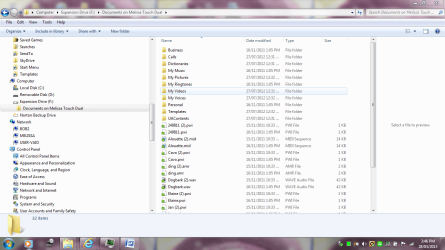
I do not have the information on the phone anymore - I just have the actual folder from a sync. It contains .wav. .mid and .pwi files that I can not open.
I also can not seem to find a way to find the .zip application to compress information to upload what I mean so people can manipulate the data that I am trying to explain on this forum.
Thank you.
Mel
This is some information I have received - but the website is not English -
Hi Melissa,
Thank you for choosing Microsoft Community. By the description, I understand that you are unable to open the pwi files on the computer.
The PWI files are basically the extension for notes on the windows phones. This can be accesses on Outlook notes after syncing the device to the Outlook application.
You may copy the PWI files to the phone PWI location by browsing and then sync with Outlook.
You may also search for 3rd party software’s which might help you in accessing the PWI files on the computer.
I hope this information helps. If you have any other issues with Office suites and office related products, reply and we will be happy to assist you.
Thank You
·
Here;s what i found,
http://www.huslik-elektronik.de/husliknet/software/5-freie-software/25-converter-for-pocket-word-to-wav.html
After a lot of frustration.
I have finally decided to post an issue that I am having with opening .pwi files from an old Windows Mobile Phone.
I do not have the information on the phone anymore - I just have the actual folder from a sync. It contains .wav. .mid and .pwi files that I can not open.
I also can not seem to find a way to find the .zip application to compress information to upload what I mean so people can manipulate the data that I am trying to explain on this forum.
Thank you.
Mel
This is some information I have received - but the website is not English -
Hi Melissa,
Thank you for choosing Microsoft Community. By the description, I understand that you are unable to open the pwi files on the computer.
The PWI files are basically the extension for notes on the windows phones. This can be accesses on Outlook notes after syncing the device to the Outlook application.
You may copy the PWI files to the phone PWI location by browsing and then sync with Outlook.
You may also search for 3rd party software’s which might help you in accessing the PWI files on the computer.
I hope this information helps. If you have any other issues with Office suites and office related products, reply and we will be happy to assist you.
Thank You
·
Here;s what i found,
http://www.huslik-elektronik.de/husliknet/software/5-freie-software/25-converter-for-pocket-word-to-wav.html
Attachments
My Computer
- Computer type
- Laptop
- Computer Manufacturer/Model Number
- Sony VAIO / E Series VPCEB46FG
- OS
- Windows 7 Home Premium 64bit
- CPU
- Windows 7 Service Pack 1 x86 NTFS
- Motherboard
- AMD E-350 Processor
- Memory
- 4 GB
- Hard Drives
- 500GB
- Other Info
- 1.6GHz


