How do you partition for hard drives (for users with 1TB and above)

Ravanx

Banned
Local time
5:42 AM
Messages
117
How many partitions do you create?
What is the purpose of each partition?
How much space do you allocate to each of those partitions?

This is how I do it (for 1TB):
100GB - C:OS
800GB - D:Entertainment
100GB - E:Games

Do you make a partition specially for downloads?
Then you can designate that partition as your downloads folder on your web browser so that you don't have to keep transfering your downloads from the OS partition to the Entertainment partition.


Btw, if you install games on a separate partition, will any of the components of the game's installer be installed on your C:OS partition?

How can you check whether the installer of a program changes anything or adds anything into the factory files that were installed by Windows 7 DVD?
Eg An anti-virus program would most likely install various files into your C:\Windows even if you set its install directory into E:\Games. This is especially so since it changes the options that you have when you right-click on files.
On the other hand, if you were installing a simple program like mIRC and set its install directory to E:\Games, the mIRC installer would not install anything onto your C:\Windows.
 
Last edited:

My Computer My Computer

At a glance

Windows 7 Pro
OS
Windows 7 Pro
Setting up partitions and sizes is a matter of personal preference....kinda like why all Homes are not laid out the same way.

How can you check whether the installer of a program changes anything or adds anything into the factory files that were installed by Windows 7 DVD?
Eg An anti-virus program would most likely install various files into your C:\Windows even if you set its install directory into E:\Games. This is especially so since it changes the options that you have when you right-click on files.

As far as the above i use Total Uninstall.
It creates a snapshot of your system when installing any app and records all system file additions and changes made...

Unfortunately it is no longer Free...
 

My Computer My Computer

At a glance

Vista Ultimate X64/ Windows 7 Dual-bootQ66004G OCZ PC2 8500 PlatinumEVGA 8800GTS Vid Card
Computer Manufacturer/Model Number
Self-Built
OS
Vista Ultimate X64/ Windows 7 Dual-boot
CPU
Q6600
Motherboard
ASUS P5K
Memory
4G OCZ PC2 8500 Platinum
Graphics Card(s)
EVGA 8800GTS Vid Card
Hard Drives
500G Seagate SATA
200G Seagate SATA
100G WD Caviar SATA
80G WD Caviar IDE
PSU
OCZ Elite 800W PSU
Case
RaidMax Smilodon Case
Just to add something about how to save HD space on system disk C:.

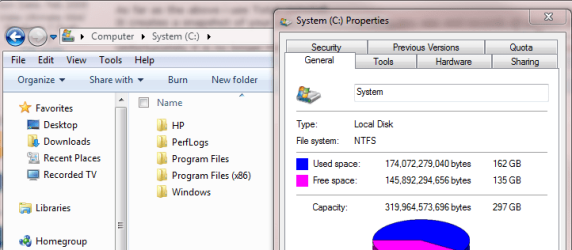
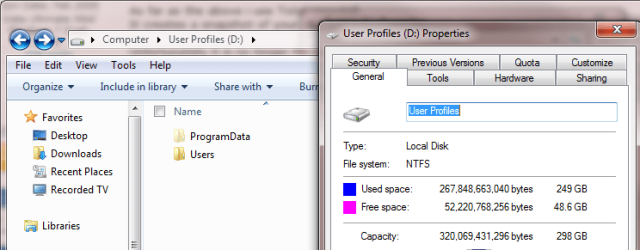
Some, I would like to say most of the modern applications create folders and store some user specific data in Users\Username\AppData and ProgramData. Microsoft do not recommend relocating Windows and Program Files folders, they should remain on system disk. Luckily, ProgramData and Users can be relocated without any problems.

For instance your 100 gig C: would never be enough for me. Even after relocating Users and ProgramData to D. already during the installation, using sysprep in Audit Mode, my C: which has only Windows and Program Files is over 160 gigs. Everything else is on D:

System_Used.PNG Users_used.PNG

Then E: for Videos

So, I think that reserving only 100 gigs to system from a tera disk is awfully little.

Kari
 

My Computer My Computer

At a glance

Windows 10 Pro x64 EN-GB1.6 GHz Intel Core i7-720QM Processor6 GBATI Mobility Radeon HD 5850 Graphics
Computer type
Laptop
Computer Manufacturer/Model Number
HP ENVY 17-1150eg
OS
Windows 10 Pro x64 EN-GB
CPU
1.6 GHz Intel Core i7-720QM Processor
Memory
6 GB
Graphics Card(s)
ATI Mobility Radeon HD 5850 Graphics
Sound Card
Beats sound system with integrated subwoofer
Monitor(s) Displays
17" laptop display, 22" LED and 32" Full HD TV through HDMI
Screen Resolution
1600*900 (1), 1920*1080 (2&3)
Hard Drives
Internal: 2 x 500 GB SATA Hard Disk Drive 7200 rpm
External: 2TB for backups, 3TB USB3 network drive for media
Cooling
As Envy runs a bit warm, I have it on a Cooler Master pad
Keyboard
Logitech diNovo Media Desktop Laser (bluetooth)
Mouse
Logitech Performance Mouse MX
Internet Speed
50/10 Mbps VDSL
Antivirus
Windows Defender 4.3.9431.0
Browser
Maxthon 3.5.2., IE11
Setting up partitions and sizes is a matter of personal preference....kinda like why all Homes are not laid out the same way.

Exactly. You partition to suit your needs.

But I'd also recommend a larger partition for your OS.
 

My Computer My Computer

At a glance

8 Pro x64i7 3770K 4.6GHz16GB G.Skill Trident X 2666mhzx2 EVGA 780 Ti Superclocked SLI
Computer type
PC/Desktop
Computer Manufacturer/Model Number
Systems by SmartEyeball
OS
8 Pro x64
CPU
i7 3770K 4.6GHz
Motherboard
ASUS P8Z77 WS
Memory
16GB G.Skill Trident X 2666mhz
Graphics Card(s)
x2 EVGA 780 Ti Superclocked SLI
Sound Card
SB X-FI Surround 5.1 PRO USB / ATH-AD900 Headphones
Monitor(s) Displays
x3 Dell U2410 / 58" Samsung
Screen Resolution
5760*1200/ 1920*1200
Hard Drives
2x Intel 520 240GB (RAID 0) * 2x WD Caviar Blacks 2TB (RAID 0) * 2TB WD Caviar Black * Sony Optirac DVD
PSU
Silverstone Strider Evolution 1200W
Case
Thermaltake Level 10 GT Snow Edition
Cooling
Noctua NH-D14
Keyboard
Topre Realforce // Ducky Shine MX Black // Filco Ninja TKL
Mouse
Thermaltake Theron (Highly Recommended) + Razer Imperator
Antivirus
MSE
Browser
IE, FF, WaterFox
Other Info
GT Extreme V2 Sim Racing Cockpit + 40" LCD and K/B Mouse stand ▼
Fanatec CSR Elite Wheel + Clubsport V1 Pedals + CSR shifter/7G-H ▼Saitek X52 Pro ▼ TrackIR 5 Pro
Buttkicker v2 Seat Rumbler with Dedicated 5.1 and Sub Woofer attached to frame ▼
=
Bloody Big Grin
I personally won't partition a drive with more than two partitions, but that's personal preference. If the system has one drive, I'll create one for the OS and apps, and another for user data. If it has two drives, I make the primary dirve one partition for the OS and apps, while the second drive is for user data. I prefer to keep it simple.
 

My Computer My Computer

At a glance

Windows 7 Ultimate x64 SP1Intel Core i7-260012 GB Patriot Extreme DDR3-1333Nvidia GTX 470
OS
Windows 7 Ultimate x64 SP1
CPU
Intel Core i7-2600
Motherboard
Gigabyte GA-P67A-UD3P-B3
Memory
12 GB Patriot Extreme DDR3-1333
Graphics Card(s)
Nvidia GTX 470
Monitor(s) Displays
Dell UltraSharp 2209WA
Hard Drives
OCZ Agility3 240 GB, WD5001AALS, WD7501AALS
PSU
OCZ ModStream 700W
Case
CoolerMaster HAF 912 Advanced
Cooling
CoolerMaster Hyper 212 Plus
Back
Top