How do you reformat during Windows 7 install?

maacu

New member
Local time
9:56 PM
Messages
10
OK. I'm a newbie when it comes to installing a new OS, so please bare with me on such an elementary question. All the posts I've found regarding reformatting seems to assume that it's self explanatory. However, when I attempt to install Windows 7, it gives me the option to choose which partition to install but I do not see anywhere that it gives me the option to delete or reformat anything. Am I blind or something? Please help the ignorant newbie!

Btw, my previous OS that I'm trying to get rid of is Vista.
 
Last edited by a moderator:

My Computer

Computer Manufacturer/Model Number
Dell 530
OS
windows 7
Memory
3 Gigs
Hello maacu, welcome to Seven Forums!


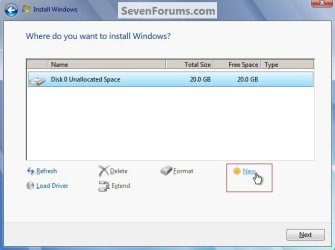
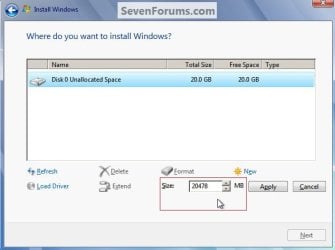
During the installation you'll be presented with screens like these, this is how to do it, first click the "Delete" to remove all the existing partitions then "New" for as many as you want to create then "Format" and that's it.

You can also use the method in the tutorial at the link below; be advised though, the "clean all" method should not be used on any Hard Disk Drive (HDD) that contains data that you don't want to lose as it WILL over-write everything on the HDD and it will be un-recoverable.


SSD / HDD : Optimize for Windows Reinstallation


click an image to enlarge
NewPartition.jpgNewPartition2.jpg
 

My Computer

Computer Manufacturer/Model Number
* BFK Customs *
OS
W 7 64-bit Ultimate
CPU
Intel Q9550 Yorkfield
Motherboard
ASUS P5Q Pro
Memory
8GB Dominator 8500C5D
Graphics Card(s)
ATI : XFX 5870
Sound Card
Realtek HD Audio 7-1
Monitor(s) Displays
1x 47" LCD HDMI & 3x 26" LCD HDMI
Screen Resolution
1920x1080P & 1920x1200
Hard Drives
1x 80GB Intel X25-M G2 SSD : 1x 500GB & 1x 640GB WD Caviar Black(s)
PSU
Corsair 620HX
Case
Cooler Master RC-690
Cooling
Tuniq Tower 120, 2x 140mm and 3x 120mm case fans
Keyboard
Microsoft 500
Mouse
Razer Diamondback 3G
Internet Speed
14 Mb/s
Other Info
1x Koutech 3Gb/s SATA HDD Hot Swap Rack
Don't see that screen

Thanks for the reply bare foot kid!

thing is, my screen doesn't show what your example shows. i don't have the option of deleting, extending, new or reformatting anything. that doesn't appear anywhere on the screen. the screen simply asks me which partition on want to install windows 7. what the heck?!
 

My Computer

Computer Manufacturer/Model Number
Dell 530
OS
windows 7
Memory
3 Gigs
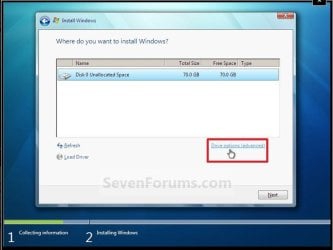
You will need to click on the text that is in red to bring up the options to delete and format ect. make sure you have the right partition selected each time you apply a command. good luck to you.
drive options 2+.JPG
 

My Computer

Computer Manufacturer/Model Number
Gateway GT5692
OS
Windows 7 Ulti. x64
CPU
AMD Phenom 8450 triple-core 2.10 ghz
Memory
4GB
Graphics Card(s)
ATI Radion HD 3200
Monitor(s) Displays
Gateway FPD1775W
Screen Resolution
1280x720
Hard Drives
465.6613 Gibibytes
If you have NOTHING on the HDD you care about, use the tutorial I posted above.
 

My Computer

Computer Manufacturer/Model Number
* BFK Customs *
OS
W 7 64-bit Ultimate
CPU
Intel Q9550 Yorkfield
Motherboard
ASUS P5Q Pro
Memory
8GB Dominator 8500C5D
Graphics Card(s)
ATI : XFX 5870
Sound Card
Realtek HD Audio 7-1
Monitor(s) Displays
1x 47" LCD HDMI & 3x 26" LCD HDMI
Screen Resolution
1920x1080P & 1920x1200
Hard Drives
1x 80GB Intel X25-M G2 SSD : 1x 500GB & 1x 640GB WD Caviar Black(s)
PSU
Corsair 620HX
Case
Cooler Master RC-690
Cooling
Tuniq Tower 120, 2x 140mm and 3x 120mm case fans
Keyboard
Microsoft 500
Mouse
Razer Diamondback 3G
Internet Speed
14 Mb/s
Other Info
1x Koutech 3Gb/s SATA HDD Hot Swap Rack
You will need to click on the text that is in red to bring up the options to delete and format ect. make sure you have the right partition selected each time you apply a command. good luck to you.
View attachment 91766


Thanks Larry, I forgot I had a snip of that one.
 

My Computer

Computer Manufacturer/Model Number
* BFK Customs *
OS
W 7 64-bit Ultimate
CPU
Intel Q9550 Yorkfield
Motherboard
ASUS P5Q Pro
Memory
8GB Dominator 8500C5D
Graphics Card(s)
ATI : XFX 5870
Sound Card
Realtek HD Audio 7-1
Monitor(s) Displays
1x 47" LCD HDMI & 3x 26" LCD HDMI
Screen Resolution
1920x1080P & 1920x1200
Hard Drives
1x 80GB Intel X25-M G2 SSD : 1x 500GB & 1x 640GB WD Caviar Black(s)
PSU
Corsair 620HX
Case
Cooler Master RC-690
Cooling
Tuniq Tower 120, 2x 140mm and 3x 120mm case fans
Keyboard
Microsoft 500
Mouse
Razer Diamondback 3G
Internet Speed
14 Mb/s
Other Info
1x Koutech 3Gb/s SATA HDD Hot Swap Rack
Thanks myzr7.

i'm not at home with my pc right now so i can't try this yet. however, i'm pretty sure that i didn't have that option either cause i would've tried it. it tried clicking on anything on that screen that might work. since i'm not at the computer i can't be 100% certain but i hope i'm wrong.

but something just occurred to me. when i received my windows 7 brand new in box with the seals, etc. (bought it on eBay) there was a sticker that said, "only to be distributed with a new pc." do you think this might have something to do with this particular installation disc not having the option to delete or reformat drives? just a thought. again, i'm new at this.
 

My Computer

Computer Manufacturer/Model Number
Dell 530
OS
windows 7
Memory
3 Gigs
No mate, you probably got an OEM version, one that can only be installed to one PC and never moved as it's forever tied to the first motherboard that it's installed to but that should have no impact on the subject at hand.
 

My Computer

Computer Manufacturer/Model Number
* BFK Customs *
OS
W 7 64-bit Ultimate
CPU
Intel Q9550 Yorkfield
Motherboard
ASUS P5Q Pro
Memory
8GB Dominator 8500C5D
Graphics Card(s)
ATI : XFX 5870
Sound Card
Realtek HD Audio 7-1
Monitor(s) Displays
1x 47" LCD HDMI & 3x 26" LCD HDMI
Screen Resolution
1920x1080P & 1920x1200
Hard Drives
1x 80GB Intel X25-M G2 SSD : 1x 500GB & 1x 640GB WD Caviar Black(s)
PSU
Corsair 620HX
Case
Cooler Master RC-690
Cooling
Tuniq Tower 120, 2x 140mm and 3x 120mm case fans
Keyboard
Microsoft 500
Mouse
Razer Diamondback 3G
Internet Speed
14 Mb/s
Other Info
1x Koutech 3Gb/s SATA HDD Hot Swap Rack
How are you doing the install? Are you doing it by inserting the upgrade disk while Win 7 is running, or are you booting the CD itself? You need to boot the CD to be able to format the hard drive during the install.
 

My Computer

Computer type
PC/Desktop
Computer Manufacturer/Model Number
Lenovo IdeaCenter 450
OS
Windows 10 Pro X64
CPU
Intel Quad Core i7-4770 @ 3.4Ghz
Memory
16.0GB PC3-12800 DDR3 SDRAM 1600 MHz
Graphics Card(s)
Intel Integrated HD Graphics
Sound Card
Realtek HD Audio
Monitor(s) Displays
HP 22" LCD
Screen Resolution
1680 x 1050
Hard Drives
250GB Samsung EVO SATA-3 SSD
2TB Seagate ST2000DM001 SATA-2
1.5TB Seagate ST3150041AS SATA
Keyboard
Dell USB
Mouse
Lenovo USB
Internet Speed
Cable via Road Runner 3MB Upload, 30MB Download
Antivirus
Windows Defender, MBAM Pro, MBAE
Browser
Seamonkey
Other Info
UEFI/GPT
PLDS DVD-RW DH16AERSH
How do you boot the CD itself without running Windows?
 

My Computer

Computer Manufacturer/Model Number
Dell 530
OS
windows 7
Memory
3 Gigs
Ztruker,

I think you hit the core of my issue because I just tried installing again to attempt to find "advanced options" or whatever (which sure enough wasn't there) but then I noticed that it said, "In order to make changes to partitions, you need to boot Windows from the installation disc" which sounds like the same thing as what you said. BUT HOW DO YOU DO THAT?!!!!! AM I THAT STUPID? remember, I'm as newbie as you can get when it comes to this!
 

My Computer

Computer Manufacturer/Model Number
Dell 530
OS
windows 7
Memory
3 Gigs
Try going into the Bios and changing the order on how it's booted i forgot where but i'm sure someone can correct me. and if ya know how ah well try putting CD-ROM to #1 to boot first.
 

My Computer

Computer type
PC/Desktop
OS
Win7 Home Premium x64 SP1, Archlinux x86_64. Elementary Luna

My Computer

Computer Manufacturer/Model Number
Gateway GT5692
OS
Windows 7 Ulti. x64
CPU
AMD Phenom 8450 triple-core 2.10 ghz
Memory
4GB
Graphics Card(s)
ATI Radion HD 3200
Monitor(s) Displays
Gateway FPD1775W
Screen Resolution
1280x720
Hard Drives
465.6613 Gibibytes
"BIOS." WHAT THE HECK IS THAT? i just looked through the tutorial and it didn't explain what BIOS is or how to get there. i also did try restarting my computer while the DVD was in there and it just started up like normal. i really do appreciate all the help you are all giving me, but i'm frustrated!!!
 

My Computer

Computer Manufacturer/Model Number
Dell 530
OS
windows 7
Memory
3 Gigs
"BIOS." WHAT THE HECK IS THAT? i just looked through the tutorial and it didn't explain what BIOS is or how to get there. i also did try restarting my computer while the DVD was in there and it just started up like normal. i really do appreciate all the help you are all giving me, but i'm frustrated!!!
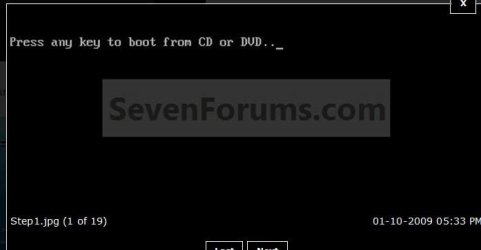
You did not see this message after you restarted with your install disk in the drive?
any key.JPG
 

My Computer

Computer Manufacturer/Model Number
Gateway GT5692
OS
Windows 7 Ulti. x64
CPU
AMD Phenom 8450 triple-core 2.10 ghz
Memory
4GB
Graphics Card(s)
ATI Radion HD 3200
Monitor(s) Displays
Gateway FPD1775W
Screen Resolution
1280x720
Hard Drives
465.6613 Gibibytes
nope. tried it twice already and didn't see it. however, i saw in the upper right-hand corner that said "F2" for setup and so it brought me to a page that looked like i could set my DVD/CD drive as priority once i poked around in that page. am i on the right track?
 

My Computer

Computer Manufacturer/Model Number
Dell 530
OS
windows 7
Memory
3 Gigs
nope. tried it twice already and didn't see it. however, i saw in the upper right-hand corner that said "F2" for setup and so it brought me to a page that looked like i could set my DVD/CD drive as priority once i poked around in that page. am i on the right track?
Yes if you set your dvd drive to boot first then you should get the hit any key prompt.
Have you backed up your data from the vista install that you are going to format? You do understand that once you format that its gone. :rolleyes:
 

My Computer

Computer Manufacturer/Model Number
Gateway GT5692
OS
Windows 7 Ulti. x64
CPU
AMD Phenom 8450 triple-core 2.10 ghz
Memory
4GB
Graphics Card(s)
ATI Radion HD 3200
Monitor(s) Displays
Gateway FPD1775W
Screen Resolution
1280x720
Hard Drives
465.6613 Gibibytes
yes, i understand. i've backed up everything already. plus, i have carbonite service which has worked great for me in the past so i'm not worried about losing data. i appreciate the concern. thank you.:D

i'm going to try the "F2" thing again because just as i was shutting windows down, i got a blue screen saying something about "cache dump" and so afterwards when i tried to boot the cd it said, "windows was shut down improperly" and then it started up normally and didn't give me the "hit any key prompt." so i will try yet again. I'M MOTIVATED TO GET TO THE BOTTOM OF THIS!!!

why do you think i am having to hit the "F2" key at startup while others don't seem to have to?
 

My Computer

Computer Manufacturer/Model Number
Dell 530
OS
windows 7
Memory
3 Gigs
can't believe this. it still didn't work. windows started up normally even after setting my dvd drive as priority. should i be opening in safe mode or does that have anything to do with it? there's also an option to push "F12 boot menu" at startup. does that apply to me? i'm gonna try it now and see...


frustration in progress....
 

My Computer

Computer Manufacturer/Model Number
Dell 530
OS
windows 7
Memory
3 Gigs
can't believe this. it still didn't work. windows started up normally even after setting my dvd drive as priority. should i be opening in safe mode or does that have anything to do with it? there's also an option to push "F12 boot menu" at startup. does that apply to me? i'm gonna try it now and see...


frustration in progress....
Posibility that you did not save your changes correctly in set up. That would be my guess. Safe mode is not envolved in booting from the install disk.
 

My Computer

Computer Manufacturer/Model Number
Gateway GT5692
OS
Windows 7 Ulti. x64
CPU
AMD Phenom 8450 triple-core 2.10 ghz
Memory
4GB
Graphics Card(s)
ATI Radion HD 3200
Monitor(s) Displays
Gateway FPD1775W
Screen Resolution
1280x720
Hard Drives
465.6613 Gibibytes
Back
Top