How do you set the Window Pane for folders, to always stay the same ?

KL70

New member
Local time
4:00 PM
Messages
2
For numerous folders I have of things I've downloaded, I have the Window Pane at the top right set to 'List', as that's how I like numerous folders to appear as.

When I go back, it unfortunately keeps usually changing to 'Medium Icons', or to 'Details', neither of which I want or like. Is there anything I can do, to keep it permanently set to 'List' all the time.
 

My Computer My Computer

At a glance

Windows 7
OS
Windows 7

My Computer My Computer

At a glance

Windows 7 x64 Professional SP1Intel C2D T9550 2.66 GHz @ 2.793 GHz (Thanks ...8 GB DDR3ATI MOBILITY RADEON 4670
Computer Manufacturer/Model Number
DELL SXPS 1640
OS
Windows 7 x64 Professional SP1
CPU
Intel C2D T9550 2.66 GHz @ 2.793 GHz (Thanks ThrottleStop!!)
Motherboard
Intel PM45
Memory
8 GB DDR3
Graphics Card(s)
ATI MOBILITY RADEON 4670
Sound Card
CREATIVE XFI AUDIO NOTEBOOK
Monitor(s) Displays
16.1 WLED
Screen Resolution
1920x1080
Hard Drives
Seagate ST9500420AS 500GB (465GiBi) 7200 RPM Drive

External Drives:-
2 TB WD Essentials x 3
1 TB WD Mybook Gen 1
1 TB WD Mybook Gen 2
1 TB Seagate
1 TB Seagate
320 GB WD Scorpio Black (enclosed)
PSU
90W Dell Power Brick
Case
Dell Chassis
Cooling
Coolermaster Cooling Pad
Keyboard
Built-in backlighted Keyboard
Mouse
Logitech Wireless Mini Mouse
Internet Speed
4/0.5
Is there any YouTube video/s on my query for Windows 7, as I had a look at those links and they're rather confusing to follow.
 

My Computer My Computer

At a glance

Windows 7
OS
Windows 7
Is there any YouTube video/s on my query for Windows 7, as I had a look at those links and they're rather confusing to follow.

To simplify matters for you I'll just list out some of the more pertinent points of those guides.

Firstly, Windows 7 assigns a folder type to a folder depending on the content in the folder. There are 4 types, music, pictures, video and normal (no type).

I assume you want Windows to permanently set all your folder types to list all your content regardless of type, yes?

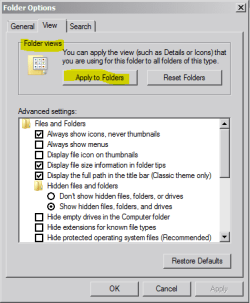
In that case, you'll have to set your folder to the list view for each type of folder once, and after setting that view type, head to Folder Options of the folder and in the dialog box select Apply to Folders.

Capture1.PNG

You have to do this 4 Times. Once for each type of folder (video, music, pictures and normal type)
 

My Computer My Computer

At a glance

Windows 7 x64 Professional SP1Intel C2D T9550 2.66 GHz @ 2.793 GHz (Thanks ...8 GB DDR3ATI MOBILITY RADEON 4670
Computer Manufacturer/Model Number
DELL SXPS 1640
OS
Windows 7 x64 Professional SP1
CPU
Intel C2D T9550 2.66 GHz @ 2.793 GHz (Thanks ThrottleStop!!)
Motherboard
Intel PM45
Memory
8 GB DDR3
Graphics Card(s)
ATI MOBILITY RADEON 4670
Sound Card
CREATIVE XFI AUDIO NOTEBOOK
Monitor(s) Displays
16.1 WLED
Screen Resolution
1920x1080
Hard Drives
Seagate ST9500420AS 500GB (465GiBi) 7200 RPM Drive

External Drives:-
2 TB WD Essentials x 3
1 TB WD Mybook Gen 1
1 TB WD Mybook Gen 2
1 TB Seagate
1 TB Seagate
320 GB WD Scorpio Black (enclosed)
PSU
90W Dell Power Brick
Case
Dell Chassis
Cooling
Coolermaster Cooling Pad
Keyboard
Built-in backlighted Keyboard
Mouse
Logitech Wireless Mini Mouse
Internet Speed
4/0.5
Back
Top