JavaScript is disabled. For a better experience, please enable JavaScript in your browser before proceeding.
You are using an out of date browser. It may not display this or other websites correctly.
You should upgrade or use an
alternative browser .
How do you suppress/hide shortcuts from Windows Explorer
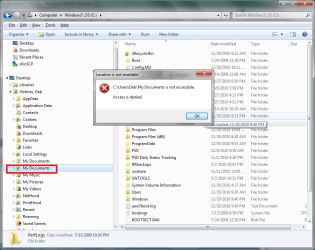
Within the folder tree frame of Windows Explorer, I have entries for shortcuts to various folders (such as Mu Documents) as well as entries for real folders. In most (perhaps all) cases the shortcut names duplicate the name of a real folder but the short cuts pop-up an alert that about not being accessible where the folders by the same names can be opened and used. Is there a way to prevent all of these shortcuts from displaying? They waste a ton of space for no discernable benefit.
Lenovo T410 Windows 7 250GB
Administrator
Staff member
Hello Deb, and welcome to Seven Forums.
Could you post back a
screenshot with the locations that you would like to hide or remove highlighted?
Some can easily be removed, but I just need to make sure of which ones first.
64-bit Windows 11 Pro for Workstations Intel i7-8700K OC'd to 5 GHz 64 GB (4x16GB) G.SKILL TridentZ RGB DDR4 3600... ASUS ROG-STRIX-GTX1080TI-O11G-GAMING PC/Desktop Self built custom 64-bit Windows 11 Pro for Workstations Intel i7-8700K OC'd to 5 GHz ASUS ROG Maximus XI Formula Z390 64 GB (4x16GB) G.SKILL TridentZ RGB DDR4 3600 MHz ASUS ROG-STRIX-GTX1080TI-O11G-GAMING Integrated 2 x Samsung Odyssey G7 27" 2560x1440 1TB Samsung 990 PRO M.2, Seasonic Prime Titanium 850W Thermaltake Core P3 Corsair Hydro H115i Logitech wireless K800 Logitech MX Master 4 2 Gb/s Download and 100 Mb/s Upload Malwarebyte Anti-Malware Premium Google Chrome Logitech Z625 speaker system,
New member
Thread Starter
Sure... Haven't tried uploading a picture before. Lets see if this works.
Shortcuts.png
60.4 KB
· Views: 34
Lenovo T410 Windows 7 250GB
Administrator
Staff member
These are not really folders, but junction points instead used for backwards compatibilty of old programs that reference these older locations instead of the new ones since Vista. They cannot be removed.
The only way to hide them is to check the
Hide protected operating system files box in Folder Options "View" tab.
64-bit Windows 11 Pro for Workstations Intel i7-8700K OC'd to 5 GHz 64 GB (4x16GB) G.SKILL TridentZ RGB DDR4 3600... ASUS ROG-STRIX-GTX1080TI-O11G-GAMING PC/Desktop Self built custom 64-bit Windows 11 Pro for Workstations Intel i7-8700K OC'd to 5 GHz ASUS ROG Maximus XI Formula Z390 64 GB (4x16GB) G.SKILL TridentZ RGB DDR4 3600 MHz ASUS ROG-STRIX-GTX1080TI-O11G-GAMING Integrated 2 x Samsung Odyssey G7 27" 2560x1440 1TB Samsung 990 PRO M.2, Seasonic Prime Titanium 850W Thermaltake Core P3 Corsair Hydro H115i Logitech wireless K800 Logitech MX Master 4 2 Gb/s Download and 100 Mb/s Upload Malwarebyte Anti-Malware Premium Google Chrome Logitech Z625 speaker system,
New member
Thread Starter
Thanks, I was afraid of that. Unfortunately I need to see other system files so I guess I'll just have to deal with the clutter. Maybe some day they'll add a separate suppression option for 'junction' points.
Lenovo T410 Windows 7 250GB
Administrator
Staff member
You're welcome.
64-bit Windows 11 Pro for Workstations Intel i7-8700K OC'd to 5 GHz 64 GB (4x16GB) G.SKILL TridentZ RGB DDR4 3600... ASUS ROG-STRIX-GTX1080TI-O11G-GAMING PC/Desktop Self built custom 64-bit Windows 11 Pro for Workstations Intel i7-8700K OC'd to 5 GHz ASUS ROG Maximus XI Formula Z390 64 GB (4x16GB) G.SKILL TridentZ RGB DDR4 3600 MHz ASUS ROG-STRIX-GTX1080TI-O11G-GAMING Integrated 2 x Samsung Odyssey G7 27" 2560x1440 1TB Samsung 990 PRO M.2, Seasonic Prime Titanium 850W Thermaltake Core P3 Corsair Hydro H115i Logitech wireless K800 Logitech MX Master 4 2 Gb/s Download and 100 Mb/s Upload Malwarebyte Anti-Malware Premium Google Chrome Logitech Z625 speaker system,