How do you un-link master volume slider from others in the mixer?

fiscoking

New member
Local time
8:43 PM
Messages
12
Hello,

I've got Win7 x64 on a lenovo G560, and I'm trying to record from an IE webcast using loop recorder.

The recording application has the ability to select a device from the mixer to record from, but when I raise the volume level of IE in the mixer, the volume level of the main speakers raises too.

In order to set the recording level correctly for the recording app, (around 80%), the speakers on my laptop are so loud it's annoying. You have to shout to be heard by anyone else in the room.

I realise that for desktop users with a separate amp (and hardware volume control) this might not be a problem, but for me it is, because my laptop uses the Win 7 mixer to set the speaker volume - no hardware control.

How do I un-link the master (speaker) volume from the others?

Thanks.

P.S. I have searched but have not found a solution.
 

My Computer My Computer

At a glance

win7 64
OS
win7 64
Hello,

I've got Win7 x64 on a lenovo G560, and I'm trying to record from an IE webcast using loop recorder.

The recording application has the ability to select a device from the mixer to record from, but when I raise the volume level of IE in the mixer, the volume level of the main speakers raises too.

In order to set the recording level correctly for the recording app, (around 80%), the speakers on my laptop are so loud it's annoying. You have to shout to be heard by anyone else in the room.

I realise that for desktop users with a separate amp (and hardware volume control) this might not be a problem, but for me it is, because my laptop uses the Win 7 mixer to set the speaker volume - no hardware control.

How do I un-link the master (speaker) volume from the others?

Thanks.

P.S. I have searched but have not found a solution.
this maybe a simple solution but have you considered plugging a set of headphones in?

for your information, no you cannot unlink the master volume because as soon as the slider for IE reaches its peak, then it raises the volume of the master slider, there is no way to override this, if it is too loud then i can only consider plugging in a set of headphones.
 

My Computer My Computer

At a glance

Windows 7 Ultimate x64 SP1Intel Q6600 @ 2.6Ghz4Gb DDR2 Corsair Dominator @ 800Mhz 5-5-5-15EVGA 560 GTX SC FTW 1GB
Computer type
PC/Desktop
Computer Manufacturer/Model Number
Custom Build
OS
Windows 7 Ultimate x64 SP1
CPU
Intel Q6600 @ 2.6Ghz
Motherboard
Evga NF78-CK-132-A 3-Way SLI
Memory
4Gb DDR2 Corsair Dominator @ 800Mhz 5-5-5-15
Graphics Card(s)
EVGA 560 GTX SC FTW 1GB
Sound Card
Realtek HD 7.1 Audio, Plantronics GameCom780 7.1 Headset
Monitor(s) Displays
Dell S2409W
Screen Resolution
1920 x 1080
Hard Drives
SanDisk SDSSDHII-120G-G25 120GB SSD
Samsung 7200RPM 750Gb SATA
Samsung 850 EVO 120GB SSD
Western Digital Green 1TB 7200RPM
PSU
Xigmatek 750W Quad sli quad core 80% eff
Case
Antec 900 Gaming Case
Cooling
Zalman CNPS9700-NT NVIDIA Tritium
Keyboard
Logitech generic keyboard, MS wireless keyboard
Mouse
Razor Lachesis Banshee V2 Blue, 4000DPI, MS wireless mouse
Internet Speed
152Mb Virgin Media Fibre Optic
Antivirus
Microsoft Security Essentials
Browser
Google Chrome
Other Info
Wireless Gaming Receiver for Windows, Wireless Xbox 360 Pad
Hello Mr Needs,

Thank you for your reply.

I see some aspects of Windows 7 have gone many steps back. What on earth was Microsoft thinking when they put the new mixer together? If what you say is true, then I will have to carry headphones around with me - to solve a software problem.

Does anyone know of a replacement mixer (3rd party) that will unlink the sliders?
 

My Computer My Computer

At a glance

win7 64
OS
win7 64
Hello Mr Needs,

Thank you for your reply.

I see some aspects of Windows 7 have gone many steps back. What on earth was Microsoft thinking when they put the new mixer together? If what you say is true, then I will have to carry headphones around with me - to solve a software problem.

Does anyone know of a replacement mixer (3rd party) that will unlink the sliders?
it hasn't gone backwards at all, for every version of windows i've ever used, there has only been a master slider and 3rd party applications had their own in built slider(of which some didn't even have a volume control at all), with Vista and 7, the incorporation of seperate sliders for individual applications were a godsend for many, but there are flaws, if you were using XP or earlier then you wouldn't have those options, when the slider reaches the peak then it has no option to raise the master volume otherwise the sound will distort, and what's the point of recording audio that ends up distorted?
 

My Computer My Computer

At a glance

Windows 7 Ultimate x64 SP1Intel Q6600 @ 2.6Ghz4Gb DDR2 Corsair Dominator @ 800Mhz 5-5-5-15EVGA 560 GTX SC FTW 1GB
Computer type
PC/Desktop
Computer Manufacturer/Model Number
Custom Build
OS
Windows 7 Ultimate x64 SP1
CPU
Intel Q6600 @ 2.6Ghz
Motherboard
Evga NF78-CK-132-A 3-Way SLI
Memory
4Gb DDR2 Corsair Dominator @ 800Mhz 5-5-5-15
Graphics Card(s)
EVGA 560 GTX SC FTW 1GB
Sound Card
Realtek HD 7.1 Audio, Plantronics GameCom780 7.1 Headset
Monitor(s) Displays
Dell S2409W
Screen Resolution
1920 x 1080
Hard Drives
SanDisk SDSSDHII-120G-G25 120GB SSD
Samsung 7200RPM 750Gb SATA
Samsung 850 EVO 120GB SSD
Western Digital Green 1TB 7200RPM
PSU
Xigmatek 750W Quad sli quad core 80% eff
Case
Antec 900 Gaming Case
Cooling
Zalman CNPS9700-NT NVIDIA Tritium
Keyboard
Logitech generic keyboard, MS wireless keyboard
Mouse
Razor Lachesis Banshee V2 Blue, 4000DPI, MS wireless mouse
Internet Speed
152Mb Virgin Media Fibre Optic
Antivirus
Microsoft Security Essentials
Browser
Google Chrome
Other Info
Wireless Gaming Receiver for Windows, Wireless Xbox 360 Pad
it hasn't gone backwards at all, for every version of windows i've ever used, there has only been a master slider and 3rd party applications had their own in built slider(of which some didn't even have a volume control at all),

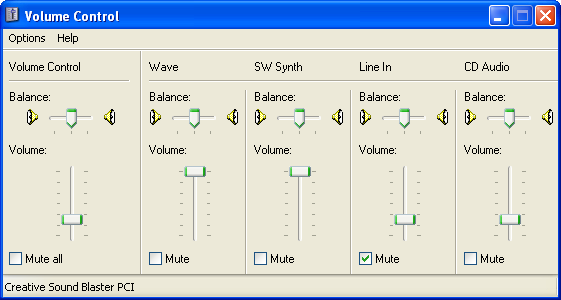
I don't know what sort of sound cards or drivers you've used that didn't provide a volume control, but even the very basic sound chips I've used on XP (Realtek, SoundBlaster etc) provided a mixer that allowed you to lower the master volume while keeping the others raised higher. A pictue in point from an XP mixer:

winxppro-2-1.png


when the slider reaches the peak then it has no option to raise the master volume otherwise the sound will distort

It didn't work this way in XP, so I see of no reason why it would apply in Win 7.

OK, so Microsoft have written their own mixer, and seen fit to link the sliders (even though Realtek \ SoundBlaster managed to write theirs without linking on XP), the end result is the same, I have to switch to a 3rd party mixer if I don't want to carry headphones around.

Does anyone have any suggestions?

Thanks.
 

My Computer My Computer

At a glance

win7 64
OS
win7 64
it hasn't gone backwards at all, for every version of windows i've ever used, there has only been a master slider and 3rd party applications had their own in built slider(of which some didn't even have a volume control at all),

I don't know what sort of sound cards or drivers you've used that didn't provide a volume control, but even the very basic sound chips I've used on XP (Realtek, SoundBlaster etc) provided a mixer that allowed you to lower the master volume while keeping the others raised higher. A pictue in point from an XP mixer:

winxppro-2-1.png


when the slider reaches the peak then it has no option to raise the master volume otherwise the sound will distort

It didn't work this way in XP, so I see of no reason why it would apply in Win 7.

OK, so Microsoft have written their own mixer, and seen fit to link the sliders (even though Realtek \ SoundBlaster managed to write theirs without linking on XP), the end result is the same, I have to switch to a 3rd party mixer if I don't want to carry headphones around.

Does anyone have any suggestions?

Thanks.

Right, I understand where you are coming from but them features are already incorporated into 7 anyway, it's just that the sliders don't represent what you had in XP or earlier, when the master volume slider starts to move up, that means the slider that you're moving has hit the maximum volume it can go, so it tries to make it louder(as this is what you're trying to do) to meet your needs, if you want the same thing in 7 as you did in XP then simply turn all volume sliders to max(including the master volume slider) and set the volume with the master slider (the application will still run at maximum volume), no 3rd party applications have been made to control volume limits as windows controls are more than sufficient.
 

My Computer My Computer

At a glance

Windows 7 Ultimate x64 SP1Intel Q6600 @ 2.6Ghz4Gb DDR2 Corsair Dominator @ 800Mhz 5-5-5-15EVGA 560 GTX SC FTW 1GB
Computer type
PC/Desktop
Computer Manufacturer/Model Number
Custom Build
OS
Windows 7 Ultimate x64 SP1
CPU
Intel Q6600 @ 2.6Ghz
Motherboard
Evga NF78-CK-132-A 3-Way SLI
Memory
4Gb DDR2 Corsair Dominator @ 800Mhz 5-5-5-15
Graphics Card(s)
EVGA 560 GTX SC FTW 1GB
Sound Card
Realtek HD 7.1 Audio, Plantronics GameCom780 7.1 Headset
Monitor(s) Displays
Dell S2409W
Screen Resolution
1920 x 1080
Hard Drives
SanDisk SDSSDHII-120G-G25 120GB SSD
Samsung 7200RPM 750Gb SATA
Samsung 850 EVO 120GB SSD
Western Digital Green 1TB 7200RPM
PSU
Xigmatek 750W Quad sli quad core 80% eff
Case
Antec 900 Gaming Case
Cooling
Zalman CNPS9700-NT NVIDIA Tritium
Keyboard
Logitech generic keyboard, MS wireless keyboard
Mouse
Razor Lachesis Banshee V2 Blue, 4000DPI, MS wireless mouse
Internet Speed
152Mb Virgin Media Fibre Optic
Antivirus
Microsoft Security Essentials
Browser
Google Chrome
Other Info
Wireless Gaming Receiver for Windows, Wireless Xbox 360 Pad
Hello Mr.Needs,

Thank you again for your response.

'simply turn all volume sliders to max(including the master volume slider) and set the volume with the master slider (the application will still run at maximum volume), '

The statement above doesn't work for me. If I set all the sliders to maximum, and then use the master slider to control the recording level, I end up with the master slider at 80% (as the IE slider needs to be at 80%), and the speakers on the laptop blast away.

This is not the functionality that was available in XP at all, as you could set individual volume channels (and record from them) without having to raise the master volume above 0.

To this end, the windows volume control is less than sufficient for laptop users.

(Am I the only one to see this - please chip in if I've misunderstood Mr.Needs responses).

Thanks again for your reply, but I just can't make the Win7 mixer function as I wish without having the speakers on my laptop blast away.
 

My Computer My Computer

At a glance

win7 64
OS
win7 64
'simply turn all volume sliders to max(including the master volume slider) and set the volume with the master slider (the application will still run at maximum volume), '

The statement above doesn't work for me. If I set all the sliders to maximum, and then use the master slider to control the recording level, I end up with the master slider at 80% (as the IE slider needs to be at 80%), and the speakers on the laptop blast away.

incorrect, the IE slider will be at 100% but the master slider will be at whatever you set it, it will show that the IE slider will be equal to the master slider but this is misleading, the other sliders are at 100% regardless, the master volume then controls the overall system volume and sets it accordingly.
 

My Computer My Computer

At a glance

Windows 7 Ultimate x64 SP1Intel Q6600 @ 2.6Ghz4Gb DDR2 Corsair Dominator @ 800Mhz 5-5-5-15EVGA 560 GTX SC FTW 1GB
Computer type
PC/Desktop
Computer Manufacturer/Model Number
Custom Build
OS
Windows 7 Ultimate x64 SP1
CPU
Intel Q6600 @ 2.6Ghz
Motherboard
Evga NF78-CK-132-A 3-Way SLI
Memory
4Gb DDR2 Corsair Dominator @ 800Mhz 5-5-5-15
Graphics Card(s)
EVGA 560 GTX SC FTW 1GB
Sound Card
Realtek HD 7.1 Audio, Plantronics GameCom780 7.1 Headset
Monitor(s) Displays
Dell S2409W
Screen Resolution
1920 x 1080
Hard Drives
SanDisk SDSSDHII-120G-G25 120GB SSD
Samsung 7200RPM 750Gb SATA
Samsung 850 EVO 120GB SSD
Western Digital Green 1TB 7200RPM
PSU
Xigmatek 750W Quad sli quad core 80% eff
Case
Antec 900 Gaming Case
Cooling
Zalman CNPS9700-NT NVIDIA Tritium
Keyboard
Logitech generic keyboard, MS wireless keyboard
Mouse
Razor Lachesis Banshee V2 Blue, 4000DPI, MS wireless mouse
Internet Speed
152Mb Virgin Media Fibre Optic
Antivirus
Microsoft Security Essentials
Browser
Google Chrome
Other Info
Wireless Gaming Receiver for Windows, Wireless Xbox 360 Pad
"incorrect, the IE slider will be at 100% but the master slider will be at whatever you set it"

That's no how it works on my Win7 system. When you set the IE slider at 100%, the master volumeslider follows it to 100%. When you pull the master volume slider back down, the IE slider follows it down - with the recording level too.

To illustrate the point, look at these two screenshots. I've got Win7 sound recorder recording from the default recording device (stereo mix). In the first screenshot, the IE slider is at 100%, and the sound recorder app has a signal to record (illustrated by the green sound level). The master volume level has followed the IE slider to 100% also, meaning the speaker are loud too.

http://i67.photobucket.com/albums/h316/goodproducts101/sound1.jpg

In the second screenshot, I've pulled the master vol slider down (to reduce speaker noise), and the IE slider has followed it down too. Note the recording level on the sound recorder app - no green signal - nothing to record.

http://i67.photobucket.com/albums/h316/goodproducts101/sound2.jpg

Try it yourself on your computer, and see what happens.
 

My Computer My Computer

At a glance

win7 64
OS
win7 64
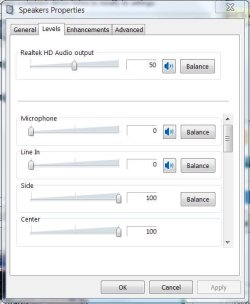
Do you have Realtec drivers? I don't use the Mixer because of the master volume. That's why they call it master volume. You can set the level of individual speakers, line-in and microphone through Sound properties> Speakers > Levels.
 

Attachments

  • Sound-Prop-Level.JPG
    Sound-Prop-Level.JPG
    38.6 KB · Views: 16

My Computer My Computer

At a glance

Windows 7 Pro-x64i7-2600 3.4GHz - 3.8GHz Turbo8Gb - 2x4GB, Muskin 991770 PC3-1333Integrated Intel HD 2000
Computer type
PC/Desktop
Computer Manufacturer/Model Number
Built 2/11/2011
OS
Windows 7 Pro-x64
CPU
i7-2600 3.4GHz - 3.8GHz Turbo
Motherboard
Intel DH67BL-B3
Memory
8Gb - 2x4GB, Muskin 991770 PC3-1333
Graphics Card(s)
Integrated Intel HD 2000
Sound Card
Integrated Intel 10.1 HD, RealTek ALC892
Monitor(s) Displays
Asus LCD VH222H, Haier HL24XSL2a
Screen Resolution
1920x1080, 1920x1080
Hard Drives
Crucial SSD C300-128Gb,
Western Digital WD5002AALX - 500Gb,
Western Digital WD7501AALS - 750Gb
PSU
Seasonic 650W 80+ Gold Modular
Case
Rosewill Defender
Cooling
Stock CPU, Four 120mm case fans, PCH fan added
Keyboard
Logitech EX100 Y-RBH94 Wireless
Mouse
Logitech EX100 M-RCE95 Wireless
Internet Speed
3.0/1.5 Mbs
Antivirus
Microsoft Security Essentials
Browser
Microsoft Internet Explorer 11
Other Info
Antec Veris Premier-Multimedia IR Station,
Cyber Accoustics-3602 Speakers,
AFT XM-5U Card Reader,
Hauppauge TV-HVR-2250,
Sony LX300 USB Turntable
No, I have 'Conexant Smart Audio' drivers (for the Conexant HD audio device).

Interestingly, I don't see the sliders you've got under the levels tab. I only see one slider titled 'Speakers' and whn you move that about, it also moves the master speaker slider in the Win7 mixer.

From the screenshot you've provided, it looks like audio manufacturers are still able to customise the way the mixer works in Win7 (albeit in a different window and tab to the standard mixer).

Looks like I'm going to have to buy those headphones after all........

Thanks for your help.
 

My Computer My Computer

At a glance

win7 64
OS
win7 64
Back
Top