How do you use the snip tool?

546 Inspiron

New member
Local time
12:54 PM
Messages
99
How do I add a snip in here? It is supposed to be in the clip board ready to paste but PASTE is never lit up and I can't save and paste either. I can't select paste.
 

My Computer

Computer Manufacturer/Model Number
Dell 546 Inspiron desktop
OS
Windows 7 home premium with 64 bit
CPU
AMD Athlon 630 2.8ghz X4 (Quad)
Motherboard
Dell 780g
Memory
8 Gigs of ddr2 at 800 mhz
Graphics Card(s)
Dell integrated ATI 3200
Sound Card
None
Monitor(s) Displays
20" Dell
Screen Resolution
1200x1600
Hard Drives
Two 1TRB Seagate Barracuda drives with a 32MB cache in raid 1 (Mirrored)
PSU
300 Watts Dell
Case
Mini-tower
Cooling
3 Fans total at PSU, CPU, and case.
Keyboard
Dell
Mouse
Logitech trackball (marble mouse)
Internet Speed
DSL
Other Info
Western Digital 1.5tb external drive (green back-up drive) Cool and quiet!
Are you able to save the snip?

or are you just having problems uploading to the site?

If you're having problems uploading, under the reply to thread box, select on the manage attachments link, and upload it from your saved folder.
 

My Computer

Computer Manufacturer/Model Number
Toshiba P300
OS
Windows 8 Pro
CPU
Intel Centrino Dual Core P7450 2.13GHz
Memory
4gb
Graphics Card(s)
ATI Mobility Raedon HD3650
Hard Drives
Toshiba MK3252GSX ATA
Internet Speed
Wish it were faster

My Computer

Computer type
PC/Desktop
Computer Manufacturer/Model Number
Self built custom
OS
64-bit Windows 11 Pro for Workstations
CPU
Intel i7-8700K OC'd to 5 GHz
Motherboard
ASUS ROG Maximus XI Formula Z390
Memory
64 GB (4x16GB) G.SKILL TridentZ RGB DDR4 3600 MHz
Graphics Card(s)
ASUS ROG-STRIX-GTX1080TI-O11G-GAMING
Sound Card
Integrated
Monitor(s) Displays
2 x Samsung Odyssey G7 27"
Screen Resolution
2560x1440
Hard Drives
1TB Samsung 990 PRO M.2,
4TB Samsung 990 PRO PRO M.2,
TerraMaster F8 SSD Plus NAS
PSU
Seasonic Prime Titanium 850W
Case
Thermaltake Core P3
Cooling
Corsair Hydro H115i
Keyboard
Logitech wireless K800
Mouse
Logitech MX Master 4
Internet Speed
2 Gb/s Download and 100 Mb/s Upload
Antivirus
Malwarebyte Anti-Malware Premium
Browser
Google Chrome
Other Info
Logitech Z625 speaker system,
Logitech BRIO 4K Pro webcam,
HP Color LaserJet Pro MFP M477fdn,
APC SMART-UPS RT 1000 XL - SURT1000XLI,
Galaxy S23 Plus phone
It figures.....a question comes up that I could answer and I'm too late.:D
 

My Computer

Computer type
PC/Desktop
Computer Manufacturer/Model Number
Gigabyte Technology Co., Ltd.
OS
Win 7 Ultimate 64-bit SP1 (desktop)
CPU
Intel Core 2 Duo E8400
Motherboard
Gigabyte GA-EP35-DS3R
Memory
2x 2GB OCZ DDR II SDRAM PC2-6400
Graphics Card(s)
NVIDIA GeForce 9400GT
Monitor(s) Displays
HP 2009m(primary), Acer P191W
Screen Resolution
1600x900, 1440x900
Hard Drives
Internal:WD Caviar Black 640GB 32MB cache 7200RPM
External:Samsung Story Station 1TB HDD desktop drive
500GB Toshiba portable drive
PSU
Antec Earthwatts EA500D
Case
Antec Sonata III
Cooling
4 fans
Keyboard
Logitech Wave
Mouse
Logitech M-SBF90
Internet Speed
Slow due to home Wireless-G router
Antivirus
MSE, Hitman Pro, Malwarebytes
Browser
Chrome and Palemoon
Other Info
Laptop....Acer 5750Z-4835
15.6" HD Widescreen CineCrystal™ LED-backlit LCD Display: (1366x768 resolution, 16:9 aspect ratio)
Intel® Pentium® Processor B940 (2.0GHz, 2MB L3 cache)
Windows® 7 Home Premium,500GB Hard Drive,4GB DDR3 RAM, Intel® HD Graphics,8X DVD-Super Multi Double-Layer Drive
Multi-in-1 Digital Media Card Reader,802.11b/g/n Wi-Fi
Chrome and Palemoon, MSE, Hitman Pro
Yup...Brink is an over-achiever......Keep up the good work
 

My Computer

Computer Manufacturer/Model Number
Systemax N2000 Gaming PC
OS
Windows 7 Ultimate x64
CPU
Q6600 @2.4ghz (G0 stepping)
Motherboard
XFX nforce 680i LT
Memory
8 gb OCZ vista essential sli PC-6400
Graphics Card(s)
Dual 9800gt in SLI mode
Sound Card
Integrated 8.1 High Definition Audio
Monitor(s) Displays
Dual Sceptre x246w 24 inch monitors
Screen Resolution
1920 x 1200 each monitor
Hard Drives
500 GB SATA II / 7500 rpm
PSU
Cooler Master Real Power Pro 1250W
Case
N2000 server tower
Cooling
Thermaltake Bigwater 760 is
Keyboard
MS Intelitype 6000 v2.0
Mouse
MS Intelipoint 6000
Internet Speed
Wi-power 1.5GB up / 512k down
Other Info
Windows 7 Ultimate x64, Windows 7 Pro x64, Windows Home Premium X86, Windows XP pro, Windows Home Server x86, Ubuntu 10.4 x86 and x64, Ubuntu server 10.4, SQL Server 2005, MySQL 5.0
LOL. :o
 

My Computer

Computer type
PC/Desktop
Computer Manufacturer/Model Number
Self built custom
OS
64-bit Windows 11 Pro for Workstations
CPU
Intel i7-8700K OC'd to 5 GHz
Motherboard
ASUS ROG Maximus XI Formula Z390
Memory
64 GB (4x16GB) G.SKILL TridentZ RGB DDR4 3600 MHz
Graphics Card(s)
ASUS ROG-STRIX-GTX1080TI-O11G-GAMING
Sound Card
Integrated
Monitor(s) Displays
2 x Samsung Odyssey G7 27"
Screen Resolution
2560x1440
Hard Drives
1TB Samsung 990 PRO M.2,
4TB Samsung 990 PRO PRO M.2,
TerraMaster F8 SSD Plus NAS
PSU
Seasonic Prime Titanium 850W
Case
Thermaltake Core P3
Cooling
Corsair Hydro H115i
Keyboard
Logitech wireless K800
Mouse
Logitech MX Master 4
Internet Speed
2 Gb/s Download and 100 Mb/s Upload
Antivirus
Malwarebyte Anti-Malware Premium
Browser
Google Chrome
Other Info
Logitech Z625 speaker system,
Logitech BRIO 4K Pro webcam,
HP Color LaserJet Pro MFP M477fdn,
APC SMART-UPS RT 1000 XL - SURT1000XLI,
Galaxy S23 Plus phone
Are you able to save the snip?

or are you just having problems uploading to the site?

If you're having problems uploading, under the reply to thread box, select on the manage attachments link, and upload it from your saved folder.
Thanks, I missed the manage attachments feature and tried to just copy and paste. I am new to snip and this forum but I will try that. The snip is a great feature and I don't remember seeing it in my old Vista OS. Hp has a feature like that that came with my new D1660 printer (Which died right after the 90 day warantee)
 

My Computer

Computer Manufacturer/Model Number
Dell 546 Inspiron desktop
OS
Windows 7 home premium with 64 bit
CPU
AMD Athlon 630 2.8ghz X4 (Quad)
Motherboard
Dell 780g
Memory
8 Gigs of ddr2 at 800 mhz
Graphics Card(s)
Dell integrated ATI 3200
Sound Card
None
Monitor(s) Displays
20" Dell
Screen Resolution
1200x1600
Hard Drives
Two 1TRB Seagate Barracuda drives with a 32MB cache in raid 1 (Mirrored)
PSU
300 Watts Dell
Case
Mini-tower
Cooling
3 Fans total at PSU, CPU, and case.
Keyboard
Dell
Mouse
Logitech trackball (marble mouse)
Internet Speed
DSL
Other Info
Western Digital 1.5tb external drive (green back-up drive) Cool and quiet!

My Computer

Computer Manufacturer/Model Number
* BFK Customs *
OS
W 7 64-bit Ultimate
CPU
Intel Q9550 Yorkfield
Motherboard
ASUS P5Q Pro
Memory
8GB Dominator 8500C5D
Graphics Card(s)
ATI : XFX 5870
Sound Card
Realtek HD Audio 7-1
Monitor(s) Displays
1x 47" LCD HDMI & 3x 26" LCD HDMI
Screen Resolution
1920x1080P & 1920x1200
Hard Drives
1x 80GB Intel X25-M G2 SSD : 1x 500GB & 1x 640GB WD Caviar Black(s)
PSU
Corsair 620HX
Case
Cooler Master RC-690
Cooling
Tuniq Tower 120, 2x 140mm and 3x 120mm case fans
Keyboard
Microsoft 500
Mouse
Razer Diamondback 3G
Internet Speed
14 Mb/s
Other Info
1x Koutech 3Gb/s SATA HDD Hot Swap Rack
Yes I will study it too but I think I just missed a funtion...............thanks.
 

My Computer

Computer Manufacturer/Model Number
Dell 546 Inspiron desktop
OS
Windows 7 home premium with 64 bit
CPU
AMD Athlon 630 2.8ghz X4 (Quad)
Motherboard
Dell 780g
Memory
8 Gigs of ddr2 at 800 mhz
Graphics Card(s)
Dell integrated ATI 3200
Sound Card
None
Monitor(s) Displays
20" Dell
Screen Resolution
1200x1600
Hard Drives
Two 1TRB Seagate Barracuda drives with a 32MB cache in raid 1 (Mirrored)
PSU
300 Watts Dell
Case
Mini-tower
Cooling
3 Fans total at PSU, CPU, and case.
Keyboard
Dell
Mouse
Logitech trackball (marble mouse)
Internet Speed
DSL
Other Info
Western Digital 1.5tb external drive (green back-up drive) Cool and quiet!
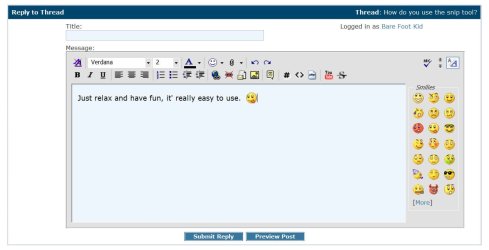
Just relax and have fun, it' really easy to use. :p


click this image to enlarge

fun.JPG
 

My Computer

Computer Manufacturer/Model Number
* BFK Customs *
OS
W 7 64-bit Ultimate
CPU
Intel Q9550 Yorkfield
Motherboard
ASUS P5Q Pro
Memory
8GB Dominator 8500C5D
Graphics Card(s)
ATI : XFX 5870
Sound Card
Realtek HD Audio 7-1
Monitor(s) Displays
1x 47" LCD HDMI & 3x 26" LCD HDMI
Screen Resolution
1920x1080P & 1920x1200
Hard Drives
1x 80GB Intel X25-M G2 SSD : 1x 500GB & 1x 640GB WD Caviar Black(s)
PSU
Corsair 620HX
Case
Cooler Master RC-690
Cooling
Tuniq Tower 120, 2x 140mm and 3x 120mm case fans
Keyboard
Microsoft 500
Mouse
Razer Diamondback 3G
Internet Speed
14 Mb/s
Other Info
1x Koutech 3Gb/s SATA HDD Hot Swap Rack
Are you able to save the snip?

or are you just having problems uploading to the site?

If you're having problems uploading, under the reply to thread box, select on the manage attachments link, and upload it from your saved folder.
Thanks, I missed the manage attachments feature and tried to just copy and paste. I am new to snip and this forum but I will try that. The snip is a great feature and I don't remember seeing it in my old Vista OS. Hp has a feature like that that came with my new D1660 printer (Which died right after the 90 day warantee)

In Vista, you have to enable "Tablet PC", else you will not see it (go figure). But there are better snipping tools than the windows version. Try those 2 - you can make annotations, arrows, highlights, boxes arount things, etc.). Jing you can also program to a Function key - very handy.

A+ Freeware - Multimedia & Design - FastStone Capture 5.3 (last freeware version)
Jing | Add visuals to your online conversations
 

My Computer

Computer Manufacturer/Model Number
HP, Dell, Gateway, Toshiba - 4 laptops and 2 desktops
OS
Vista, Windows7, Mint Mate, Zorin, Windows 8
CPU
from 1.6GHz Duo to i7
Monitor(s) Displays
2x HP w2207
Hard Drives
5x HDD, 7x SSD, 12x Externals
Keyboard
with trackball - no mices
Mouse
Trackball mice
Internet Speed
DSL 6000
Back
Top