How does Win7 prioritize multiple network adapters?

gregrocker

New member
Guru
Local time
7:32 AM
Messages
50,634
When both an Ethernet and Wireless adapter are enabled, we know that Win7 will prioritize one over the other as shown in Network Connection Priority - Change in Windows

What interests me is if this is flexible enough that Win7 will change adapters to one able to receive the signal best at any given time.

For example if there were a wired connection, a PCI wireless card, and a USB wireless adapter, and the Advanced settings on Wireless adapters page claims the USB wireless is the priority 1 device, can Win7 detect if suddenly the PCI card is getting stronger reception and change it on the fly?

Also, how does Win7 rate these in priority? I remember finding it once in answer to someone's question but cannot now locate the link.
 
Please notice that my comment below is not based on known facts but is solely me "thinking out loud".

Windows is natively capable of recognizing when a prioritized NIC is connected but I think that's it; as the speed of a connection hardly ever is stable but instead changes all the time, such a tool would in worst case need to change the active NIC all the time.

Even with a certain time period needed to decide if the connection with NIC 2 really is faster than NIC 1 this would IMO not work very well as the control period could mean changing back to NIC 1 after the next control period, causing again a small interruption or at least some delay in all connections.

Just some thoughts. Interesting question, though!

Kari
 

My Computer My Computer

Computer type
Laptop
Computer Manufacturer/Model Number
HP ENVY 17-1150eg
OS
Windows 10 Pro x64 EN-GB
CPU
1.6 GHz Intel Core i7-720QM Processor
Memory
6 GB
Graphics Card(s)
ATI Mobility Radeon HD 5850 Graphics
Sound Card
Beats sound system with integrated subwoofer
Monitor(s) Displays
17" laptop display, 22" LED and 32" Full HD TV through HDMI
Screen Resolution
1600*900 (1), 1920*1080 (2&3)
Hard Drives
Internal: 2 x 500 GB SATA Hard Disk Drive 7200 rpm
External: 2TB for backups, 3TB USB3 network drive for media
Cooling
As Envy runs a bit warm, I have it on a Cooler Master pad
Keyboard
Logitech diNovo Media Desktop Laser (bluetooth)
Mouse
Logitech Performance Mouse MX
Internet Speed
50/10 Mbps VDSL
Antivirus
Windows Defender 4.3.9431.0
Browser
Maxthon 3.5.2., IE11
When both an Ethernet and Wireless adapter are enabled, we know that Win7 will prioritize one over the other as shown in Network Connection Priority - Change in Windows

What interests me is if this is flexible enough that Win7 will change adapters to one able to receive the signal best at any given time.

For example if there were a wired connection, a PCI wireless card, and a USB wireless adapter, and the Advanced settings on Wireless adapters page claims the USB wireless is the priority 1 device, can Win7 detect if suddenly the PCI card is getting stronger reception and change it on the fly?

Also, how does Win7 rate these in priority? I remember finding it once in answer to someone's question but cannot now locate the link.

Some say it's the metric that determines this but that isn't always true, other say you can mess with the MTU settings but doesn't really pan out either. There is even a network priority list some place but even that is not completely reliable.

Windows will choose a wired connection over wireless most every time because it's the faster connection. It seems that in order for Windows to use a slower connection you would need to disable the other faster connections first.

There seems to be exceptions to this rule but all things being equal and with a properly working system the wired connection should win out every time.

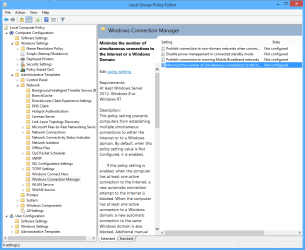
There is a setting in the Local Security Policy which enables all network connections to start up and be active all the time, although the wired connection is typically the one Windows will choose to connect with.

The following Security Policy allows Windows to enable all network connections at start up, it's not configured by default, setting to disabled allows for multiple connections to be enabled at start up.

With this setting at default on my machine, Windows will typically only allow the wired connection to start but not the wireless. Very Occasionally windows will start with both connections, disabling this setting makes it so that all network connections are enabled at start up.
 

Attachments

  • Set up Windows for dual connections.PNG
    Set up Windows for dual connections.PNG
    36.6 KB · Views: 1

My Computer My Computer

Computer type
PC/Desktop
Computer Manufacturer/Model Number
Home built
OS
Windows 7 Ult, Windows 8.1 Pro,
CPU
Q9650-4.275GHz, E8600 4.5GHz, E6750-3.8GHz
Motherboard
Evga 780i FTW
Memory
G.Skill PC2 9600 1200Mhz 5 5 5 15 2T
Graphics Card(s)
GTX480
Sound Card
Asus Xonar D2
Monitor(s) Displays
HannsG
Screen Resolution
1680X1050
Hard Drives
GSkill Phoenix Pro 120GB SSD
PSU
ThermalTake Toughpower 1000Watt modular
Case
ThermalTake XaserV
Cooling
Xigmatek S1283
Keyboard
Logitech G15
Mouse
Logitech G9
Internet Speed
T1
Back
Top