How force windows explorer to show folders on top in grouped view ?

TreeHole

New member
Local time
2:51 AM
Messages
17
I use grouping view in every folder. Group by Type. But in some folders, inner folders appear not on top like this:
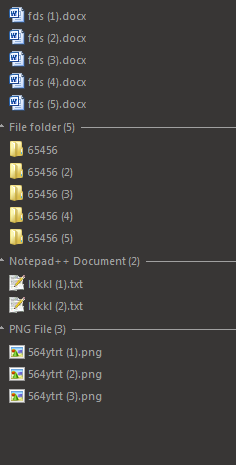
B8owjTi.png


If I decide to group by Folder, I lose grouping by Type.

I simple need it as is it by Type, but inner folders appearing on top. And of course, everything will be sorted by name.


How ?

Thanks
 

My Computer My Computer

At a glance

Windows 7 Ultimate 32 bit
Computer type
PC/Desktop
OS
Windows 7 Ultimate 32 bit
Make use of attributes displayed in explorer. Right click in the folder in question and select \ Sort By \ More. Select attributes and click OK. Now you can group by attribute using View \ Group By \ Attributes. Now sort by Type using View \ Sort By \ Type. You'll get folders to appear at the top, and files underneath.
 
Last edited:

My Computer My Computer

At a glance

Windows 10 Pro 64 bitAMD FX 9590 8 Core Black EditionCorsair Vengeance 16GB DDR3AMD Radeon (TM) R9 380 Gaming Series
Computer type
PC/Desktop
Computer Manufacturer/Model Number
Custom Built By Me.
OS
Windows 10 Pro 64 bit
CPU
AMD FX 9590 8 Core Black Edition
Motherboard
MSI 990FXA GAMING (MS-7893)
Memory
Corsair Vengeance 16GB DDR3
Graphics Card(s)
AMD Radeon (TM) R9 380 Gaming Series
Sound Card
AMD High Definition
Monitor(s) Displays
Samsung 32" 60Hz 4ms Curved PLS LED
Screen Resolution
1920 X 1080
Hard Drives
C: 223 GB SSD = E: 465 GB HDD = F: 931 GB HDD = G: 149 GB HDD = H: 931 GB HDD
PSU
EVGA Supernova NEX750B 750W ATX EPS12V 80PLUS Bronze
Case
Cool Master
Cooling
Noctua NH-D15 Premium Cooler with 2x NF-A15 PWM 140mm Fan
Internet Speed
Fiber Optic: Download 332.7 Mbps / Upload 331.5 Mbps
Antivirus
Windows Defender
Browser
Slimjet (64bit)
Sorry, I'm pretty confused.
Because when I click Sort by > More or Group by > More, it opens me Details view type. So it's something different.
Nonetheless, in those menus, can be picked just one option. It's not possible sort by Name and at same time by Folder

Please explain
oc42BW5.png


If you may, try show me by:
Recordit: Record screencasts fast & free! with GIF Support!

Thank you very much
 

My Computer My Computer

At a glance

Windows 7 Ultimate 32 bit
Computer type
PC/Desktop
OS
Windows 7 Ultimate 32 bit
Last edited:

My Computer My Computer

At a glance

Windows 10 Pro 64 bitAMD FX 9590 8 Core Black EditionCorsair Vengeance 16GB DDR3AMD Radeon (TM) R9 380 Gaming Series
Computer type
PC/Desktop
Computer Manufacturer/Model Number
Custom Built By Me.
OS
Windows 10 Pro 64 bit
CPU
AMD FX 9590 8 Core Black Edition
Motherboard
MSI 990FXA GAMING (MS-7893)
Memory
Corsair Vengeance 16GB DDR3
Graphics Card(s)
AMD Radeon (TM) R9 380 Gaming Series
Sound Card
AMD High Definition
Monitor(s) Displays
Samsung 32" 60Hz 4ms Curved PLS LED
Screen Resolution
1920 X 1080
Hard Drives
C: 223 GB SSD = E: 465 GB HDD = F: 931 GB HDD = G: 149 GB HDD = H: 931 GB HDD
PSU
EVGA Supernova NEX750B 750W ATX EPS12V 80PLUS Bronze
Case
Cool Master
Cooling
Noctua NH-D15 Premium Cooler with 2x NF-A15 PWM 140mm Fan
Internet Speed
Fiber Optic: Download 332.7 Mbps / Upload 331.5 Mbps
Antivirus
Windows Defender
Browser
Slimjet (64bit)
You can use the "Sort by" and "Group by" options at the same time (as Lance1 suggested).
 

My Computer My Computer

At a glance

W7 Ultimate SP1, LM19.2 MATE, W10 Home 1703, ...AMD Phenom II x6 1100T, 3.3 GHz12GB DDR3 1333 G-Skill (4GB x 2), G-Skill (2G...NVIDIA GeForce GTX 660
Computer type
PC/Desktop
Computer Manufacturer/Model Number
n/a
OS
W7 Ultimate SP1, LM19.2 MATE, W10 Home 1703, W10 Pro 1703 VM, #All 64 bit
CPU
AMD Phenom II x6 1100T, 3.3 GHz
Motherboard
ASUS M4A88T-M/USB3 (AM3)
Memory
12GB DDR3 1333 G-Skill (4GB x 2), G-Skill (2GB x 2)
Graphics Card(s)
NVIDIA GeForce GTX 660
Sound Card
Realtek?
Monitor(s) Displays
Samsung S23B350
Screen Resolution
1920x1080
Hard Drives
WD Green 2TB (SATA), WD Green 3TB (SATA), WD Blue 4TB (SATA), WD Blue 6TB (SATA)
PSU
Cooler Master
Case
Antec GX300 Tower
Cooling
3x Antec TRICOOL 120mm Fans
Mouse
Wired Optical
Internet Speed
DSL
Antivirus
Avast
Browser
Pale Moon (64 bit)
Other Info
2018-12-27 Upgraded HDDs
2015-12-10 Upgraded case, graphics card, storage
2015-08-15 Upgraded motherboard & RAM
2015-07-15 Upgraded LM17.1 to LM17.2
lehnerus2000: I know, but up there I wrote: it's not possible to have two things in Sort by or Group by, it's possible to pick just one option in each (Sort by something - just one thing), Group by something - just one thing).

Lance1: See, I did it like you showed. Sort by Type and Group by Attributes. It's not possible to get ! And I need Group by Type, Sort by Name and then force to have folders on top !
Video link: Recordit: Record screencasts fast & free! with GIF Support!

Thanks everybody for help
 

My Computer My Computer

At a glance

Windows 7 Ultimate 32 bit
Computer type
PC/Desktop
OS
Windows 7 Ultimate 32 bit
Any ideas please ?
 

My Computer My Computer

At a glance

Windows 7 Ultimate 32 bit
Computer type
PC/Desktop
OS
Windows 7 Ultimate 32 bit
System File Checker

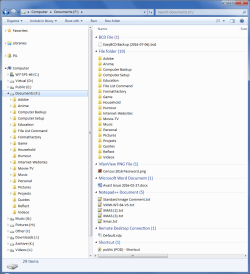
I notice that the files in your screenshot are sorted/grouped differently on your machine compared to mine.
On my PC, Microsoft Word documents are listed after Folders when I use "Group by Type". :confused:
WE - Group By.png
I suspect that it won't make any difference, but have you tried using SFC to check for system file errors?

Open the Command Prompt (Use the "Run as administrator" option in the context menu).
Type:
sfc /scannow
Tutorial
SFC /SCANNOW Command - System File Checker
 
Last edited:

My Computer My Computer

At a glance

W7 Ultimate SP1, LM19.2 MATE, W10 Home 1703, ...AMD Phenom II x6 1100T, 3.3 GHz12GB DDR3 1333 G-Skill (4GB x 2), G-Skill (2G...NVIDIA GeForce GTX 660
Computer type
PC/Desktop
Computer Manufacturer/Model Number
n/a
OS
W7 Ultimate SP1, LM19.2 MATE, W10 Home 1703, W10 Pro 1703 VM, #All 64 bit
CPU
AMD Phenom II x6 1100T, 3.3 GHz
Motherboard
ASUS M4A88T-M/USB3 (AM3)
Memory
12GB DDR3 1333 G-Skill (4GB x 2), G-Skill (2GB x 2)
Graphics Card(s)
NVIDIA GeForce GTX 660
Sound Card
Realtek?
Monitor(s) Displays
Samsung S23B350
Screen Resolution
1920x1080
Hard Drives
WD Green 2TB (SATA), WD Green 3TB (SATA), WD Blue 4TB (SATA), WD Blue 6TB (SATA)
PSU
Cooler Master
Case
Antec GX300 Tower
Cooling
3x Antec TRICOOL 120mm Fans
Mouse
Wired Optical
Internet Speed
DSL
Antivirus
Avast
Browser
Pale Moon (64 bit)
Other Info
2018-12-27 Upgraded HDDs
2015-12-10 Upgraded case, graphics card, storage
2015-08-15 Upgraded motherboard & RAM
2015-07-15 Upgraded LM17.1 to LM17.2
sfc won't help, I'm afraid my goal can't be done without some tweak into system. I see on your screenshot, you have .bcd file on top of folders.

I'm just surprised other people thought it can be done so easy. I'm facing my problem for long time.
Now we have to find some inside system editation, which would force windows do what I need.

p.s.: I posted video, not screenshot, did you see it whole ?

Thank you
 
Last edited:

My Computer My Computer

At a glance

Windows 7 Ultimate 32 bit
Computer type
PC/Desktop
OS
Windows 7 Ultimate 32 bit
Please anybody ?
 

My Computer My Computer

At a glance

Windows 7 Ultimate 32 bit
Computer type
PC/Desktop
OS
Windows 7 Ultimate 32 bit
Hello,

Surprisingly, the Group By order itself isn’t configurable through Explorer. Fortunately, Windows is highly amenable once you reason out the quirks.

See attached registry tweak. Tested on Windows 10.
 

Attachments

My Computer My Computer

At a glance

Windows 10, Windows 8.1 Pro, Windows 7 Profes...
Computer type
PC/Desktop
OS
Windows 10, Windows 8.1 Pro, Windows 7 Professional, OS X El Capitan
Hello,

Surprisingly, the Group By order itself isn’t configurable through Explorer. Fortunately, Windows is highly amenable once you reason out the quirks.

See attached registry tweak. Tested on Windows 10.

I tested your reg files on my Windows 7 VM and it worked like a charm. Folders to the top After a reboot! Good On YA! :thumbsup:
 
Last edited:

My Computer My Computer

At a glance

Windows 10 Pro 64 bitAMD FX 9590 8 Core Black EditionCorsair Vengeance 16GB DDR3AMD Radeon (TM) R9 380 Gaming Series
Computer type
PC/Desktop
Computer Manufacturer/Model Number
Custom Built By Me.
OS
Windows 10 Pro 64 bit
CPU
AMD FX 9590 8 Core Black Edition
Motherboard
MSI 990FXA GAMING (MS-7893)
Memory
Corsair Vengeance 16GB DDR3
Graphics Card(s)
AMD Radeon (TM) R9 380 Gaming Series
Sound Card
AMD High Definition
Monitor(s) Displays
Samsung 32" 60Hz 4ms Curved PLS LED
Screen Resolution
1920 X 1080
Hard Drives
C: 223 GB SSD = E: 465 GB HDD = F: 931 GB HDD = G: 149 GB HDD = H: 931 GB HDD
PSU
EVGA Supernova NEX750B 750W ATX EPS12V 80PLUS Bronze
Case
Cool Master
Cooling
Noctua NH-D15 Premium Cooler with 2x NF-A15 PWM 140mm Fan
Internet Speed
Fiber Optic: Download 332.7 Mbps / Upload 331.5 Mbps
Antivirus
Windows Defender
Browser
Slimjet (64bit)
I use grouping view in every folder. Group by Type. But in some folders, inner folders appear not on top like this:
B8owjTi.png

If I decide to group by Folder, I lose grouping by Type.
I simple need it as is it by Type, but inner folders appearing on top. And of course, everything will be sorted by name.
How ? Thanks


Hi

I don't think you understand what you are doing.

Type = this refer to type of file, the extension

In your picture, the docx is not valid file type, 4 alphanumeric instead of 3 as in DOS method which by default use filename fd instead Type,
while the rest do have Fiile follow by Notepad .... Png


Edit:


Eric.
 

My Computer My Computer

At a glance

Windows 7 x64
Computer type
Laptop
Computer Manufacturer/Model Number
Toshiba L630 and L735
OS
Windows 7 x64
Hard Drives
240 GB SSD
I use grouping view in every folder. Group by Type. But in some folders, inner folders appear not on top like this:
B8owjTi.png

If I decide to group by Folder, I lose grouping by Type.
I simple need it as is it by Type, but inner folders appearing on top. And of course, everything will be sorted by name.
How ? Thanks


Hi

I don't think you understand what you are doing.

Type = this refer to type of file, the extension

In your picture, the docx is not valid file type, 4 alphanumeric instead of 3 as in DOS method which by default use filename fd instead Type,
while the rest do have Fiile follow by Notepad .... Png


Edit:


Eric.

I think the fix is in with Pyprohly reg files. All the OP has to do is run the first reg file GroupBy-FoldersFirst.reg restart the system and Bob,s Your Uncle!
 

My Computer My Computer

At a glance

Windows 10 Pro 64 bitAMD FX 9590 8 Core Black EditionCorsair Vengeance 16GB DDR3AMD Radeon (TM) R9 380 Gaming Series
Computer type
PC/Desktop
Computer Manufacturer/Model Number
Custom Built By Me.
OS
Windows 10 Pro 64 bit
CPU
AMD FX 9590 8 Core Black Edition
Motherboard
MSI 990FXA GAMING (MS-7893)
Memory
Corsair Vengeance 16GB DDR3
Graphics Card(s)
AMD Radeon (TM) R9 380 Gaming Series
Sound Card
AMD High Definition
Monitor(s) Displays
Samsung 32" 60Hz 4ms Curved PLS LED
Screen Resolution
1920 X 1080
Hard Drives
C: 223 GB SSD = E: 465 GB HDD = F: 931 GB HDD = G: 149 GB HDD = H: 931 GB HDD
PSU
EVGA Supernova NEX750B 750W ATX EPS12V 80PLUS Bronze
Case
Cool Master
Cooling
Noctua NH-D15 Premium Cooler with 2x NF-A15 PWM 140mm Fan
Internet Speed
Fiber Optic: Download 332.7 Mbps / Upload 331.5 Mbps
Antivirus
Windows Defender
Browser
Slimjet (64bit)
Back
Top