Solved How get back the ability to makes changes to a file

Pooky1959

New member
Local time
10:20 AM
Messages
29
I have been trying to do updates to programs I have on a external hard drive.
For the last few weeks I have been trying to update a few programs; but receive a message saying that I don't have authority to make changes. I can't even delete an empty folder.
I am logged on as administrator, and click to 'Allow' changes. I have tried going into the properties, the security of that folder and it says that Administrators have full control. Although the General tab says it is read only.
I have even downloaded the "Take Ownership" program; but when I right click the folder and chose that option, the Command Prompt opens and says that I am denied access to all that folders files.
Any ideas?
 

My Computer My Computer

Computer type
PC/Desktop
Computer Manufacturer/Model Number
eMachine
OS
Windows Pro 7 32bit
Hard Drives
Internal?
External - Iomega 2TB
Antivirus
AVG Free, Zone Alarm
Browser
Mozilla Firefox
Check Disk

Have you tried checking the HDD for errors?

190617d1325243548-my-external-hhd-won-t-recognize-my-data-check-disk.png
190618d1325243737-my-external-hhd-won-t-recognize-my-data-check-disk-2.png


After I have used it at TAFE, one of my external HDDs often claims that it is "Read-only".
I have to run "Error-checking" before it will behave normally.

The result of the error checking is always, "No problems found". :confused:
 

My Computer My Computer

Computer type
PC/Desktop
Computer Manufacturer/Model Number
n/a
OS
W7 Ultimate SP1, LM19.2 MATE, W10 Home 1703, W10 Pro 1703 VM, #All 64 bit
CPU
AMD Phenom II x6 1100T, 3.3 GHz
Motherboard
ASUS M4A88T-M/USB3 (AM3)
Memory
12GB DDR3 1333 G-Skill (4GB x 2), G-Skill (2GB x 2)
Graphics Card(s)
NVIDIA GeForce GTX 660
Sound Card
Realtek?
Monitor(s) Displays
Samsung S23B350
Screen Resolution
1920x1080
Hard Drives
WD Green 2TB (SATA), WD Green 3TB (SATA), WD Blue 4TB (SATA), WD Blue 6TB (SATA)
PSU
Cooler Master
Case
Antec GX300 Tower
Cooling
3x Antec TRICOOL 120mm Fans
Mouse
Wired Optical
Internet Speed
DSL
Antivirus
Avast
Browser
Pale Moon (64 bit)
Other Info
2018-12-27 Upgraded HDDs
2015-12-10 Upgraded case, graphics card, storage
2015-08-15 Upgraded motherboard & RAM
2015-07-15 Upgraded LM17.1 to LM17.2
Ok. So I did the check as suggest. I received no errors. And when I check the properties on my "Programs" folders it says that Administrators have full control. Yet I can still not even delete this empty folder. And when I click the security tab I get this message "The Permissions are incorrectly ordered, which may cause some entries to be ineffective", so I click "ok", and it opens and not one of the Groups or Users has any permission. I tried to "edit" but get a message that say it was incorrectly ordered, I click re-order and try to change the access and get another error message denying me access and even though I click Continue, I another error message saying that permissions were NOT changed "Access is Denied". The General tab for my 'Programs" folder is still Read-only, should I change this?
 

My Computer My Computer

Computer type
PC/Desktop
Computer Manufacturer/Model Number
eMachine
OS
Windows Pro 7 32bit
Hard Drives
Internal?
External - Iomega 2TB
Antivirus
AVG Free, Zone Alarm
Browser
Mozilla Firefox
Everyone and/or Owner

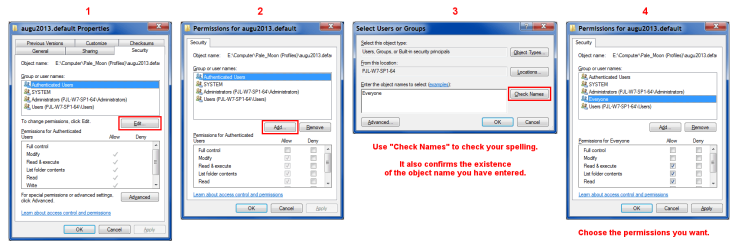
Have you tried adding "Everyone" to the "Group or user names:"?
Permissions - Add Everyone.png
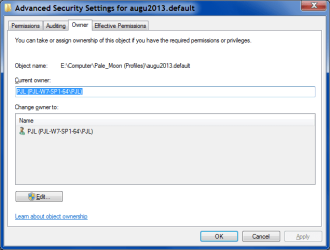
Also, check the "Owner" tab in "Advanced Security Settings" (click the "Advanced" button in step 1 above).
Advanced - Owner.png
 

My Computer My Computer

Computer type
PC/Desktop
Computer Manufacturer/Model Number
n/a
OS
W7 Ultimate SP1, LM19.2 MATE, W10 Home 1703, W10 Pro 1703 VM, #All 64 bit
CPU
AMD Phenom II x6 1100T, 3.3 GHz
Motherboard
ASUS M4A88T-M/USB3 (AM3)
Memory
12GB DDR3 1333 G-Skill (4GB x 2), G-Skill (2GB x 2)
Graphics Card(s)
NVIDIA GeForce GTX 660
Sound Card
Realtek?
Monitor(s) Displays
Samsung S23B350
Screen Resolution
1920x1080
Hard Drives
WD Green 2TB (SATA), WD Green 3TB (SATA), WD Blue 4TB (SATA), WD Blue 6TB (SATA)
PSU
Cooler Master
Case
Antec GX300 Tower
Cooling
3x Antec TRICOOL 120mm Fans
Mouse
Wired Optical
Internet Speed
DSL
Antivirus
Avast
Browser
Pale Moon (64 bit)
Other Info
2018-12-27 Upgraded HDDs
2015-12-10 Upgraded case, graphics card, storage
2015-08-15 Upgraded motherboard & RAM
2015-07-15 Upgraded LM17.1 to LM17.2
I was a pain. I changed the Security permissions and had to click 'Continue' about fifty times to allow that change to happen. But now I am able to delete folders and update programs.
Thank you!
 

My Computer My Computer

Computer type
PC/Desktop
Computer Manufacturer/Model Number
eMachine
OS
Windows Pro 7 32bit
Hard Drives
Internal?
External - Iomega 2TB
Antivirus
AVG Free, Zone Alarm
Browser
Mozilla Firefox
No problem. :)

Be aware that "Everyone" will have the permissions you selected (i.e. it is not a very secure way to set the permissions).
It's a "quick and dirty" fix.

I suggest that you copy your data to another HDD (if possible) and then reformat the troublesome HDD. :geek:
Remember to check the files for malware.
 

My Computer My Computer

Computer type
PC/Desktop
Computer Manufacturer/Model Number
n/a
OS
W7 Ultimate SP1, LM19.2 MATE, W10 Home 1703, W10 Pro 1703 VM, #All 64 bit
CPU
AMD Phenom II x6 1100T, 3.3 GHz
Motherboard
ASUS M4A88T-M/USB3 (AM3)
Memory
12GB DDR3 1333 G-Skill (4GB x 2), G-Skill (2GB x 2)
Graphics Card(s)
NVIDIA GeForce GTX 660
Sound Card
Realtek?
Monitor(s) Displays
Samsung S23B350
Screen Resolution
1920x1080
Hard Drives
WD Green 2TB (SATA), WD Green 3TB (SATA), WD Blue 4TB (SATA), WD Blue 6TB (SATA)
PSU
Cooler Master
Case
Antec GX300 Tower
Cooling
3x Antec TRICOOL 120mm Fans
Mouse
Wired Optical
Internet Speed
DSL
Antivirus
Avast
Browser
Pale Moon (64 bit)
Other Info
2018-12-27 Upgraded HDDs
2015-12-10 Upgraded case, graphics card, storage
2015-08-15 Upgraded motherboard & RAM
2015-07-15 Upgraded LM17.1 to LM17.2
I agree.
Tax refund. lol
 

My Computer My Computer

Computer type
PC/Desktop
Computer Manufacturer/Model Number
eMachine
OS
Windows Pro 7 32bit
Hard Drives
Internal?
External - Iomega 2TB
Antivirus
AVG Free, Zone Alarm
Browser
Mozilla Firefox
Back
Top