how hard is it to "Move" install to another hdd?

DirtyElf

///M3
Power User
Local time
4:15 PM
Messages
556
Location
Orlando, FL
eventually I'm going to get a SSD, right now I have one main drive a 7200 rpm wd hard drive.

when i eventually get my SSD, what would be involved in moving my OS and programs to the SSD? is it a simple click and move?

is there a tutorial somewhere?

thanks :)
 

My Computer My Computer

At a glance

Windows 7 64-bit HomeIntel Core i7-870 Lynnfield 2.93 Ghz8GB 4x2 A-Data 1333 MhzHIS Radeon HD 5850 1GB
Computer type
PC/Desktop
Computer Manufacturer/Model Number
My First Build
OS
Windows 7 64-bit Home
CPU
Intel Core i7-870 Lynnfield 2.93 Ghz
Motherboard
Asus P7P55D-E Pro
Memory
8GB 4x2 A-Data 1333 Mhz
Graphics Card(s)
HIS Radeon HD 5850 1GB
Sound Card
Onboard
Monitor(s) Displays
Dell S2440L 24"
Screen Resolution
1080p
Hard Drives
120 GB Intel X25-M SATA Solid State Drive ///
1 TB Western Digital Caviar Black SATA 6gb/s 7200rpm Drive
PSU
Corsair 650TX 650 Watt
Case
Antec Three Hundred
Cooling
Stock Intel /// 4 Antec Case Fans /// NZXT Sentry-2
Keyboard
Logitech LX 710
Mouse
Logitech LX 710
Other Info
LG Blu-Ray Drive
Short of exporting your registry, your user profiles, and the rest of your non windows folders. I cannot think of any other way to do it.
 

My Computer My Computer

At a glance

Windows 7 x86/x64, Server 2008r2, Web Server ...i7 v2 3930K Steping stone 2G.SKILL Ripjaws Z Series 32GBAMD HD 5770
Computer Manufacturer/Model Number
SMN-Productions
OS
Windows 7 x86/x64, Server 2008r2, Web Server 2008
CPU
i7 v2 3930K Steping stone 2
Motherboard
ASUS Rampage IV Extreme
Memory
G.SKILL Ripjaws Z Series 32GB
Graphics Card(s)
AMD HD 5770
Monitor(s) Displays
Acer 21" and Samsung 20"
Hard Drives
Patriot Pyro 80GB
PSU
1000 Watt
Case
HAF-X
Cooling
4 Fans
Keyboard
Black Widow Ultimate
You can clone directly from HD to SSD using the excellent free Acronis programs available if either of the drives are WD or Seagate. Those programs also have imaging options so you save the image first to external or another HD, then unplug the Source HD to reimage to the SSD using Boot Disk.
http://support.wdc.com/product/downloaddetail.asp?swid=119
http://www.seagate.com/www/en-us/support/downloads/discwizard

Win7 has its own built-in backup imaging program: http://www.sevenforums.com/tutorials/663-backup-complete-computer-create-image-backup.html

Many prefer Macrium Reflect as an alternative free imaging program. http://download.cnet.com/Macrium-Re...45728.html?part=dl-6288502&subj=dl&tag=button

I would personally run the free Acronis cloning program on Auto setting as it is real easy and works well. Be sure to include the MBR and Track0 it it asks.
 
Very true greg. I always forget about ghosting...
 

My Computer My Computer

At a glance

Windows 7 x86/x64, Server 2008r2, Web Server ...i7 v2 3930K Steping stone 2G.SKILL Ripjaws Z Series 32GBAMD HD 5770
Computer Manufacturer/Model Number
SMN-Productions
OS
Windows 7 x86/x64, Server 2008r2, Web Server 2008
CPU
i7 v2 3930K Steping stone 2
Motherboard
ASUS Rampage IV Extreme
Memory
G.SKILL Ripjaws Z Series 32GB
Graphics Card(s)
AMD HD 5770
Monitor(s) Displays
Acer 21" and Samsung 20"
Hard Drives
Patriot Pyro 80GB
PSU
1000 Watt
Case
HAF-X
Cooling
4 Fans
Keyboard
Black Widow Ultimate
There might be an easier way, quite similar in nature to what has been suggested above. Just that this is what I actually did to install my SSD with a Windows 7 OS image a few months ago, using Windows all the way.

After prepping my SSD with new Firmware, etc., I shrank my C partition (running Windows 7 Ultimate to my satisfaction) to a partition size about 10% under the available (accessible) drive size of my new SSD, then created an image of the C Drive (OS partition) using the Windows 7 backup. Windows saved this, my current System's image, in a second installed HDD on my pc.
Then disconnected my current C drive, plugged in my new SSD, and restarted the computer into the Windows 7 repair DVD, and rebuilt and mounted the Windows 7 OS backup image into my new SSD, and presto.

Has been working perfectly ever since.

Hope this helps.
 
Last edited:

My Computer My Computer

At a glance

Win 7 Ultimate 64 Bit, Win 7 32 Bit on HTPC, ...Intel Q9550 on Gaming pc, Intel E8400 on medi...4GB OCZ DDR2 on both PC, 4GB DDR3 on ServerGB 4890 1Gb OC, GB 5670 1GB on Media PC
Computer Manufacturer/Model Number
Home builds (3)
OS
Win 7 Ultimate 64 Bit, Win 7 32 Bit on HTPC, UnRAID on Server
CPU
Intel Q9550 on Gaming pc, Intel E8400 on media pc, AMD Serve
Motherboard
GB EP-45-DS3R, HTPC: GB EP-41-UD3L
Memory
4GB OCZ DDR2 on both PC, 4GB DDR3 on Server
Graphics Card(s)
GB 4890 1Gb OC, GB 5670 1GB on Media PC
Monitor(s) Displays
2434 AOC, and LG LCD
Screen Resolution
1080p
Hard Drives
System 1 -Three 1 TB 7200-12 Seagates in RAID5
Media PC- OCZ Vertex LE 120GB SSD, 2TB WD, 750GB WD
Home Server- 22TB UnRAID home server running Twelve 2TB Hard disks
PSU
Antec 850w Quattro, Scythe Silent 550W -HTPC, 620 Seasonic -
Case
Antec P182, Zalman HD503, Fractal XL
Cooling
Thermalright, Scythe on HTPC
Keyboard
Logitech
Mouse
Razer and Logitech
Internet Speed
Cable
would the built-in "windows easy transfer" work?
 

My Computer My Computer

At a glance

windows 7 ultimate 64bitIntel Core2 Extreme x9000 2.8GHZ4Gig2 NVidia GeForce 8800M GTX (SLi)
Computer Manufacturer/Model Number
Alienware AREA-51 M17x
OS
windows 7 ultimate 64bit
CPU
Intel Core2 Extreme x9000 2.8GHZ
Motherboard
Asus P965 Intel chipset
Memory
4Gig
Graphics Card(s)
2 NVidia GeForce 8800M GTX (SLi)
Sound Card
onboard
Monitor(s) Displays
17in. built-in, 47in JVC LCD
Screen Resolution
1080p
Hard Drives
2 250Gig Hitachi (RAID 0) @ 7200RPM
Case
17in. laptop
Mouse
touchpad, Logitech Anywhere Mouse cordless laser
Internet Speed
cable
Windows easy transfer will migrate only the user files and program settings to a New OS install all programs would need to be re-installed.
 

My Computers My Computers

  • At a glance

    Windows 11 Pro x64 [Latest Release and Releas...Ryzen 9 5950X, 3.8 - 5.2 MHz64GB [2 x 32GB] DDR4 3200MHz4GB NVIDIA GEFORCE GTX 1650 Ti
    Computer type
    PC/Desktop
    Computer Manufacturer/Model Number
    ChillBlast - Custom to my design
    OS
    Windows 11 Pro x64 [Latest Release and Release Preview]
    CPU
    Ryzen 9 5950X, 3.8 - 5.2 MHz
    Motherboard
    Asus Prime X570-Pro
    Memory
    64GB [2 x 32GB] DDR4 3200MHz
    Graphics Card(s)
    4GB NVIDIA GEFORCE GTX 1650 Ti
    Sound Card
    On-board SPDIF to 5.1 System + HDMI [5.1 system]
    Monitor(s) Displays
    32" UHD 32 Bit HDR Monitor + 43" UHD 4K 32Bit HDR TV
    Screen Resolution
    2 x 3840 x 2160 @60Hz
    Hard Drives
    1TB M2 SSD OS, 500GB Fast Access SSD, 2 x 8TB Data + Various Externals from 1TB to 4TB, 10TB NAS
    PSU
    NZXT C750 80 PLUS Gold 750W Modular PSU
    Case
    Workstation Case [Matt Black]
    Cooling
    NZXT Kraken X63 280mm CPU Cooler +2x Quiet Case fans
    Keyboard
    Logitech Wireless MX Keys & K400 + others
    Mouse
    Logitech Wireless MX Master 3S
    Internet Speed
    920 MB Down 50 MB Up
    Antivirus
    BitDefender Total Security Pro
    Browser
    Chrome (always run latest Non-Beta)
    Other Info
    Also run ...
    Laptop - Quad 8GB - Windows 10 Pro x64
    Nexus 7 Android tablet x2
    Samsung 10.2" tablet
    Blackview TAB 8 4G Android Tablet c/w Keyboard
    Wacom Intuos Pro Medium Pen Pad
    Wacom Intuos Pro Small Pen Pad
    Wacom Expresskeys Remote
    Loopdeck+ Graphics Controller
    Shuttle Pro v2 Control
  • At a glance

    Windows 11 Pro x64 Latest RPIntel I7 10750H 5.0GHz32GB [2x16GB] DDR4 2933 MHznVidia GTX1650Ti 4 GB GDDR6
    Computer type
    Laptop
    System Manufacturer/Model Number
    Dell XPS 17 10750H
    OS
    Windows 11 Pro x64 Latest RP
    CPU
    Intel I7 10750H 5.0GHz
    Motherboard
    Dell XPS
    Memory
    32GB [2x16GB] DDR4 2933 MHz
    Graphics Card(s)
    nVidia GTX1650Ti 4 GB GDDR6
    Sound Card
    Stock [Realtek] 4 Speaker
    Monitor(s) Displays
    17" IPS UHD+ Infinity Edge Touchscreen
    Screen Resolution
    3840 x 2400
    Hard Drives
    2TB M2 NVMe, 4TB External + various 500GB & 1TB External NVMe (also have access to spinner HDD from
    PSU
    Stock
    Case
    Stock XPS Aluminium & Carbon Fibre
    Cooling
    Stock - Active Fan Control
    Keyboard
    Backlit + Various Logitech
    Mouse
    Stock Track Pad + Logitech MX Trackball
    Internet Speed
    72 MB Down 18MB Up
    Browser
    Chrome
    Other Info
    Also run ...
    Laptop - Quad 8GB - Windows 10 Pro x64
    Nexus 7 Android tablet x2
    10.2" tablet
    Sony Z3 Android Smartphone
    Wacom Intuos Pro Medium Pen Pad
    Wacom Intuos Pro Small Pen Pad
    Wacom Expresskeys Remote
    Loopdeck+ Graphics Controller
    Shuttle Pro v2 Control Pad
    10TB NAS
Elf...

I did the exact thing back in May. After weeks of thinking, and planning it turned out to be as simple as using the software, in this case Acronis True Image 10, that came with the hard drive(Kingston).

Clean and defrag your OS drive.

Have a connected back up and system image drive. and make one just before final shutdown before adding the new drive.


NOTE: make sure the partition you're cloning is the same or smaller size than ssd drive your cloning to.

Connect the new drive, and make sure you can identify it.
Make sure your bios is set to boot from cd/dvd drive first.
Put the acronis disc in and reboot.
follow the directions in the software.
After its done, when rebooting, go into bios and change the boot drive to the ssd.
reboot and enjoy your old, but now faster, OS on a new drive.

Click on the ssdnow software installation link:

Kingston Technology Company - SSDNow - Learn More
 

My Computer My Computer

At a glance

windows 7 32Intel i7 4770KCorsair Vengeance 8gb DDR3 2133(PC3 17000)nVidia GTX 660 2gb
Computer type
PC/Desktop
Computer Manufacturer/Model Number
Homebuilt
OS
windows 7 32
CPU
Intel i7 4770K
Motherboard
Asus Z97-A
Memory
Corsair Vengeance 8gb DDR3 2133(PC3 17000)
Graphics Card(s)
nVidia GTX 660 2gb
Sound Card
Asus Xonar D1
Monitor(s) Displays
Dell Ultrasharp UM2913WM
Screen Resolution
2560x1080 32
Hard Drives
PNY 240gb SSD
Seagate 500gb SSD
PSU
Corsair CXM 600
Case
Fractal Design Define R4
Cooling
Arctic Freezer Xtreme rev 2
Keyboard
Logitech K800 Wireless Illuminated
Mouse
MicroSoft 5000
Internet Speed
Cable
Antivirus
MSE
Browser
IE 11 and Chrome
Other Info
Samsung DVD-RW
Cambridge 4.1 speakers
Hauppauge HVR-950 USB Tuner
Asus Optimized Overclock to 4.4ghz
You have 2 options:

1. Either do like ProfQ has described and use imaging. That requires that you first adjust your current C to a size that is slightly smaller than the SSD. Imaging cannot "squeeze" e.g. an image of a 100GB partition to a 60GB SSD. For that I would use Macrium: http://www.sevenforums.com/tutorials/73828-imaging-free-macrium.html?ltr=I
2. Cloning can "squeeze" and move the clone to a smaller SSD. Here I would use free Acronis (there are also a lot of Pro (paid) versions of other programs that can do that). Acronis True Image Home - Free software downloads and software reviews - CNET Download.com
 

My Computer My Computer

At a glance

Vista, Windows7, Mint Mate, Zorin, Windows 8from 1.6GHz Duo to i7
Computer Manufacturer/Model Number
HP, Dell, Gateway, Toshiba - 4 laptops and 2 desktops
OS
Vista, Windows7, Mint Mate, Zorin, Windows 8
CPU
from 1.6GHz Duo to i7
Monitor(s) Displays
2x HP w2207
Hard Drives
5x HDD, 7x SSD, 12x Externals
Keyboard
with trackball - no mices
Mouse
Trackball mice
Internet Speed
DSL 6000
You have 2 options:

1. Either do like ProfQ has described and use imaging. That requires that you first adjust your current C to a size that is slightly smaller than the SSD. Imaging cannot "squeeze" e.g. an image of a 100GB partition to a 60GB SSD. For that I would use Macrium: http://www.sevenforums.com/tutorials/73828-imaging-free-macrium.html?ltr=I
2. Cloning can "squeeze" and move the clone to a smaller SSD. Here I would use free Acronis (there are also a lot of Pro (paid) versions of other programs that can do that). Acronis True Image Home - Free software downloads and software reviews - CNET Download.com

Thanks whs
Your post reminded me I should mention software I used for my SSD install/migration
For both HD and SSD partition sizing I used partition wizard home edition- a free software
For the SSD I only used the windows image and then benchmarked it.

Did try Acronis first, since I've had some experience w it, but failed twice

So used above simple imaging and never looked back.
 

My Computer My Computer

At a glance

Win 7 Ultimate 64 Bit, Win 7 32 Bit on HTPC, ...Intel Q9550 on Gaming pc, Intel E8400 on medi...4GB OCZ DDR2 on both PC, 4GB DDR3 on ServerGB 4890 1Gb OC, GB 5670 1GB on Media PC
Computer Manufacturer/Model Number
Home builds (3)
OS
Win 7 Ultimate 64 Bit, Win 7 32 Bit on HTPC, UnRAID on Server
CPU
Intel Q9550 on Gaming pc, Intel E8400 on media pc, AMD Serve
Motherboard
GB EP-45-DS3R, HTPC: GB EP-41-UD3L
Memory
4GB OCZ DDR2 on both PC, 4GB DDR3 on Server
Graphics Card(s)
GB 4890 1Gb OC, GB 5670 1GB on Media PC
Monitor(s) Displays
2434 AOC, and LG LCD
Screen Resolution
1080p
Hard Drives
System 1 -Three 1 TB 7200-12 Seagates in RAID5
Media PC- OCZ Vertex LE 120GB SSD, 2TB WD, 750GB WD
Home Server- 22TB UnRAID home server running Twelve 2TB Hard disks
PSU
Antec 850w Quattro, Scythe Silent 550W -HTPC, 620 Seasonic -
Case
Antec P182, Zalman HD503, Fractal XL
Cooling
Thermalright, Scythe on HTPC
Keyboard
Logitech
Mouse
Razer and Logitech
Internet Speed
Cable
ok, so i ended up getting a x-25m for christmas and i was wondering if you guys ever came to a concensus about the best way to go about this.

acronis can clone the C: partition onto my new drive, and then i just boot from that drive and wipe the C: partition from my old spinner? or am i missing something?
 

My Computer My Computer

At a glance

Windows 7 64-bit HomeIntel Core i7-870 Lynnfield 2.93 Ghz8GB 4x2 A-Data 1333 MhzHIS Radeon HD 5850 1GB
Computer type
PC/Desktop
Computer Manufacturer/Model Number
My First Build
OS
Windows 7 64-bit Home
CPU
Intel Core i7-870 Lynnfield 2.93 Ghz
Motherboard
Asus P7P55D-E Pro
Memory
8GB 4x2 A-Data 1333 Mhz
Graphics Card(s)
HIS Radeon HD 5850 1GB
Sound Card
Onboard
Monitor(s) Displays
Dell S2440L 24"
Screen Resolution
1080p
Hard Drives
120 GB Intel X25-M SATA Solid State Drive ///
1 TB Western Digital Caviar Black SATA 6gb/s 7200rpm Drive
PSU
Corsair 650TX 650 Watt
Case
Antec Three Hundred
Cooling
Stock Intel /// 4 Antec Case Fans /// NZXT Sentry-2
Keyboard
Logitech LX 710
Mouse
Logitech LX 710
Other Info
LG Blu-Ray Drive
I tried out the Paragon Migration Tool yesterday to move Win7 from a HDD to a SSD. It worked flawlessly and is super easy to operate. It transported the 100MB partition automatically and made the alignment. For the $20 you pay for it, it is worth having. I could have done it with the free tools, but I like my creature comforts.
 

My Computer My Computer

At a glance

Vista, Windows7, Mint Mate, Zorin, Windows 8from 1.6GHz Duo to i7
Computer Manufacturer/Model Number
HP, Dell, Gateway, Toshiba - 4 laptops and 2 desktops
OS
Vista, Windows7, Mint Mate, Zorin, Windows 8
CPU
from 1.6GHz Duo to i7
Monitor(s) Displays
2x HP w2207
Hard Drives
5x HDD, 7x SSD, 12x Externals
Keyboard
with trackball - no mices
Mouse
Trackball mice
Internet Speed
DSL 6000
I'd try cloning using Acronis in Auto mode to adjust to size differentials if any.

After cloning, unplug the source HD and try booting the clone after setting it as first HD to boot (after DVD) in BIOS setup.

If it fails to boot, make sure (if you have it) the 100mb Sys Reserved or Win 7 partition are marked Active, boot the Win7 DVD Repair console or Repair CD to run Startup Repair up to 3 separate times with reboots to repair or write the MBR until it starts. http://www.sevenforums.com/tutorials/105541-startup-repair-run-3-separate-times.html
 
I don't know what Acronis app or version you have, but if you have a WD or Seagate somewhere in your PC, you can get the free Acronis version from those drive manufacturers.

I looked at mine the other day and it looks like "cloning" is included. This free Acronis version might be more recent or capable than whatever paid Acronis you might have now?

Cloning bypasses the complexity of imaging and would be my first choice, barring evidence to the contrary. I don't have an SSD now, but likely will within 6 months, so I am trying to stay on top of this question.
 

My Computer My Computer

At a glance

Windows 7 Home Premium SP1, 64-bitIntel Skylake i5-6600K, not overclocked8 GB HyperX DDR4-2666 (2 x 4 GB)none; graphics are integrated on CPU
Computer type
PC/Desktop
Computer Manufacturer/Model Number
Ignatz Special; 4 speed manual gearbox; factory air conditioning; one of one
OS
Windows 7 Home Premium SP1, 64-bit
CPU
Intel Skylake i5-6600K, not overclocked
Motherboard
AsRock Z170M Extreme 4, micro ATX
Memory
8 GB HyperX DDR4-2666 (2 x 4 GB)
Graphics Card(s)
none; graphics are integrated on CPU
Sound Card
onboard: Realtek ALC1150; external: USB Behringer UF0-202
Monitor(s) Displays
Dell S2340M 23 inch IPS
Screen Resolution
1600 x 900
Hard Drives
System: Crucial MX100 series SSD, 128 GB;
Data: Samsung Spinpoint 103SJ, 1 TB;
Backup: WD Caviar Green WD30EZRX-00D8PB0, 3 TB
PSU
Rosewill SilentNight 500 watt fanless, semi-modular
Case
Antec Solo II
Cooling
Noctua NH-U12S; Noctua F12 intake, Noctua S12A exhaust
Keyboard
Microsoft 200 6JH-00001 USB
Mouse
Dell or Microsoft optical wired; USB
Antivirus
Microsoft Security Essentials and Malwarebytes Premium
Browser
Pale Moon
Other Info
All fans PWM; speeds at idle: CPU circa 500 rpm; intake circa 600 rpm; exhaust circa 600 rpm; CPU temps 27 idle and 47 C load in a warm room (27 C/81 F) when running Intel Extreme Tuning Utility stress test.
i have a wd caviar black in my machine now which i use.. where do i get the acronis free version?

edit: i will also want to remove the C: partition from my wd caviar black and add it to another partition on my drive.. acronis can easily accomplish this once i am running off of the ssd correct? even if the partition is to the left in the disk management screen?
 

My Computer My Computer

At a glance

Windows 7 64-bit HomeIntel Core i7-870 Lynnfield 2.93 Ghz8GB 4x2 A-Data 1333 MhzHIS Radeon HD 5850 1GB
Computer type
PC/Desktop
Computer Manufacturer/Model Number
My First Build
OS
Windows 7 64-bit Home
CPU
Intel Core i7-870 Lynnfield 2.93 Ghz
Motherboard
Asus P7P55D-E Pro
Memory
8GB 4x2 A-Data 1333 Mhz
Graphics Card(s)
HIS Radeon HD 5850 1GB
Sound Card
Onboard
Monitor(s) Displays
Dell S2440L 24"
Screen Resolution
1080p
Hard Drives
120 GB Intel X25-M SATA Solid State Drive ///
1 TB Western Digital Caviar Black SATA 6gb/s 7200rpm Drive
PSU
Corsair 650TX 650 Watt
Case
Antec Three Hundred
Cooling
Stock Intel /// 4 Antec Case Fans /// NZXT Sentry-2
Keyboard
Logitech LX 710
Mouse
Logitech LX 710
Other Info
LG Blu-Ray Drive
i have a wd caviar black in my machine now which i use.. where do i get the acronis free version?

edit: i will also want to remove the C: partition from my wd caviar black and add it to another partition on my drive.. acronis can easily accomplish this once i am running off of the ssd correct? even if the partition is to the left in the disk management screen?

WD Acronis here:

WD Support


Assuming you are moving your operating system to the SSD, I would get the SSD up and running first.

You can remove partitions on the Caviar black with Disk Management, but it won't expand a partition to the left into unallocated space.

Normally, C is to the left, so if you deleted it, the unallocated space would be to the left in disk management, as you imply.

I don't think Acronis True Image or the WD is the tool for expanding partitions.

Look at Paragon products or Partition Wizard, the free editions. There may be others?
 

My Computer My Computer

At a glance

Windows 7 Home Premium SP1, 64-bitIntel Skylake i5-6600K, not overclocked8 GB HyperX DDR4-2666 (2 x 4 GB)none; graphics are integrated on CPU
Computer type
PC/Desktop
Computer Manufacturer/Model Number
Ignatz Special; 4 speed manual gearbox; factory air conditioning; one of one
OS
Windows 7 Home Premium SP1, 64-bit
CPU
Intel Skylake i5-6600K, not overclocked
Motherboard
AsRock Z170M Extreme 4, micro ATX
Memory
8 GB HyperX DDR4-2666 (2 x 4 GB)
Graphics Card(s)
none; graphics are integrated on CPU
Sound Card
onboard: Realtek ALC1150; external: USB Behringer UF0-202
Monitor(s) Displays
Dell S2340M 23 inch IPS
Screen Resolution
1600 x 900
Hard Drives
System: Crucial MX100 series SSD, 128 GB;
Data: Samsung Spinpoint 103SJ, 1 TB;
Backup: WD Caviar Green WD30EZRX-00D8PB0, 3 TB
PSU
Rosewill SilentNight 500 watt fanless, semi-modular
Case
Antec Solo II
Cooling
Noctua NH-U12S; Noctua F12 intake, Noctua S12A exhaust
Keyboard
Microsoft 200 6JH-00001 USB
Mouse
Dell or Microsoft optical wired; USB
Antivirus
Microsoft Security Essentials and Malwarebytes Premium
Browser
Pale Moon
Other Info
All fans PWM; speeds at idle: CPU circa 500 rpm; intake circa 600 rpm; exhaust circa 600 rpm; CPU temps 27 idle and 47 C load in a warm room (27 C/81 F) when running Intel Extreme Tuning Utility stress test.
im not so worried about the extra 100 gigs of space on my 1 tb drive, i can extend the "left" partition later.. i just want to get the OS up and running on the SSD
 

My Computer My Computer

At a glance

Windows 7 64-bit HomeIntel Core i7-870 Lynnfield 2.93 Ghz8GB 4x2 A-Data 1333 MhzHIS Radeon HD 5850 1GB
Computer type
PC/Desktop
Computer Manufacturer/Model Number
My First Build
OS
Windows 7 64-bit Home
CPU
Intel Core i7-870 Lynnfield 2.93 Ghz
Motherboard
Asus P7P55D-E Pro
Memory
8GB 4x2 A-Data 1333 Mhz
Graphics Card(s)
HIS Radeon HD 5850 1GB
Sound Card
Onboard
Monitor(s) Displays
Dell S2440L 24"
Screen Resolution
1080p
Hard Drives
120 GB Intel X25-M SATA Solid State Drive ///
1 TB Western Digital Caviar Black SATA 6gb/s 7200rpm Drive
PSU
Corsair 650TX 650 Watt
Case
Antec Three Hundred
Cooling
Stock Intel /// 4 Antec Case Fans /// NZXT Sentry-2
Keyboard
Logitech LX 710
Mouse
Logitech LX 710
Other Info
LG Blu-Ray Drive
I think Acronis' free WD app will let you clone just your OS partition to whatever space you select on the target HD. You would manually set up cloning instead of choosing Auto in that case.

If not, once cloned you can Move the unneeded partition elsewhere using free Partition Wizard CD, delete the original, then Resize the adjacent partition into the space.

Save the source HD until it is all set up and running perfectly then you can plug it in a wipe it using Diskpart from elevated Command Line: http://www.sevenforums.com/tutorials/52129-disk-clean-clean-all-diskpart-command.html
 
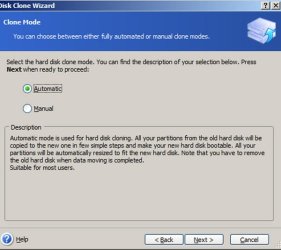
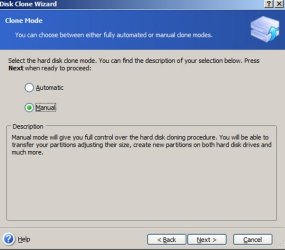
Here are the 2 menu choices in WD Acronis for cloning.

The first is auto. The second is manual. Note the different wording.

I went 2 steps beyond these screens. You choose the source at the first step and the destination at the second step.

Neither of those steps said anything about "partitions". The choices were about "disks".

I can only assume that the manual choice lets you specify particular partitions at step 3 or 4 and that you are NOT restricted to cloning an entire drive, as opposed to a partition.

Any confirmation on this?
 

Attachments

  • clone auto.JPG
    clone auto.JPG
    42.7 KB · Views: 4
  • clone manual.JPG
    clone manual.JPG
    33.7 KB · Views: 5

My Computer My Computer

At a glance

Windows 7 Home Premium SP1, 64-bitIntel Skylake i5-6600K, not overclocked8 GB HyperX DDR4-2666 (2 x 4 GB)none; graphics are integrated on CPU
Computer type
PC/Desktop
Computer Manufacturer/Model Number
Ignatz Special; 4 speed manual gearbox; factory air conditioning; one of one
OS
Windows 7 Home Premium SP1, 64-bit
CPU
Intel Skylake i5-6600K, not overclocked
Motherboard
AsRock Z170M Extreme 4, micro ATX
Memory
8 GB HyperX DDR4-2666 (2 x 4 GB)
Graphics Card(s)
none; graphics are integrated on CPU
Sound Card
onboard: Realtek ALC1150; external: USB Behringer UF0-202
Monitor(s) Displays
Dell S2340M 23 inch IPS
Screen Resolution
1600 x 900
Hard Drives
System: Crucial MX100 series SSD, 128 GB;
Data: Samsung Spinpoint 103SJ, 1 TB;
Backup: WD Caviar Green WD30EZRX-00D8PB0, 3 TB
PSU
Rosewill SilentNight 500 watt fanless, semi-modular
Case
Antec Solo II
Cooling
Noctua NH-U12S; Noctua F12 intake, Noctua S12A exhaust
Keyboard
Microsoft 200 6JH-00001 USB
Mouse
Dell or Microsoft optical wired; USB
Antivirus
Microsoft Security Essentials and Malwarebytes Premium
Browser
Pale Moon
Other Info
All fans PWM; speeds at idle: CPU circa 500 rpm; intake circa 600 rpm; exhaust circa 600 rpm; CPU temps 27 idle and 47 C load in a warm room (27 C/81 F) when running Intel Extreme Tuning Utility stress test.
Back
Top