how i backup windows environment variables ?

drugo

New member
Member
VIP
Local time
7:43 AM
Messages
476
Hi

about windows environment variables , can i backup them ?

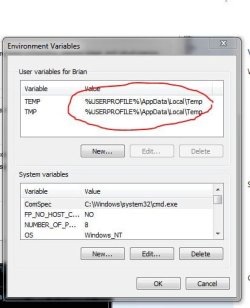
may i know where does windows 7 store them ?

thanks
 

My Computer

Computer type
PC/Desktop
OS
windows 7 ultimate 64bit
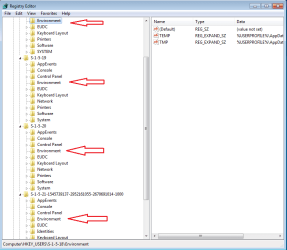
I reckon here.
 

Attachments

  • Capture.JPG
    Capture.JPG
    34.6 KB · Views: 26

My Computer

Computer type
PC/Desktop
Computer Manufacturer/Model Number
Skylake Special #666
OS
Windows 10 Pro x64
CPU
Intel Core i7 6700K
Motherboard
Asus Sabertooth Z170 Mark 1
Memory
GSkill TridentZ RGB 16GB 3600 16-16-16-36
Graphics Card(s)
EVGA GTX 980 Ti SC x2
Sound Card
Realtek High Definition
Monitor(s) Displays
AOC G2460PG
Screen Resolution
1920 x 1080 144Hz
Hard Drives
Samsung 860 Pro 256GB, Seagate Barracuda 4TB x2
PSU
EVGA 1000 P2, EVGA White Custom Braided Cables
Case
Corsair Vengeance C70 Gunmetal Black
Cooling
Corsair H100i v2, Corsair ML120 x2, Thermal Grizzly Kryonaut
Keyboard
Logitech G910 Orion Spectrum
Mouse
Logitech G700s
Internet Speed
Verizon Fios Quantum Gateway 75/75
Antivirus
Windows Defender, Malwarebytes Free 3.8.3
Browser
Chrome
Other Info
Corsair SP120 x4, LG Blu-ray Drive, Durabrand HT-395 100 Watt Dolby Digital Amp, Corsair H2100 Wireless 7.1 Headset

My Computer

Computer type
Laptop
Computer Manufacturer/Model Number
Employer provided Dell Latitude
OS
W7 Pro SP1 64bit
CPU
i7
Memory
8GB
Graphics Card(s)
Intel HD Graphics
Hard Drives
crappy SSD
Antivirus
Employer mandated Symantec Endpoint Protection
Browser
Pale Moon 64bit, IE11 64bit & Chrome 64bit

My Computer

Computer type
PC/Desktop
OS
windows 7 ultimate 64bit
There could be many users:

ev.png
 

My Computer

Computer type
Laptop
Computer Manufacturer/Model Number
Employer provided Dell Latitude
OS
W7 Pro SP1 64bit
CPU
i7
Memory
8GB
Graphics Card(s)
Intel HD Graphics
Hard Drives
crappy SSD
Antivirus
Employer mandated Symantec Endpoint Protection
Browser
Pale Moon 64bit, IE11 64bit & Chrome 64bit
Well I've never needed to back them up but I do have software installed that checks for invalid paths. I have noticed that it does have a backup / restore option.

Example of backup:

Code:
BACKUP_TYPE_ENVMANAGER
USER
TEMP
V:\AppData\Local\Temp 
TMP
V:\AppData\Local\Temp 
PATH
;C:\Program Files (x86)\Icecream Screen Recorder\bin\gstreamer\x86\bin 
BACKUP_TYPE_ENVMANAGER
SYSTEM
ComSpec
C:\Windows\system32\cmd.exe 
devmgr_show_nonpresent_devices
1 
FP_NO_HOST_CHECK
NO 
NUMBER_OF_PROCESSORS
2 
OS
Windows_NT 
Path
C:\Windows\system32;C:\Windows;C:\Windows\system32\Wbem;C:\Windows\system32;C:\Windows;C:\Windows\System32\Wbem;C:\Windows\System32\WindowsPowerShell\v1.0\;C:\Program Files (x86)\Common Files\Adobe\AGL;C:\Program Files\Prio;C:\Program Files (x86)\Icecream Screen Recorder\bin\gstreamer\x86\bin;C:\Program Files\EmEditor 
PATHEXT
.COM;.EXE;.BAT;.CMD;.VBS;.VBE;.JS;.JSE;.WSF;.WSH;.MSC 
PROCESSOR_ARCHITECTURE
AMD64 
PROCESSOR_IDENTIFIER
AMD64 Family 20 Model 2 Stepping 0, AuthenticAMD 
PROCESSOR_LEVEL
20 
PROCESSOR_REVISION
0200 
PSModulePath
C:\Windows\system32\WindowsPowerShell\v1.0\Modules\ 
TEMP
V:\Windows\TEMP 
TMP
V:\Windows\TEMP 
USERNAME
SYSTEM 
windir
C:\Windows 
windows_tracing_flags
3 
SAN_DIR
C:\Program Files\SiSoftware\SiSoftware Sandra Lite 2015.SP2 
GPU_MAX_ALLOC_PERCENT
100 
HASH_ENVMANAGER
3e174e5d5e62b017b1e69b6c7dd864ccc973d6f4

You can get the software needed from here:

Path Manager

Path-Manager download | SourceForge.net

Note: Don't make any changes unless you know what you are doing - however backup and restore is fine to use.
 

My Computer

Computer type
Laptop
Computer Manufacturer/Model Number
ASUS
OS
Microsoft Windows 7 Home Premium 64-bit 7601 Multiprocessor Free Service Pack 1
CPU
AMD C-60 APU with Radeon(tm) HD Graphics
Motherboard
ASUSTeK COMPUTER INC. X501U
Memory
4.00 GB
Graphics Card(s)
AMD Radeon HD 6290 Graphics
Sound Card
(1) AMD High Definition Audio Device (2) Realtek High Defi
Screen Resolution
1366 x 768 x 32 bits (4294967296 colors) @ 60 Hz
Hard Drives
Hitachi HTS545050A7E380 SATA Disk Device
Antivirus
Comodo CIS & FW, SecureAplus App Whitelisting, Threatfire
Browser
Cyberfox 64bit, Opera 64bit, Airfox
Other Info
Spy-The-Spy, HitmanPro.Alert, Norton Connect Safe, MJRegWatcher, BitDefender TrafficLight, Voodoo Shield, Zemana AntiMalware
There could be many users:
thanks a lot


Well I've never needed to back them up but I do have software installed that checks for invalid paths. I have noticed that it does have a backup / restore option.

You can get the software needed from here:

Path Manager

Path-Manager download | SourceForge.net

Note: Don't make any changes unless you know what you are doing - however backup and restore is fine to use.
but does the program save a backup reg file ?

thanks !
ps sadly i can't add reputation to both of you
 

My Computer

Computer type
PC/Desktop
OS
windows 7 ultimate 64bit
Path Manager uses text files - not a registry backup.

   Note
To keep backup, user can export the environment information. Just user Export button for that purpose which ask for a folder where this information will be saved. Two text files will be made, one for system variables and one for user variables. As for requirements the user can then import these files back to memory. However, even after import the changes still need to be committed.


If I make any changes they take effect here:

hkey_local_machine\system\CurrentControlSet\control\session manager\environment\

But I am the only user on my machine!
 
Last edited:

My Computer

Computer type
Laptop
Computer Manufacturer/Model Number
ASUS
OS
Microsoft Windows 7 Home Premium 64-bit 7601 Multiprocessor Free Service Pack 1
CPU
AMD C-60 APU with Radeon(tm) HD Graphics
Motherboard
ASUSTeK COMPUTER INC. X501U
Memory
4.00 GB
Graphics Card(s)
AMD Radeon HD 6290 Graphics
Sound Card
(1) AMD High Definition Audio Device (2) Realtek High Defi
Screen Resolution
1366 x 768 x 32 bits (4294967296 colors) @ 60 Hz
Hard Drives
Hitachi HTS545050A7E380 SATA Disk Device
Antivirus
Comodo CIS & FW, SecureAplus App Whitelisting, Threatfire
Browser
Cyberfox 64bit, Opera 64bit, Airfox
Other Info
Spy-The-Spy, HitmanPro.Alert, Norton Connect Safe, MJRegWatcher, BitDefender TrafficLight, Voodoo Shield, Zemana AntiMalware
Back
Top