How long are URL bar entries stored in IE9?

sam731

New member
Local time
8:40 PM
Messages
2
Today I noticed that the URL bar of sites I've visited in IE9 (64-bit) is completely empty. For the past 2-3 years or so, it's had the same listing of websites in the dropdown, but now they are gone and it's blank. I didn't delete history or do anything to cause this, so I'm very puzzled.

I don't access this IE9 browser by the usual means. It's a bit buried and I'll try to explain. It comes up as the default browser when I click on a pre-set tab within a record-keeping software platform used by my work (a large company). I can also access it by proxy when I am logged in to work from home, by clicking the same tab. For the past 2-3 years, I've been able to access all the URLs in the dropdown, whether logged in from home or at work.

My question is, why is the URL bar suddenly empty, when I know I didn't delete anything or clear any history? They've been there for 2-3 years, without fail. Is there a time limit on how long IE stores them? Or, Could it be that my workplace's system admin reconfigured something, and that's why they're gone? I understand that since I access it through a workplace system, I don't have complete control over it.

Any help or insight would be appreciated. Thanks, Sam
 

My Computer My Computer

At a glance

Windows - unknown
Computer type
PC/Desktop
OS
Windows - unknown
Hi and welcome to SevenForums,
Search history by default is stored for 20 days or 250mb which ever comes first in ie9-10 until it starts to be over written with more recent entries
If nothing is being retained I would say yes please contact your companies tech support for reasons why and troubleshooting efforts.
 

My Computer My Computer

At a glance

Win-7-Pro64bit 7-H-Prem-64biti7-5930K 2nd i9-9940x both water blocked VRM'...Trident-z 3200C14 2nd Trident-z 3600C16EVGA 1080ti ftw3 2nd Titan Xp both water blocked
Computer type
PC/Desktop
Computer Manufacturer/Model Number
Custom assembled by me :}
OS
Win-7-Pro64bit 7-H-Prem-64bit
CPU
i7-5930K 2nd i9-9940x both water blocked VRM's too
Motherboard
ASUS SABERTOOTH X99 2nd ASUS x299 Apex
Memory
Trident-z 3200C14 2nd Trident-z 3600C16
Graphics Card(s)
EVGA 1080ti ftw3 2nd Titan Xp both water blocked
Sound Card
Built-in Realtek
Monitor(s) Displays
1-AOC G2460PG 24"G-Sync 144Hz/ 2nd 1-ASUS VG248QE 24" 144Hz
Screen Resolution
1920 x 1080 144Hz
Hard Drives
2-Samsung M.2 Evo & Evo Plus
2-Samsung 850 EVO 500GB SSD's/ 3-2.5 W.D. Black 1tb-&3-1tb/3-3.5 WD Black 1tb hdd's
PSU
EVGA SuperNOVA 1000-P2 2nd 1200-P2
Case
2-Corsair Obsidian Series 450D Black ATX Mid Tower
Cooling
Custom water loops
Keyboard
Logitech G710+/ 2nd Logitech G910
Mouse
2-RedDragon M901 Perdition 16400 dpi Gaming mouse = wired
Internet Speed
Comcast Ping 19ms 89.31mbps download speed 6.12mbps upload
Antivirus
Malwarebytes Pro/ Superantispyware Pro
Browser
FireFox & Pale moon
Other Info
2nd ASUS X299 Apex/Intel i9-9940x with Custom water loop/7H-Prem-x64/Corsair 450D case/Ram Trident-z 3600C16 4x8gb / Samsung970Evo plus 500gb SSD/Dual ssd EZ swap evo/PSU EVGA SuperNova 1200w-P2 80+Platinum/GPU Titan Xp /8-ML-140 on push-pull on 2-280GTX rads
Thank you for your response, but the problem is actually not with the browsing history. The problem is with the URL bar (The drop-down at the top of the browser that stores a list of URLs visited). It used to store a whole bunch of URLs from the past couple of years. Now they are all gone. Since it is accessed through a work network, I am wondering if the system administrator may have changed some settings or something (??) to cause this. I realize they probably cannot be recovered, but I am just wondering what happened.
 

My Computer My Computer

At a glance

Windows - unknown
Computer type
PC/Desktop
OS
Windows - unknown
Hi,
That is part of your browser history
You can check by going to the Gear symbol on the top right and Manage add-ons,
Search providers section on the left column,
See if search from the search bar is checked
View attachment 367707
 
Last edited:

My Computer My Computer

At a glance

Win-7-Pro64bit 7-H-Prem-64biti7-5930K 2nd i9-9940x both water blocked VRM'...Trident-z 3200C14 2nd Trident-z 3600C16EVGA 1080ti ftw3 2nd Titan Xp both water blocked
Computer type
PC/Desktop
Computer Manufacturer/Model Number
Custom assembled by me :}
OS
Win-7-Pro64bit 7-H-Prem-64bit
CPU
i7-5930K 2nd i9-9940x both water blocked VRM's too
Motherboard
ASUS SABERTOOTH X99 2nd ASUS x299 Apex
Memory
Trident-z 3200C14 2nd Trident-z 3600C16
Graphics Card(s)
EVGA 1080ti ftw3 2nd Titan Xp both water blocked
Sound Card
Built-in Realtek
Monitor(s) Displays
1-AOC G2460PG 24"G-Sync 144Hz/ 2nd 1-ASUS VG248QE 24" 144Hz
Screen Resolution
1920 x 1080 144Hz
Hard Drives
2-Samsung M.2 Evo & Evo Plus
2-Samsung 850 EVO 500GB SSD's/ 3-2.5 W.D. Black 1tb-&3-1tb/3-3.5 WD Black 1tb hdd's
PSU
EVGA SuperNOVA 1000-P2 2nd 1200-P2
Case
2-Corsair Obsidian Series 450D Black ATX Mid Tower
Cooling
Custom water loops
Keyboard
Logitech G710+/ 2nd Logitech G910
Mouse
2-RedDragon M901 Perdition 16400 dpi Gaming mouse = wired
Internet Speed
Comcast Ping 19ms 89.31mbps download speed 6.12mbps upload
Antivirus
Malwarebytes Pro/ Superantispyware Pro
Browser
FireFox & Pale moon
Other Info
2nd ASUS X299 Apex/Intel i9-9940x with Custom water loop/7H-Prem-x64/Corsair 450D case/Ram Trident-z 3600C16 4x8gb / Samsung970Evo plus 500gb SSD/Dual ssd EZ swap evo/PSU EVGA SuperNova 1200w-P2 80+Platinum/GPU Titan Xp /8-ML-140 on push-pull on 2-280GTX rads
~~~
My question is, why is the URL bar suddenly empty, when I know I didn't delete anything or clear any history?...
My first thought was some patch via Windows updates cleared this info, but I could not replicate the issue. Typed URLs survived the latest round of patches to IE.


~~~
They've been there for 2-3 years, without fail. Is there a time limit on how long IE stores them?....
Not that I've seen.


~~~
Or, Could it be that my workplace's system admin reconfigured something, and that's why they're gone?...
That is the most likely reason. You could ask the admins or look around your computer at various log files.


Hi and welcome to SevenForums,
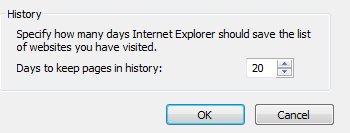
Search history by default is stored for 20 days....
For lack of a better term, I'm going to call that setting the "20 days" setting.

The OP is talking about Typed URLs. That "20 days" setting has no impact on the Typed URLs list.

Typed URLs are cleared when users clear history - so yes, Typed URLs are a part of history. The label that Microsoft uses for that "20 days" setting is misleading.

IE9-1.PNG

IE is the process that writes some of the Typed URLs to the registry and yet that "20 days" setting does not clear the Typed URLs after X number of days.

Typed URLs are added to the registry...

...if the user types a valid URL into IE9's address bar and then presses Enter or clicks on the "go" arrow.

...if the user selects a URL via AutoComplete.

...if URLs are fed to IE via various Windows APIs (Application Programming Interfaces) are also added to this list of "Typed" URLs. This is what the OP was seeing. ["I click on a pre-set tab within a record-keeping software platform used by my work"] As the OP noted, the list has been there for years.

I did some testing inside a virtual machine by changing the date/time. Typed URLs remained, but the list of websites visited as shown via IE's Favorites Center (Ctrl-H) was cleared (as expected).

The Favorites Center list includes websites that users visited via clicking. The Typed URLs list does not.

Malware can populate the Typed URLs list via Windows APIs. Google "Julie Amero" "typedurls".

The Typed URLs list holds 25 URLs (or typos) for IE8. IE9 also holds 25 validated URLs. IE11 holds 50. I did not test IE10.


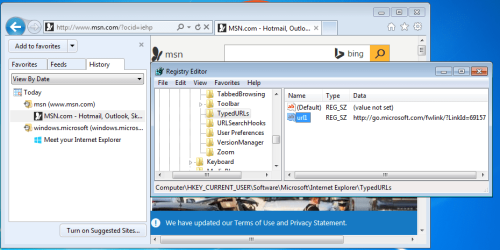
IE's Favorites Center list and the Typed URLs list can (and often do) differ due to redirects. When you install a new version of IE, the install process takes you to two websites: MSN (via a redirect) and Meet your Internet Explorer. The redirect link stays in list of Typed URLs. MSN.com URL is added to IE's Favorites Center history list. There is nothing in list of Typed URLs associated with the Meet your Internet Explorer. Perhaps it came to IE via the Windows shell.

IE9-2.PNG
 

My Computer My Computer

At a glance

W7 Pro SP1 64biti78GBIntel HD Graphics
Computer type
Laptop
Computer Manufacturer/Model Number
Employer provided Dell Latitude
OS
W7 Pro SP1 64bit
CPU
i7
Memory
8GB
Graphics Card(s)
Intel HD Graphics
Hard Drives
crappy SSD
Antivirus
Employer mandated Symantec Endpoint Protection
Browser
Pale Moon 64bit, IE11 64bit & Chrome 64bit
Back
Top