How many of you combine taskbar buttons on Windows 7?

How is your taskbar buttons set on Windows 7?

  • Always combine

    Votes: 19 50.0%
  • Never combine (or Combine when taskbar is full)

    Votes: 18 47.4%
  • I don't use Windows 7

    Votes: 1 2.6%

  • Total voters
    38

problemo

New member
Local time
10:17 AM
Messages
22
For some reasons, I feel it's much easier to see the names of the windows that are open on the taskbar rather than small icons that are tabbed. I think it's much faster and convenient. So why do most people always combine taskbar on Windows 7?
 

My Computer My Computer

At a glance

Windows 7 Home Premium 64-bitIntel Core2 Quad 8300 @ 2.5GHz8GBATI Radeon 4800 Series
Computer Manufacturer/Model Number
HP Elite PC
OS
Windows 7 Home Premium 64-bit
CPU
Intel Core2 Quad 8300 @ 2.5GHz
Memory
8GB
Graphics Card(s)
ATI Radeon 4800 Series
Monitor(s) Displays
Dell 23" Widescreen
Screen Resolution
1920x1080
Hard Drives
685GB SATA3G
Case
HP Elite
Keyboard
HP Keyboard
Mouse
Microsoft optical mouse
Internet Speed
1MBps download / 60kbps upload
It really depends on how you use Windows 7 for which option may work best for you.

Like me, I usually have so many things opened at once, it's not even funny. For example, 10 tabs in IE9, a few virtual machines, and a few other programs. There just wouldn't be enough room on the taskbar for all of them without them being grouped. "Always combined" is just more convenient for me. :)
 

My Computer My Computer

At a glance

64-bit Windows 11 Pro for WorkstationsIntel i7-8700K OC'd to 5 GHz64 GB (4x16GB) G.SKILL TridentZ RGB DDR4 3600...ASUS ROG-STRIX-GTX1080TI-O11G-GAMING
Computer type
PC/Desktop
Computer Manufacturer/Model Number
Self built custom
OS
64-bit Windows 11 Pro for Workstations
CPU
Intel i7-8700K OC'd to 5 GHz
Motherboard
ASUS ROG Maximus XI Formula Z390
Memory
64 GB (4x16GB) G.SKILL TridentZ RGB DDR4 3600 MHz
Graphics Card(s)
ASUS ROG-STRIX-GTX1080TI-O11G-GAMING
Sound Card
Integrated
Monitor(s) Displays
2 x Samsung Odyssey G7 27"
Screen Resolution
2560x1440
Hard Drives
1TB Samsung 990 PRO M.2,
4TB Samsung 990 PRO PRO M.2,
TerraMaster F8 SSD Plus NAS
PSU
Seasonic Prime Titanium 850W
Case
Thermaltake Core P3
Cooling
Corsair Hydro H115i
Keyboard
Logitech wireless K800
Mouse
Logitech MX Master 4
Internet Speed
2 Gb/s Download and 100 Mb/s Upload
Antivirus
Malwarebyte Anti-Malware Premium
Browser
Google Chrome
Other Info
Logitech Z625 speaker system,
Logitech BRIO 4K Pro webcam,
HP Color LaserJet Pro MFP M477fdn,
APC SMART-UPS RT 1000 XL - SURT1000XLI,
Galaxy S23 Plus phone
Agree with Brink, I only *un group on a netbook with Windows Classic
 
Last edited:

My Computer My Computer

At a glance

Windows 7 Ultimate SP1 - 64 BitIntel Core i5 2500k2x4GB DDR3 1333HzAti Radeon 6770
Computer type
PC/Desktop
Computer Manufacturer/Model Number
Novatech iRush Pro
OS
Windows 7 Ultimate SP1 - 64 Bit
CPU
Intel Core i5 2500k
Motherboard
Foxconn H67M-S/H67M-V/H67
Memory
2x4GB DDR3 1333Hz
Graphics Card(s)
Ati Radeon 6770
Sound Card
None
Monitor(s) Displays
Samsung S22B150
Screen Resolution
1920x1080
Hard Drives
2x500GB
PSU
500W
Cooling
Fan
Keyboard
HP KU0316
Mouse
Wireless Logitech M185
Internet Speed
20MB/s
Antivirus
Avast Free
Browser
Google Chrome
Other Info
Logitech M185 Mouse
KU-M316 Keyboard
Always combine. Only way to get my taskbar separated like my theme is designed for.

6jnlmf.jpg


:thumbsup:

A Guy
 

My Computer My Computer

At a glance

Windows 10 Home x64INTEL Core i5-750 Quad-Core 3.37GHzHyperX Fury Black Series 8GB (2 x 4GB) 1866MhzEVGA GeForce GTX 750 Superclocked 1GB 128-Bit...
Computer type
PC/Desktop
OS
Windows 10 Home x64
CPU
INTEL Core i5-750 Quad-Core 3.37GHz
Motherboard
ASUS P7P55D
Memory
HyperX Fury Black Series 8GB (2 x 4GB) 1866Mhz
Graphics Card(s)
EVGA GeForce GTX 750 Superclocked 1GB 128-Bit GDDR5
Monitor(s) Displays
LG 32MA68HY 32" IPS
Screen Resolution
1920 x 1080
Hard Drives
Samsung 840 Evo 120GB, SEAGATE 500GB Barracuda® 7200.12, SATA 3 Gb/s, 7200 RPM, 16MB cache
PSU
ANTEC TruePower New TP-550, 80 PLUS, 550W
Case
ANTEC Three Hundred Illusion
Cooling
COOLER MASTER Hyper 212 Plus, 4 x 120mm 1 x 140mm Noctua's
Internet Speed
85 + Mbps
Antivirus
Avast
Browser
Vivaldi
I only combine when full.

Have also enabled QuickLaunch, gotten rid of the pinned icons and set the taskbar to use small icons as I like the lower-profile look of the older taskbars.

taskbar-1.jpg
 

My Computer My Computer

At a glance

7HP
OS
7HP
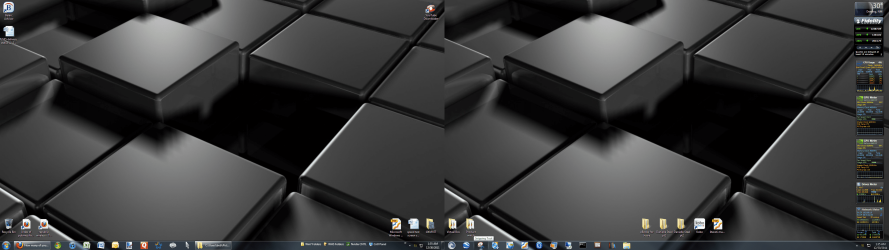
I have been a combiner although since upgrading to multiple monitors and making my taskbar span multiple 24" monitors I find that I have way more real-estate than I am currently using, so not so much crowding any more.

expanded taskbar2.PNG
 

My Computer My Computer

At a glance

Windows 7 Ultimate x64Q6600 @2.4ghz (G0 stepping)8 gb OCZ vista essential sli PC-6400Dual 9800gt in SLI mode
Computer Manufacturer/Model Number
Systemax N2000 Gaming PC
OS
Windows 7 Ultimate x64
CPU
Q6600 @2.4ghz (G0 stepping)
Motherboard
XFX nforce 680i LT
Memory
8 gb OCZ vista essential sli PC-6400
Graphics Card(s)
Dual 9800gt in SLI mode
Sound Card
Integrated 8.1 High Definition Audio
Monitor(s) Displays
Dual Sceptre x246w 24 inch monitors
Screen Resolution
1920 x 1200 each monitor
Hard Drives
500 GB SATA II / 7500 rpm
PSU
Cooler Master Real Power Pro 1250W
Case
N2000 server tower
Cooling
Thermaltake Bigwater 760 is
Keyboard
MS Intelitype 6000 v2.0
Mouse
MS Intelipoint 6000
Internet Speed
Wi-power 1.5GB up / 512k down
Other Info
Windows 7 Ultimate x64, Windows 7 Pro x64, Windows Home Premium X86, Windows XP pro, Windows Home Server x86, Ubuntu 10.4 x86 and x64, Ubuntu server 10.4, SQL Server 2005, MySQL 5.0
It really depends on how you use Windows 7 for which option may work best for you.

Like me, I usually have so many things opened at once, it's not even funny. For example, 10 tabs in IE9, a few virtual machines, and a few other programs. There just wouldn't be enough room on the taskbar for all of them without them being grouped. "Always combined" is just more convenient for me. :)
I have a vertical taskbar on the left, set to combine only when taskbar is full with small icons.

It works for me, showing for instance only one IE regardless how many tabs I have open. To see and select a tab, I just need to hover the pointer on top of IE:

Taskbar_Combine_when_full_2.png

I like it this way. It is very clear and easy to use.

Kari
 

My Computer My Computer

At a glance

Windows 10 Pro x64 EN-GB1.6 GHz Intel Core i7-720QM Processor6 GBATI Mobility Radeon HD 5850 Graphics
Computer type
Laptop
Computer Manufacturer/Model Number
HP ENVY 17-1150eg
OS
Windows 10 Pro x64 EN-GB
CPU
1.6 GHz Intel Core i7-720QM Processor
Memory
6 GB
Graphics Card(s)
ATI Mobility Radeon HD 5850 Graphics
Sound Card
Beats sound system with integrated subwoofer
Monitor(s) Displays
17" laptop display, 22" LED and 32" Full HD TV through HDMI
Screen Resolution
1600*900 (1), 1920*1080 (2&3)
Hard Drives
Internal: 2 x 500 GB SATA Hard Disk Drive 7200 rpm
External: 2TB for backups, 3TB USB3 network drive for media
Cooling
As Envy runs a bit warm, I have it on a Cooler Master pad
Keyboard
Logitech diNovo Media Desktop Laser (bluetooth)
Mouse
Logitech Performance Mouse MX
Internet Speed
50/10 Mbps VDSL
Antivirus
Windows Defender 4.3.9431.0
Browser
Maxthon 3.5.2., IE11
I prefer a clean desktop so I use shortcuts pinned to the Start menu, but the programs I use the most are pinned to the Taskbar as well.
 

My Computer My Computer

At a glance

Windows 7 Ultimate SP1 64-BitIntel Core i7 870 @ 2.93GHz8Gb Dual-Channel DDR3 @ 664MHznVidia GeForce GTX 460 1024MB dedicated RAM
Computer Manufacturer/Model Number
HP Pavilion Elite 495UK
OS
Windows 7 Ultimate SP1 64-Bit
CPU
Intel Core i7 870 @ 2.93GHz
Motherboard
MSI 2A9C (CPU1)
Memory
8Gb Dual-Channel DDR3 @ 664MHz
Graphics Card(s)
nVidia GeForce GTX 460 1024MB dedicated RAM
Sound Card
Realtek HD Audio
Monitor(s) Displays
HP2310i
Screen Resolution
1920 x 1080
Hard Drives
1x1954GB Hitachi HDS22020ALA 330 (RAID), 1x1954GB Hitachi External for backup and storage
PSU
460W
Case
HP Elite
Cooling
Air cooled
Keyboard
Logitech K750 solar-powered keyboard
Mouse
Logitech Wireless M180 mouse
Internet Speed
2Mb
Other Info
Pure Avanti Flow Internet Radio with iPod Dock, 64Gb iPod, HP USB Speakers, Sony MDR-V500 Headphones, Sony Vaio F-Series Laptop
Always combine for me with icons central in the taskbar. IMO looks cleaner.

Capture.JPG

Danny
 

My Computer My Computer

At a glance

Windows 7 Home Premium x64 SP1intel(R)core(TM)2 duo CPU T6600 @ 2.20GHz3 gb ddr3ati radeon hd4570/512mb
Computer Manufacturer/Model Number
acer aspire 5935g
OS
Windows 7 Home Premium x64 SP1
CPU
intel(R)core(TM)2 duo CPU T6600 @ 2.20GHz
Motherboard
intel gm45/gm47 revision 07
Memory
3 gb ddr3
Graphics Card(s)
ati radeon hd4570/512mb
Monitor(s) Displays
lop156wh2-tle1 15.3 flat
Screen Resolution
1366x768
Hard Drives
OCZ-Agility3 60gig ssd
320gig external hdd
500gig external hdd
Mouse
Optical
Internet Speed
30Mbps Down/30Mbps Up
I hadn't even given it much thought, I don't have many open at once programs anyway so there isn't a lot on my taskbar. I have a few pinned, the ones I want to get at quick but apart from that I don't take much notice, I think they would probably combine if the taskbar got full though, I can't see that happening much though. :p
 

My Computer My Computer

At a glance

Windows 10 64bit/Windows 10 64bit/Windows 10 ...Intel Pentium J3710 @ 60GHz/Intel B820,1.7GHz...8.00GB DDR3 @ 1599MHz/8GB 2 x 4GB DDR3/8.00GB...Intel HD Graphics/Intel/512MB ATI AMD Radeon ...
Computer type
PC/Desktop
Computer Manufacturer/Model Number
Acer Aspire XC-704 x64 bit/ Asus K55A Notebook PC/HP Envy x360 Convertible 15-bq0xx
OS
Windows 10 64bit/Windows 10 64bit/Windows 10 64bit
CPU
Intel Pentium J3710 @ 60GHz/Intel B820,1.7GHz/AMD A9 Radeon
Motherboard
Acer Aspire XC-704 (SOCKET 0)/Asus/HP 8312 (Socket FP4)
Memory
8.00GB DDR3 @ 1599MHz/8GB 2 x 4GB DDR3/8.00GB Dual-Channel
Graphics Card(s)
Intel HD Graphics/Intel/512MB ATI AMD Radeon R5 Graphics (HP
Sound Card
Realtek High Definition Audio/Onboard/AMD High Definition Au
Monitor(s) Displays
Acer LCD K222HQL /Asus 15.6/Generic PnP Monitor (1920x1080@6
Screen Resolution
1920x1080@59Hz/1366 x 768/1920x1080@60Hz
Hard Drives
1863GBWesternn Digital WDC/Asus/119GB SanDisk SD8SN8U-128G-1006 (SSD)
931GB Hitachi HGST HTS721010A9E630 (SATA)
Keyboard
Microsoft Natural Ergonomic Keyboard 4000 (UK)/Inbuilt/Inbui
Mouse
Microsoft Optical Wheel Mouse/Same plus Touchpad/Same + Pad
Internet Speed
Infinity 2 up to 76 Mbps
Antivirus
MSE/MSE/MSE and all 3 have MalwareBytes Premium
Browser
Edge, Firefox/Edge, Firefox/Edge, Firefox, Chrome
Other Info
Seagate Expansion 500GB External Desktop Drive
Seagate Expansion Portable Drives 500GB and 1TB
Epson XP-332 Wireless Printer
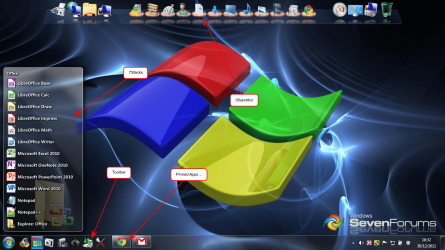
This is my current setup.

1. Two pinned apps that I always launch.
2. A toolbar that groups and expands 7Stacks with my most used Apps
3. An Objectdoc that contains links to libraries, the file system and some tools

screenshot90_2011-12-30.png
 

My Computer My Computer

At a glance

Microsoft Windows 7 Home Premium 64-bit Servi...Intel(R) Core(TM) i3 CPU M 330 @ 2.13GHz8 GB DDR3Intel(R) HD Graphics
Computer type
Laptop
Computer Manufacturer/Model Number
Hewlett-Packard/G62-107SA Notebook
OS
Microsoft Windows 7 Home Premium 64-bit Service Pack 1
CPU
Intel(R) Core(TM) i3 CPU M 330 @ 2.13GHz
Motherboard
Hewlett-Packard 1425
Memory
8 GB DDR3
Graphics Card(s)
Intel(R) HD Graphics
Sound Card
Realtek High Definition Audio
Monitor(s) Displays
Builtin
Screen Resolution
1366 x 768 x 32 bits (4294967296 colors) @ 60 Hz
Hard Drives
250 GB SATA Hard Disk Drive 7200 rpm
2TB Seagate GoFlex USB 2 Drive
1TB Iomega Prestige USB 2 Drive
1.5TB Iomega Prestige USB 2 Drive (Samsung)
2TB WD MyBook Live NAS.
Mouse
Logitech Anywhere MX
Internet Speed
152 Mbs download 10 Mbs upload
Antivirus
Norton 360
Browser
Chrome
combined i don't like a messy taskbar
 

My Computer My Computer

At a glance

Windows 10 64bitAMD Phenom II X4 925 (Deneb)(2.8GHz) OC 3.4GHzCorsair Vengeance DDR3 4GBX2 (8192MB)XFX HD 6870 1GB (OC)- 940MHz core, mem 1150MHz
Computer type
PC/Desktop
Computer Manufacturer/Model Number
custom build
OS
Windows 10 64bit
CPU
AMD Phenom II X4 925 (Deneb)(2.8GHz) OC 3.4GHz
Motherboard
M5A78L-MLX Plus
Memory
Corsair Vengeance DDR3 4GBX2 (8192MB)
Graphics Card(s)
XFX HD 6870 1GB (OC)- 940MHz core, mem 1150MHz
Monitor(s) Displays
Vizio 26' 1920x1080 / Acer 1336x768
Screen Resolution
1920x1080 60Hz /1336x768
Hard Drives
Kingston Digital 60GB SSDNow V300/500gb HDD Western Digital 7200rpm (/WD 160GB HDD 7200rpm
PSU
CORSAIR CX600 600w
Case
AZZA Orion 202 EVO
Cooling
cooler master hyper TX3 cpu cooler
Keyboard
Razer DeathStalker
Mouse
Logitech Optical Gaming Mouse G400
Antivirus
Defualt on win 10
Browser
Firefox
Other Info
cpu is overclocked in bios
I guess because I have a 1080p resolution, I don't see I will ever run out of space, and never have, so I never combine taskbar buttons. It's much easier for me to see what I have open rather than have to hover over each tab button. But I do understand combining taskbar buttons looks much more sexier.
 

My Computer My Computer

At a glance

Windows 7 Home Premium 64-bitIntel Core2 Quad 8300 @ 2.5GHz8GBATI Radeon 4800 Series
Computer Manufacturer/Model Number
HP Elite PC
OS
Windows 7 Home Premium 64-bit
CPU
Intel Core2 Quad 8300 @ 2.5GHz
Memory
8GB
Graphics Card(s)
ATI Radeon 4800 Series
Monitor(s) Displays
Dell 23" Widescreen
Screen Resolution
1920x1080
Hard Drives
685GB SATA3G
Case
HP Elite
Keyboard
HP Keyboard
Mouse
Microsoft optical mouse
Internet Speed
1MBps download / 60kbps upload
I don't bother....I never have that many open at once that I need to do that.
 

My Computer My Computer

At a glance

Windows 7 Home PremiumAmd Semperon 2.10GHz2 GigATI Radeon 3100
Computer Manufacturer/Model Number
Toshiba Satellite L455D
OS
Windows 7 Home Premium
CPU
Amd Semperon 2.10GHz
Memory
2 Gig
Graphics Card(s)
ATI Radeon 3100
Sound Card
Realtek
Monitor(s) Displays
15.6 inch
Screen Resolution
1366x768
Hard Drives
250gig
Mouse
Logitech Wireless
Internet Speed
16/2 cable
Combine ...

I use "Combine when taskbar is full".
I like to see what I actually have open and to be able to go directly to it.

I'm also using VirtuaWin + KvasdoPager, set to 4 Desktops.
Taskbar.png
 

My Computer My Computer

At a glance

W7 Ultimate SP1, LM19.2 MATE, W10 Home 1703, ...AMD Phenom II x6 1100T, 3.3 GHz12GB DDR3 1333 G-Skill (4GB x 2), G-Skill (2G...NVIDIA GeForce GTX 660
Computer type
PC/Desktop
Computer Manufacturer/Model Number
n/a
OS
W7 Ultimate SP1, LM19.2 MATE, W10 Home 1703, W10 Pro 1703 VM, #All 64 bit
CPU
AMD Phenom II x6 1100T, 3.3 GHz
Motherboard
ASUS M4A88T-M/USB3 (AM3)
Memory
12GB DDR3 1333 G-Skill (4GB x 2), G-Skill (2GB x 2)
Graphics Card(s)
NVIDIA GeForce GTX 660
Sound Card
Realtek?
Monitor(s) Displays
Samsung S23B350
Screen Resolution
1920x1080
Hard Drives
WD Green 2TB (SATA), WD Green 3TB (SATA), WD Blue 4TB (SATA), WD Blue 6TB (SATA)
PSU
Cooler Master
Case
Antec GX300 Tower
Cooling
3x Antec TRICOOL 120mm Fans
Mouse
Wired Optical
Internet Speed
DSL
Antivirus
Avast
Browser
Pale Moon (64 bit)
Other Info
2018-12-27 Upgraded HDDs
2015-12-10 Upgraded case, graphics card, storage
2015-08-15 Upgraded motherboard & RAM
2015-07-15 Upgraded LM17.1 to LM17.2
Even with Combine, I get the arrow for having too many items open to switch between even more programs. :D

mrDeh.png
 

My Computer My Computer

At a glance

Windows 7 Ultimate SP1 - 64 BitIntel Core i5 2500k2x4GB DDR3 1333HzAti Radeon 6770
Computer type
PC/Desktop
Computer Manufacturer/Model Number
Novatech iRush Pro
OS
Windows 7 Ultimate SP1 - 64 Bit
CPU
Intel Core i5 2500k
Motherboard
Foxconn H67M-S/H67M-V/H67
Memory
2x4GB DDR3 1333Hz
Graphics Card(s)
Ati Radeon 6770
Sound Card
None
Monitor(s) Displays
Samsung S22B150
Screen Resolution
1920x1080
Hard Drives
2x500GB
PSU
500W
Cooling
Fan
Keyboard
HP KU0316
Mouse
Wireless Logitech M185
Internet Speed
20MB/s
Antivirus
Avast Free
Browser
Google Chrome
Other Info
Logitech M185 Mouse
KU-M316 Keyboard
I'd like it if W7 offered the option to stretch the whole taskbar over multiple horizontally aligned monitors, as that would save me from combining at the point of overflow, and would really make multi-displays better to run - alas it's not been something which MS have considered implementing.

Yeah. I know, some would argue that could mean a lot of mousing back and forth to the start orb, however isn't that what the Windows Key is for? ;)

So I choose to combine when the taskbar is full, and voted accordingly. I really do think MS should have a bit of a rethink on improving their next incarnation of Windows in this respect though.
 

My Computer My Computer

At a glance

W7 x64Intel Q9300 2.5Ghz Quad LGA775 (Would like Q9...4Gb OCZ Gold 1,333MhzPalit HD4850 O/C Sonic 512Mb DDR3, Dual DViD's
Computer Manufacturer/Model Number
Custom built machine
OS
W7 x64
CPU
Intel Q9300 2.5Ghz Quad LGA775 (Would like Q9650)
Motherboard
Gigabyte GA-EP45T-UD3R (F6 Bios)
Memory
4Gb OCZ Gold 1,333Mhz
Graphics Card(s)
Palit HD4850 O/C Sonic 512Mb DDR3, Dual DViD's
Sound Card
Azalia to twin Samson 50w Studio Monitors
Monitor(s) Displays
Twin Dell (E-IPS) U2311H 23.6" Screens
Screen Resolution
1920 x 1080 @ 60Hz
Hard Drives
Crucial M4 SSD, archives on twin Western Digital Caviar Black WD2002FAEX, 2TB, 7200rpm HDD's, Samsung Ritemaster CD/DVD Burner...
PSU
OCZ 600w
Case
Lian-Li PC8 acoustifoamed' aluminium tower
Cooling
Scythe 140mm Zipang
Keyboard
Cherry PS/2 custom model
Mouse
Lenovo USB laser "Thinkpad" Mouse
Internet Speed
ADSL2+ @14Mbps downstream & Cat6 Gigabit Ethernet
Antivirus
NOD32
Browser
Opera
Other Info
Silicon Dust HD Homerun Dual FTA (Ethernet) TV Tuners, Dray Tek Vigor 2850Vn router and 8x HP Gigabit Switch. Lian-Li CR26 Card Reader, Canon MF4430 iSensys laser printer/scanner.
I'd like it if W7 offered the option to stretch the whole taskbar over multiple horizontally aligned monitors, as that would save me from combining at the point of overflow, and would really make multi-displays better to run - alas it's not been something which MS have considered implementing.

Yeah. I know, some would argue that could mean a lot of mousing back and forth to the start orb, however isn't that what the Windows Key is for? ;)

So I choose to combine when the taskbar is full, and voted accordingly. I really do think MS should have a bit of a rethink on improving their next incarnation of Windows in this respect though.

Try UltraMon or MultiMon
 

My Computer My Computer

At a glance

Windows 7 Ultimate SP1 - 64 BitIntel Core i5 2500k2x4GB DDR3 1333HzAti Radeon 6770
Computer type
PC/Desktop
Computer Manufacturer/Model Number
Novatech iRush Pro
OS
Windows 7 Ultimate SP1 - 64 Bit
CPU
Intel Core i5 2500k
Motherboard
Foxconn H67M-S/H67M-V/H67
Memory
2x4GB DDR3 1333Hz
Graphics Card(s)
Ati Radeon 6770
Sound Card
None
Monitor(s) Displays
Samsung S22B150
Screen Resolution
1920x1080
Hard Drives
2x500GB
PSU
500W
Cooling
Fan
Keyboard
HP KU0316
Mouse
Wireless Logitech M185
Internet Speed
20MB/s
Antivirus
Avast Free
Browser
Google Chrome
Other Info
Logitech M185 Mouse
KU-M316 Keyboard
I'd like it if W7 offered the option to stretch the whole taskbar over multiple horizontally aligned monitors, as that would save me from combining at the point of overflow, and would really make multi-displays better to run - alas it's not been something which MS have considered implementing.

Yeah. I know, some would argue that could mean a lot of mousing back and forth to the start orb, however isn't that what the Windows Key is for? ;)

So I choose to combine when the taskbar is full, and voted accordingly. I really do think MS should have a bit of a rethink on improving their next incarnation of Windows in this respect though.

I use this one (free): Dual Monitor Taskbar Adds Workable Windows 7 Taskbar To Second Monitor

See post# 6 of this thread for visual (Dual 24" monitors).
 

My Computer My Computer

At a glance

Windows 7 Ultimate x64Q6600 @2.4ghz (G0 stepping)8 gb OCZ vista essential sli PC-6400Dual 9800gt in SLI mode
Computer Manufacturer/Model Number
Systemax N2000 Gaming PC
OS
Windows 7 Ultimate x64
CPU
Q6600 @2.4ghz (G0 stepping)
Motherboard
XFX nforce 680i LT
Memory
8 gb OCZ vista essential sli PC-6400
Graphics Card(s)
Dual 9800gt in SLI mode
Sound Card
Integrated 8.1 High Definition Audio
Monitor(s) Displays
Dual Sceptre x246w 24 inch monitors
Screen Resolution
1920 x 1200 each monitor
Hard Drives
500 GB SATA II / 7500 rpm
PSU
Cooler Master Real Power Pro 1250W
Case
N2000 server tower
Cooling
Thermaltake Bigwater 760 is
Keyboard
MS Intelitype 6000 v2.0
Mouse
MS Intelipoint 6000
Internet Speed
Wi-power 1.5GB up / 512k down
Other Info
Windows 7 Ultimate x64, Windows 7 Pro x64, Windows Home Premium X86, Windows XP pro, Windows Home Server x86, Ubuntu 10.4 x86 and x64, Ubuntu server 10.4, SQL Server 2005, MySQL 5.0
I never combine the stuff on my taskbar; even though I rarely look at them (I use winkey/alt-tab for everything) I just like knowing I have X items open, without having to worry whether X = X or not.

My taskbar could disappear and the only thing I would care about is not seeing the various gizmos I have docked in the system tray :P (which, naturally, I have set to show everything instead of the default hide inactive icons). Come to think about it, my system tray stretches nearly half my screen width...
 

My Computer My Computer

At a glance

Win7 Pro x64Koa i5-2550K8 GBSapphire ATI 6870 1GB GDDR5
Computer Manufacturer/Model Number
Self-built rig
OS
Win7 Pro x64
CPU
Koa i5-2550K
Memory
8 GB
Graphics Card(s)
Sapphire ATI 6870 1GB GDDR5
Sound Card
RealTek HD Audio / ATI HDMI Audio
Monitor(s) Displays
Samsung HDTV Monitor T23A350
Screen Resolution
1920 x 1080
Hard Drives
- SSD (C:)
- HDD (D:)
- BD-ROM (E:)
Keyboard
Logitech G110
Internet Speed
Unifi home (5mbps)
Back
Top