

Hi all!
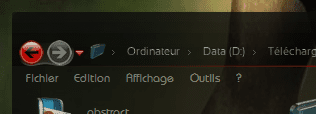
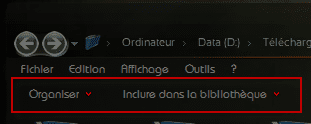
When i'm using a "normal" visual style (like native Aero), there's a "command bar" just below the "tool bar" in the explorer window.
I noticed that sometimes, with other visual styles, that command bar disappears and i thought it was like that... but when i edit with Windows Style Builder and do a test, it is there... :sarc:.
(see attachments, in red the bar i'm talking about...)
Sometimes it's still there after applying the custom theme, then after a reboot... disappeared...
Is there a way to enable once for all that bar which i find useful???
Thanks in advance for any comment or advise...!
When i'm using a "normal" visual style (like native Aero), there's a "command bar" just below the "tool bar" in the explorer window.
I noticed that sometimes, with other visual styles, that command bar disappears
and i thought it was like that... but when i edit with Windows Style Builder and do a test, it is there... :sarc:. (see attachments, in red the bar i'm talking about...)
Sometimes it's still there after applying the custom theme, then after a reboot...
disappeared...Is there a way to enable once for all that bar which i find useful???
Thanks in advance for any comment or advise...!
Attachments
Last edited by a moderator:
My Computer
- Computer Manufacturer/Model Number
- Home Made 00x
- OS
- 7Home64
- CPU
- AMD Phenom II x4 965 - 3,4GHz
- Motherboard
- Gigabyte GA-880GMA-UD2H
- Memory
- DDR3 1333Mhz, 8Gb (Corsair xms3 : 9, 9, 9, 24)
- Graphics Card(s)
- GeForce GTX550Ti 1024mb GDDR5 (Gainward)
- Sound Card
- Creative X-Fi ExtremeGamer
- Monitor(s) Displays
- Acer 27", led, full hd
- Screen Resolution
- 1920x1080
- Hard Drives
- G-Skill SSD 80Gb + Kingston SSD 64Gb + WD sata 500Mb + Hitachi sata 1Tb
- PSU
- CombatPower 750W, 12cm fan
- Case
- Antec "Three Hundred", 12 + 14 cm fans
- Cooling
- Noctua NH-U12P (CPU) + 2xNF-B9 (HDD's) + NF-P12 (case side)
- Keyboard
- Logitech + Saitek "Cyborg Command Unit"
- Mouse
- Logitech LS1 laser
- Internet Speed
- 4Mb/s
- Other Info
- 6-fan-&-temp controller Scythe Kase Master Pro 5.25
