How Much is Too Much?

Davy7RC

New member
Local time
8:21 PM
Messages
47
Location
Massachusetts
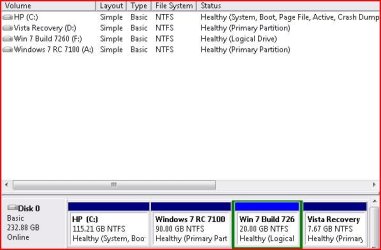
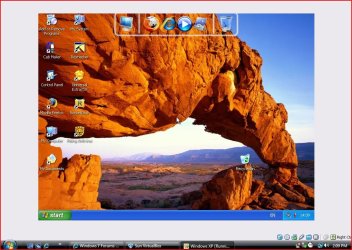
:huh:I 've gotten kinda carried away with my tweaking and adding on to my PC...just noticed I have 5 OSes ( 2 are Virtual) on my computer! My default OS is Vista ( came installed on my PC) and also have my HDD partitioned with Vista, Win7 RC 7100(on which I also have WinXP Pro SP3 installed with Windows Virtual PC), Build 7260, and I also D/L'ed SunxVM VirtualBox on which I installed Win XP Pro( I know I already have it but the Windows Virtual PC program is limited to Win 7 so if I wanted to use it I would have to restart my PC to exit Vista and boot win7RC up...I just had a CRAZY thought----I wonder if you can partition a partition????;)
 

Attachments

  • Boot Partitions.JPG
    Boot Partitions.JPG
    39.4 KB · Views: 1,044
  • Virtual XP.JPG
    Virtual XP.JPG
    129 KB · Views: 85

My Computer

Computer Manufacturer/Model Number
HP Pavilion a6009n Desktop
OS
Vista / 7 RC 7100/Virtual XP
CPU
AMD Athlon 64x2 Dual-Core Processor 3800 + 2.00GHz
Motherboard
Asus M2N68-LA
Memory
2.00GB
Graphics Card(s)
NVidia GeForce 6150SE nForce 430
Monitor(s) Displays
HPmx705
Screen Resolution
1024x768
Hard Drives
SeaGate 7200.10 Barracuda 250GB
Mouse
Logitech TrackMan Wheel
Internet Speed
DSL--1056kbits/sec x 448kbits/sec
Can't you do an Extended Partition from a Logical one ?
 

My Computer

Computer type
PC/Desktop
Computer Manufacturer/Model Number
Acer Aspire XC-704 x64 bit/ Asus K55A Notebook PC/HP Envy x360 Convertible 15-bq0xx
OS
Windows 10 64bit/Windows 10 64bit/Windows 10 64bit
CPU
Intel Pentium J3710 @ 60GHz/Intel B820,1.7GHz/AMD A9 Radeon
Motherboard
Acer Aspire XC-704 (SOCKET 0)/Asus/HP 8312 (Socket FP4)
Memory
8.00GB DDR3 @ 1599MHz/8GB 2 x 4GB DDR3/8.00GB Dual-Channel
Graphics Card(s)
Intel HD Graphics/Intel/512MB ATI AMD Radeon R5 Graphics (HP
Sound Card
Realtek High Definition Audio/Onboard/AMD High Definition Au
Monitor(s) Displays
Acer LCD K222HQL /Asus 15.6/Generic PnP Monitor (1920x1080@6
Screen Resolution
1920x1080@59Hz/1366 x 768/1920x1080@60Hz
Hard Drives
1863GBWesternn Digital WDC/Asus/119GB SanDisk SD8SN8U-128G-1006 (SSD)
931GB Hitachi HGST HTS721010A9E630 (SATA)
Keyboard
Microsoft Natural Ergonomic Keyboard 4000 (UK)/Inbuilt/Inbui
Mouse
Microsoft Optical Wheel Mouse/Same plus Touchpad/Same + Pad
Internet Speed
Infinity 2 up to 76 Mbps
Antivirus
MSE/MSE/MSE and all 3 have MalwareBytes Premium
Browser
Edge, Firefox/Edge, Firefox/Edge, Firefox, Chrome
Other Info
Seagate Expansion 500GB External Desktop Drive
Seagate Expansion Portable Drives 500GB and 1TB
Epson XP-332 Wireless Printer
Tried to extend into 7260, but for some reason it won't let me....do you know how?
 

My Computer

Computer Manufacturer/Model Number
HP Pavilion a6009n Desktop
OS
Vista / 7 RC 7100/Virtual XP
CPU
AMD Athlon 64x2 Dual-Core Processor 3800 + 2.00GHz
Motherboard
Asus M2N68-LA
Memory
2.00GB
Graphics Card(s)
NVidia GeForce 6150SE nForce 430
Monitor(s) Displays
HPmx705
Screen Resolution
1024x768
Hard Drives
SeaGate 7200.10 Barracuda 250GB
Mouse
Logitech TrackMan Wheel
Internet Speed
DSL--1056kbits/sec x 448kbits/sec
Just curious, why do you have so many OSs? Unless you were doing tech support or something similar, it seems like you'd use more time mucking around with the OS than actually using the computer as a tool.
 

My Computer

OS
Windows 7
Windows Virtual PC is not limited to win 7.
 

My Computer

OS
Win 7
I've gotten bored with surfing the Web, watching movies, chats and all that other stuff, so I like to tinker with the PC itself; tweaking and adjusting settings, trying out different OSes, installing new programs and software, and while I'm doing these things, I'm learning to troubleshoot problems that pop up and fixing them...Nothing wrong with that, is there?? For someone who's never taken a computer class I've learned a lot since I started using a PC regularly about Jan 2007 and I started with a hand-me down HP with a beat-up monitor running Win95 and using Juno dial-up. I'm not working at the moment so I have lots of free time on my hands...now I have a new(ish) HP bought in June '07 with Vista pre-installed and just sitting here and messin around , reading and trying things out to see how they work. Maybe I could use what I learned to update my job skills and get a BETTER job.....Sorry if I got long-winded but I guess I wanted to explain why I do what I do.....
 

My Computer

Computer Manufacturer/Model Number
HP Pavilion a6009n Desktop
OS
Vista / 7 RC 7100/Virtual XP
CPU
AMD Athlon 64x2 Dual-Core Processor 3800 + 2.00GHz
Motherboard
Asus M2N68-LA
Memory
2.00GB
Graphics Card(s)
NVidia GeForce 6150SE nForce 430
Monitor(s) Displays
HPmx705
Screen Resolution
1024x768
Hard Drives
SeaGate 7200.10 Barracuda 250GB
Mouse
Logitech TrackMan Wheel
Internet Speed
DSL--1056kbits/sec x 448kbits/sec
Also with the right software you can have virtual drives that hold a Hard Drive letter when the Comp is restarted...you could go right to the letter Z !
 

My Computer

Computer Manufacturer/Model Number
Home Build
OS
Windows 7 Ultimate RC1 / XP Black 2009
CPU
Core2Duo E8400
Motherboard
MSI
Memory
3GB
Graphics Card(s)
ATI Radeon HD 3850
Hard Drives
W/D 250GB x2
Case
Thermaltake Tsunami Dream
Keyboard
Logitech G15
Mouse
Razer Death Adder
Internet Speed
6.5 - 7 MB
@ OP,
"I wonder if you can partition a partition???"

Yes, you can create as many partitions as there are letters in the alphabet, subtracting for any floppy, cd/dvd drives, utility and/or recovery partitions you might have, as well as older mem stick/card readers that assign drive letters to them. There might be a few more exceptions, but I doubt you'll ever reach the end of the alphabet to worry if you have enough letters.

Heres the rub, For more than 3 partitions, you have to create an extended partition. Then from within the extended partition you create logical partitions. You currently have an extended partition, but unfortunately, its only 20 gigs. For you to make more partitions, you would have to delete both windows 7100 & 7260 and then the current extended. With the newly freed 110 gigs, you create an extended partition with all that space, then create logical drives from within the extended. You can create as many as you want with the space you have up to the limit discussed, but doubt you would have to worry about that with 110 gig's.

Since Vista, (as you can see cause you have an OS installed on a Logical partition), its possible to install OS's from Vista and Newer on Logical Drives. With XP and older legacy OS's, they would have to be installed only on primary partitions to which on windows is limited to 3. The forth partition would be the extended, and logical partitions are all that can be created from within an extended partition. You cannot create a primary partition from within an extended partition. Also, You need at least One Primary partition for the boot manager.

Should you decide on redoing your hard drive, I recommend the following:

1. KEEP YOUR HP RECOVERY PARTITION (1st thing to do- If your PC didn't come with recovery disc's, you should be able to create them and suggest you do so. Within your Original OS, should be a program from HP to create them).

2. Your first partition would be a Primary one sized appropriately for how you intend on using it. If your installing Vista and a few programs, but don't really intend on using it too much, then keep it reasonably small. With Vista, somewhere around 24 gig's would be about as small as I would go. Increase if you have a lot of programs to install. Take a look at what you have now, see what you would keep and size appropriately leaving a little "head room" I'd say you want to try and keep about 25% of the partition empty. For disk defrag to run, it needs a minimum of 15% free. But keep in mind you can always reduce the size of the page file, system restore, and the recycle bin to free up space.

3. A> You could create a second primary partition, just to have another primary partition in case its needed in the future, about 24 gigs. You could always use it as storage, untill needed for an OS.
3. B> Create an Extended partition with all remaining space.

4. Create as many Logical partitions as you want, sizing them appropriately for how you intend on using them. (Install Vista and Newer OS's here)

Hope this helps, Oh & btw, theres no such thing as "too much" :p
 

My Computer

Computer Manufacturer/Model Number
POS
OS
OS3.5
CPU
celery
Motherboard
Good Question ...Unknown
Memory
memory never forgets
Graphics Card(s)
OB
Sound Card
OB
Monitor(s) Displays
HUGE
Screen Resolution
168000000x105000000
Hard Drives
full
PSU
OEM 65watt
Case
N/A
Cooling
OB
Keyboard
OB
Mouse
mouse
Internet Speed
1 Trillion MBps
Other Info
Still An Awesome Forum!

My Computer

Computer Manufacturer/Model Number
Home Build
OS
Windows 7 Ultimate RC1 / XP Black 2009
CPU
Core2Duo E8400
Motherboard
MSI
Memory
3GB
Graphics Card(s)
ATI Radeon HD 3850
Hard Drives
W/D 250GB x2
Case
Thermaltake Tsunami Dream
Keyboard
Logitech G15
Mouse
Razer Death Adder
Internet Speed
6.5 - 7 MB
Tried to extend into 7260, but for some reason it won't let me....do you know how?
Sorry I can't help you there as I don't know enough but I see that OEM has given you a pretty good explanation which hopefully will give you plenty to play with ;)

Good luck with the experiments you are doing you'll probably learn a lot more from being hands on, hope it brings you better prospects in the job front :D
 

My Computer

Computer type
PC/Desktop
Computer Manufacturer/Model Number
Acer Aspire XC-704 x64 bit/ Asus K55A Notebook PC/HP Envy x360 Convertible 15-bq0xx
OS
Windows 10 64bit/Windows 10 64bit/Windows 10 64bit
CPU
Intel Pentium J3710 @ 60GHz/Intel B820,1.7GHz/AMD A9 Radeon
Motherboard
Acer Aspire XC-704 (SOCKET 0)/Asus/HP 8312 (Socket FP4)
Memory
8.00GB DDR3 @ 1599MHz/8GB 2 x 4GB DDR3/8.00GB Dual-Channel
Graphics Card(s)
Intel HD Graphics/Intel/512MB ATI AMD Radeon R5 Graphics (HP
Sound Card
Realtek High Definition Audio/Onboard/AMD High Definition Au
Monitor(s) Displays
Acer LCD K222HQL /Asus 15.6/Generic PnP Monitor (1920x1080@6
Screen Resolution
1920x1080@59Hz/1366 x 768/1920x1080@60Hz
Hard Drives
1863GBWesternn Digital WDC/Asus/119GB SanDisk SD8SN8U-128G-1006 (SSD)
931GB Hitachi HGST HTS721010A9E630 (SATA)
Keyboard
Microsoft Natural Ergonomic Keyboard 4000 (UK)/Inbuilt/Inbui
Mouse
Microsoft Optical Wheel Mouse/Same plus Touchpad/Same + Pad
Internet Speed
Infinity 2 up to 76 Mbps
Antivirus
MSE/MSE/MSE and all 3 have MalwareBytes Premium
Browser
Edge, Firefox/Edge, Firefox/Edge, Firefox, Chrome
Other Info
Seagate Expansion 500GB External Desktop Drive
Seagate Expansion Portable Drives 500GB and 1TB
Epson XP-332 Wireless Printer
Sorry I can't help you there as I don't know enough but I see that OEM has given you a pretty good explanation which hopefully will give you plenty to play with ;)

Good luck with the experiments you are doing you'll probably learn a lot more from being hands on, hope it brings you better prospects in the job front :D
He sure has....lol I have to read it over and over to get all the info into my head!!:confused: Thanks for your comments; glad to meet new friends from "cross the pond":D
 
Last edited:

My Computer

Computer Manufacturer/Model Number
HP Pavilion a6009n Desktop
OS
Vista / 7 RC 7100/Virtual XP
CPU
AMD Athlon 64x2 Dual-Core Processor 3800 + 2.00GHz
Motherboard
Asus M2N68-LA
Memory
2.00GB
Graphics Card(s)
NVidia GeForce 6150SE nForce 430
Monitor(s) Displays
HPmx705
Screen Resolution
1024x768
Hard Drives
SeaGate 7200.10 Barracuda 250GB
Mouse
Logitech TrackMan Wheel
Internet Speed
DSL--1056kbits/sec x 448kbits/sec
Sometimes one is too much! :D
Why don't you boot from whd images? I don't know how is it works exactly, but you can find it in the tutorials. I think it is better to have some vhd files on one partition than having 10 partition on one drive.
And I think you can convert your partitions to vhds!

ps: May be only the Win7 can run from vhd - i don't know sorry
 

My Computer

Computer Manufacturer/Model Number
home made
OS
Windows 7 RTM x64
CPU
AMD X2 5000+
Motherboard
Asrock
Memory
4GB
Graphics Card(s)
Nvidia 9400GT
Sound Card
onboard 6Ch
Monitor(s) Displays
Medion 22" + HannSpree 22"
Screen Resolution
1680X1050 + 1920X1080
Hard Drives
Intel SSD 80GB
WD 1.5 TB
WD 1 TB
Samsung 1TB X 3
PSU
noname
Case
noname
Cooling
Zalman
Keyboard
DeLUX multimedia keyboard
Mouse
Microsoft
Internet Speed
25MB/s
Tried to extend into 7260, but for some reason it won't let me....do you know how?

The reason you could not extend the space of 7260 is because you have no free space within your extended partition. If you did shrink your 7100 and tried to extend that free space into 7260, it won't work because you cannot extend space from outside the extended partition into the extended partition and vise-versa. With the disk management tools, you would not be able to extend it (7260) without deleting it first.

Heres what you would need to do using windows disk management tools:

1. delete 7260 partition.
2. delete the extended partition.
3. shrink 7100's partition.
4. you now should be able to create a bigger extended partition and thus a bigger logical partition for 7260.

You could try searching for a free partitioning tool, or maybe some one will chime in and let you know of one thats better capable of doing what you need without deleting any partitions. Not sure if theres a free one that will allow to shrink/extend from a primary to a logical thats inside a extended partition though.
 

My Computer

Computer Manufacturer/Model Number
POS
OS
OS3.5
CPU
celery
Motherboard
Good Question ...Unknown
Memory
memory never forgets
Graphics Card(s)
OB
Sound Card
OB
Monitor(s) Displays
HUGE
Screen Resolution
168000000x105000000
Hard Drives
full
PSU
OEM 65watt
Case
N/A
Cooling
OB
Keyboard
OB
Mouse
mouse
Internet Speed
1 Trillion MBps
Other Info
Still An Awesome Forum!
Sometimes one is too much! :D
Why don't you boot from whd images? I don't know how is it works exactly, but you can find it in the tutorials. I think it is better to have some vhd files on one partition than having 10 partition on one drive.
And I think you can convert your partitions to vhds!

ps: May be only the Win7 can run from vhd - i don't know sorry

Yup. Boot from VHD is new to Windows 7 & Windows Server 2008 R2. I've been booting the VHDs as fast as they leak. It's a great way to try them on the physical machine, run them as long as you want, then unattach the VHD, delete the one file and woosh, it's gone. I haven't minded that recent leaks have been in VHD format. It's not like I'll be using them more than a couple weeks anyway.

The new WIM2VHD converter
Windows(R) Image to Virtual Hard Disk (WIM2VHD) Converter - Home
allows you to make VHDs from any .wim file.

Right now I quad boot Server 2008 R2 (VHD), W7 7260 (VHD), W7 7264 (physical partition) and W7 7137 (physical partition). If, say, 7265 is leaked in VHD format only, I can swap it for one of the other VHDs I'm booting to and boot to the new one.

This screencast is a good place to start
Boot From VHD - Windows Server 2008 R2 Demo Screencast 2 of 4 | Media | TechNet Edge

Now, one might ask, can a VHD be booted (like on Windows Virtual PC) from within a booted VHD? Something for thought to get my long-winded post back on the track of "How Much is Too Much?" LOL
Tom
 

My Computer

Computer type
PC/Desktop
Computer Manufacturer/Model Number
Dell: XPS 420 (2), XPS M1330 (several), XPS 14z, Mini 9, Mini 10v
OS
W8 Pro, W7 Ultimate, XP Pro x64, Vista x64, Ubuntu
CPU
Q6600, Q6700, T7500, T7500, N270, N270
Motherboard
Dell
Memory
8GB, 8GB, 4GB, 4GB, 2GB, 2GB
Graphics Card(s)
ATI, nVidia, nVidia, nVidia, Intel, Intel
Monitor(s) Displays
Dell 2408WFP
Hard Drives
A drawer full. OCZ Vertex's in RAID 0. Vertex 3's, Vertex 4, Samsung 830's, Samsung 840's, Intel 330. Don't use dino drives any more except for servers.
Keyboard
Logitech Wave
Internet Speed
29 Mbps DL / .95 Mbps UL
Other Info
New project(2013)...Another low power server. Zotac H67ITX, i3-2100T, Windows Server 2012 Essentials on Samsung SSD.
Previous project...Low power (38-40 watts using Kill-a-Watt) Windows Home Server. Zotac ION (Atom 330, GeForce9400), 4GB RAM, 2x2TB WD Green, IN WIM miniITX Case. Fits on a shelf in laundry closet, practically silent.
now, one might ask, can a vhd be booted (like on windows virtual pc) from within a booted vhd? Something for thought to get my long-winded post back on the track of "how much is too much?" lol

lol :d
 

My Computer

Computer Manufacturer/Model Number
home made
OS
Windows 7 RTM x64
CPU
AMD X2 5000+
Motherboard
Asrock
Memory
4GB
Graphics Card(s)
Nvidia 9400GT
Sound Card
onboard 6Ch
Monitor(s) Displays
Medion 22" + HannSpree 22"
Screen Resolution
1680X1050 + 1920X1080
Hard Drives
Intel SSD 80GB
WD 1.5 TB
WD 1 TB
Samsung 1TB X 3
PSU
noname
Case
noname
Cooling
Zalman
Keyboard
DeLUX multimedia keyboard
Mouse
Microsoft
Internet Speed
25MB/s

My Computer

Computer Manufacturer/Model Number
* BFK Customs *
OS
W 7 64-bit Ultimate
CPU
Intel Q9550 Yorkfield
Motherboard
ASUS P5Q Pro
Memory
8GB Dominator 8500C5D
Graphics Card(s)
ATI : XFX 5870
Sound Card
Realtek HD Audio 7-1
Monitor(s) Displays
1x 47" LCD HDMI & 3x 26" LCD HDMI
Screen Resolution
1920x1080P & 1920x1200
Hard Drives
1x 80GB Intel X25-M G2 SSD : 1x 500GB & 1x 640GB WD Caviar Black(s)
PSU
Corsair 620HX
Case
Cooler Master RC-690
Cooling
Tuniq Tower 120, 2x 140mm and 3x 120mm case fans
Keyboard
Microsoft 500
Mouse
Razer Diamondback 3G
Internet Speed
14 Mb/s
Other Info
1x Koutech 3Gb/s SATA HDD Hot Swap Rack
Back
Top