How much software do you install upon...

Lebon14

Gomen ne Jenna-chan
Guru
VIP
Local time
2:11 AM
Messages
1,324
Location
Canada
Hey guys.
Question to you and every of you.
How much software do you install when you reinstall your main Windows? And name them...

Here is my count.

Softwares : 39
Games : 6

Total : 44

Softwares :
- ActiveSMART
- Adobe Audition 1.5
- Photoshop CS4
- Windows Live Messenger
- AIM
- TuneUpUtilities 2009 (For unsigned themes mainly)
- Burrrn
- Vuze (Azureus)
- WinRAR
- CamStudio
- ScreamerRadio
- Skype
- CDex 1.7
- Citrus Alarm Clock v1
- DVD Decrypter
- eMule
- NOD32
- FileZilla FTP
- foobar2000
- Foxit Reader
- The KMPlayer
- ImgBurn
- iTunes (mainly to buy music)
- Speedfan
- Steam
- Java
- MediaCoder
- Office 2007
- mIRC
- MixMeister BPM Analyzer
- BozBackup
- Firefox
- Thunderbird
- Nero 8 Lite
- Notepad ++
- StepMania
- ReNamer
- CCleaner
- Spybot Search & Destroy

Games :
- Bus Driver
- Wormux
- Halo 2
- TrackMania United Forever
- Audiosurf
- Unreal Tournament III

P.S : I won't give anything through PM.
 

My Computer

Computer type
PC/Desktop
Computer Manufacturer/Model Number
Custom build
OS
Windows 10 Professional 64-bit
CPU
Ryzen 9 5900X
Motherboard
Gigabyte X570 Aorus Master
Memory
G.Skill 3600Mhz CL16 16GB × 4
Graphics Card(s)
EVGA GeForce RTX 3070 Ti FTW3 Ultra Gaming
Sound Card
On-board
Monitor(s) Displays
Dell Alienware AW3418DW
Screen Resolution
3440x1440
Hard Drives
1×Sabrent Rocket 4 Plus 2TB nvme SSD (System, internal)
2x4TB Western Digital Blue (Internal)
1x4TB HDST 7200RPM (Internal)
PSU
Seasonic Focus Plus 850W Platinum
Case
Corsair 680X
Cooling
Stock fans + 3× Corsair QL120, Corsair H100i Platinum
Keyboard
Logitech K350
Mouse
Logitech M510
Internet Speed
120Mbits dl - 20Mbits up
Antivirus
ESET NOD32 Antivirus
Browser
Firefox (latest version)
Other Info
Headphones : Audio-Technica ATH-M50x
Scanner : Canon Canoscan LiDE 220 + Plustek OptiBook 4800
Here's mine;
Untitled.png
 

My Computer

Computer Manufacturer/Model Number
Samsung NP530U4B-S02IN
OS
Windows® 8 Pro (64-bit)
CPU
Intel® Core™ i5 Processor 2467M (1.60GHz, 3MB L3 Cache)
Motherboard
Samsung Electronics
Memory
6GB DDR3 System Memory at 1,333MHz (on BD 4GB + 2GB x 1)
Graphics Card(s)
AMD Radeon™ HD7550M 1GB DDR3 (Ext. Graphic)
Sound Card
Realtek High Definition Audio
Monitor(s) Displays
35.56cm (14.0) SuperBright 300nit HD LED Display
Screen Resolution
1366x768
Hard Drives
1TB S-ATA II Hard Drive (5400RPM) with ExpressCache 16GB SSD
Internet Speed
sucks
Antivirus
Microsoft Security Essentials
Browser
Google Chrome (Sync enabled)
Let my laziness glow in the dark. After installing Windows and drivers, and Windows updates if applicable, I install the security apps. Apply my massive reg file. Then, I do not install anything until I need to use it.
 
Apps:
Adobe Reader
CC Cleaner
Daemon Tools
Firefox + plugins (flashplayer, etc)
Gfwl Client
Pinnacle Game Profiler (for 360 controller)
Photoshop
uTorrent
Winrar

Games:
Fallout 3
Oblivion
Left 4 Dead
then the impulse installs of a bunch of others

pretty basic. but thats the usual list for me.
 

My Computer

Computer Manufacturer/Model Number
eMachines W3502
OS
Windows 7 Ultimate x32
CPU
Intel Celeron D 3.2 Ghz 533 fsb (LGA 775)
Motherboard
Intel D101GGC
Memory
1 GB (2x512MB) PC-3200 DDR @ 200Mhz
Graphics Card(s)
Nvidia GeForce 9400GT- 1GB
Sound Card
Sound Blaster X-Fi Xtreame Gamer
Monitor(s) Displays
19" LCD HDtv
Screen Resolution
1360x768 @ 60Htz
Hard Drives
SeaGate Barracuda 750GB
SeaGate Barracuda 100GB
Toshiba CD/DVDW/ TS-H552D [DVD+R, DL]
PSU
stock (idk)
Case
The busted remains of the stock case
Cooling
Dust cooled, waitwut?
Keyboard
Stock. Missing a few keys.
Mouse
Logitech LX8 5-btn mouse (wireless)
Internet Speed
TWC 10Mb
Other Info
Keeps going, and going, and going.......
firefox
realVNC
ccleaner
defragler
updates
my current anti-virus / firewall
 

My Computer

Computer Manufacturer/Model Number
SMN-Productions
OS
Windows 7 x86/x64, Server 2008r2, Web Server 2008
CPU
i7 v2 3930K Steping stone 2
Motherboard
ASUS Rampage IV Extreme
Memory
G.SKILL Ripjaws Z Series 32GB
Graphics Card(s)
AMD HD 5770
Monitor(s) Displays
Acer 21" and Samsung 20"
Hard Drives
Patriot Pyro 80GB
PSU
1000 Watt
Case
HAF-X
Cooling
4 Fans
Keyboard
Black Widow Ultimate
Maximum was 160 in XP which i dont use anymore.
In Winodws 7
 

Attachments

  • ko.JPG
    ko.JPG
    59.6 KB · Views: 745

My Computer

Computer Manufacturer/Model Number
Intel
OS
Windows 7 Professional, Windows XP
CPU
Intel Dual Core
Motherboard
Intel D945GCNL
Memory
2GB
Graphics Card(s)
Intel 82945G Express
Monitor(s) Displays
HP Pavilion 1859m
Screen Resolution
1366x768
Hard Drives
Samsung 250GB SATA
Maxtor 80GB SATA
Case
High Tower
Cooling
Air
Keyboard
Delux
Mouse
A4Tech
Internet Speed
512kbps downlink and 128kbps uplink :(

My Computer

Computer Manufacturer/Model Number
Samsung NP530U4B-S02IN
OS
Windows® 8 Pro (64-bit)
CPU
Intel® Core™ i5 Processor 2467M (1.60GHz, 3MB L3 Cache)
Motherboard
Samsung Electronics
Memory
6GB DDR3 System Memory at 1,333MHz (on BD 4GB + 2GB x 1)
Graphics Card(s)
AMD Radeon™ HD7550M 1GB DDR3 (Ext. Graphic)
Sound Card
Realtek High Definition Audio
Monitor(s) Displays
35.56cm (14.0) SuperBright 300nit HD LED Display
Screen Resolution
1366x768
Hard Drives
1TB S-ATA II Hard Drive (5400RPM) with ExpressCache 16GB SSD
Internet Speed
sucks
Antivirus
Microsoft Security Essentials
Browser
Google Chrome (Sync enabled)
Let my laziness glow in the dark. After installing Windows and drivers, and Windows updates if applicable, I install the security apps. Apply my massive reg file. Then, I do not install anything until I need to use it.

That's pretty much what I do....

The obvious 1's for me are
  • Photoshop CS4
  • Avast!
  • PHP 5
  • My SQL
  • No-IP
  • Internet Information Services (IIS) 7.5
+ games when I feel like playing them :p

Here's a screenie, runtime about 1 month

Capture.PNG

and NO my name isn't Annmarie ;)
 

My Computer

Computer Manufacturer/Model Number
Compaq Desktop
OS
Windows 7 Ultimate x64
CPU
AMD Sempron Dual Core
Memory
3GB
Graphics Card(s)
NVIDIA GeForce 6150SE nForce 430
Screen Resolution
1024x768
Hard Drives
150GB Sata
I'm a simple guy, I do not use much.

I generally only install;

  • uTorrent
  • Adobe Flash Player (for IE and other browsers)
  • Google Chrome (dev build)
  • Intel Graphics Media Accelerator Driver
  • Java 7 Milestone 4 (x86 and x64)
  • Microsoft Office Professional Plus 2010 (Tech Preview)
  • Microsoft Project Professional Plus 2010 (Tech Preview)
  • Microsoft Security Essentials
  • Microsoft SharePoint Designer 2010 (Tech Preview)
  • Microsoft Silverlight
  • Microsoft Visio 2010 (Tech Preview)
  • Synaptics Pointing Device Driver
  • Trillian Astra
  • WinRAR

Probably missed something but as you can see I don't need much in terms of programs :)
 

My Computer

Computer Manufacturer/Model Number
Custom | Whitebox
OS
Windows 7 Ultimate, OS X 10.7, Ubuntu 11.04
CPU
Intel E6750 @ 3.80GHz
Motherboard
Gigabyte GA-EP45-UD3L (Revision 1.1)
Memory
2x2GB & 2x1GB (6GB) OCZ Reaper 1066MHz @ 1080MHz
Graphics Card(s)
EVGA nVidia GTX 260 896mb (216 Core) FTW Edition
Sound Card
Realtek ALC888
Monitor(s) Displays
21" VIZIO TV
Screen Resolution
1680x1050 @ 60Hz
Hard Drives
Western Digital WD6401AALS - 640GB
Hitachi HDP725016GLA380 - 160GB
PSU
Corsair 750W
Case
NZXT Nemesis Elite
Cooling
Thermaltake SpinQ
Keyboard
Logitech Wireless S520
Mouse
Logitech Wireless S520 - Microsoft Wireless Arc Mouse
Internet Speed
Download: 20mbps, Upload: 3mbps
i install things as and when i need them. i like to keep a lean system.

there are a few must-install essentials for me though, including:

kaspersky 2010
google chrome
flash
windows live mail
winamp
km player
foxit reader
winrar
ati tray tools
ashampoo burning studio

those are the essentials, then come games, lots of games, followed by multimedia/creative apps for when i feel the creative urge coming on.
 

My Computer

Computer Manufacturer/Model Number
mickey megabyte 1234
OS
ultimate 64 sp1
CPU
i5 2500K [email protected]
Motherboard
MSI P67A-GD53
Memory
8 gigs GSkill Ripjaws 1600
Graphics Card(s)
amd hd6950
Sound Card
creative x-fi gamer
Monitor(s) Displays
samsung 24"
Screen Resolution
1920x1080
Hard Drives
ocz vertex 2e 60 gig, samsung f3 1tb, buffalo 2tb ext
PSU
antec 550
Case
antec three hundred
Cooling
i'm a cooling fan
Keyboard
saitek eclipse ii
Mouse
logitech g3
Internet Speed
about 4 Mbps
Other Info
i love win7
Programs:
  • Drivers first
  • Avira AV
  • Mozilla
  • MozBackup to restore my mozilla settins,bookmarks
  • Google Chrome
  • Opera
  • Photoshop
  • Fillezilla
  • uTorrent
  • Total Commander
  • Winamp
  • KM Player
  • FastStone Capture
  • UltraISO
  • Advanced System Care
  • TuneUP Utilities
  • CamStudio
  • Sandboxie
  • ExplorerXP
  • Everything
  • IrfanView
  • Yahoo Messenger
  • MSN
  • TeamViewer
  • Notepad++
  • Lexmark 4300 series drivers and stuff
  • Daemon Tools(i use UltraISO more now)
  • Unlocker
  • MyPhoneExplorer
  • WinRAR
  • Raxco Perfect Disk
  • CCleaner
  • Acronis TrueImage
  • Internet Download Manager
  • Java
I don't install all of them next after install,i install them when i need them!

Games i play from the other partition and i install others if i have time!
 

My Computer

Computer Manufacturer/Model Number
Fujitsu Siemens
OS
XP SP2
CPU
Intel Celeron D 3.07 GHz
Motherboard
/
Memory
1GB
Graphics Card(s)
Nvidia GeForce 6200 SE 256mb
Sound Card
Realtek
Monitor(s) Displays
17 "
Screen Resolution
1280x1024
Hard Drives
160GB
Internet Speed
2mb
Let my laziness glow in the dark. After installing Windows and drivers, and Windows updates if applicable, I install the security apps. Apply my massive reg file. Then, I do not install anything until I need to use it.

That is so me.
Still:
installed apps.jpg
 

My Computer

Computer type
PC/Desktop
Computer Manufacturer/Model Number
Multirama PC Expert [Bulgaria]
OS
Windows 7 Home Premium [64-Bit]
CPU
Intel Core 2 Quad CPU Q8200 @ 2.33 GHz
Motherboard
GIGABYTE GA-G31M-S2C
Memory
4094 MB DDR2
Graphics Card(s)
SAPPHIRE Radeon HD 6970 (2 GB VRAM)
Sound Card
Realtek ALC883 @ Intel 82801GB ICH7 - High Definition Audio
Monitor(s) Displays
Samsung SyncMaster BX2235 [21.5" LCD with LED Backlight]
Screen Resolution
1920x1080
Hard Drives
Hitachi HDT721075SLA360 - 750 GB
PSU
Cooler Master GX750 - 750W
Case
Multirama (Black / 2010 Revision)
Cooling
Stock + Cooler Master
Keyboard
Logitech G510 (Gaming Keyboard)
Mouse
Razer Lachesis (4000 DPI, Blue Version)
Internet Speed
Vivacom Optical [100 Mbps]
Browser
Chrome [Windows]
Due to the nature of my system as an ever changing user support testbed, the actual programs I have running varies

Today the total stands at 143 installed programs

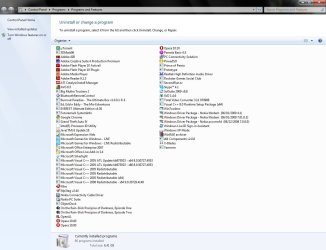
Unfortunately I can't get a Screenshot to show the complete list and I'm too lazy to type out a list :o :p.

But to give some idea I have 3 complete Office suites Office 2007 Office 2010 and openoffice 3.11 complete with a lot of addons, There are about 25 separate entries for Visual studio, and five or six browsers, oh and about ten image editors/managers
 

My Computers

System One System Two

  • Computer type
    PC/Desktop
    Computer Manufacturer/Model Number
    ChillBlast - Custom to my design
    OS
    Windows 11 Pro x64 [Latest Release and Release Preview]
    CPU
    Ryzen 9 5950X, 3.8 - 5.2 MHz
    Motherboard
    Asus Prime X570-Pro
    Memory
    64GB [2 x 32GB] DDR4 3200MHz
    Graphics Card(s)
    4GB NVIDIA GEFORCE GTX 1650 Ti
    Sound Card
    On-board SPDIF to 5.1 System + HDMI [5.1 system]
    Monitor(s) Displays
    32" UHD 32 Bit HDR Monitor + 43" UHD 4K 32Bit HDR TV
    Screen Resolution
    2 x 3840 x 2160 @60Hz
    Hard Drives
    1TB M2 SSD OS, 500GB Fast Access SSD, 2 x 8TB Data + Various Externals from 1TB to 4TB, 10TB NAS
    PSU
    NZXT C750 80 PLUS Gold 750W Modular PSU
    Case
    Workstation Case [Matt Black]
    Cooling
    NZXT Kraken X63 280mm CPU Cooler +2x Quiet Case fans
    Keyboard
    Logitech Wireless MX Keys & K400 + others
    Mouse
    Logitech Wireless MX Master 3S
    Internet Speed
    920 MB Down 50 MB Up
    Antivirus
    BitDefender Total Security Pro
    Browser
    Chrome (always run latest Non-Beta)
    Other Info
    Also run ...
    Laptop - Quad 8GB - Windows 10 Pro x64
    Nexus 7 Android tablet x2
    Samsung 10.2" tablet
    Blackview TAB 8 4G Android Tablet c/w Keyboard
    Wacom Intuos Pro Medium Pen Pad
    Wacom Intuos Pro Small Pen Pad
    Wacom Expresskeys Remote
    Loopdeck+ Graphics Controller
    Shuttle Pro v2 Control
  • Computer type
    Laptop
    System Manufacturer/Model Number
    Dell XPS 17 10750H
    OS
    Windows 11 Pro x64 Latest RP
    CPU
    Intel I7 10750H 5.0GHz
    Motherboard
    Dell XPS
    Memory
    32GB [2x16GB] DDR4 2933 MHz
    Graphics Card(s)
    nVidia GTX1650Ti 4 GB GDDR6
    Sound Card
    Stock [Realtek] 4 Speaker
    Monitor(s) Displays
    17" IPS UHD+ Infinity Edge Touchscreen
    Screen Resolution
    3840 x 2400
    Hard Drives
    2TB M2 NVMe, 4TB External + various 500GB & 1TB External NVMe (also have access to spinner HDD from
    PSU
    Stock
    Case
    Stock XPS Aluminium & Carbon Fibre
    Cooling
    Stock - Active Fan Control
    Keyboard
    Backlit + Various Logitech
    Mouse
    Stock Track Pad + Logitech MX Trackball
    Internet Speed
    72 MB Down 18MB Up
    Browser
    Chrome
    Other Info
    Also run ...
    Laptop - Quad 8GB - Windows 10 Pro x64
    Nexus 7 Android tablet x2
    10.2" tablet
    Sony Z3 Android Smartphone
    Wacom Intuos Pro Medium Pen Pad
    Wacom Intuos Pro Small Pen Pad
    Wacom Expresskeys Remote
    Loopdeck+ Graphics Controller
    Shuttle Pro v2 Control Pad
    10TB NAS
Due to the nature of my system as an ever changing user support testbed, the actual programs I have running varies

Today the total stands at 143 installed programs

Unfortunately I can't get a Screenshot to show the complete list and I'm too lazy to type out a list :o :p.

But to give some idea I have 3 complete Office suites Office 2007 Office 2010 and openoffice 3.11 complete with a lot of addons, There are about 25 separate entries for Visual studio, and five or six browsers, oh and about ten image editors/managers

Geez lol
 

My Computer

Computer Manufacturer/Model Number
Custom | Whitebox
OS
Windows 7 Ultimate, OS X 10.7, Ubuntu 11.04
CPU
Intel E6750 @ 3.80GHz
Motherboard
Gigabyte GA-EP45-UD3L (Revision 1.1)
Memory
2x2GB & 2x1GB (6GB) OCZ Reaper 1066MHz @ 1080MHz
Graphics Card(s)
EVGA nVidia GTX 260 896mb (216 Core) FTW Edition
Sound Card
Realtek ALC888
Monitor(s) Displays
21" VIZIO TV
Screen Resolution
1680x1050 @ 60Hz
Hard Drives
Western Digital WD6401AALS - 640GB
Hitachi HDP725016GLA380 - 160GB
PSU
Corsair 750W
Case
NZXT Nemesis Elite
Cooling
Thermaltake SpinQ
Keyboard
Logitech Wireless S520
Mouse
Logitech Wireless S520 - Microsoft Wireless Arc Mouse
Internet Speed
Download: 20mbps, Upload: 3mbps
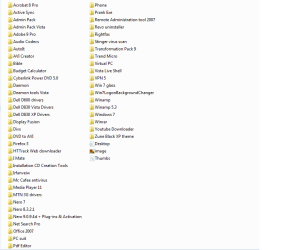
Here is my software some i only use on my XP machine

Games
-> NFS underground 1,3 ,Carbon
-> Football manager 2008
-> Mame 32
-> Playstation Emulator
 

Attachments

  • software.png
    software.png
    15.7 KB · Views: 82

My Computer

Computer Manufacturer/Model Number
DELL LATITUDE E6400
OS
Windows Se7en
CPU
2.26-GHz Intel Core 2 Duo P8400 processor and 2GB of RAM
Hard Drives
150gb
I install the OS and then first thing my Anti Virus, and then every program as I need them, the list would be endless.;)
 
Last edited:

My Computer

Computer Manufacturer/Model Number
Self Build 64bit
OS
Vista Ult64, Win7600
CPU
Intel Core 2 Quad Q6600 @ 2400 MHz 64bit OS
Motherboard
Asus P5E3 Deluxe WiFi @p 64 bit OS
Memory
4096 MB DDR3-SDRAM
Graphics Card(s)
ATI Radeon HD 3870 Series x2 Crossfired
Sound Card
Realtek on board
Monitor(s) Displays
Samsung SyncMaster - 23 inches
Screen Resolution
1680x1050 pixels at 60 Hz in True Colors
Hard Drives
Hitachi (250 GB)/Samsung 750 GB. /Barracuda 160 GB.
My Book 1 TB external..
PSU
Cooler Master 1000w
Case
Cooler Master Cosmos 1000.
Cooling
Fans and fresh air,
Keyboard
Wireless
Mouse
Wireless
Internet Speed
Never fast enough
Other Info
I use a Magnum.
I developed a system during all the Beta/RC on Windows 7.

First thing is AV and FW followed by a browser. Then any drivers that need updating, (not as many with the later builds :D ). Then my Outlook, (gotta stay in touch ;) )

I create a weekly backup of my start menu program list, (all programs are held in the all programs area not the User Roaming area), which I restore to any new OS install. This gives me a set of dead start menu links which works as a good reminder of what I need to install - As they are installed the links become live again, I tend to install as required rather than a specific install session.
 

My Computers

System One System Two

  • Computer type
    PC/Desktop
    Computer Manufacturer/Model Number
    ChillBlast - Custom to my design
    OS
    Windows 11 Pro x64 [Latest Release and Release Preview]
    CPU
    Ryzen 9 5950X, 3.8 - 5.2 MHz
    Motherboard
    Asus Prime X570-Pro
    Memory
    64GB [2 x 32GB] DDR4 3200MHz
    Graphics Card(s)
    4GB NVIDIA GEFORCE GTX 1650 Ti
    Sound Card
    On-board SPDIF to 5.1 System + HDMI [5.1 system]
    Monitor(s) Displays
    32" UHD 32 Bit HDR Monitor + 43" UHD 4K 32Bit HDR TV
    Screen Resolution
    2 x 3840 x 2160 @60Hz
    Hard Drives
    1TB M2 SSD OS, 500GB Fast Access SSD, 2 x 8TB Data + Various Externals from 1TB to 4TB, 10TB NAS
    PSU
    NZXT C750 80 PLUS Gold 750W Modular PSU
    Case
    Workstation Case [Matt Black]
    Cooling
    NZXT Kraken X63 280mm CPU Cooler +2x Quiet Case fans
    Keyboard
    Logitech Wireless MX Keys & K400 + others
    Mouse
    Logitech Wireless MX Master 3S
    Internet Speed
    920 MB Down 50 MB Up
    Antivirus
    BitDefender Total Security Pro
    Browser
    Chrome (always run latest Non-Beta)
    Other Info
    Also run ...
    Laptop - Quad 8GB - Windows 10 Pro x64
    Nexus 7 Android tablet x2
    Samsung 10.2" tablet
    Blackview TAB 8 4G Android Tablet c/w Keyboard
    Wacom Intuos Pro Medium Pen Pad
    Wacom Intuos Pro Small Pen Pad
    Wacom Expresskeys Remote
    Loopdeck+ Graphics Controller
    Shuttle Pro v2 Control
  • Computer type
    Laptop
    System Manufacturer/Model Number
    Dell XPS 17 10750H
    OS
    Windows 11 Pro x64 Latest RP
    CPU
    Intel I7 10750H 5.0GHz
    Motherboard
    Dell XPS
    Memory
    32GB [2x16GB] DDR4 2933 MHz
    Graphics Card(s)
    nVidia GTX1650Ti 4 GB GDDR6
    Sound Card
    Stock [Realtek] 4 Speaker
    Monitor(s) Displays
    17" IPS UHD+ Infinity Edge Touchscreen
    Screen Resolution
    3840 x 2400
    Hard Drives
    2TB M2 NVMe, 4TB External + various 500GB & 1TB External NVMe (also have access to spinner HDD from
    PSU
    Stock
    Case
    Stock XPS Aluminium & Carbon Fibre
    Cooling
    Stock - Active Fan Control
    Keyboard
    Backlit + Various Logitech
    Mouse
    Stock Track Pad + Logitech MX Trackball
    Internet Speed
    72 MB Down 18MB Up
    Browser
    Chrome
    Other Info
    Also run ...
    Laptop - Quad 8GB - Windows 10 Pro x64
    Nexus 7 Android tablet x2
    10.2" tablet
    Sony Z3 Android Smartphone
    Wacom Intuos Pro Medium Pen Pad
    Wacom Intuos Pro Small Pen Pad
    Wacom Expresskeys Remote
    Loopdeck+ Graphics Controller
    Shuttle Pro v2 Control Pad
    10TB NAS
Eset NOD32 Antivirus 4
Office 2007 Professional
Adobe Photoshop CS4
Adobe Illustrator CS4
Adobe Reader
uTorrent
eMule
GOM Player
VLC Player
Quick Time
Nokia PC Suite
Firefox
WinRAR
Windows Live Messenger
ImgBurn
Daemon Tools

and of course Adobe Flash player, Java, ATI Catalyst CC...
 

My Computer

OS
Windows 7 Professional x64
CPU
Intel Core i7 2600K @ Corsair H50 Hydro Series
Motherboard
Intel Burrage DP67BG Extreme Series
Memory
Corsair XMS3 6GB DDR3 PC1600
Graphics Card(s)
Gigabyte nVidia Geforce GTX 560 Ti
Monitor(s) Displays
27" LG LED LCD E2750
Screen Resolution
1920x1080
Hard Drives
Samsung SpinPoint F3 1TB
PSU
Corsair Gaming Series 700W
Case
Thermaltake Shark VA7000BWA
Keyboard
Razer Lycosa
Mouse
Razer Imperator
Internet Speed
VDSL2 20/2 Mbit
As im too lazy to sit down and install a bunch of stuff , I first install the important software and one game:


  • Boot Camp
  • Avast
  • Spybot
  • Winamp
  • Firefox
  • Winrar
  • Drivers (Nvidia and sound driver)
  • Codecs
  • ICQ
Game:

  • Call of duty 4 (Cant lock ones need for proper entertainment).

Afterwards when im less lazy I will install:

  • Visual Studio 2008 C++
  • Directx SDK
  • Java
  • JCreator
  • Nero 9
  • Office 2007
  • PhotoShop CS2
  • 3dsMax 9
And that's pretty much it , I never have more than I actually need , keeps it clean :D
 

My Computer

OS
Windows 7 32Bit Ultimate
CPU
Intel Core2Duo T8300 2.4GHz / Intel P4 2.6GHZ
Memory
2GB 800Mhz / 1GB 677MHz
Graphics Card(s)
GeForce 8600M / GeForce 6600GT
Case
MacBook LapTop / Stational PC
...I'm too lazy to type out a list...
I feel your pain.

Dir /o:n /b /s C:\Users\Antman\AppData\Roaming\Microsoft\Windows\Start Menu\Programs\*.lnk >> E:\Desktop\ListApps.txt

I am going to save that - wouldn't want to have to type it again.
 
Back
Top