How my network group automatically changed from Home to Public?

jraju

New member
Member
VIP
Local time
3:33 AM
Messages
759
Hi,
At times, when i am having problem with internet connection, i first note that the home icon changed to public. when going to the network settings, the message, that you are not now connected to the home group, since there is go connection established. I again have to reset the router to change the modem setting to get the internet connection
Mere change of public to Home does not resolve the problem. My question is how this change is brought about ? How to avoid in future
 

My Computer My Computer

At a glance

Microsoft Windows 7 Ultimate 64-bit 7601 Mult...Intel(R) Core(TM)2 Duo CPU E7200 @ 2.53GHz4.00 GBNVIDIA GeForce 210
Computer type
PC/Desktop
Computer Manufacturer/Model Number
custom build
OS
Microsoft Windows 7 Ultimate 64-bit 7601 Multiprocessor Free Service Pack 1
CPU
Intel(R) Core(TM)2 Duo CPU E7200 @ 2.53GHz
Motherboard
To be filled by O.E.M. To be filled by O.E.M.
Memory
4.00 GB
Graphics Card(s)
NVIDIA GeForce 210
Sound Card
(1) NVIDIA High Definition Audio (2) Realtek High Definiti
Screen Resolution
1920 x 1080 x 32 bits (4294967296 colors) @ 60 Hz
Hard Drives
ST3500312CS ATA Device
I think your problem may relate to the Network Location Awareness (NLA) service provider

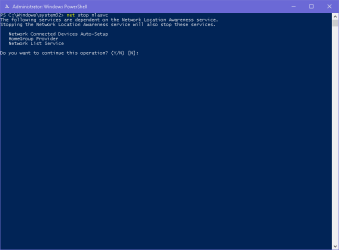
When you start Windows this service will start - if it starts before the Lan card is fully functional it will set you location to public. To find out if this is your problem open up either a PowerShell or Command prompt as administrator and type or paste the following command
Code:
net stop nlasvc

nla stop.png
Enter Y and press enter


If you have Network and Sharing Center open you should see it reset itself to Home, If it does not run this command
Code:
net start nlasvc

If this fixes your problem open services.msc from a command prompt and double click on Network Location Awareness and set the startup type to Automatic (Delayed)

Some info about Network Location Awareness (NLA) service provider

Network Location Awareness (NLA) and how it relates to Windows Firewall Profiles - Microsoft Enterprise Networking Team - Site Home - TechNet Blogs

The Role of NLA msdn.microsoft

Network Location Awareness technet.microsoft

Network Location Awareness Service: How It Can Ruin Your Day (and How To Fix It)
 
Last edited:

My Computer My Computer

At a glance

Microsoft Windows 7 Ultimate 32-bit 7601Intel(R) Pentium(R) Dual CPU E2160 @ 1.80GHz4.00 GB(1) VNC Mirror Driver (2) Intel(R) G33/G31 Ex...
Computer type
PC/Desktop
Computer Manufacturer/Model Number
Compac
OS
Microsoft Windows 7 Ultimate 32-bit 7601
CPU
Intel(R) Pentium(R) Dual CPU E2160 @ 1.80GHz
Motherboard
MSI Boston
Memory
4.00 GB
Graphics Card(s)
(1) VNC Mirror Driver (2) Intel(R) G33/G31 Express Chipset
Sound Card
Disabled
Monitor(s) Displays
Headless
Screen Resolution
1280 x 960 x 32 bits (4294967296 colors) @ 60 Hz
Hard Drives
ST3320820AS ATA Device
Keyboard
Headless
Mouse
Headless
Antivirus
Malwarebytes pro
Other Info
Also
Windows 8.1 Laptop and Desktop both Acer
Hi, Thank you very much for the reply.
Yesterday i posted with checking my ip. Today morning when i boot, i was not given internet access and i tried the ipconfig/all. i was shown a different ip so access to me was denied and home group changed to public.
I think my ip changed to 169.254.90.67, which i know it is not mine. So , some program changed this ip from my original.
In a way , router check by passed to change this ip to block my internet access.The changed ip4 as 169.254.90.67, which is not all possible ips from my service provider.
Could you suggest, how to overcome this problem.
I reset and reconfigured about 25 times for this problem, and hence this post to get some suggestion to the problem. I think so many persons are approaching the isp tech man to reconfigure the modem.
will you sugget the way to keep away from this ip hack.
The tech man usually reconfigure the modem as usual to get the attack again. It is normal configuration to get internet access. ipconfig failed to resolve. if i reset again, i have to reconfigure and the problem will be repeating with no end in site.
p;
 

My Computer My Computer

At a glance

Microsoft Windows 7 Ultimate 64-bit 7601 Mult...Intel(R) Core(TM)2 Duo CPU E7200 @ 2.53GHz4.00 GBNVIDIA GeForce 210
Computer type
PC/Desktop
Computer Manufacturer/Model Number
custom build
OS
Microsoft Windows 7 Ultimate 64-bit 7601 Multiprocessor Free Service Pack 1
CPU
Intel(R) Core(TM)2 Duo CPU E7200 @ 2.53GHz
Motherboard
To be filled by O.E.M. To be filled by O.E.M.
Memory
4.00 GB
Graphics Card(s)
NVIDIA GeForce 210
Sound Card
(1) NVIDIA High Definition Audio (2) Realtek High Definiti
Screen Resolution
1920 x 1080 x 32 bits (4294967296 colors) @ 60 Hz
Hard Drives
ST3500312CS ATA Device
Hi, I ran the commands you posted. My system shows as home group first stopped and then start command started providing my internet access. I also went to the services.msc and changed to auto delayed. from automatic. How to know the problem is solved. I will try to post the next logging results.
 

My Computer My Computer

At a glance

Microsoft Windows 7 Ultimate 64-bit 7601 Mult...Intel(R) Core(TM)2 Duo CPU E7200 @ 2.53GHz4.00 GBNVIDIA GeForce 210
Computer type
PC/Desktop
Computer Manufacturer/Model Number
custom build
OS
Microsoft Windows 7 Ultimate 64-bit 7601 Multiprocessor Free Service Pack 1
CPU
Intel(R) Core(TM)2 Duo CPU E7200 @ 2.53GHz
Motherboard
To be filled by O.E.M. To be filled by O.E.M.
Memory
4.00 GB
Graphics Card(s)
NVIDIA GeForce 210
Sound Card
(1) NVIDIA High Definition Audio (2) Realtek High Definiti
Screen Resolution
1920 x 1080 x 32 bits (4294967296 colors) @ 60 Hz
Hard Drives
ST3500312CS ATA Device
Back
Top