How to access dir on own Win7 via WebDav? net use W: \\127.0.0.1\ttt

pstein

New member
Member
VIP
Local time
7:59 PM
Messages
244
Is it possible to setup a directory on own Win7 Pro system as WebDAV directory?

I have no Windows server installation but only a Win 7 pro system.

Is it possible to setup one of my directories (e.g. D:\work\transfer\) for WebDAV access (from inhouse LAN)?

I created a share (with sharename "ttt") for the mentioned directory and entered afterwards the following command:

net use W: \\127.0.0.1\ttt

It works insofar that now a drive W: appears in my Windows Explorer and shows the content of D:\work\transfer\

The question is: Can I access the content via WebDAV connection (=with WebDAV commands) as well?

What will be the WebDAV address for it?

Does https://127.0.0.1/ttt work without a full local Web server?

Alternatively is there a most easy workaround?

Thank you
Peter
 

My Computer My Computer

At a glance

win7pro 64bit
Computer type
PC/Desktop
OS
win7pro 64bit
127.0.0.1 is local ip so it cant be used from any other pc as it would just goto the local pc
 

My Computer My Computer

At a glance

win 8 32 bit
Computer type
PC/Desktop
OS
win 8 32 bit
127.0.0.1 or localhost will be withen your PC only. If this WebDAV server is withen your local network only, then you'll want to access the PC via its IP. The computer's IP may be something like 192.168.1.12 or what ever. Look in your network properties in Windows. Make sure the firewall is off or set appropriately.
 

My Computer My Computer

At a glance

Windows 7 Ultimate x64
Computer type
PC/Desktop
OS
Windows 7 Ultimate x64
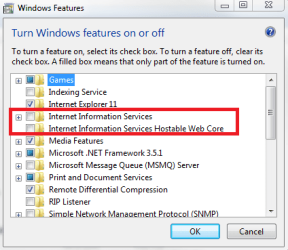
Control panel > Programs and features > Turn windows features on or off. From here you can install IIS as shown in my screenshot. Note: IIS is limited in connections on a non-server install.


IIS.PNG


There is also Xampp. You can install apahce with xampp. XAMPP Installers and Downloads for Apache Friends Setting up and using either are specialty areas. For further help you might want to look for an IIS forum and xampp has their own forum.
 

My Computers My Computers

  • At a glance

    Windows 7 pro/Windows 10 ProIntel i7 860 Quad core 2.8 ghz8 gbATI Radeon HD 5770 1 gb ram
    Computer type
    PC/Desktop
    Computer Manufacturer/Model Number
    HP Pavillion Elite HPE-250f
    OS
    Windows 7 pro/Windows 10 Pro
    CPU
    Intel i7 860 Quad core 2.8 ghz
    Memory
    8 gb
    Graphics Card(s)
    ATI Radeon HD 5770 1 gb ram
    Monitor(s) Displays
    Alienware 25 AW2521HF & Viewsonic
    Screen Resolution
    1920 x1080 & 1680x1050
    Hard Drives
    WD blue 1 tb & 500 gb.
    Browser
    FF of course.
    Other Info
    https://www.bestbuy.com/site/hp-pavilion-elite-desktop-intel-core-i7-processor-8gb-memory-1tb-hard-drive/9921493.p?skuId=9921493
  • At a glance

    Windows 2012 R2 Data center/Linux Minti3 9100 3.6GHz, 8M cache, 4C/4T8GB 2666MT/s DDR4 ECC UDIMM
    Computer type
    PC/Desktop
    System Manufacturer/Model Number
    Dell Poweredge T140
    OS
    Windows 2012 R2 Data center/Linux Mint
    CPU
    i3 9100 3.6GHz, 8M cache, 4C/4T
    Memory
    8GB 2666MT/s DDR4 ECC UDIMM
    Monitor(s) Displays
    Viewsonic
    Screen Resolution
    1680x1050
    Hard Drives
    1 TB & 750 GB
    Other Info
    https://www.dell.com/en-us/work/shop/productdetailstxn/poweredge-t140?~ck=bt
Back
Top