How to add "character map" to context menu when writing/editing text

brillohead

New member
Local time
1:44 AM
Messages
10
How to add "character map" to context menu when writing/editing text

I did this years ago with XP, worked for word/wordpad/notepad/and online, like here. Now that I bumped up to 7, forgot how to do it... I think a quick regedit

Surprised no tut on this. For me, it's much easier to leave the cursor where I want to insert the character than going to start>Accessories>System Tools>Character Map or start>search>charmap>charmap.exe, and then 4 more clicks to copy desired character. Remembering the keys, not going to happen.

Also, related question, once you finally get to character map, why 4 more clicks? Scroll to desired character>select>copy>paste. Seems select and copy are redundant. How about macros? I generally only use a few of these odd characters anyway, and rarely at that.

Or even better, how about speech macros for these characters? If there were speech commands for unusual characters (e.g., ü, °, ®, £) and numbers/math (e.g., ¼, ², ±), that could save a LOT of time. Ever try to find/insert the € or √¯symbol?

So, 1) character map in context menu? or even better, 2) speech macros for a greater selection of characters/symbols, including math?

Two questions, sorry. But related. Any help with either would be appreciated.
 

My Computer My Computer

At a glance

Windows 7 Home Premium 64bit
OS
Windows 7 Home Premium 64bit

My Computer My Computer

At a glance

Win7 Home Premium 64xIntel Core 2 Duo P7450 / 2.13 GHz (2.29 with ...4 GB PC-6400 Hyundai (2X2) at 800MhzNVIDIA GeForce GTX 260M 1GB DDR3 VRAM
Computer type
Laptop
Computer Manufacturer/Model Number
ASUS G60-RBBX05
OS
Win7 Home Premium 64x
CPU
Intel Core 2 Duo P7450 / 2.13 GHz (2.29 with Extreme Turbo)
Memory
4 GB PC-6400 Hyundai (2X2) at 800Mhz
Graphics Card(s)
NVIDIA GeForce GTX 260M 1GB DDR3 VRAM
Monitor(s) Displays
16" LED Backlit
Screen Resolution
1366 x 768 on laptop 1600x1050 max res on 22" external mon
Hard Drives
OCZ Agility 3 60GB SSD / 320 GB - Serial ATA-150 - 7200 rpm
PSU
6-cell Lithium ion { lasts 1.5 hours }
Case
ASUS G60 Laptop
Keyboard
Chicklet type back-lit (white light) keyboard
Mouse
Logitech G9 Laser Mouse 3200dpi and 1000 reports per minute
Internet Speed
Comcast 8.60mb/s up - 3.11mb/s down
Antivirus
MSE
Browser
Firefox
Other Info
General mid-budget gaming Comp. Low batterylife - High FrameRates - currently overheating problems :(

2nd Rig: Case: Rosewill BLACKHAWK Gaming ATX Mid Tower Computer Case

Mobo: GIGABYTE GA-990FXA-UD3
CPU: AMD FX-6200 Zambezi 3.8GHz (4.1GHz Turbo)
Heatsink: COOLER MASTER V8 CPU Cooler
RAM: Patriot Viper 3 8GB (2 x 4GB) 240-Pin DDR3 SDRAM 1866 (PC3 15000)
GPU: SAPPHIRE Radeon HD 6850 1GB 2
Also, autohotkey is great for macro's like this that could call the program when you press a combination of keys.

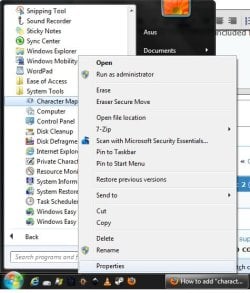
Or, for the very simple included features of windows, you could setup a key by doing this:

go to the character map icon in the start menu and right click and go to the Properties

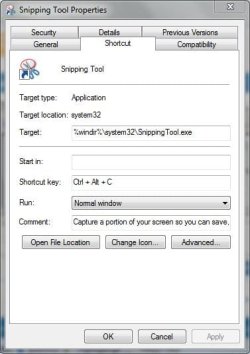
Then enter a combination of keys in the "shortcut key" field. This is usually Ctrl + Shift (or Alt)+ <letter>
 

Attachments

  • step1.jpg
    step1.jpg
    41.3 KB · Views: 6
  • step2.JPG
    step2.JPG
    33.9 KB · Views: 6

My Computer My Computer

At a glance

Win7 Home Premium 64xIntel Core 2 Duo P7450 / 2.13 GHz (2.29 with ...4 GB PC-6400 Hyundai (2X2) at 800MhzNVIDIA GeForce GTX 260M 1GB DDR3 VRAM
Computer type
Laptop
Computer Manufacturer/Model Number
ASUS G60-RBBX05
OS
Win7 Home Premium 64x
CPU
Intel Core 2 Duo P7450 / 2.13 GHz (2.29 with Extreme Turbo)
Memory
4 GB PC-6400 Hyundai (2X2) at 800Mhz
Graphics Card(s)
NVIDIA GeForce GTX 260M 1GB DDR3 VRAM
Monitor(s) Displays
16" LED Backlit
Screen Resolution
1366 x 768 on laptop 1600x1050 max res on 22" external mon
Hard Drives
OCZ Agility 3 60GB SSD / 320 GB - Serial ATA-150 - 7200 rpm
PSU
6-cell Lithium ion { lasts 1.5 hours }
Case
ASUS G60 Laptop
Keyboard
Chicklet type back-lit (white light) keyboard
Mouse
Logitech G9 Laser Mouse 3200dpi and 1000 reports per minute
Internet Speed
Comcast 8.60mb/s up - 3.11mb/s down
Antivirus
MSE
Browser
Firefox
Other Info
General mid-budget gaming Comp. Low batterylife - High FrameRates - currently overheating problems :(

2nd Rig: Case: Rosewill BLACKHAWK Gaming ATX Mid Tower Computer Case

Mobo: GIGABYTE GA-990FXA-UD3
CPU: AMD FX-6200 Zambezi 3.8GHz (4.1GHz Turbo)
Heatsink: COOLER MASTER V8 CPU Cooler
RAM: Patriot Viper 3 8GB (2 x 4GB) 240-Pin DDR3 SDRAM 1866 (PC3 15000)
GPU: SAPPHIRE Radeon HD 6850 1GB 2
For instance, I have my Snipping tool set to Ctrl + Alt + C

So as I would press Ctrl+C to copy something, I press Ctrl+Alt+C to launch snipping tool:
 

Attachments

  • snipping.JPG
    snipping.JPG
    34.1 KB · Views: 5

My Computer My Computer

At a glance

Win7 Home Premium 64xIntel Core 2 Duo P7450 / 2.13 GHz (2.29 with ...4 GB PC-6400 Hyundai (2X2) at 800MhzNVIDIA GeForce GTX 260M 1GB DDR3 VRAM
Computer type
Laptop
Computer Manufacturer/Model Number
ASUS G60-RBBX05
OS
Win7 Home Premium 64x
CPU
Intel Core 2 Duo P7450 / 2.13 GHz (2.29 with Extreme Turbo)
Memory
4 GB PC-6400 Hyundai (2X2) at 800Mhz
Graphics Card(s)
NVIDIA GeForce GTX 260M 1GB DDR3 VRAM
Monitor(s) Displays
16" LED Backlit
Screen Resolution
1366 x 768 on laptop 1600x1050 max res on 22" external mon
Hard Drives
OCZ Agility 3 60GB SSD / 320 GB - Serial ATA-150 - 7200 rpm
PSU
6-cell Lithium ion { lasts 1.5 hours }
Case
ASUS G60 Laptop
Keyboard
Chicklet type back-lit (white light) keyboard
Mouse
Logitech G9 Laser Mouse 3200dpi and 1000 reports per minute
Internet Speed
Comcast 8.60mb/s up - 3.11mb/s down
Antivirus
MSE
Browser
Firefox
Other Info
General mid-budget gaming Comp. Low batterylife - High FrameRates - currently overheating problems :(

2nd Rig: Case: Rosewill BLACKHAWK Gaming ATX Mid Tower Computer Case

Mobo: GIGABYTE GA-990FXA-UD3
CPU: AMD FX-6200 Zambezi 3.8GHz (4.1GHz Turbo)
Heatsink: COOLER MASTER V8 CPU Cooler
RAM: Patriot Viper 3 8GB (2 x 4GB) 240-Pin DDR3 SDRAM 1866 (PC3 15000)
GPU: SAPPHIRE Radeon HD 6850 1GB 2
All three of your suggestions get me to character map, and that's what I asked for. Thanks you.

However, I just found what I suspect is an obscure list of speech macros at WSR Application Macros - Browse /Speech Macros at SourceForge.net. There are ~15 different macros, among them, "numbers", "fractions", punctuation", "abbreviation", "sketch-up", and "word". Haven't installed all yet, but after adding "punctuation", I can now say "british pound" and get "£" on the page, or "umlaut" and get "ü".
Having one-click-to-character map is good; but saying umlaut and having it typed for me is better. (I did have to say umlaut 3 times and then record it as a new word in the speech dictionary, but now it works every time... )

Just installed "fractions", said three quarters, it typed "¾".

If these speech macro things work, grading papers will go faster.

Thanks again. I will use your suggestion. But right now, I'm going to check out these speech macros. There are even speech-macros for "unicode' and "ultra-edit".
 

My Computer My Computer

At a glance

Windows 7 Home Premium 64bit
OS
Windows 7 Home Premium 64bit
Back
Top