How to allow *all* incoming TCP connections

Rixterz

New member
Local time
9:58 PM
Messages
28
Hello there,

I am making a Remote Control program like Teamviewer in VB.Net using the TCP protocol and it works fine locally (in LAN), but nobody outside of my network can connect to my computer. I've tried to add exceptions to all TCP ports and I've tried to totally disable the firewall, but there still is no connection. Why is this+how do you fix it?

-Rixterz
 

My Computer My Computer

At a glance

Windows 7 Ultimate x86Genuine Intel CPU T1600 @ 1.66GHz 1.66GHzRAM 3.00 GB(Unknown)
Computer type
PC/Desktop
Computer Manufacturer/Model Number
Packard Bell
OS
Windows 7 Ultimate x86
CPU
Genuine Intel CPU T1600 @ 1.66GHz 1.66GHz
Motherboard
(Unknown)
Memory
RAM 3.00 GB
Graphics Card(s)
(Unknown)
Hard Drives
Hitachi ATA Device
Antivirus
Microsoft Security Essentials
Browser
Google Chrome
How are users attempting to connect?

How does your app handle NATs?

How does your app handle brute forcing the credentials needed to connect/control?
 

My Computer My Computer

At a glance

W7 Pro SP1 64biti78GBIntel HD Graphics
Computer type
Laptop
Computer Manufacturer/Model Number
Employer provided Dell Latitude
OS
W7 Pro SP1 64bit
CPU
i7
Memory
8GB
Graphics Card(s)
Intel HD Graphics
Hard Drives
crappy SSD
Antivirus
Employer mandated Symantec Endpoint Protection
Browser
Pale Moon 64bit, IE11 64bit & Chrome 64bit
Reply to UsernameIssues

This link may help you understand the process:
HttpListener Class (System.Net)

Users simply connect by navigating to 127.0.0.1:8080/HttpListener/ on a web browser.

Here is my code:

Code:
Imports System.Net
Imports System.Globalization
Public Class Form1
    Private Sub Form1_Load(sender As System.Object, e As System.EventArgs) Handles MyBase.Load
        Dim prefixes() As String = {"http://*:8080/HttpListener/"}
        ProcessRequests(prefixes)
    End Sub
    Private Sub ProcessRequests(ByVal prefixes() As String)
        If Not System.Net.HttpListener.IsSupported Then
            MsgBox("Windows XP SP2, Server 2003, or higher is required to " & "use the HttpListener class.")
            Exit Sub
        End If
        If prefixes Is Nothing OrElse prefixes.Length = 0 Then
            Throw New ArgumentException("prefixes")
        End If
        Dim listener As System.Net.HttpListener = New System.Net.HttpListener()
        For Each s As String In prefixes
            listener.Prefixes.Add(s)
        Next
        Try
            listener.Start()
            MsgBox("Listening...")
            Dim numRequestsToBeHandled As Integer = 10
            For i As Integer = 0 To numRequestsToBeHandled
                Dim response As HttpListenerResponse = Nothing
                Try
                    Dim context As HttpListenerContext = listener.GetContext()
                    response = context.Response
                    Dim responseString As String = "<HTML><BODY>Yay! Response received!</BODY></HTML>"
                    Dim buffer() As Byte = System.Text.Encoding.UTF8.GetBytes(responseString)
                    response.ContentLength64 = buffer.Length
                    Dim output As System.IO.Stream = response.OutputStream
                    output.Write(buffer, 0, buffer.Length)
                Catch ex As HttpListenerException
                    MsgBox(ex.Message)
                Finally
                    If response IsNot Nothing Then
                        response.Close()
                    End If
                End Try
            Next
        Catch ex As HttpListenerException
            MsgBox(ex.Message)
        Finally
            listener.Close()
            MsgBox("Done Listening...")
        End Try
    End Sub
End Class

I ran this code on my computer and also opened Google Chrome. I navigated to 127.0.0.1:8080/HttpListener/ and I received the response. But when I use my public IP and connect to 86.xxx.xxx.xxx:8080/HttpListener/, I get this error on Chrome:
"Google Chrome could not load the web page because 86.xxx.xxx.xxx took too long to respond".

Please download and run the application from this link, and click OK on the messagebox saying "Listening...". Then go on a web browser and navigate to 127.0.0.1:8080/HttpListener/. You'll see a little message. And then go to whatismyip.com and navigate to TheDisplayedIP:8080/HttpListener/.
 

My Computer My Computer

At a glance

Windows 7 Ultimate x86Genuine Intel CPU T1600 @ 1.66GHz 1.66GHzRAM 3.00 GB(Unknown)
Computer type
PC/Desktop
Computer Manufacturer/Model Number
Packard Bell
OS
Windows 7 Ultimate x86
CPU
Genuine Intel CPU T1600 @ 1.66GHz 1.66GHz
Motherboard
(Unknown)
Memory
RAM 3.00 GB
Graphics Card(s)
(Unknown)
Hard Drives
Hitachi ATA Device
Antivirus
Microsoft Security Essentials
Browser
Google Chrome
It's very likely that your router is dropping the connection, because of NAT. Your program is probably OK, as it does work locally, but you'll need to do a port forwarding on your router to let your computer actually receive the connection. As it stands in your samples, 8080 is the port you need to open.

BTW, you might want to use a non-standard port instead of 8080, as it's a frequently used to attack random server found with open ports (like you want to). At least until your program is stable enough to withstand heavy, malicious load, it's better to use a random port instead.

Also, as it seems, your program don't work like TeamViewer at all. TeamViewer uses a central server to which all clients connect, and it acts as a man in the middle that establishes the connections, so all users only need outgoing access. Yours does a direct connection, much like the built-in Terminal Serveer, in a "peer-to-peer" fashion.
 

My Computer My Computer

At a glance

Windows 7 Ultimate x64Intel Core i7-740QM8 GB DDR3NVIDIA GeForce 330GT
Computer type
Laptop
Computer Manufacturer/Model Number
Toshiba Sattelite A665-S6092
OS
Windows 7 Ultimate x64
CPU
Intel Core i7-740QM
Memory
8 GB DDR3
Graphics Card(s)
NVIDIA GeForce 330GT
Screen Resolution
1366x768
Hard Drives
Samsung 840 SSD 500GB
1TB USB3 external HD
Cooling
Coolermaster Notepal U3 notebook cooling pad
Internet Speed
3mbps ASDL
Antivirus
ClamWin 0.98.7
Browser
Opera 12.17 x86 (main), Firefox 38 (sec), IE11 (last resort)
Thanks for the additional info.

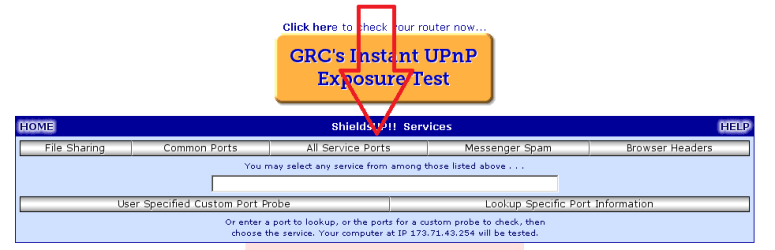
As mentioned, you will need port forwarding. Whatever port number that you opt to forward, you might want to scan it via this tool.
 

My Computer My Computer

At a glance

W7 Pro SP1 64biti78GBIntel HD Graphics
Computer type
Laptop
Computer Manufacturer/Model Number
Employer provided Dell Latitude
OS
W7 Pro SP1 64bit
CPU
i7
Memory
8GB
Graphics Card(s)
Intel HD Graphics
Hard Drives
crappy SSD
Antivirus
Employer mandated Symantec Endpoint Protection
Browser
Pale Moon 64bit, IE11 64bit & Chrome 64bit
Thanks for the additional info.

As mentioned, you will need port forwarding. Whatever port number that you opt to forward, you might want to scan it via this tool.

But I have no clue how to portforward!
 

My Computer My Computer

At a glance

Windows 7 Ultimate x86Genuine Intel CPU T1600 @ 1.66GHz 1.66GHzRAM 3.00 GB(Unknown)
Computer type
PC/Desktop
Computer Manufacturer/Model Number
Packard Bell
OS
Windows 7 Ultimate x86
CPU
Genuine Intel CPU T1600 @ 1.66GHz 1.66GHz
Motherboard
(Unknown)
Memory
RAM 3.00 GB
Graphics Card(s)
(Unknown)
Hard Drives
Hitachi ATA Device
Antivirus
Microsoft Security Essentials
Browser
Google Chrome

My Computer My Computer

At a glance

W7 Pro SP1 64biti78GBIntel HD Graphics
Computer type
Laptop
Computer Manufacturer/Model Number
Employer provided Dell Latitude
OS
W7 Pro SP1 64bit
CPU
i7
Memory
8GB
Graphics Card(s)
Intel HD Graphics
Hard Drives
crappy SSD
Antivirus
Employer mandated Symantec Endpoint Protection
Browser
Pale Moon 64bit, IE11 64bit & Chrome 64bit
Ugh, it doesn't even work. I configured everything and forwarded it to this computer, using both tcp and udp ports as 1000-1010. I navigated to loopback:1005/SecretPassword/ and it worked, but using my public ip 86.xxx.xxx.xxx:1005/SecretPassword/ still gave nothing. Useless.
 

My Computer My Computer

At a glance

Windows 7 Ultimate x86Genuine Intel CPU T1600 @ 1.66GHz 1.66GHzRAM 3.00 GB(Unknown)
Computer type
PC/Desktop
Computer Manufacturer/Model Number
Packard Bell
OS
Windows 7 Ultimate x86
CPU
Genuine Intel CPU T1600 @ 1.66GHz 1.66GHz
Motherboard
(Unknown)
Memory
RAM 3.00 GB
Graphics Card(s)
(Unknown)
Hard Drives
Hitachi ATA Device
Antivirus
Microsoft Security Essentials
Browser
Google Chrome
Use your home computer to run the scan mentioned above.
 

My Computer My Computer

At a glance

W7 Pro SP1 64biti78GBIntel HD Graphics
Computer type
Laptop
Computer Manufacturer/Model Number
Employer provided Dell Latitude
OS
W7 Pro SP1 64bit
CPU
i7
Memory
8GB
Graphics Card(s)
Intel HD Graphics
Hard Drives
crappy SSD
Antivirus
Employer mandated Symantec Endpoint Protection
Browser
Pale Moon 64bit, IE11 64bit & Chrome 64bit
Use your home computer to run the scan mentioned above.

I ran the scan on port 1005 and it said

THE EQUIPMENT AT THE TARGET IP ADDRESS
DID NOT RESPOND TO OUR UPnP PROBES!

So it's just telling me what I already know without telling me how to deal with it
 

My Computer My Computer

At a glance

Windows 7 Ultimate x86Genuine Intel CPU T1600 @ 1.66GHz 1.66GHzRAM 3.00 GB(Unknown)
Computer type
PC/Desktop
Computer Manufacturer/Model Number
Packard Bell
OS
Windows 7 Ultimate x86
CPU
Genuine Intel CPU T1600 @ 1.66GHz 1.66GHz
Motherboard
(Unknown)
Memory
RAM 3.00 GB
Graphics Card(s)
(Unknown)
Hard Drives
Hitachi ATA Device
Antivirus
Microsoft Security Essentials
Browser
Google Chrome
You do not want to run the UPnP scan. You want the port scan.

scan.png
 

My Computer My Computer

At a glance

W7 Pro SP1 64biti78GBIntel HD Graphics
Computer type
Laptop
Computer Manufacturer/Model Number
Employer provided Dell Latitude
OS
W7 Pro SP1 64bit
CPU
i7
Memory
8GB
Graphics Card(s)
Intel HD Graphics
Hard Drives
crappy SSD
Antivirus
Employer mandated Symantec Endpoint Protection
Browser
Pale Moon 64bit, IE11 64bit & Chrome 64bit
All ports showed to be STEALTH-rated.
 

My Computer My Computer

At a glance

Windows 7 Ultimate x86Genuine Intel CPU T1600 @ 1.66GHz 1.66GHzRAM 3.00 GB(Unknown)
Computer type
PC/Desktop
Computer Manufacturer/Model Number
Packard Bell
OS
Windows 7 Ultimate x86
CPU
Genuine Intel CPU T1600 @ 1.66GHz 1.66GHz
Motherboard
(Unknown)
Memory
RAM 3.00 GB
Graphics Card(s)
(Unknown)
Hard Drives
Hitachi ATA Device
Antivirus
Microsoft Security Essentials
Browser
Google Chrome
Then the port forwarding and/or the computer itself is not setup correctly.

Sorry - I'm not very experienced in opening up ports. I spend my time closing them. I don't ever want my internet facing IP address to respond to a port scan.
 

My Computer My Computer

At a glance

W7 Pro SP1 64biti78GBIntel HD Graphics
Computer type
Laptop
Computer Manufacturer/Model Number
Employer provided Dell Latitude
OS
W7 Pro SP1 64bit
CPU
i7
Memory
8GB
Graphics Card(s)
Intel HD Graphics
Hard Drives
crappy SSD
Antivirus
Employer mandated Symantec Endpoint Protection
Browser
Pale Moon 64bit, IE11 64bit & Chrome 64bit
But I have no clue how to portforward!

Then you should really learn what it is and how to use it if you plan to use your program over internet. Of course, online scans don't know what's bad with your setup, just if it it's open or not, only you have the means to get the exact cause.


Question, when you setup the port forwarding on your router web admin screen, what did you put on the target IP address? It should be the local IP of your computer.
 

My Computer My Computer

At a glance

Windows 7 Ultimate x64Intel Core i7-740QM8 GB DDR3NVIDIA GeForce 330GT
Computer type
Laptop
Computer Manufacturer/Model Number
Toshiba Sattelite A665-S6092
OS
Windows 7 Ultimate x64
CPU
Intel Core i7-740QM
Memory
8 GB DDR3
Graphics Card(s)
NVIDIA GeForce 330GT
Screen Resolution
1366x768
Hard Drives
Samsung 840 SSD 500GB
1TB USB3 external HD
Cooling
Coolermaster Notepal U3 notebook cooling pad
Internet Speed
3mbps ASDL
Antivirus
ClamWin 0.98.7
Browser
Opera 12.17 x86 (main), Firefox 38 (sec), IE11 (last resort)
Last edited:

My Computer My Computer

At a glance

W7 Pro SP1 64biti78GBIntel HD Graphics
Computer type
Laptop
Computer Manufacturer/Model Number
Employer provided Dell Latitude
OS
W7 Pro SP1 64bit
CPU
i7
Memory
8GB
Graphics Card(s)
Intel HD Graphics
Hard Drives
crappy SSD
Antivirus
Employer mandated Symantec Endpoint Protection
Browser
Pale Moon 64bit, IE11 64bit & Chrome 64bit
I don't own the router, I just access it. I used PFConfig.exe to do portforwarding but it's useless.
 

My Computer My Computer

At a glance

Windows 7 Ultimate x86Genuine Intel CPU T1600 @ 1.66GHz 1.66GHzRAM 3.00 GB(Unknown)
Computer type
PC/Desktop
Computer Manufacturer/Model Number
Packard Bell
OS
Windows 7 Ultimate x86
CPU
Genuine Intel CPU T1600 @ 1.66GHz 1.66GHz
Motherboard
(Unknown)
Memory
RAM 3.00 GB
Graphics Card(s)
(Unknown)
Hard Drives
Hitachi ATA Device
Antivirus
Microsoft Security Essentials
Browser
Google Chrome
You need to use the router web configuration screen to setup it. It's model-specific, but generally quite similar. But you of course need to have access to it to do so. I you aren't the owner, and the owner don't let you to configure it, you're pretty much out of luck. Are you by any chance on a shared connection?
Without chance of get a port forwarding going on the router, it will block every connection attempt from internet into any LAN computer, which will disrupt your program.

Your options would be to get permission (and the admin password) to setup the router, get another internet connection to test, or to refactor your program to do something like TeamViewer, if you can get an external reliable server.

BTW, what's pfconfig.exe anyway? I don't see anything like it in Windows?
 

My Computer My Computer

At a glance

Windows 7 Ultimate x64Intel Core i7-740QM8 GB DDR3NVIDIA GeForce 330GT
Computer type
Laptop
Computer Manufacturer/Model Number
Toshiba Sattelite A665-S6092
OS
Windows 7 Ultimate x64
CPU
Intel Core i7-740QM
Memory
8 GB DDR3
Graphics Card(s)
NVIDIA GeForce 330GT
Screen Resolution
1366x768
Hard Drives
Samsung 840 SSD 500GB
1TB USB3 external HD
Cooling
Coolermaster Notepal U3 notebook cooling pad
Internet Speed
3mbps ASDL
Antivirus
ClamWin 0.98.7
Browser
Opera 12.17 x86 (main), Firefox 38 (sec), IE11 (last resort)
I don't own the router, I just access it. I used PFConfig.exe to do portforwarding but it's useless.

I will keep it simple.
You should not be trying to change a router or any other piece of equipment that you don't own or don't have permission from the owner to do such things.

The forum rule.

6) No discussions of hacking someones system, network, password, etc.

http://www.sevenforums.com/misc.php?do=showrules
 

My Computer My Computer

At a glance

Windows 10 Pro. 64/ version 1709 Windows 7 Pr...Intel i7-6800K @ 4.3Corsair Platinum 16 gig @2400EVGA GTX 1070 OC
Computer type
PC/Desktop
Computer Manufacturer/Model Number
Home made Desktop
OS
Windows 10 Pro. 64/ version 1709 Windows 7 Pro/64
CPU
Intel i7-6800K @ 4.3
Motherboard
ASUS X-99 Deluxe II
Memory
Corsair Platinum 16 gig @2400
Graphics Card(s)
EVGA GTX 1070 OC
Monitor(s) Displays
Asus 27" LED LCD/VE278Q
Screen Resolution
1920-1080 or 1280-720 HDMI
Hard Drives
INTEL SSD 730-240 Gb Sata 3.0/
PSU
EVGA Platium 1200W
Case
Phanteks Luxe Tempered Glass 8 fans/ one radiator
Cooling
XSPC/ Water Cooled CPU
Keyboard
Das 4 Professional
Mouse
Logitech M705/MX Anywhere 2-S
Internet Speed
100 mbits
Antivirus
Microsoft Security Essentials/ Malwarebytes Premium 3.0/ SAS
Browser
I.E. 11 default/Firefox/ ISP Time Warner Cable/Spectrum
Other Info
LG BluRay Burner/
Sound system-KLipsch-THX/
Icy Dock ssd Hot Swap bays.

My Computer My Computer

At a glance

W7 Pro SP1 64biti78GBIntel HD Graphics
Computer type
Laptop
Computer Manufacturer/Model Number
Employer provided Dell Latitude
OS
W7 Pro SP1 64bit
CPU
i7
Memory
8GB
Graphics Card(s)
Intel HD Graphics
Hard Drives
crappy SSD
Antivirus
Employer mandated Symantec Endpoint Protection
Browser
Pale Moon 64bit, IE11 64bit & Chrome 64bit
6) No discussions of hacking someones system, network, password, etc.

Chill! It's my mum's router. I don't legally own it but I have permission to access it. I understand why you thought that though.
 

My Computer My Computer

At a glance

Windows 7 Ultimate x86Genuine Intel CPU T1600 @ 1.66GHz 1.66GHzRAM 3.00 GB(Unknown)
Computer type
PC/Desktop
Computer Manufacturer/Model Number
Packard Bell
OS
Windows 7 Ultimate x86
CPU
Genuine Intel CPU T1600 @ 1.66GHz 1.66GHz
Motherboard
(Unknown)
Memory
RAM 3.00 GB
Graphics Card(s)
(Unknown)
Hard Drives
Hitachi ATA Device
Antivirus
Microsoft Security Essentials
Browser
Google Chrome
Back
Top