- Local time
- 10:55 PM
- Messages
- 71
How to automatically run a shortcut with "RunAs" w/ credentials
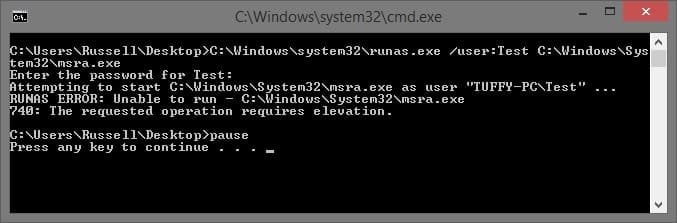
WHat would I need to put in the target field of a shortcut properties in order to automatically run as a diff user? (Instead of holding down shift and right clicking on shortcut and selecting RunAs different user.) I am trying to run remote assistance as a diff user and I added /runas /user:username %windir%\systm32\msra.exe /offerra but nothing comes up, i see a window flash for a moment but nothing happens. also tried adding /password password) and that did not work either.
thanks.
WHat would I need to put in the target field of a shortcut properties in order to automatically run as a diff user? (Instead of holding down shift and right clicking on shortcut and selecting RunAs different user.) I am trying to run remote assistance as a diff user and I added /runas /user:username %windir%\systm32\msra.exe /offerra but nothing comes up, i see a window flash for a moment but nothing happens. also tried adding /password
password) and that did not work either.thanks.
Last edited:
My Computer
At a glance
Windows 7 Ultimate x64Intel Core i5-3350P Ivy Bridge Quad-Core 3.1GHzzHyperX XMP 10th Anniversary Series 16GBEVGA GeForce GTX 970 4GB
- Computer type
- PC/Desktop
- Computer Manufacturer/Model Number
- Custom
- OS
- Windows 7 Ultimate x64
- CPU
- Intel Core i5-3350P Ivy Bridge Quad-Core 3.1GHzz
- Motherboard
- Asus P8H77-v
- Memory
- HyperX XMP 10th Anniversary Series 16GB
- Graphics Card(s)
- EVGA GeForce GTX 970 4GB
- Sound Card
- Onboard
- Monitor(s) Displays
- Acer S241HL 24", ASUS V238h 23"
- Screen Resolution
- 1920x1080
- Hard Drives
- Kingston SSD 240GB
Samsung 2TB
- PSU
- XION AXP-700K14XE 700W ATX
- Case
- HEC 6C28BBX585 Black Steel ATX Mid Tower
- Cooling
- ZALMAN CNPS9500 AT 2 Ball CPU Cooling Fan/Heatsink
- Keyboard
- Logitech G710+
- Mouse
- Anker Wireless Vertical Mouse
- Internet Speed
- 220/20
- Antivirus
- Webroot
- Browser
- Chrome