how to avoid getting rootkits

User001

New member
Local time
6:12 PM
Messages
11
I have seen online and on this forum to disable UAC using Win7, but how does one protect against rootkits - it uses admin permissions.

Also, if one disables UAC using Win 7, how does one verifies any incoming 3rd party applications and able to scan them using antiviruses/antispyware...etc.
I have seen a program from Hakin9 previous article where a hacker can create a blank Microsoft certificate using C++.
 

My Computer

OS
Win 7 Ultimate x32
Don't know the BEST manual way.... but, try not to trust anything but the expert...., install a good Antivirus with solid rootkit protection. For me Avast 5 Free should be more than enough for such job. Also, install a good Firewall for catching things that missed by UAC, say nothing's better than Comodo Firewall. Good Luck!
 

My Computer

Computer Manufacturer/Model Number
CHIP (Custom)
OS
Windows 7 Pro. 64 Bit + Back|Track 5 (Both Updated)
CPU
AMD FX 4100 (3.6GHz, 2 x 2MB L2, 8MB L3) Socket AM3
Motherboard
Biostar A880GZ (AM3+)
Memory
Kingmax DDR3 - 2 x 2GB (1333 MHz)
Graphics Card(s)
XFX ATi Radeon HD 5570 (1GB DDR3)
Sound Card
On Board (Realtec HD Codec)
Monitor(s) Displays
Samsung SyncMaster 2033sw (20") : DVI Connected
Screen Resolution
1600 x 900 (60Hz)
Hard Drives
Seagate 500GB SATA 2.0
PSU
UMAX 550W
Case
Basic White
Cooling
AMD Stock
Keyboard
Logitech
Mouse
Logitech Mouse
Internet Speed
BSNL DataOne 512KB/s
Other Info
Protected with.....
Bitdefender Internet Security 2012
SUPERAntiSpyware
Malwarebytes Anti Malware
OpenDNS
I would disagree with disabling UAC on Windows 7. People who disable it are simply annoyed by it. Others of us, have no trouble with the occasional pop-up here and there and leave it enabled.
 

My Computer

Computer Manufacturer/Model Number
Self-Built in July 2009
OS
Windows 7 Ultimate x64
CPU
Intel Q9550 2.83Ghz OC'd to 3.40Ghz
Motherboard
Gigabyte GA-EP45-UD3R rev. 1.1, F12 BIOS
Memory
8GB G.Skill PI DDR2-800, 4-4-4-12 timings
Graphics Card(s)
EVGA 1280MB Nvidia GeForce GTX570
Sound Card
Realtek ALC899A 8 channel onboard audio
Monitor(s) Displays
23" Acer x233H
Screen Resolution
1920x1080
Hard Drives
Intel X25-M 80GB Gen 2 SSD
Western Digital 1TB Caviar Black, 32MB cache. WD1001FALS
PSU
Corsair 620HX modular
Case
Antec P182
Cooling
stock
Keyboard
ABS M1 Mechanical
Mouse
Logitech G9 Laser Mouse
Internet Speed
15/2 cable modem
Other Info
Windows and Linux enthusiast. Logitech G35 Headset.
Hi, User001.

Certainly there are the standard recommendations to keep not only Windows software updated but third-party software updated as well, have up-to-date anti-virus software and a software firewall -- preferably a router as well. I agree that UAC should be enabled. A UAC prompt is one of the first signals that a program wants to run.

There are two additional important security measures. One is to use a limited user account, not Admin. The other is to keep DEP on. (Data Execution Prevention (DEP) is a security feature that helps prevent damage from viruses and other security threats by monitoring your programs to make sure they use system memory safely.)
 

My Computer

OS
Windows 7 & Windows Vista Ultimate

My Computer

Computer type
PC/Desktop
Computer Manufacturer/Model Number
Dell Hell oh Well
OS
Win 7 32 Home Premium, Win 7 64 Pro, Win 8.1, Win 10
CPU
Intel Core 2 Duo 2.93GHz
Memory
Not much with my ADHD
Graphics Card(s)
ATI Radeon HD 4350
Monitor(s) Displays
24" HDTV/Monitor
Screen Resolution
Blurry after a Scotch or 2
Hard Drives
1 HDD 250 GB, 1 HDD 1 TB, 3 - 1 TB Externals
Case
Don't get on my case...man :D
Cooling
I have an Air Conditioner & Diet Pepsi
Keyboard
Saitek Cyborg
Mouse
10 yr old MS optical mouse that still works
Internet Speed
Never fast enough
Antivirus
Various
Browser
Various
rootkit

According to the techrepublic article: I believe I had a #7 & #8 in my Win XP Pro SP3.
I ran Sophos & detected them, but does not know how to delete them.
What are the best ways to get rid?
I was thinking of getting hands on a clean PC running XP Pro & copy its entire registry and replace them in my PC.
 

My Computer

OS
Win 7 Ultimate x32
Do not disable User Account Control. UAC prompts the user if you allow or disallow programs to be executed and allow/disallow them to make changes to your computer. If you disable it, you'll never know what are the changes that are going to be made by applications to your computer. I suggest you set it to the default setting or to the max setting.

To avoid rootkits, you must scan your PC from time to time with GMER.
 

My Computer

Computer type
PC/Desktop
Computer Manufacturer/Model Number
Custom Built
OS
Windows 7 Ultimate x64
CPU
Intel(R) Core(TM) 2 Quad Q8200 @ 2.33 GHz
Motherboard
Asus P5KPL-AM SE Motherboard
Memory
2x2GB Kingston DDR2
Graphics Card(s)
1GB AMD Radeon HD 5450
Sound Card
VIA Technologies High Definition Audio Device
Monitor(s) Displays
Samsung SyncMaster 733NW
Screen Resolution
1440x900
Hard Drives
SEAGATE 320GB Barracuda® 7200.12, SATA 3 Gb/s, 7200 RPM, 16MB cache x 2
Case
Custom Casing
Cooling
Ice cubes from the freezer ;)
Keyboard
Generic Plug & Play Keyboard
Mouse
Optical Mouse
Internet Speed
Very slow
Do not disable User Account Control. UAC prompts the user if you allow or disallow programs to be executed and allow/disallow them to make changes to your computer. If you disable it, you'll never know what are the changes that are going to be made by applications to your computer. I suggest you set it to the default setting or to the max setting.

To avoid rootkits, you must scan your PC from time to time with GMER.


thank you
 

My Computer

Computer Manufacturer/Model Number
Gateway/NV7923u & NV79C52u Laptops
OS
windows 7 professional & ultimate 64bit laptops
CPU
2.27 boost to 2.53 & 2.53 boost to 2.80
Motherboard
Mobile Intel® HM55 Express Chipset ???
Memory
4GB
Graphics Card(s)
Intel® Graphics Media Accelerator HD
Sound Card
realtek High-definition audio support
Monitor(s) Displays
17.3 " HD 1600 x 900
Hard Drives
hatachi Travelstar 5400 500GB & west digital 500GB
Internet Speed
35MB fios
what about using Run as Admin

I was thinking, I read from a Win 7 text, the author suggest to bypass UAC, use Run as Admin.

Is using Run as Admin the same as UAC?
Can I check the Detail before I either Cancel or Install?
If I can Cancel using Run as Admin, where is the file stored and can I scan it using Antivirus before install or delete it if the file was detected as corrupt/infected?
 

My Computer

OS
Win 7 Ultimate x32
do not disable user account control. Uac prompts the user if you allow or disallow programs to be executed and allow/disallow them to make changes to your computer. If you disable it, you'll never know what are the changes that are going to be made by applications to your computer. I suggest you set it to the default setting or to the max setting.

To avoid rootkits, you must scan your pc from time to time with gmer.


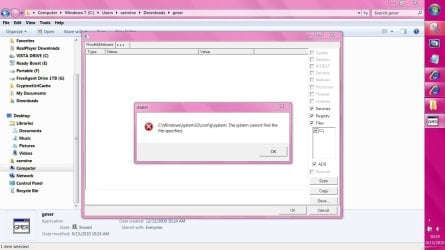
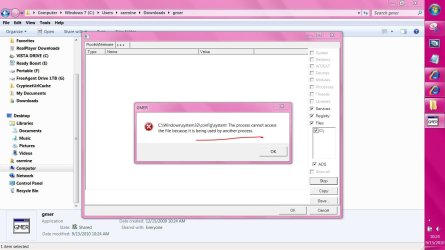
gmer gives me errors?
 

Attachments

  • Capture.JPG
    Capture.JPG
    114.7 KB · Views: 45
  • Capture2.JPG
    Capture2.JPG
    117.7 KB · Views: 27

My Computer

Computer Manufacturer/Model Number
Gateway/NV7923u & NV79C52u Laptops
OS
windows 7 professional & ultimate 64bit laptops
CPU
2.27 boost to 2.53 & 2.53 boost to 2.80
Motherboard
Mobile Intel® HM55 Express Chipset ???
Memory
4GB
Graphics Card(s)
Intel® Graphics Media Accelerator HD
Sound Card
realtek High-definition audio support
Monitor(s) Displays
17.3 " HD 1600 x 900
Hard Drives
hatachi Travelstar 5400 500GB & west digital 500GB
Internet Speed
35MB fios
I was thinking, I read from a Win 7 text, the author suggest to bypass UAC, use Run as Admin.

Is using Run as Admin the same as UAC?
Can I check the Detail before I either Cancel or Install?
If I can Cancel using Run as Admin, where is the file stored and can I scan it using Antivirus before install or delete it if the file was detected as corrupt/infected?
Hi, User001.

To begin, as you have been advised by all of the replies in this thread, you should not try to bypass UAC. When selecting Run as Admin, you will receive a UAC prompt.

Second, unless you change the location, when you download files on Windows 7, they are saved to C:\\Users\%UserName%\Downloads. You can navigate to that folder and scan with your antivirus prior to installing. Note, however, that is not a guarantee the file is not infected. You could also scan the file at Virus Total or Jotti as well.

Advice: Download only from vendor and reputable sites.

To avoid rootkits, you must scan your pc from time to time with gmer.


gmer gives me errors?

Hi, pacinitaly.

GMER has not been updated for Windows 7. Besides, even if compatible, it would not help you avoid rootkits. It is for scanning/removal of rootkits.
 

My Computer

OS
Windows 7 & Windows Vista Ultimate
I was thinking, I read from a Win 7 text, the author suggest to bypass UAC, use Run as Admin.

Is using Run as Admin the same as UAC?
Can I check the Detail before I either Cancel or Install?
If I can Cancel using Run as Admin, where is the file stored and can I scan it using Antivirus before install or delete it if the file was detected as corrupt/infected?
Hi, User001.

To begin, as you have been advised by all of the replies in this thread, you should not try to bypass UAC. When selecting Run as Admin, you will receive a UAC prompt.

Second, unless you change the location, when you download files on Windows 7, they are saved to C:\\Users\%UserName%\Downloads. You can navigate to that folder and scan with your antivirus prior to installing. Note, however, that is not a guarantee the file is not infected. You could also scan the file at Virus Total or Jotti as well.

Advice: Download only from vendor and reputable sites.

To avoid rootkits, you must scan your pc from time to time with gmer.


gmer gives me errors?

Hi, pacinitaly.

GMER has not been updated for Windows 7. Besides, even if compatible, it would not help you avoid rootkits. It is for scanning/removal of rootkits.


thanks corrine !!!
 

My Computer

Computer Manufacturer/Model Number
Gateway/NV7923u & NV79C52u Laptops
OS
windows 7 professional & ultimate 64bit laptops
CPU
2.27 boost to 2.53 & 2.53 boost to 2.80
Motherboard
Mobile Intel® HM55 Express Chipset ???
Memory
4GB
Graphics Card(s)
Intel® Graphics Media Accelerator HD
Sound Card
realtek High-definition audio support
Monitor(s) Displays
17.3 " HD 1600 x 900
Hard Drives
hatachi Travelstar 5400 500GB & west digital 500GB
Internet Speed
35MB fios

My Computer

Computer type
PC/Desktop
Computer Manufacturer/Model Number
Bruce ... somewhere in his 40's
OS
Windows 7 Ultimate 32bit SP1
CPU
Intel(R) Core(TM)2 Quad CPU @ 2.40GHz, 2400 MHz
Motherboard
INTEL/D975XBX2
Memory
4 GB
Graphics Card(s)
ATI Radeon HD 2600 Pro
Monitor(s) Displays
Samsung SyncMaster 914v
Screen Resolution
1280 x 1024
Hard Drives
2/500GB each ... ST3500630AS ATA Device.
One is not connected
PSU
Rocketfish 700 W
Case
G.Skill Gigabyte Chassis
Keyboard
Standard PS/2 Keyboard
Mouse
Microsoft PS/2 Mouse
Internet Speed
DSL
Antivirus
Avira Internet Security
Browser
IE 11
Other Info
ATI HDMI Audio
great read too
 

My Computer

Computer Manufacturer/Model Number
Gateway/NV7923u & NV79C52u Laptops
OS
windows 7 professional & ultimate 64bit laptops
CPU
2.27 boost to 2.53 & 2.53 boost to 2.80
Motherboard
Mobile Intel® HM55 Express Chipset ???
Memory
4GB
Graphics Card(s)
Intel® Graphics Media Accelerator HD
Sound Card
realtek High-definition audio support
Monitor(s) Displays
17.3 " HD 1600 x 900
Hard Drives
hatachi Travelstar 5400 500GB & west digital 500GB
Internet Speed
35MB fios
got it to work on my vista laptop.:D
I don't know what I'm looking at:huh:
 

Attachments

  • Capture.JPG
    Capture.JPG
    92.6 KB · Views: 21

My Computer

Computer Manufacturer/Model Number
Gateway/NV7923u & NV79C52u Laptops
OS
windows 7 professional & ultimate 64bit laptops
CPU
2.27 boost to 2.53 & 2.53 boost to 2.80
Motherboard
Mobile Intel® HM55 Express Chipset ???
Memory
4GB
Graphics Card(s)
Intel® Graphics Media Accelerator HD
Sound Card
realtek High-definition audio support
Monitor(s) Displays
17.3 " HD 1600 x 900
Hard Drives
hatachi Travelstar 5400 500GB & west digital 500GB
Internet Speed
35MB fios
got it to work on my vista laptop.:D
I don't know what I'm looking at:huh:
From that image, you are looking at roughly what I believe is the system uses to start initially. It points out several programs and the process it at starts at, which is where Rootkits try to embed themselves in to avoid being easily removed.

So far, nothing looks out of the ordinary, as there is the normal references to ntkernel and bthport, which I believe is for the Bluetooth port enabling for bluetooth devices like a keyboard to use the laptop.
 

My Computer

Computer Manufacturer/Model Number
Alienware Area 51 Desktop and Dell Inspirion 17R (N7010)
OS
Windows 7 Ultimate x64 and Home Premium x64
CPU
Intel i7 960 (3.2 GHz Quad Core)
Motherboard
Alienware Intel based X58
Memory
12 Gigs (Triple Channel)
Graphics Card(s)
Alienware OEM nVidia GTX 560 Ti (1.25 Gig)
Sound Card
Creative Labs X-Fi Titanium
Monitor(s) Displays
Samsung PX2370 LED 23" Monitor
Screen Resolution
1920x1080
Hard Drives
2 320 Gig SATA in Raid 1 Configuration (System/App)
1 1 Tera SATA (Games)
1 1 Tera SATA (Data/Music/Videos)
PSU
750 Watt Power Supply
Case
Alienware Area 51 Desktop
Cooling
Liquid Cooled
Keyboard
Logitech G510
Mouse
Microsoft Trackball Explorer
Internet Speed
Cable
C:\Windows32\Drivers\PROCEXP141.sys is Process Explorer :)
 

My Computer

Computer type
PC/Desktop
Computer Manufacturer/Model Number
Bruce ... somewhere in his 40's
OS
Windows 7 Ultimate 32bit SP1
CPU
Intel(R) Core(TM)2 Quad CPU @ 2.40GHz, 2400 MHz
Motherboard
INTEL/D975XBX2
Memory
4 GB
Graphics Card(s)
ATI Radeon HD 2600 Pro
Monitor(s) Displays
Samsung SyncMaster 914v
Screen Resolution
1280 x 1024
Hard Drives
2/500GB each ... ST3500630AS ATA Device.
One is not connected
PSU
Rocketfish 700 W
Case
G.Skill Gigabyte Chassis
Keyboard
Standard PS/2 Keyboard
Mouse
Microsoft PS/2 Mouse
Internet Speed
DSL
Antivirus
Avira Internet Security
Browser
IE 11
Other Info
ATI HDMI Audio
got it to work on my vista laptop.:D
I don't know what I'm looking at:huh:
From that image, you are looking at roughly what I believe is the system uses to start initially. It points out several programs and the process it at starts at, which is where Rootkits try to embed themselves in to avoid being easily removed.

So far, nothing looks out of the ordinary, as there is the normal references to ntkernel and bthport, which I believe is for the Bluetooth port enabling for bluetooth devices like a keyboard to use the laptop.

C:\Windows32\Drivers\PROCEXP141.sys is Process Explorer :)


thank you both very much!!
 

My Computer

Computer Manufacturer/Model Number
Gateway/NV7923u & NV79C52u Laptops
OS
windows 7 professional & ultimate 64bit laptops
CPU
2.27 boost to 2.53 & 2.53 boost to 2.80
Motherboard
Mobile Intel® HM55 Express Chipset ???
Memory
4GB
Graphics Card(s)
Intel® Graphics Media Accelerator HD
Sound Card
realtek High-definition audio support
Monitor(s) Displays
17.3 " HD 1600 x 900
Hard Drives
hatachi Travelstar 5400 500GB & west digital 500GB
Internet Speed
35MB fios
Back
Top