how to backup system drive

eviliony

New member
Member
VIP
Local time
7:23 AM
Messages
104
Hello all... recently i hear my HDD ticking... im not sure which hdd is it because there are 2 HDD being installed... but i assume its the system disk that is ticking because the other HDD was recently bought.... but will check it again one day...

my question is... if its a system drive.. i dont have personal files in it... its just the softwares installed on it... but its quite tiring to reinstall them one by one...

is there any way i can clone the whole files on that drive to a new hdd that im gonna buy soon thus making an exactly same on the inside and easily replaced so i dont have to go through all the hassles and the computer will just run fine?

if there is please help me... so i can proceed before the ticking got worse... oh the ticking appear random times usually when opening an application.. and when it ticks everything stop responding for a while until the tick is off... so is this means that system drive is problem or the other drive? the other drive only have music pics and etc.. no softwares are installed on it..
 

My Computer

OS
Windows 7 Ultimate x64

My Computer

Computer type
PC/Desktop
Computer Manufacturer/Model Number
Golden Mk. I.4
OS
Windows 10 Pro x64 ; Xubuntu x64
CPU
Intel i7 860 @ 2.80 GHz O/C'ed to 4.0GHz
Motherboard
Gigabyte P55A-UD3R Rev.1. Award BIOS F13
Memory
16GB Corsair Vengance DDR3 @ 661 MHz Dual Channel (9-9-9-24)
Graphics Card(s)
EVGA NVidia GTX 560 1024MB
Sound Card
Realtek Integrated
Monitor(s) Displays
Dual Samsung SyncMaster 2494HS
Screen Resolution
1920*1080 and 1920*1080
Hard Drives
1*Samsung 840 EVO 120GB SSD;
1*OCZ Vertex 2 60GB SSD;
2*Samsung F3 SpinPoint 1TB in RAID0;
1*Samsung F1 SpinPoint 1TB;
2*Western Digital 1TB External USB 3.0
1*Western Digital 500GB External USB 3.0
1*Seagate 500GB External USB 2.0
PSU
Thermaltake ToughPower QFan 750W
Case
Thermaltake Element S VK60001W2Z
Cooling
Corsair H60 Water Cooling, 2*230mm and 2*80mm case fans
Keyboard
Logitech G110
Mouse
Logitech MX518
hi thanks for the quick response... for the methods u mentioned above.. should i get either one of them or should i do both?

and for example i get a new drive... its not yet formatted... how do i install the image if there is no OS installed on it? sory im quite new to this..
 

My Computer

OS
Windows 7 Ultimate x64
Hi,

It works like this:

1. You install MACRIUM REFLECT to your existing drive.
2. You run MACRIUM to create a RESCUE ISO on a USB flash/thumb drive (you can also use a CD if you like).
3. You run MACRIUM and create a Macrium image of your drive to your USB drive.

If you existing drive fails, you do this:

4. Install the new blank drive with no OS or anything else on it.
5. Boot your PC/laptop from the RESCUE ISO or CD you created in Step 2
6. Your PC will now have booted into a special mini-Linux OS, and from there you can browse to the image on your USB drive you created in Step 3.

Macrium will restore that image to the new drive you installed, and everything will be exactly as it was when you originally created the image. The restoration takes about 20 minutes depending on how large the image is.

Regards,
Golden
 

My Computer

Computer type
PC/Desktop
Computer Manufacturer/Model Number
Golden Mk. I.4
OS
Windows 10 Pro x64 ; Xubuntu x64
CPU
Intel i7 860 @ 2.80 GHz O/C'ed to 4.0GHz
Motherboard
Gigabyte P55A-UD3R Rev.1. Award BIOS F13
Memory
16GB Corsair Vengance DDR3 @ 661 MHz Dual Channel (9-9-9-24)
Graphics Card(s)
EVGA NVidia GTX 560 1024MB
Sound Card
Realtek Integrated
Monitor(s) Displays
Dual Samsung SyncMaster 2494HS
Screen Resolution
1920*1080 and 1920*1080
Hard Drives
1*Samsung 840 EVO 120GB SSD;
1*OCZ Vertex 2 60GB SSD;
2*Samsung F3 SpinPoint 1TB in RAID0;
1*Samsung F1 SpinPoint 1TB;
2*Western Digital 1TB External USB 3.0
1*Western Digital 500GB External USB 3.0
1*Seagate 500GB External USB 2.0
PSU
Thermaltake ToughPower QFan 750W
Case
Thermaltake Element S VK60001W2Z
Cooling
Corsair H60 Water Cooling, 2*230mm and 2*80mm case fans
Keyboard
Logitech G110
Mouse
Logitech MX518
okay.. i get it so basically i format the new drive with the image created by macrium?... so everything will be intact and perfectly the same right? so its gonna backup my itunes files... my save games and restore them as if nothing is happen only in the new drive correct? sorry to ask so many.. im quite a worried person when it comes to backing up everything
 

My Computer

OS
Windows 7 Ultimate x64
Hi,

Yes, that's correct - your new drive will look exactly like the old one, at the time your image was created.

Regards,
Golden
 

My Computer

Computer type
PC/Desktop
Computer Manufacturer/Model Number
Golden Mk. I.4
OS
Windows 10 Pro x64 ; Xubuntu x64
CPU
Intel i7 860 @ 2.80 GHz O/C'ed to 4.0GHz
Motherboard
Gigabyte P55A-UD3R Rev.1. Award BIOS F13
Memory
16GB Corsair Vengance DDR3 @ 661 MHz Dual Channel (9-9-9-24)
Graphics Card(s)
EVGA NVidia GTX 560 1024MB
Sound Card
Realtek Integrated
Monitor(s) Displays
Dual Samsung SyncMaster 2494HS
Screen Resolution
1920*1080 and 1920*1080
Hard Drives
1*Samsung 840 EVO 120GB SSD;
1*OCZ Vertex 2 60GB SSD;
2*Samsung F3 SpinPoint 1TB in RAID0;
1*Samsung F1 SpinPoint 1TB;
2*Western Digital 1TB External USB 3.0
1*Western Digital 500GB External USB 3.0
1*Seagate 500GB External USB 2.0
PSU
Thermaltake ToughPower QFan 750W
Case
Thermaltake Element S VK60001W2Z
Cooling
Corsair H60 Water Cooling, 2*230mm and 2*80mm case fans
Keyboard
Logitech G110
Mouse
Logitech MX518
okay.. i get it so basically i format the new drive with the image created by macrium?... so everything will be intact and perfectly the same right? so its gonna backup my itunes files... my save games and restore them as if nothing is happen only in the new drive correct? sorry to ask so many.. im quite a worried person when it comes to backing up everything

Imaging programs such as Macrium back up EVERYTHING on the chosen partition.

You most likely have a C partition and also a small "System Reserved" partition. If that is the case, you would have to include BOTH of those partitions in the image file that you make with Macrium.

You can confirm you partition setup by looking in Windows Disk Management.

Golden mentioned a Linux recovery disk that is made with Macrium. It is very important that you test this recovery disk to make sure that your computer will boot from it and load Linux. After Linux loads, make sure you can see all of your hard drives and the image file that you want to restore.

Imaging isn't foolproof. It may fail.

If I were you, I would immediately find out which drive is making that ticking noise. And I would back up my data to another drive without using an image.
 

My Computer

Computer type
PC/Desktop
Computer Manufacturer/Model Number
Ignatz Special; 4 speed manual gearbox; factory air conditioning; one of one
OS
Windows 7 Home Premium SP1, 64-bit
CPU
Intel Skylake i5-6600K, not overclocked
Motherboard
AsRock Z170M Extreme 4, micro ATX
Memory
8 GB HyperX DDR4-2666 (2 x 4 GB)
Graphics Card(s)
none; graphics are integrated on CPU
Sound Card
onboard: Realtek ALC1150; external: USB Behringer UF0-202
Monitor(s) Displays
Dell S2340M 23 inch IPS
Screen Resolution
1600 x 900
Hard Drives
System: Crucial MX100 series SSD, 128 GB;
Data: Samsung Spinpoint 103SJ, 1 TB;
Backup: WD Caviar Green WD30EZRX-00D8PB0, 3 TB
PSU
Rosewill SilentNight 500 watt fanless, semi-modular
Case
Antec Solo II
Cooling
Noctua NH-U12S; Noctua F12 intake, Noctua S12A exhaust
Keyboard
Microsoft 200 6JH-00001 USB
Mouse
Dell or Microsoft optical wired; USB
Antivirus
Microsoft Security Essentials and Malwarebytes Premium
Browser
Pale Moon
Other Info
All fans PWM; speeds at idle: CPU circa 500 rpm; intake circa 600 rpm; exhaust circa 600 rpm; CPU temps 27 idle and 47 C load in a warm room (27 C/81 F) when running Intel Extreme Tuning Utility stress test.
okay.. i get it so basically i format the new drive with the image created by macrium?... so everything will be intact and perfectly the same right? so its gonna backup my itunes files... my save games and restore them as if nothing is happen only in the new drive correct? sorry to ask so many.. im quite a worried person when it comes to backing up everything

Imaging programs such as Macrium back up EVERYTHING on the chosen partition.

You most likely have a C partition and also a small "System Reserved" partition. If that is the case, you would have to include BOTH of those partitions in the image file that you make with Macrium.

You can confirm you partition setup by looking in Windows Disk Management.

Golden mentioned a Linux recovery disk that is made with Macrium. It is very important that you test this recovery disk to make sure that your computer will boot from it and load Linux. After Linux loads, make sure you can see all of your hard drives and the image file that you want to restore.

Imaging isn't foolproof. It may fail.

If I were you, I would immediately find out which drive is making that ticking noise. And I would back up my data to another drive without using an image.

Hi im quite sure that the ticking is coming from my primary drive... well actually for this primary drive there is nothing to backup as i have my personal data on the secondary drive... but i just want to avoid hassle of reinstalling windows, updating the softwares and so on... is there anyway i can do that without image? is there anyway i can clone my primary hdd? as for you mentioned about system partition.... i already removed that during installation of OS... i increased the size and install OS on the same partition...

EDIT: just by any chance, if anybody knows how to remove the welcome screen? i have stated in this -> http://www.sevenforums.com/general-discussion/224616-help-uac-softwares.html#post1883418
 

My Computer

OS
Windows 7 Ultimate x64
Hi im quite sure that the ticking is coming from my primary drive... well actually for this primary drive there is nothing to backup as i have my personal data on the secondary drive... but i just want to avoid hassle of reinstalling windows, updating the softwares and so on... is there anyway i can do that without image? is there anyway i can clone my primary hdd? as for you mentioned about system partition.... i already removed that during installation of OS... i increased the size and install OS on the same partition...

A screenshot of Windows Disk Management might clear up any confusion, but.....

There is no way to back up Window itself without using an image.

Unusual noise is never a good sign. I would download the hard drive manufacturer's hard drive utility and run it to see if it says your drive is in bad shape. Even if it passes the test, unusual noise is concerning.

The good news is that you have no personal data on this noisy drive. All you can lose is Windows and that can always be reinstalled if necessary.

Imaging and cloning are different processes.

If you were to get a new drive, you could move Windows to it by imaging or by cloning. Imaging is the most common choice.

Imaging is best thought of as a way to recover from a disaster, such as a failed drive. But it can also be used to move a system to a new drive even if there was no disaster.

Cloning is most often used when you want to move to a larger hard drive, when there has been no drive failure and things are working OK. But imaging can be used for this same purpose.
 

My Computer

Computer type
PC/Desktop
Computer Manufacturer/Model Number
Ignatz Special; 4 speed manual gearbox; factory air conditioning; one of one
OS
Windows 7 Home Premium SP1, 64-bit
CPU
Intel Skylake i5-6600K, not overclocked
Motherboard
AsRock Z170M Extreme 4, micro ATX
Memory
8 GB HyperX DDR4-2666 (2 x 4 GB)
Graphics Card(s)
none; graphics are integrated on CPU
Sound Card
onboard: Realtek ALC1150; external: USB Behringer UF0-202
Monitor(s) Displays
Dell S2340M 23 inch IPS
Screen Resolution
1600 x 900
Hard Drives
System: Crucial MX100 series SSD, 128 GB;
Data: Samsung Spinpoint 103SJ, 1 TB;
Backup: WD Caviar Green WD30EZRX-00D8PB0, 3 TB
PSU
Rosewill SilentNight 500 watt fanless, semi-modular
Case
Antec Solo II
Cooling
Noctua NH-U12S; Noctua F12 intake, Noctua S12A exhaust
Keyboard
Microsoft 200 6JH-00001 USB
Mouse
Dell or Microsoft optical wired; USB
Antivirus
Microsoft Security Essentials and Malwarebytes Premium
Browser
Pale Moon
Other Info
All fans PWM; speeds at idle: CPU circa 500 rpm; intake circa 600 rpm; exhaust circa 600 rpm; CPU temps 27 idle and 47 C load in a warm room (27 C/81 F) when running Intel Extreme Tuning Utility stress test.
okay.. i get it so basically i format the new drive with the image created by macrium?... so everything will be intact and perfectly the same right? so its gonna backup my itunes files... my save games and restore them as if nothing is happen only in the new drive correct? sorry to ask so many.. im quite a worried person when it comes to backing up everything

Imaging programs such as Macrium back up EVERYTHING on the chosen partition.

You most likely have a C partition and also a small "System Reserved" partition. If that is the case, you would have to include BOTH of those partitions in the image file that you make with Macrium.

You can confirm you partition setup by looking in Windows Disk Management.

Golden mentioned a Linux recovery disk that is made with Macrium. It is very important that you test this recovery disk to make sure that your computer will boot from it and load Linux. After Linux loads, make sure you can see all of your hard drives and the image file that you want to restore.

Imaging isn't foolproof. It may fail.

If I were you, I would immediately find out which drive is making that ticking noise. And I would back up my data to another drive without using an image.

If the Linux disk can't see your backup drive you will need to create a Windows PE disk for Macrium. This is easy to do as there is a wizard in Macrium but it does involve a 1.7GB download of the WAIK so best to try Linux first but the PE disk has a lot more features and driver support.
 

My Computer

Computer type
Laptop
Computer Manufacturer/Model Number
Hewlett-Packard/G62-107SA Notebook
OS
Microsoft Windows 7 Home Premium 64-bit Service Pack 1
CPU
Intel(R) Core(TM) i3 CPU M 330 @ 2.13GHz
Motherboard
Hewlett-Packard 1425
Memory
8 GB DDR3
Graphics Card(s)
Intel(R) HD Graphics
Sound Card
Realtek High Definition Audio
Monitor(s) Displays
Builtin
Screen Resolution
1366 x 768 x 32 bits (4294967296 colors) @ 60 Hz
Hard Drives
250 GB SATA Hard Disk Drive 7200 rpm
2TB Seagate GoFlex USB 2 Drive
1TB Iomega Prestige USB 2 Drive
1.5TB Iomega Prestige USB 2 Drive (Samsung)
2TB WD MyBook Live NAS.
Mouse
Logitech Anywhere MX
Internet Speed
152 Mbs download 10 Mbs upload
Antivirus
Norton 360
Browser
Chrome
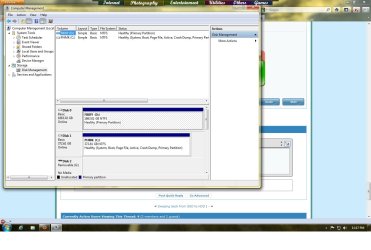
so here is the screenshot of my disk mgmt
 

Attachments

  • diskmgmt.jpg
    diskmgmt.jpg
    115.7 KB · Views: 4

My Computer

OS
Windows 7 Ultimate x64
No system reserved.

All you would have to image is the C drive.

The image file would have to be stored somewhere other than C. Presumably on D or an external if you have one. Then restore from D or the external by booting into the Linux recovery disc.

The image file would be quite large---roughly half the size of the occupied space on C.

I use images, but don't count on them. I've never restored an image file because I have never had to. My drives haven't failed.

You should always know what plan B will be if your image backup fails--it does happen--more frequently than you'd like.
 

My Computer

Computer type
PC/Desktop
Computer Manufacturer/Model Number
Ignatz Special; 4 speed manual gearbox; factory air conditioning; one of one
OS
Windows 7 Home Premium SP1, 64-bit
CPU
Intel Skylake i5-6600K, not overclocked
Motherboard
AsRock Z170M Extreme 4, micro ATX
Memory
8 GB HyperX DDR4-2666 (2 x 4 GB)
Graphics Card(s)
none; graphics are integrated on CPU
Sound Card
onboard: Realtek ALC1150; external: USB Behringer UF0-202
Monitor(s) Displays
Dell S2340M 23 inch IPS
Screen Resolution
1600 x 900
Hard Drives
System: Crucial MX100 series SSD, 128 GB;
Data: Samsung Spinpoint 103SJ, 1 TB;
Backup: WD Caviar Green WD30EZRX-00D8PB0, 3 TB
PSU
Rosewill SilentNight 500 watt fanless, semi-modular
Case
Antec Solo II
Cooling
Noctua NH-U12S; Noctua F12 intake, Noctua S12A exhaust
Keyboard
Microsoft 200 6JH-00001 USB
Mouse
Dell or Microsoft optical wired; USB
Antivirus
Microsoft Security Essentials and Malwarebytes Premium
Browser
Pale Moon
Other Info
All fans PWM; speeds at idle: CPU circa 500 rpm; intake circa 600 rpm; exhaust circa 600 rpm; CPU temps 27 idle and 47 C load in a warm room (27 C/81 F) when running Intel Extreme Tuning Utility stress test.
usually how large is the image file? i usually prefer to boot from CD but if it takes a lot of CDs i willgo with pendrive then
 

My Computer

OS
Windows 7 Ultimate x64
Plan B would have to be a clean install which means you need either your Windows install disk or the OEM recovery disks if your system came pre-installed.
 

My Computer

Computer type
Laptop
Computer Manufacturer/Model Number
Hewlett-Packard/G62-107SA Notebook
OS
Microsoft Windows 7 Home Premium 64-bit Service Pack 1
CPU
Intel(R) Core(TM) i3 CPU M 330 @ 2.13GHz
Motherboard
Hewlett-Packard 1425
Memory
8 GB DDR3
Graphics Card(s)
Intel(R) HD Graphics
Sound Card
Realtek High Definition Audio
Monitor(s) Displays
Builtin
Screen Resolution
1366 x 768 x 32 bits (4294967296 colors) @ 60 Hz
Hard Drives
250 GB SATA Hard Disk Drive 7200 rpm
2TB Seagate GoFlex USB 2 Drive
1TB Iomega Prestige USB 2 Drive
1.5TB Iomega Prestige USB 2 Drive (Samsung)
2TB WD MyBook Live NAS.
Mouse
Logitech Anywhere MX
Internet Speed
152 Mbs download 10 Mbs upload
Antivirus
Norton 360
Browser
Chrome
usually how large is the image file? i usually prefer to boot from CD but if it takes a lot of CDs i willgo with pendrive then

See my post 12 re size.

The Linux recovery CD is just that--one CD.

The recovery CD is NOT where you store the image file. The recovery CD is just a means to access the image file and restore it. Store the image file on a hard drive. Drive D or an external.
 

My Computer

Computer type
PC/Desktop
Computer Manufacturer/Model Number
Ignatz Special; 4 speed manual gearbox; factory air conditioning; one of one
OS
Windows 7 Home Premium SP1, 64-bit
CPU
Intel Skylake i5-6600K, not overclocked
Motherboard
AsRock Z170M Extreme 4, micro ATX
Memory
8 GB HyperX DDR4-2666 (2 x 4 GB)
Graphics Card(s)
none; graphics are integrated on CPU
Sound Card
onboard: Realtek ALC1150; external: USB Behringer UF0-202
Monitor(s) Displays
Dell S2340M 23 inch IPS
Screen Resolution
1600 x 900
Hard Drives
System: Crucial MX100 series SSD, 128 GB;
Data: Samsung Spinpoint 103SJ, 1 TB;
Backup: WD Caviar Green WD30EZRX-00D8PB0, 3 TB
PSU
Rosewill SilentNight 500 watt fanless, semi-modular
Case
Antec Solo II
Cooling
Noctua NH-U12S; Noctua F12 intake, Noctua S12A exhaust
Keyboard
Microsoft 200 6JH-00001 USB
Mouse
Dell or Microsoft optical wired; USB
Antivirus
Microsoft Security Essentials and Malwarebytes Premium
Browser
Pale Moon
Other Info
All fans PWM; speeds at idle: CPU circa 500 rpm; intake circa 600 rpm; exhaust circa 600 rpm; CPU temps 27 idle and 47 C load in a warm room (27 C/81 F) when running Intel Extreme Tuning Utility stress test.
The image is very much larger of course but should be stored on a HDD not a CD/DVD.
 

My Computer

Computer type
Laptop
Computer Manufacturer/Model Number
Hewlett-Packard/G62-107SA Notebook
OS
Microsoft Windows 7 Home Premium 64-bit Service Pack 1
CPU
Intel(R) Core(TM) i3 CPU M 330 @ 2.13GHz
Motherboard
Hewlett-Packard 1425
Memory
8 GB DDR3
Graphics Card(s)
Intel(R) HD Graphics
Sound Card
Realtek High Definition Audio
Monitor(s) Displays
Builtin
Screen Resolution
1366 x 768 x 32 bits (4294967296 colors) @ 60 Hz
Hard Drives
250 GB SATA Hard Disk Drive 7200 rpm
2TB Seagate GoFlex USB 2 Drive
1TB Iomega Prestige USB 2 Drive
1.5TB Iomega Prestige USB 2 Drive (Samsung)
2TB WD MyBook Live NAS.
Mouse
Logitech Anywhere MX
Internet Speed
152 Mbs download 10 Mbs upload
Antivirus
Norton 360
Browser
Chrome
Okay thanks both of u.. Im still quite blur tho but ill get back to you after i download the macrium app
 

My Computer

OS
Windows 7 Ultimate x64
Macrium is about as simple and painless as imaging can be. You can accept the defaults in most cases.

Make a folder on your D drive called "images".

In your case, just go to the backup menu and choose "backup Windows". You should then see your C drive with a checkmark. If it isn't checked, check it manually. Don't check D.

Navigate to that images folder you just made in the "destination" area of the Macrium screen.

The next screen will show you a summary of what will happen.

Click finish and away it goes--it will take 5 minutes or more, depending on the speed of your PC and the size of C.

Then go back to Macrium and go to the "other tasks" menu. Chose "create rescue media". This is where you make the Linux bootable CD. Choose "Linux" in the next Window. If the Linux disc will not boot your PC, go back to this same page and choose "advanced". That will allow you to make a modified version of the Linux disc in "compatibility mode".

If neither the regular Linux disc or the "compatibility mode" Linux disc will boot, you have to make a "Windows PE" disc instead. If it won't boot your PC, don't use Macrium.
 

My Computer

Computer type
PC/Desktop
Computer Manufacturer/Model Number
Ignatz Special; 4 speed manual gearbox; factory air conditioning; one of one
OS
Windows 7 Home Premium SP1, 64-bit
CPU
Intel Skylake i5-6600K, not overclocked
Motherboard
AsRock Z170M Extreme 4, micro ATX
Memory
8 GB HyperX DDR4-2666 (2 x 4 GB)
Graphics Card(s)
none; graphics are integrated on CPU
Sound Card
onboard: Realtek ALC1150; external: USB Behringer UF0-202
Monitor(s) Displays
Dell S2340M 23 inch IPS
Screen Resolution
1600 x 900
Hard Drives
System: Crucial MX100 series SSD, 128 GB;
Data: Samsung Spinpoint 103SJ, 1 TB;
Backup: WD Caviar Green WD30EZRX-00D8PB0, 3 TB
PSU
Rosewill SilentNight 500 watt fanless, semi-modular
Case
Antec Solo II
Cooling
Noctua NH-U12S; Noctua F12 intake, Noctua S12A exhaust
Keyboard
Microsoft 200 6JH-00001 USB
Mouse
Dell or Microsoft optical wired; USB
Antivirus
Microsoft Security Essentials and Malwarebytes Premium
Browser
Pale Moon
Other Info
All fans PWM; speeds at idle: CPU circa 500 rpm; intake circa 600 rpm; exhaust circa 600 rpm; CPU temps 27 idle and 47 C load in a warm room (27 C/81 F) when running Intel Extreme Tuning Utility stress test.
okay that explains everything... now i get the idea.. thanks will give it a shot later
 

My Computer

OS
Windows 7 Ultimate x64

My Computer

Computer type
Laptop
Computer Manufacturer/Model Number
Hewlett-Packard/G62-107SA Notebook
OS
Microsoft Windows 7 Home Premium 64-bit Service Pack 1
CPU
Intel(R) Core(TM) i3 CPU M 330 @ 2.13GHz
Motherboard
Hewlett-Packard 1425
Memory
8 GB DDR3
Graphics Card(s)
Intel(R) HD Graphics
Sound Card
Realtek High Definition Audio
Monitor(s) Displays
Builtin
Screen Resolution
1366 x 768 x 32 bits (4294967296 colors) @ 60 Hz
Hard Drives
250 GB SATA Hard Disk Drive 7200 rpm
2TB Seagate GoFlex USB 2 Drive
1TB Iomega Prestige USB 2 Drive
1.5TB Iomega Prestige USB 2 Drive (Samsung)
2TB WD MyBook Live NAS.
Mouse
Logitech Anywhere MX
Internet Speed
152 Mbs download 10 Mbs upload
Antivirus
Norton 360
Browser
Chrome
Back
Top