How to backup Windows 7 taskbar pinned items?

JamesR404

New member
Member
Local time
3:17 PM
Messages
43
Does anyone know how to save the pinned items in the task bar? I've got quite a few items pinned and I would be hard pressed to find them all again manually if something would happen to my computer.

I'd like to save the current settings so that I can restore them should I ever have my windows box fail in the future.
 

My Computer My Computer

Computer Manufacturer/Model Number
Asus EEE PC 1000HE
OS
Windows 7
CPU
1.66 Ghz Intel Atom N280
Motherboard
Asus
Memory
1 GB (upgrading to 2GB)
Hard Drives
140 GB
ST9160310AS ATA
Code:
  C:\Users\[B]Your User Name[/B]\AppData\Roaming\Microsoft\Internet Explorer\Quick Launch\User Pinned  .
Holds your Taskbar and Start Menu pinned folders inside. When you re-install the folders to this location you will have to (I think) open the folders and re-pin the programs. But as you say they will all be together.
 

My Computer My Computer

OS
Windows 7 x64
Thanks for the help, it's almost what I need but not quite.

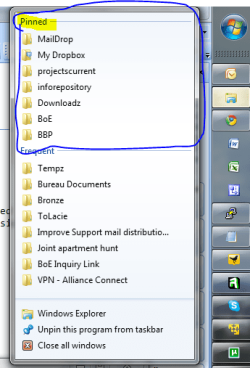
This is a what I want to preserve/backup:
Attached "Pinned items.PNG"

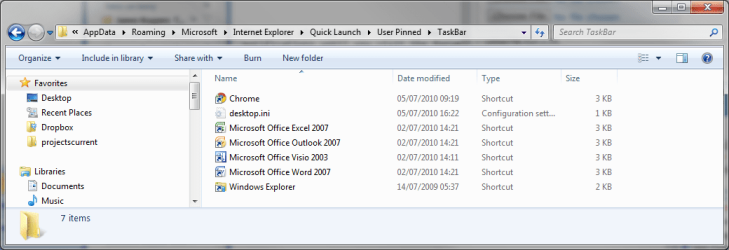
This is what I have in the directory:
Directory contents.png

So, you can see it's the applications, but non of the actual files that were pinned
 

Attachments

  • Pinned items.PNG
    Pinned items.PNG
    26.5 KB · Views: 26
  • Directory Contents.png
    Directory Contents.png
    30.5 KB · Views: 62

My Computer My Computer

Computer Manufacturer/Model Number
Asus EEE PC 1000HE
OS
Windows 7
CPU
1.66 Ghz Intel Atom N280
Motherboard
Asus
Memory
1 GB (upgrading to 2GB)
Hard Drives
140 GB
ST9160310AS ATA
Back
Top