How to browse for a program

shortmantuff

New member
Power User
Local time
8:34 PM
Messages
171
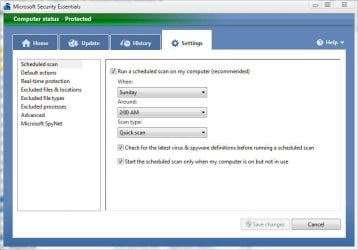
I want to schedule my antivirus software to run (MSE) by using Schedule Task. When I go to create a task, I have to browse for the program. I have no idea what to click to start it. What folder should I look in to find MSE and to run it.
 

My Computer

Computer Manufacturer/Model Number
Toshiba Satellite A215-S4757
OS
Windows 7 Home Premium x86
Motherboard
AMD Turion™ 64 X2 Dual-Core Mobile Technology TL56 1.8 GHz
Memory
4096MB (2 x 2048) DDR2 667mhz Corsair
Graphics Card(s)
ATI Radeon® X1200 128MB-319MB dynamically allocated shared g
Sound Card
Realtek
Monitor(s) Displays
15.4” diagonal widescreen TruBrite®TFT LCD display at 1280x8
Screen Resolution
1280x800
Hard Drives
Internal HD: 250GB (4200RPM); Serial ATA HDD
External HD: Western Digital 320GB My Passport Elite WDMLZ3200TN USB 2.0 Portable Hard Drive (Bronze)
Case
Targus
Mouse
Logitech G7
Internet Speed
6meg

Attachments

  • mse.JPG
    mse.JPG
    46.8 KB · Views: 4

My Computer

Computer type
PC/Desktop
Computer Manufacturer/Model Number
Self Built
OS
Win 10 Pro x64
CPU
Intel I5-2500K @3.3GHz
Motherboard
Asrock P67 Extreme4
Memory
16GB G.Skill Ripjaws X (4x4GB)
Graphics Card(s)
EVGA GeForce 750 Ti SC 2GB
Sound Card
ASUS Xonar DG 5.1 Channels 24-bit 96KHz PCI Interface Sound
Monitor(s) Displays
auria eq2367
Screen Resolution
1920 x 1080
Hard Drives
250GB Samsung 850 EVO SSD
1TB WD Blue
1TB Hitachi
PSU
SeaSonic X 650W 80 Plus Gold
Case
Corsair Obsidian 750D
Cooling
Corsair H60, Three 140mm case fans
Keyboard
Logitech Wireless Keyboard K520
Mouse
Logitech Wireless Mouse M310
Internet Speed
Wave Broadband ~ 100 dn 5 up
Antivirus
Windows Defender, Malwarebytes Premium
Browser
Edge, IE11, Chrome
Other Info
Laptop specs: HP g7-1365dx /
CPU: AMD A6-3420M APU with Radeon(tm) HD Graphics /
RAM: Crucial 8Gb (2x4Gb) /
SSD: Crucial M4-CT128M4SSD2 ATA Device/ FW 000F /
GFX: AMD Radeon HD 6520G /
OS: Windows 10 Pro x64
Hi shortmantuff,

On MSE you have scheduling features, on the home screen click the options Change scan schedule on the bottom of the screen.

Viola!!!!! you will be good to go!!!!!:p
 

My Computer

Computer Manufacturer/Model Number
x
OS
xp, vista, seven
CPU
x
Motherboard
x
Memory
x
Graphics Card(s)
x
Sound Card
x
Monitor(s) Displays
x
Hard Drives
x
PSU
x
Case
x
Cooling
x
Back
Top