How to browse Internet when can't open any web browser?

Suranjit

New member
Member
Local time
3:55 AM
Messages
43
Hi Guyz,

I am just wondering is there any way to browse in Windows 7 if I can't open any browser (like IE, Firefox, Chrome etc.)? Using notepad or similar applications' "Jump to URL" option, that can be done in Windows XP !!!

Thanks in advance.
S. Paul
 

My Computer My Computer

At a glance

Windows 7 64 bitInter Core 2 Duo T66004GB DDR3ATI Radeon
Computer Manufacturer/Model Number
HP
OS
Windows 7 64 bit
CPU
Inter Core 2 Duo T6600
Memory
4GB DDR3
Graphics Card(s)
ATI Radeon
Sound Card
Altec Lansing
Are you connected to the Internet through an ISP? Why can't you open any browser?
 

My Computer My Computer

At a glance

Windows 7 Ultimate 32bit SP1Intel(R) Core(TM)2 Quad CPU @ 2.40GHz, 2400 MHz4 GBATI Radeon HD 2600 Pro
Computer type
PC/Desktop
Computer Manufacturer/Model Number
Bruce ... somewhere in his 40's
OS
Windows 7 Ultimate 32bit SP1
CPU
Intel(R) Core(TM)2 Quad CPU @ 2.40GHz, 2400 MHz
Motherboard
INTEL/D975XBX2
Memory
4 GB
Graphics Card(s)
ATI Radeon HD 2600 Pro
Monitor(s) Displays
Samsung SyncMaster 914v
Screen Resolution
1280 x 1024
Hard Drives
2/500GB each ... ST3500630AS ATA Device.
One is not connected
PSU
Rocketfish 700 W
Case
G.Skill Gigabyte Chassis
Keyboard
Standard PS/2 Keyboard
Mouse
Microsoft PS/2 Mouse
Internet Speed
DSL
Antivirus
Avira Internet Security
Browser
IE 11
Other Info
ATI HDMI Audio
Type URL of website in Run box and press enter.
 

My Computer My Computer

At a glance

Windows 7 Ultimate
OS
Windows 7 Ultimate
i'm not sure i understand your question correctly.

in order to browse the internet, you need a program that can load and display webpages. among many other things, this program also has to allow the user to click on links to go to another webpage. this type of program is called a browser.

so, no, you can't browse without a browser.

i am also interested to learn how you use notepad in xp to 'jump to url'? as far as i know notepad only reads and edits simple text files. sure it can edit html files, but it cannot display html content, images, links, it can't do javascript, it can't store favourites, it can't download stuff etc etc - it's not a browser.
 

My Computer My Computer

At a glance

ultimate 64 sp1i5 2500K [email protected]8 gigs GSkill Ripjaws 1600amd hd6950
Computer Manufacturer/Model Number
mickey megabyte 1234
OS
ultimate 64 sp1
CPU
i5 2500K [email protected]
Motherboard
MSI P67A-GD53
Memory
8 gigs GSkill Ripjaws 1600
Graphics Card(s)
amd hd6950
Sound Card
creative x-fi gamer
Monitor(s) Displays
samsung 24"
Screen Resolution
1920x1080
Hard Drives
ocz vertex 2e 60 gig, samsung f3 1tb, buffalo 2tb ext
PSU
antec 550
Case
antec three hundred
Cooling
i'm a cooling fan
Keyboard
saitek eclipse ii
Mouse
logitech g3
Internet Speed
about 4 Mbps
Other Info
i love win7

My Computer My Computer

At a glance

ultimate 64 sp1i5 2500K [email protected]8 gigs GSkill Ripjaws 1600amd hd6950
Computer Manufacturer/Model Number
mickey megabyte 1234
OS
ultimate 64 sp1
CPU
i5 2500K [email protected]
Motherboard
MSI P67A-GD53
Memory
8 gigs GSkill Ripjaws 1600
Graphics Card(s)
amd hd6950
Sound Card
creative x-fi gamer
Monitor(s) Displays
samsung 24"
Screen Resolution
1920x1080
Hard Drives
ocz vertex 2e 60 gig, samsung f3 1tb, buffalo 2tb ext
PSU
antec 550
Case
antec three hundred
Cooling
i'm a cooling fan
Keyboard
saitek eclipse ii
Mouse
logitech g3
Internet Speed
about 4 Mbps
Other Info
i love win7

My Computer My Computer

At a glance

Winbdows 7 ultimate x64 | Ubuntu 12.04 x64 LTSCore 2 Duo e7400 @ 2.90GHz3GB DDR2Asus Nvidia GTX 560Ti 1GB
Computer Manufacturer/Model Number
HCL
OS
Winbdows 7 ultimate x64 | Ubuntu 12.04 x64 LTS
CPU
Core 2 Duo e7400 @ 2.90GHz
Motherboard
Gigabyte G31M-ES2L
Memory
3GB DDR2
Graphics Card(s)
Asus Nvidia GTX 560Ti 1GB
Sound Card
On-board
Monitor(s) Displays
HCL eZeeBee 18.5" LCD
Screen Resolution
1366x768 @ 60Hz
Hard Drives
Western Digital 320GB
PSU
Corsair CX500 V2 500W
Cooling
Stock
Keyboard
Stock
Mouse
Stock
Internet Speed
15-25kBps D/L | 10kBps U/L | Hey Don't laugh

My Computer My Computer

At a glance

XP / Win7 x64 ProIntel Quad-Core Q9450 @ 3.2GHz2x2GB GSkill DDR2NVIDIA GeForce 8600 GTS (EVGA)
OS
XP / Win7 x64 Pro
CPU
Intel Quad-Core Q9450 @ 3.2GHz
Motherboard
Asus P5-E
Memory
2x2GB GSkill DDR2
Graphics Card(s)
NVIDIA GeForce 8600 GTS (EVGA)
Monitor(s) Displays
Dell 2408WFP
Screen Resolution
1920x1200
Browser is just a shell:
You can open explorer based windows like My Documents or any other windows related shell to connect to the internet (unless prohibited by GPO)
 

My Computer My Computer

At a glance

7 Pro
OS
7 Pro

My Computer My Computer

At a glance

Windows 7 64 bitInter Core 2 Duo T66004GB DDR3ATI Radeon
Computer Manufacturer/Model Number
HP
OS
Windows 7 64 bit
CPU
Inter Core 2 Duo T6600
Memory
4GB DDR3
Graphics Card(s)
ATI Radeon
Sound Card
Altec Lansing
ah thanks for the link - using xp help viewer as a 'browser' - interesting.

i don't know of any similar method in windows 7, i'm afraid.

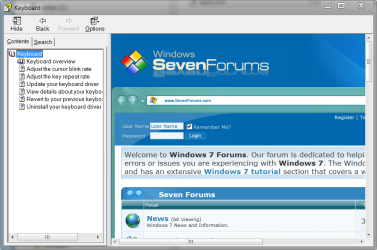
*edit* actually you can do it in 7 too:

goog.PNG

give me a few minutes to write some instructions...
 

My Computer My Computer

At a glance

ultimate 64 sp1i5 2500K [email protected]8 gigs GSkill Ripjaws 1600amd hd6950
Computer Manufacturer/Model Number
mickey megabyte 1234
OS
ultimate 64 sp1
CPU
i5 2500K [email protected]
Motherboard
MSI P67A-GD53
Memory
8 gigs GSkill Ripjaws 1600
Graphics Card(s)
amd hd6950
Sound Card
creative x-fi gamer
Monitor(s) Displays
samsung 24"
Screen Resolution
1920x1080
Hard Drives
ocz vertex 2e 60 gig, samsung f3 1tb, buffalo 2tb ext
PSU
antec 550
Case
antec three hundred
Cooling
i'm a cooling fan
Keyboard
saitek eclipse ii
Mouse
logitech g3
Internet Speed
about 4 Mbps
Other Info
i love win7
basically, you are using the old help viewer to read webpages, as the .chm help files are written in html, just like webpages.

the problem is starting up the viewer - it's hh.exe in the windows folder, but doesn't seem to want to start on its own - you need to open up a chm file to get the program running, then click on the question mark icon at top left, which has a 'jump to url' option. then type in the webpage you want - don't forget to include the http://.

i guess it's using the trident rendering engine from internet explorer, as fancy javascript etc all seems to work in the hh.exe.

anyway - download the attached zipped small chm file (from xp help), unzip it, right-click >> properties >> unblock (otherwise it won't open). double-click the file, then the help viewer should open up...

have fun!
 

Attachments

  • keyb.zip
    keyb.zip
    8.7 KB · Views: 105
  • seven.PNG
    seven.PNG
    50.9 KB · Views: 41

My Computer My Computer

At a glance

ultimate 64 sp1i5 2500K [email protected]8 gigs GSkill Ripjaws 1600amd hd6950
Computer Manufacturer/Model Number
mickey megabyte 1234
OS
ultimate 64 sp1
CPU
i5 2500K [email protected]
Motherboard
MSI P67A-GD53
Memory
8 gigs GSkill Ripjaws 1600
Graphics Card(s)
amd hd6950
Sound Card
creative x-fi gamer
Monitor(s) Displays
samsung 24"
Screen Resolution
1920x1080
Hard Drives
ocz vertex 2e 60 gig, samsung f3 1tb, buffalo 2tb ext
PSU
antec 550
Case
antec three hundred
Cooling
i'm a cooling fan
Keyboard
saitek eclipse ii
Mouse
logitech g3
Internet Speed
about 4 Mbps
Other Info
i love win7
i'm not sure i understand your question correctly.

in order to browse the internet, you need a program that can load and display webpages. among many other things, this program also has to allow the user to click on links to go to another webpage. this type of program is called a browser.

so, no, you can't browse without a browser.

i am also interested to learn how you use notepad in xp to 'jump to url'? as far as i know notepad only reads and edits simple text files. sure it can edit html files, but it cannot display html content, images, links, it can't do javascript, it can't store favourites, it can't download stuff etc etc - it's not a browser.


Hi there

Not sure I understand the problem either but if you really want a very limited browser then linux has a TEXT browser called LYNX.

I don't think Windows has such a facility but you could use Linux on a Virtual Machine and then use LYNX.

Some sites might not render at all however because of all the extra bells and whistles some sites have added into their code.

Cheers
jimbo
 

My Computer My Computer

At a glance

Linux CENTOS 7 / various Windows OS'es and se...Intel i7 Intel i58GB, 16GBOn Motherboard
Computer type
PC/Desktop
Computer Manufacturer/Model Number
Custom built, several laptops HP/ASUS
OS
Linux CENTOS 7 / various Windows OS'es and servers
CPU
Intel i7 Intel i5
Memory
8GB, 16GB
Graphics Card(s)
On Motherboard
Sound Card
Realtek HD audio
Monitor(s) Displays
Apple Cinema display, Samsung LCD
Screen Resolution
1920 X 1080
Hard Drives
4 X 1TB SATA
Mouse
Toshiba wireless laser
Internet Speed
> 20MB up
Back
Top