How to change 802.11b to 802.11n?

vstrimaitis

New member
Local time
9:20 AM
Messages
13
Hi. I just bought a new wireless adapter. It's CANYON CNP-WF511N2 Wireless N PCI Adapter. I put it in my computer and it works but in settings I can see that it's 802.11b. I want it to be 802.11n because it's faster. I've been searching for a whole day but I haven't found anything... Does any one of you guys have any idea what's wrong?

Thanks for your help!
 

My Computer My Computer

At a glance

Windows 7 Professional 64bit
OS
Windows 7 Professional 64bit
vstrimaitis, welcome to the Seven forums.

First question is, what speeds does your router support? If it doesn't support N speeds or if it does and isn't configured at that speed, then there is nothing to change in Windows or the adapters settings; it needs to be either changed in the router or a new router bought that supports N speeds.
 

My Computer My Computer

At a glance

Win 7 Ultimate x64FX-8350 @ 4.6 GHz so farADATA XPG V1 Series Black 8GB DDR3 1600Sapphire R9 270x Dual-X
Computer type
PC/Desktop
Computer Manufacturer/Model Number
Me
OS
Win 7 Ultimate x64
CPU
FX-8350 @ 4.6 GHz so far
Motherboard
Asus M5A97 EVO
Memory
ADATA XPG V1 Series Black 8GB DDR3 1600
Graphics Card(s)
Sapphire R9 270x Dual-X
Sound Card
Xonar DGX w/ Corsair Vengence 1300
Monitor(s) Displays
Acer S232HL Abid
Screen Resolution
1920x1080
Hard Drives
120 GB OCZ Vertex 3
500 GB Seagate 7200.12
PSU
Antec Earthwatts 650W Green
Case
Antec Three Hundred
Cooling
Cooler Master 212 EVO
Keyboard
Logitech G510
Mouse
Logitech G500s
Internet Speed
35000/3000
I don' know exacrly what speed my router is but it should support N (or at least G for sure :D). I just want to find how to change it. By the way, thanks for replying so fast :)
 

My Computer My Computer

At a glance

Windows 7 Professional 64bit
OS
Windows 7 Professional 64bit
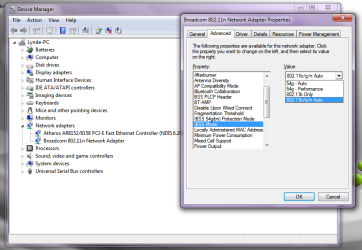
This would be one place to look,

wlanspeed.png

It should be set to Auto by default, and won't make any difference what you set it too if the router isn't configured for N.

Might want to check there first.
 

My Computer My Computer

At a glance

Win 7 Ultimate x64FX-8350 @ 4.6 GHz so farADATA XPG V1 Series Black 8GB DDR3 1600Sapphire R9 270x Dual-X
Computer type
PC/Desktop
Computer Manufacturer/Model Number
Me
OS
Win 7 Ultimate x64
CPU
FX-8350 @ 4.6 GHz so far
Motherboard
Asus M5A97 EVO
Memory
ADATA XPG V1 Series Black 8GB DDR3 1600
Graphics Card(s)
Sapphire R9 270x Dual-X
Sound Card
Xonar DGX w/ Corsair Vengence 1300
Monitor(s) Displays
Acer S232HL Abid
Screen Resolution
1920x1080
Hard Drives
120 GB OCZ Vertex 3
500 GB Seagate 7200.12
PSU
Antec Earthwatts 650W Green
Case
Antec Three Hundred
Cooling
Cooler Master 212 EVO
Keyboard
Logitech G510
Mouse
Logitech G500s
Internet Speed
35000/3000
Hm... I've looked here already but I don't have that many options... My first option is 802.11b preampled or something and it's value are: long and short; short only...
 

My Computer My Computer

At a glance

Windows 7 Professional 64bit
OS
Windows 7 Professional 64bit
Hm... I've looked here already but I don't have that many options... My first option is 802.11b preampled or something and it's value are: long and short; short only...
Hi vstrimaitis , It would be a good idea if you told us the make/model of your router then we would be able to advise if you are able to attain "n" standards :)
 

My Computer My Computer

At a glance

win 7 ultimate32bit, Win8.1pro wmc 32bitamd phenom x4 9600corsair twinxs 2x2gb2x nvidia 1gb 8500gt
Computer type
PC/Desktop
Computer Manufacturer/Model Number
self build
OS
win 7 ultimate32bit, Win8.1pro wmc 32bit
CPU
amd phenom x4 9600
Motherboard
asus m2n32-sli deluxe
Memory
corsair twinxs 2x2gb
Graphics Card(s)
2x nvidia 1gb 8500gt
Sound Card
onboard
Monitor(s) Displays
23" PB Viseo 233d
Screen Resolution
1920x1080
Hard Drives
maxtor sata 500gb
maxtor sata 320gb
fujitsu sata200gb
PSU
oryxx tornado 750w
Case
thermaltake xaser lll
Cooling
artic freezer64 pro + 7 case fans
OK, my router is ZTE F660. (I have optical fibre internet (maybe it's not called like that in english, idk)). The internet speed (wifi) is about 30Mb/s (on other devices, not my computer :D, on my computer it's 3-5Mb/s..)
 

My Computer My Computer

At a glance

Windows 7 Professional 64bit
OS
Windows 7 Professional 64bit
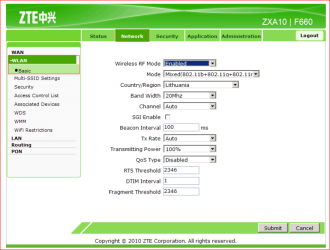
OK start with making sure that the router is set to either mixed or N only,

router.PNG

Set to N only if you do not have any other wireless devices, as that will cause any B or G only devices to not connect.

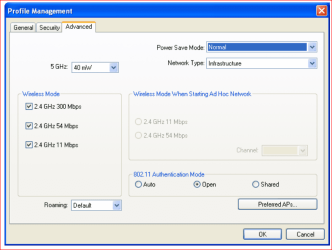
Next check in the canyon control panel,

canyon.PNG

that it is set to N speeds.

When it doubt it helps to check the user manual (which is where both of those screen shots came from).
 

My Computer My Computer

At a glance

Win 7 Ultimate x64FX-8350 @ 4.6 GHz so farADATA XPG V1 Series Black 8GB DDR3 1600Sapphire R9 270x Dual-X
Computer type
PC/Desktop
Computer Manufacturer/Model Number
Me
OS
Win 7 Ultimate x64
CPU
FX-8350 @ 4.6 GHz so far
Motherboard
Asus M5A97 EVO
Memory
ADATA XPG V1 Series Black 8GB DDR3 1600
Graphics Card(s)
Sapphire R9 270x Dual-X
Sound Card
Xonar DGX w/ Corsair Vengence 1300
Monitor(s) Displays
Acer S232HL Abid
Screen Resolution
1920x1080
Hard Drives
120 GB OCZ Vertex 3
500 GB Seagate 7200.12
PSU
Antec Earthwatts 650W Green
Case
Antec Three Hundred
Cooling
Cooler Master 212 EVO
Keyboard
Logitech G510
Mouse
Logitech G500s
Internet Speed
35000/3000
Hi vstrimaitis, As far as I can tell your router only supports b/g mode Google Translate could not find anything to say it supports "n" sorry about that :(

stormy wins the day, good find :thumbsup:
 
Last edited:

My Computer My Computer

At a glance

win 7 ultimate32bit, Win8.1pro wmc 32bitamd phenom x4 9600corsair twinxs 2x2gb2x nvidia 1gb 8500gt
Computer type
PC/Desktop
Computer Manufacturer/Model Number
self build
OS
win 7 ultimate32bit, Win8.1pro wmc 32bit
CPU
amd phenom x4 9600
Motherboard
asus m2n32-sli deluxe
Memory
corsair twinxs 2x2gb
Graphics Card(s)
2x nvidia 1gb 8500gt
Sound Card
onboard
Monitor(s) Displays
23" PB Viseo 233d
Screen Resolution
1920x1080
Hard Drives
maxtor sata 500gb
maxtor sata 320gb
fujitsu sata200gb
PSU
oryxx tornado 750w
Case
thermaltake xaser lll
Cooling
artic freezer64 pro + 7 case fans
OK start with making sure that the router is set to either mixed or N only,

View attachment 192025

Set to N only if you do not have any other wireless devices, as that will cause any B or G only devices to not connect.

Next check in the canyon control panel,

View attachment 192026

that it is set to N speeds.

When it doubt it helps to check the user manual (which is where both of those screen shots came from).

Where do I get this canyon control panel? There is a program in the CD but it doesn't install for Windows 7... I tried to install it using compatibility (Windows XP) and it did install but it didn't work... It said it couldn't find connection or something although I was connected to the internet.

By the way, if my router doesn't support N speeds, then I would at least like to change to G :D
 

My Computer My Computer

At a glance

Windows 7 Professional 64bit
OS
Windows 7 Professional 64bit
Back
Top