
MarkRocketman
New member
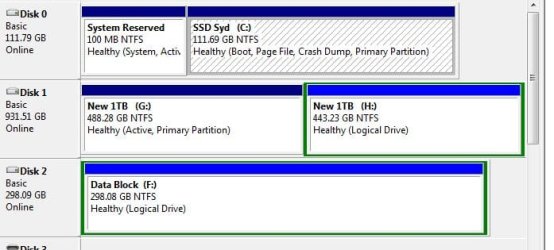
Hi Folks, I have contrived to get two active partitions on my PC! After a 2 week old hard drive (D: & F -) died I replaced (now F & G) it with an old drive that had previously been configured with XP and as a boot drive. I don’t think it is acting as boot as drive C: has an active partition and boot and largely the computer runs fine with the exception of G not being search / index able? And there being a phantom path in the backup which I can’t reset. So the question!
How do I remove the active setting on G: (it holds all the variable windows data) and will it lose all the data?
Im at that point where a little knowledge is dangerous and have seen some genius replies so thought I would ask and see if you could help me out.
See attached screen shot
NB The old drive partitions were formatted before being repopulated
How do I remove the active setting on G: (it holds all the variable windows data) and will it lose all the data?
Im at that point where a little knowledge is dangerous and have seen some genius replies so thought I would ask and see if you could help me out.
See attached screen shot
NB The old drive partitions were formatted before being repopulated
Attachments
Last edited:
My Computer
- Computer Manufacturer/Model Number
- Ebay Component Build - Under £500 Total Build
- OS
- Windows 7 Home Premium 64bit
- CPU
- i7
- Motherboard
- Asus P8P67 Pro
- Memory
- Ripsaw 8192Mb DDR3 700Mhz
- Graphics Card(s)
- AMD Radon 6800
- Hard Drives
- C:OCZ-Agility3 120Gb + 2TB x2 Segate & Samsung
- PSU
- Corsair 650
- Internet Speed
- 37Mps Down 8Mps


