How to change cursor...

PinkiPad

New member
Member
VIP
Local time
2:05 PM
Messages
100
I don't use a mouse. The cursor is a little too small for me. A Google search showed me your instructions for changing it when using a mouse.

Is there a way to enlarge or change my cursor?
 

My Computer

Computer type
Laptop
Computer Manufacturer/Model Number
MS Windows 7 Home Premium 64-bit SP1
OS
Win 7 64 bit
CPU
Intel Atom N450 1.66 ghz
Motherboard
Dell Inc 00DKZ
Memory
2 gig single channel DDR2
Graphics Card(s)
Generic PnP Monitor, Intwl Graphics Media Accelerator 3150
Screen Resolution
1024x600
Hard Drives
2.44gb Western Digital
Mouse
none
Internet Speed
WiFi
Antivirus
MalwareBytes
Browser
Firefox
Other Info
Dell 14z 5432
How can you not use a mouse? Do you use the keyboard for everything or do you mean you use the touchpad on a laptop?

By cursor, do you mean the vertical line you see when editing a file or the arrow that the mouse/touchpad controls?
 

My Computer

Computer type
PC/Desktop
Computer Manufacturer/Model Number
Lenovo IdeaCenter 450
OS
Windows 10 Pro X64
CPU
Intel Quad Core i7-4770 @ 3.4Ghz
Memory
16.0GB PC3-12800 DDR3 SDRAM 1600 MHz
Graphics Card(s)
Intel Integrated HD Graphics
Sound Card
Realtek HD Audio
Monitor(s) Displays
HP 22" LCD
Screen Resolution
1680 x 1050
Hard Drives
250GB Samsung EVO SATA-3 SSD
2TB Seagate ST2000DM001 SATA-2
1.5TB Seagate ST3150041AS SATA
Keyboard
Dell USB
Mouse
Lenovo USB
Internet Speed
Cable via Road Runner 3MB Upload, 30MB Download
Antivirus
Windows Defender, MBAM Pro, MBAE
Browser
Seamonkey
Other Info
UEFI/GPT
PLDS DVD-RW DH16AERSH
Sorry, I thought I typed out I use a Dell laptop. The arrow is just too small. I've always used a desktop so changing the mouse cursor was easy.
 

My Computer

Computer type
Laptop
Computer Manufacturer/Model Number
MS Windows 7 Home Premium 64-bit SP1
OS
Win 7 64 bit
CPU
Intel Atom N450 1.66 ghz
Motherboard
Dell Inc 00DKZ
Memory
2 gig single channel DDR2
Graphics Card(s)
Generic PnP Monitor, Intwl Graphics Media Accelerator 3150
Screen Resolution
1024x600
Hard Drives
2.44gb Western Digital
Mouse
none
Internet Speed
WiFi
Antivirus
MalwareBytes
Browser
Firefox
Other Info
Dell 14z 5432
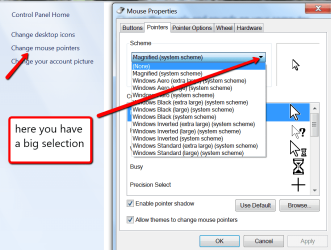
Right click on the desktop > Personalize > Change Mouse Pointer > Then see picture
 

Attachments

  • 2012-10-27_2326.png
    2012-10-27_2326.png
    50.8 KB · Views: 8

My Computer

Computer Manufacturer/Model Number
HP, Dell, Gateway, Toshiba - 4 laptops and 2 desktops
OS
Vista, Windows7, Mint Mate, Zorin, Windows 8
CPU
from 1.6GHz Duo to i7
Monitor(s) Displays
2x HP w2207
Hard Drives
5x HDD, 7x SSD, 12x Externals
Keyboard
with trackball - no mices
Mouse
Trackball mice
Internet Speed
DSL 6000

My Computer

Computer type
PC/Desktop
Computer Manufacturer/Model Number
Custom Build
OS
Windows 7 Home Premium 32-Bit - Build 7600 SP1
CPU
Intel Core i3-2120 3.30Ghz
Motherboard
Asus P8Z68-V LX Intel Z68 Socket H2 ATX
Memory
Kingston 4 GB DDR3 1333 mhz
Graphics Card(s)
AMD Radeon HD6670
Sound Card
Sound Blaster Audigy SE 24-Bit
Monitor(s) Displays
Asus VE228
Screen Resolution
1440 X 900
Hard Drives
OCZ Vertex 3 120 GB Sata 3 SSD ==
Kingston SH103/S3 120 G Hyper X 120 GB SSD ==
Western Digital 500 GB Caviar Green 7200 RPM ==
PSU
Corsair CX600M == 600 Watt
Case
NZXT Apollo - Silver with Clear Side Panel
Cooling
Three 120 mm Fans
Keyboard
Microsoft Natural 4000
Mouse
Microsoft Custom Optical 3000
Internet Speed
AT&T Fiber Optic Wireless Network
Antivirus
Microsoft Security Essentials
Browser
Chrome
Other Info
120 mm Blue LED Fan -- Three Blue LED Lazer Light Sticks
Right click on the desktop > Personalize > Change Mouse Pointer > Then see picture

But I don't use a mouse ... I'm on my iPad now so will look tomorrow -- but -- I don't remember ever seeing that there.
 

My Computer

Computer type
Laptop
Computer Manufacturer/Model Number
MS Windows 7 Home Premium 64-bit SP1
OS
Win 7 64 bit
CPU
Intel Atom N450 1.66 ghz
Motherboard
Dell Inc 00DKZ
Memory
2 gig single channel DDR2
Graphics Card(s)
Generic PnP Monitor, Intwl Graphics Media Accelerator 3150
Screen Resolution
1024x600
Hard Drives
2.44gb Western Digital
Mouse
none
Internet Speed
WiFi
Antivirus
MalwareBytes
Browser
Firefox
Other Info
Dell 14z 5432

My Computer

Computer type
Laptop
Computer Manufacturer/Model Number
MS Windows 7 Home Premium 64-bit SP1
OS
Win 7 64 bit
CPU
Intel Atom N450 1.66 ghz
Motherboard
Dell Inc 00DKZ
Memory
2 gig single channel DDR2
Graphics Card(s)
Generic PnP Monitor, Intwl Graphics Media Accelerator 3150
Screen Resolution
1024x600
Hard Drives
2.44gb Western Digital
Mouse
none
Internet Speed
WiFi
Antivirus
MalwareBytes
Browser
Firefox
Other Info
Dell 14z 5432

My Computer

Computer type
PC/Desktop
Computer Manufacturer/Model Number
Apple 17" iMac MA199LL (Early 2006)
OS
Windows 8 Pro (32-bit)
CPU
1.83GHz Intel Core Duo
Memory
2GB 667MHz DDR2 SDRAM (PC2-5300) (upgrade)
Graphics Card(s)
ATI Radeon X1600 with 128MB GDDR3 memory
Monitor(s) Displays
17-inch TFT active-matrix LCD, millions of colors
Screen Resolution
1440 x 900
Hard Drives
Hitachi 320GB HDT721032SLA360 7200RPM SATA II (upgrade)
Keyboard
Microsoft Wired Keyboard 600
Mouse
Microsoft Basic Optical Mouse v2.0
Internet Speed
4 Mbps
Antivirus
Microsoft Security Essentials
Browser
Google Chrome
Other Info
WEI:
Base Score: 3.9 Processor: 4.4 Memory 4.7
Graphics: 3.9 Gaming Graphics: 4.1 Primary HD: 5.9
The option for a laptop is still the same. Windows 7 is still windows 7 on a laptop. If you hook a mouse to a laptop it still moves the mouse pointer. Change it the sameway as you would on your desktop, as suggested.
 

My Computer

Computer type
PC/Desktop
Computer Manufacturer/Model Number
Skylake Special #666
OS
Windows 10 Pro x64
CPU
Intel Core i7 6700K
Motherboard
Asus Sabertooth Z170 Mark 1
Memory
GSkill TridentZ RGB 16GB 3600 16-16-16-36
Graphics Card(s)
EVGA GTX 980 Ti SC x2
Sound Card
Realtek High Definition
Monitor(s) Displays
AOC G2460PG
Screen Resolution
1920 x 1080 144Hz
Hard Drives
Samsung 860 Pro 256GB, Seagate Barracuda 4TB x2
PSU
EVGA 1000 P2, EVGA White Custom Braided Cables
Case
Corsair Vengeance C70 Gunmetal Black
Cooling
Corsair H100i v2, Corsair ML120 x2, Thermal Grizzly Kryonaut
Keyboard
Logitech G910 Orion Spectrum
Mouse
Logitech G700s
Internet Speed
Verizon Fios Quantum Gateway 75/75
Antivirus
Windows Defender, Malwarebytes Free 3.8.3
Browser
Chrome
Other Info
Corsair SP120 x4, LG Blu-ray Drive, Durabrand HT-395 100 Watt Dolby Digital Amp, Corsair H2100 Wireless 7.1 Headset
Well, I changed it -- twice -- but I still have a small pointer, not the hand icon I chose.
 

My Computer

Computer type
Laptop
Computer Manufacturer/Model Number
MS Windows 7 Home Premium 64-bit SP1
OS
Win 7 64 bit
CPU
Intel Atom N450 1.66 ghz
Motherboard
Dell Inc 00DKZ
Memory
2 gig single channel DDR2
Graphics Card(s)
Generic PnP Monitor, Intwl Graphics Media Accelerator 3150
Screen Resolution
1024x600
Hard Drives
2.44gb Western Digital
Mouse
none
Internet Speed
WiFi
Antivirus
MalwareBytes
Browser
Firefox
Other Info
Dell 14z 5432
Are you clicking apply and ok ? Just don`t understand why you`re having trouble with this.
 

My Computer

Computer type
PC/Desktop
Computer Manufacturer/Model Number
Skylake Special #666
OS
Windows 10 Pro x64
CPU
Intel Core i7 6700K
Motherboard
Asus Sabertooth Z170 Mark 1
Memory
GSkill TridentZ RGB 16GB 3600 16-16-16-36
Graphics Card(s)
EVGA GTX 980 Ti SC x2
Sound Card
Realtek High Definition
Monitor(s) Displays
AOC G2460PG
Screen Resolution
1920 x 1080 144Hz
Hard Drives
Samsung 860 Pro 256GB, Seagate Barracuda 4TB x2
PSU
EVGA 1000 P2, EVGA White Custom Braided Cables
Case
Corsair Vengeance C70 Gunmetal Black
Cooling
Corsair H100i v2, Corsair ML120 x2, Thermal Grizzly Kryonaut
Keyboard
Logitech G910 Orion Spectrum
Mouse
Logitech G700s
Internet Speed
Verizon Fios Quantum Gateway 75/75
Antivirus
Windows Defender, Malwarebytes Free 3.8.3
Browser
Chrome
Other Info
Corsair SP120 x4, LG Blu-ray Drive, Durabrand HT-395 100 Watt Dolby Digital Amp, Corsair H2100 Wireless 7.1 Headset
There is no hand. Just arrows.
 
Last edited:

My Computer

Computer type
PC/Desktop
Computer Manufacturer/Model Number
Skylake Special #666
OS
Windows 10 Pro x64
CPU
Intel Core i7 6700K
Motherboard
Asus Sabertooth Z170 Mark 1
Memory
GSkill TridentZ RGB 16GB 3600 16-16-16-36
Graphics Card(s)
EVGA GTX 980 Ti SC x2
Sound Card
Realtek High Definition
Monitor(s) Displays
AOC G2460PG
Screen Resolution
1920 x 1080 144Hz
Hard Drives
Samsung 860 Pro 256GB, Seagate Barracuda 4TB x2
PSU
EVGA 1000 P2, EVGA White Custom Braided Cables
Case
Corsair Vengeance C70 Gunmetal Black
Cooling
Corsair H100i v2, Corsair ML120 x2, Thermal Grizzly Kryonaut
Keyboard
Logitech G910 Orion Spectrum
Mouse
Logitech G700s
Internet Speed
Verizon Fios Quantum Gateway 75/75
Antivirus
Windows Defender, Malwarebytes Free 3.8.3
Browser
Chrome
Other Info
Corsair SP120 x4, LG Blu-ray Drive, Durabrand HT-395 100 Watt Dolby Digital Amp, Corsair H2100 Wireless 7.1 Headset
Under Mouse Pointers I have more than arrows. "Link Select" is at the bottom of the list and is the large hand.

Apply is greyed out but I choose OK.
 

My Computer

Computer type
Laptop
Computer Manufacturer/Model Number
MS Windows 7 Home Premium 64-bit SP1
OS
Win 7 64 bit
CPU
Intel Atom N450 1.66 ghz
Motherboard
Dell Inc 00DKZ
Memory
2 gig single channel DDR2
Graphics Card(s)
Generic PnP Monitor, Intwl Graphics Media Accelerator 3150
Screen Resolution
1024x600
Hard Drives
2.44gb Western Digital
Mouse
none
Internet Speed
WiFi
Antivirus
MalwareBytes
Browser
Firefox
Other Info
Dell 14z 5432
Choose the large black arrow, is apply still grayed out ? That is the problem.
Is that some theme ? Do you have allow themes to change cursor checked ?
 

My Computer

Computer type
PC/Desktop
Computer Manufacturer/Model Number
Skylake Special #666
OS
Windows 10 Pro x64
CPU
Intel Core i7 6700K
Motherboard
Asus Sabertooth Z170 Mark 1
Memory
GSkill TridentZ RGB 16GB 3600 16-16-16-36
Graphics Card(s)
EVGA GTX 980 Ti SC x2
Sound Card
Realtek High Definition
Monitor(s) Displays
AOC G2460PG
Screen Resolution
1920 x 1080 144Hz
Hard Drives
Samsung 860 Pro 256GB, Seagate Barracuda 4TB x2
PSU
EVGA 1000 P2, EVGA White Custom Braided Cables
Case
Corsair Vengeance C70 Gunmetal Black
Cooling
Corsair H100i v2, Corsair ML120 x2, Thermal Grizzly Kryonaut
Keyboard
Logitech G910 Orion Spectrum
Mouse
Logitech G700s
Internet Speed
Verizon Fios Quantum Gateway 75/75
Antivirus
Windows Defender, Malwarebytes Free 3.8.3
Browser
Chrome
Other Info
Corsair SP120 x4, LG Blu-ray Drive, Durabrand HT-395 100 Watt Dolby Digital Amp, Corsair H2100 Wireless 7.1 Headset

My Computer

Computer type
PC/Desktop
Computer Manufacturer/Model Number
Custom Build
OS
Windows 7 Home Premium 32-Bit - Build 7600 SP1
CPU
Intel Core i3-2120 3.30Ghz
Motherboard
Asus P8Z68-V LX Intel Z68 Socket H2 ATX
Memory
Kingston 4 GB DDR3 1333 mhz
Graphics Card(s)
AMD Radeon HD6670
Sound Card
Sound Blaster Audigy SE 24-Bit
Monitor(s) Displays
Asus VE228
Screen Resolution
1440 X 900
Hard Drives
OCZ Vertex 3 120 GB Sata 3 SSD ==
Kingston SH103/S3 120 G Hyper X 120 GB SSD ==
Western Digital 500 GB Caviar Green 7200 RPM ==
PSU
Corsair CX600M == 600 Watt
Case
NZXT Apollo - Silver with Clear Side Panel
Cooling
Three 120 mm Fans
Keyboard
Microsoft Natural 4000
Mouse
Microsoft Custom Optical 3000
Internet Speed
AT&T Fiber Optic Wireless Network
Antivirus
Microsoft Security Essentials
Browser
Chrome
Other Info
120 mm Blue LED Fan -- Three Blue LED Lazer Light Sticks
It is Windows Aero System Screen. No large black arrow. Is there another I should try?

(if I don't respond quickly, it is due to the hurricane)
 

My Computer

Computer type
Laptop
Computer Manufacturer/Model Number
MS Windows 7 Home Premium 64-bit SP1
OS
Win 7 64 bit
CPU
Intel Atom N450 1.66 ghz
Motherboard
Dell Inc 00DKZ
Memory
2 gig single channel DDR2
Graphics Card(s)
Generic PnP Monitor, Intwl Graphics Media Accelerator 3150
Screen Resolution
1024x600
Hard Drives
2.44gb Western Digital
Mouse
none
Internet Speed
WiFi
Antivirus
MalwareBytes
Browser
Firefox
Other Info
Dell 14z 5432
Ah! Thanks for that link. I read that in my Kindle last night but forgot (symptom of my illness). Cursor is now big and black.
 

My Computer

Computer type
Laptop
Computer Manufacturer/Model Number
MS Windows 7 Home Premium 64-bit SP1
OS
Win 7 64 bit
CPU
Intel Atom N450 1.66 ghz
Motherboard
Dell Inc 00DKZ
Memory
2 gig single channel DDR2
Graphics Card(s)
Generic PnP Monitor, Intwl Graphics Media Accelerator 3150
Screen Resolution
1024x600
Hard Drives
2.44gb Western Digital
Mouse
none
Internet Speed
WiFi
Antivirus
MalwareBytes
Browser
Firefox
Other Info
Dell 14z 5432
Gladly! Just tell me how.
 

My Computer

Computer type
Laptop
Computer Manufacturer/Model Number
MS Windows 7 Home Premium 64-bit SP1
OS
Win 7 64 bit
CPU
Intel Atom N450 1.66 ghz
Motherboard
Dell Inc 00DKZ
Memory
2 gig single channel DDR2
Graphics Card(s)
Generic PnP Monitor, Intwl Graphics Media Accelerator 3150
Screen Resolution
1024x600
Hard Drives
2.44gb Western Digital
Mouse
none
Internet Speed
WiFi
Antivirus
MalwareBytes
Browser
Firefox
Other Info
Dell 14z 5432
Back
Top