Solved How to change entries in the "System Configuration" window?

jdb007

New member
Local time
5:46 AM
Messages
14
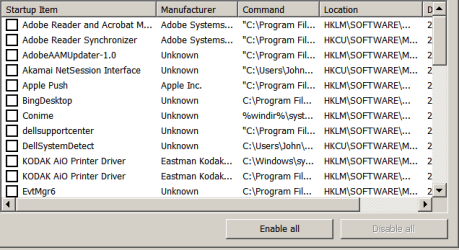
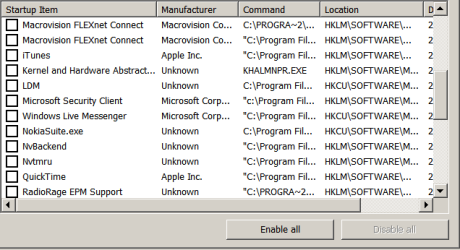
In the "SYSTEMS CONFIGURATION" window, under the "Startup" tab I have a few entries of unwanted software items that need removing.

e.g. Radiorage, Conime, Logitech (no Logitech devices attached now)

and some Unidentified software that looks a little suspicious :axe:

How and where can I delete these items safely (Registry using REGEDIT) ??

Thanks
JDB007
 

My Computer My Computer

At a glance

Windows 7 Home Premium 64 bit4 GbyteNVidia GT440
Computer type
PC/Desktop
Computer Manufacturer/Model Number
Dell Dimension 9200
OS
Windows 7 Home Premium 64 bit
Memory
4 Gbyte
Graphics Card(s)
NVidia GT440
Antivirus
MSE
Browser
Bing

My Computer My Computer

At a glance

W7 Pro SP1 64biti78GBIntel HD Graphics
Computer type
Laptop
Computer Manufacturer/Model Number
Employer provided Dell Latitude
OS
W7 Pro SP1 64bit
CPU
i7
Memory
8GB
Graphics Card(s)
Intel HD Graphics
Hard Drives
crappy SSD
Antivirus
Employer mandated Symantec Endpoint Protection
Browser
Pale Moon 64bit, IE11 64bit & Chrome 64bit
Ok, Programs and Features already done and monitored daily.
Attached screenshots (x3) show what's in the Start-up tab below. Anything with "Unknown" origin is suspicious or NOT required :rolleyes:

attachment.php


attachment.php


attachment.php


Thanks JDB007
 

Attachments

  • Screenshot 1.PNG
    Screenshot 1.PNG
    8.6 KB · Views: 58
  • Screenshot 2.PNG
    Screenshot 2.PNG
    8.3 KB · Views: 58
  • Screenshot 3.PNG
    Screenshot 3.PNG
    7.9 KB · Views: 58

My Computer My Computer

At a glance

Windows 7 Home Premium 64 bit4 GbyteNVidia GT440
Computer type
PC/Desktop
Computer Manufacturer/Model Number
Dell Dimension 9200
OS
Windows 7 Home Premium 64 bit
Memory
4 Gbyte
Graphics Card(s)
NVidia GT440
Antivirus
MSE
Browser
Bing
There are several things in that list that I would uninstall...
radiorage home page guardian
radiorage search scope monitor
search protection
searchprotection
java (see if you miss it)

There is nothing to install with Process Explorer. Give it a try. See my other post.
 

My Computer My Computer

At a glance

W7 Pro SP1 64biti78GBIntel HD Graphics
Computer type
Laptop
Computer Manufacturer/Model Number
Employer provided Dell Latitude
OS
W7 Pro SP1 64bit
CPU
i7
Memory
8GB
Graphics Card(s)
Intel HD Graphics
Hard Drives
crappy SSD
Antivirus
Employer mandated Symantec Endpoint Protection
Browser
Pale Moon 64bit, IE11 64bit & Chrome 64bit
Yes I would agree BUT the problem is I cannot find where they are installed I have searched the whole PC and NOTHING is displayed ?? Is JAVA not important ??

Thanks for your assistance

JDB007
 

My Computer My Computer

At a glance

Windows 7 Home Premium 64 bit4 GbyteNVidia GT440
Computer type
PC/Desktop
Computer Manufacturer/Model Number
Dell Dimension 9200
OS
Windows 7 Home Premium 64 bit
Memory
4 Gbyte
Graphics Card(s)
NVidia GT440
Antivirus
MSE
Browser
Bing
You will probably never miss java.

If you need it, then the website or application will probably let you know.

If you don't need it, then you are taking a huge risk for no benefit.


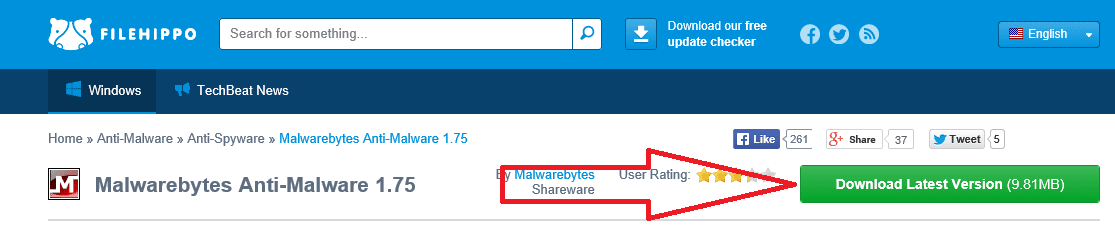
Install Malwarebytes from here:
http://www.filehippo.com/download_malwarebytes_anti_malware/

m.png

Near the end of the installation, uncheck the trial offer for the pro version.

Do the quick scan first and let it remove what it finds...
...then do a full scan and let it remove what it finds.
 

My Computer My Computer

At a glance

W7 Pro SP1 64biti78GBIntel HD Graphics
Computer type
Laptop
Computer Manufacturer/Model Number
Employer provided Dell Latitude
OS
W7 Pro SP1 64bit
CPU
i7
Memory
8GB
Graphics Card(s)
Intel HD Graphics
Hard Drives
crappy SSD
Antivirus
Employer mandated Symantec Endpoint Protection
Browser
Pale Moon 64bit, IE11 64bit & Chrome 64bit
After you scan with Malwarebytes...

You could try cCleaner - download the free version from Piriform.com (3rd on the list of download sites)

Select Tools on the left hand pane and see what Unistall gives you. If you see the questionable applications there, uninstall them.

If you're sure that the applications have been uninstalled, click Startup in cCleaner Tools
On the Windows tab, select / highlight those suspicious entries and click the disable button on the right hand side of the window.

When all of the suspicious ones are disabled, exit cCleaner and restart the machine

Then launch cCleaner and select Tools then Startup category
Again, n the Windows tab, select / highlight those suspicious entries and click the delete button. This only removes the entries from the list, nothing else.
 

My Computer My Computer

At a glance

x64 (6.3.9600) Win8.1 Pro & soon dual boot x6...AMD A6-3420M APU with Radeon(tm) HD Graphics6.00 GBAMD Radeon(TM) HD 6520G
Computer type
Laptop
Computer Manufacturer/Model Number
HP Pavilion dv6-6c10us
OS
x64 (6.3.9600) Win8.1 Pro & soon dual boot x64 (6.1.7601) Win7_SP1 HomePrem
CPU
AMD A6-3420M APU with Radeon(tm) HD Graphics
Motherboard
Hewlett-Packard 1805
Memory
6.00 GB
Graphics Card(s)
AMD Radeon(TM) HD 6520G
Sound Card
(1) AMD High Definition Audio Device (2) IDT High Definiti
Monitor(s) Displays
HP W2072a 20" LCD (1600 x 900) @ 60 Hz
Screen Resolution
1366 x 768 x 32 bits (4294967296 colors) @ 60 Hz
Hard Drives
ST640LM0 00 HM641JI SATA Disk Device
Keyboard
Logitech k520 wireless KB
Mouse
Logitech m320 wireless mouse (bundled with KB)
Internet Speed
15/5 | 54 MB Wireless 'n'
Antivirus
Realtime: Defender or Avast | On-demand: Malwarebytes, ESET
Browser
IE 11 on Win8, IE 10 on win 7
Other Info
Media: [Gimp, Audacity, VLC] || Comm: [WEmail 2012, Skype] || Productivity: [OpenOffice,| Textpad] || Utils: [Sysinternals, cCleaner, Speccy, Defraggler]
Thanks I will see what that turns up

JDB007
 

My Computer My Computer

At a glance

Windows 7 Home Premium 64 bit4 GbyteNVidia GT440
Computer type
PC/Desktop
Computer Manufacturer/Model Number
Dell Dimension 9200
OS
Windows 7 Home Premium 64 bit
Memory
4 Gbyte
Graphics Card(s)
NVidia GT440
Antivirus
MSE
Browser
Bing

My Computer My Computer

At a glance

Windows 10 Pro. 64/ version 1709 Windows 7 Pr...Intel i7-6800K @ 4.3Corsair Platinum 16 gig @2400EVGA GTX 1070 OC
Computer type
PC/Desktop
Computer Manufacturer/Model Number
Home made Desktop
OS
Windows 10 Pro. 64/ version 1709 Windows 7 Pro/64
CPU
Intel i7-6800K @ 4.3
Motherboard
ASUS X-99 Deluxe II
Memory
Corsair Platinum 16 gig @2400
Graphics Card(s)
EVGA GTX 1070 OC
Monitor(s) Displays
Asus 27" LED LCD/VE278Q
Screen Resolution
1920-1080 or 1280-720 HDMI
Hard Drives
INTEL SSD 730-240 Gb Sata 3.0/
PSU
EVGA Platium 1200W
Case
Phanteks Luxe Tempered Glass 8 fans/ one radiator
Cooling
XSPC/ Water Cooled CPU
Keyboard
Das 4 Professional
Mouse
Logitech M705/MX Anywhere 2-S
Internet Speed
100 mbits
Antivirus
Microsoft Security Essentials/ Malwarebytes Premium 3.0/ SAS
Browser
I.E. 11 default/Firefox/ ISP Time Warner Cable/Spectrum
Other Info
LG BluRay Burner/
Sound system-KLipsch-THX/
Icy Dock ssd Hot Swap bays.
Thanks for the input .... the file C:\Windows\System32\drivers\conime.exe is NOT there !! Is this where it should be, or is this where the "nasty " file is laying and would be deleted ??

JDB007
 

My Computer My Computer

At a glance

Windows 7 Home Premium 64 bit4 GbyteNVidia GT440
Computer type
PC/Desktop
Computer Manufacturer/Model Number
Dell Dimension 9200
OS
Windows 7 Home Premium 64 bit
Memory
4 Gbyte
Graphics Card(s)
NVidia GT440
Antivirus
MSE
Browser
Bing
I do not have it in a fresh install of W7 in a virtual machine. Nor do I have it on any other W7 computer that I checked. See this thread: non-existent conime.exe wanting to be on start-up list - Microsoft Community

I recently came across an infection that hid itself from the Windows file Explorer in a way that I've not seen before. So, let's let the professionals that wrote Malwarebytes determine if any nasties can be found.
 

My Computer My Computer

At a glance

W7 Pro SP1 64biti78GBIntel HD Graphics
Computer type
Laptop
Computer Manufacturer/Model Number
Employer provided Dell Latitude
OS
W7 Pro SP1 64bit
CPU
i7
Memory
8GB
Graphics Card(s)
Intel HD Graphics
Hard Drives
crappy SSD
Antivirus
Employer mandated Symantec Endpoint Protection
Browser
Pale Moon 64bit, IE11 64bit & Chrome 64bit
I am running a FULL scan with MST right now and will follow this again with Malware - will post the results asap

Thanks

JDB007
 

My Computer My Computer

At a glance

Windows 7 Home Premium 64 bit4 GbyteNVidia GT440
Computer type
PC/Desktop
Computer Manufacturer/Model Number
Dell Dimension 9200
OS
Windows 7 Home Premium 64 bit
Memory
4 Gbyte
Graphics Card(s)
NVidia GT440
Antivirus
MSE
Browser
Bing
See: conime.exe | ThreatExpert statistics

You might also want to scan your system with Farbar System Recovery tool.

Download the Farbar Recovery Scan Tool (FRST) Click here
  1. Select the version that applies to your system: 32-bit OR 64-bit
    .
  2. Click the Save button
    Default save location is your Downloads folder
    :note: If the SmartFilter bar is presented, click the Actions button and click Don't Run (saves FRST but does not run it)
    .
  3. Double-click FRST or FRST64 to launch the utility
    :info: FRST is the 32-bit version / FRST64 is the 64-bit version
    • Click the Yes button to confirm UAC
      .
    • Click the Yes button on the Warranty disclaimer window.
      .
    • Tick [[FONT=Webdings, serif]a[/FONT]] all Whitelist checkboxes
      .
    • Tick [[FONT=Webdings, serif]a[/FONT]] Addition.txt in the Optional scan list
      .
  4. Click the Scan button to begin scanning.
    .
  5. FRST creates two logs when the scan has finished, they are located in the same folder where FRST was launched
Thanks
 

My Computer My Computer

At a glance

x64 (6.3.9600) Win8.1 Pro & soon dual boot x6...AMD A6-3420M APU with Radeon(tm) HD Graphics6.00 GBAMD Radeon(TM) HD 6520G
Computer type
Laptop
Computer Manufacturer/Model Number
HP Pavilion dv6-6c10us
OS
x64 (6.3.9600) Win8.1 Pro & soon dual boot x64 (6.1.7601) Win7_SP1 HomePrem
CPU
AMD A6-3420M APU with Radeon(tm) HD Graphics
Motherboard
Hewlett-Packard 1805
Memory
6.00 GB
Graphics Card(s)
AMD Radeon(TM) HD 6520G
Sound Card
(1) AMD High Definition Audio Device (2) IDT High Definiti
Monitor(s) Displays
HP W2072a 20" LCD (1600 x 900) @ 60 Hz
Screen Resolution
1366 x 768 x 32 bits (4294967296 colors) @ 60 Hz
Hard Drives
ST640LM0 00 HM641JI SATA Disk Device
Keyboard
Logitech k520 wireless KB
Mouse
Logitech m320 wireless mouse (bundled with KB)
Internet Speed
15/5 | 54 MB Wireless 'n'
Antivirus
Realtime: Defender or Avast | On-demand: Malwarebytes, ESET
Browser
IE 11 on Win8, IE 10 on win 7
Other Info
Media: [Gimp, Audacity, VLC] || Comm: [WEmail 2012, Skype] || Productivity: [OpenOffice,| Textpad] || Utils: [Sysinternals, cCleaner, Speccy, Defraggler]
What is MST?
 

My Computer My Computer

At a glance

Windows 10 Pro. 64/ version 1709 Windows 7 Pr...Intel i7-6800K @ 4.3Corsair Platinum 16 gig @2400EVGA GTX 1070 OC
Computer type
PC/Desktop
Computer Manufacturer/Model Number
Home made Desktop
OS
Windows 10 Pro. 64/ version 1709 Windows 7 Pro/64
CPU
Intel i7-6800K @ 4.3
Motherboard
ASUS X-99 Deluxe II
Memory
Corsair Platinum 16 gig @2400
Graphics Card(s)
EVGA GTX 1070 OC
Monitor(s) Displays
Asus 27" LED LCD/VE278Q
Screen Resolution
1920-1080 or 1280-720 HDMI
Hard Drives
INTEL SSD 730-240 Gb Sata 3.0/
PSU
EVGA Platium 1200W
Case
Phanteks Luxe Tempered Glass 8 fans/ one radiator
Cooling
XSPC/ Water Cooled CPU
Keyboard
Das 4 Professional
Mouse
Logitech M705/MX Anywhere 2-S
Internet Speed
100 mbits
Antivirus
Microsoft Security Essentials/ Malwarebytes Premium 3.0/ SAS
Browser
I.E. 11 default/Firefox/ ISP Time Warner Cable/Spectrum
Other Info
LG BluRay Burner/
Sound system-KLipsch-THX/
Icy Dock ssd Hot Swap bays.

My Computer My Computer

At a glance

W7 Pro SP1 64biti78GBIntel HD Graphics
Computer type
Laptop
Computer Manufacturer/Model Number
Employer provided Dell Latitude
OS
W7 Pro SP1 64bit
CPU
i7
Memory
8GB
Graphics Card(s)
Intel HD Graphics
Hard Drives
crappy SSD
Antivirus
Employer mandated Symantec Endpoint Protection
Browser
Pale Moon 64bit, IE11 64bit & Chrome 64bit
You asked about how to remove startup programs using REGEDIT.

This will help to get rid of some of your startup programs.

As you install new programs onto a Windows computer at your home or office, some of these applications may add themselves to the startup list. As this list grows, your computer may appear to slow down, a consequence of so many programs running in the background. You can reduce the number of programs that auto-start by removing them from the startup entries in the Windows registry using Regedit. Editing the Windows registry manually can be risky, so you should always create a backup before you do this.

Step 1
Click "Start," then click "Run," enter "regedit" and click "Ok" for systems older than Windows 7. For Windows 7 systems, click "Start," type "regedit" in the search box and press "Enter."

Step 2
Back up your registry. Click "File," select "Export" and navigate to a location to save your backup. Click "Ok."

Step 3
Navigate to each of the following in this list of registry keys and delete any programs you do not wish to run at startup:
HKLM\Software\Microsoft\Windows\CurrentVersion\Run HKLM\Software\Microsoft\Windows\CurrentVersion\RunOnce HKLM\Software\Microsoft\Windows\CurrentVersion\RunServices HKLM\Software\Microsoft\Windows\CurrentVersion\RunServicesOnce HKCU\Software\Microsoft\Windows\CurrentVersion\Run HKCU\Software\Microsoft\Windows\CurrentVersion\RunOnce HKCU\Software\Microsoft\Windows\CurrentVersion\RunOnceEx

Step 4
Reboot your computer using a clean shutdown after you've made the desired changes.
 

My Computers My Computers

  • At a glance

    Win7, Win10, Win11
    Computer type
    PC/Desktop
    Computer Manufacturer/Model Number
    HP Pavilion 6751c
    OS
    Win7, Win10, Win11
    Internet Speed
    100 Mbps
    Antivirus
    Norton 360
    Browser
    IE 11
  • At a glance

    Win7, Win10, Win11
    Computer type
    PC/Desktop
    System Manufacturer/Model Number
    HP ENVY 750-514 & Dell XPS 8960
    OS
    Win7, Win10, Win11
    Antivirus
    Norton 360
Thanks I have already looked into this and deleted "some" suspicious entries (not too many !) and will leave for a few days to ensure we are still running.

Cheers

JDB007
 

My Computer My Computer

At a glance

Windows 7 Home Premium 64 bit4 GbyteNVidia GT440
Computer type
PC/Desktop
Computer Manufacturer/Model Number
Dell Dimension 9200
OS
Windows 7 Home Premium 64 bit
Memory
4 Gbyte
Graphics Card(s)
NVidia GT440
Antivirus
MSE
Browser
Bing

My Computer My Computer

At a glance

Windows 7 Home Premium 64 bit4 GbyteNVidia GT440
Computer type
PC/Desktop
Computer Manufacturer/Model Number
Dell Dimension 9200
OS
Windows 7 Home Premium 64 bit
Memory
4 Gbyte
Graphics Card(s)
NVidia GT440
Antivirus
MSE
Browser
Bing
Thanks jbd007,

I'm going to ask for help on this, there's a lot of things in the output that I'm not sure about.

Bill
.
 

My Computer My Computer

At a glance

x64 (6.3.9600) Win8.1 Pro & soon dual boot x6...AMD A6-3420M APU with Radeon(tm) HD Graphics6.00 GBAMD Radeon(TM) HD 6520G
Computer type
Laptop
Computer Manufacturer/Model Number
HP Pavilion dv6-6c10us
OS
x64 (6.3.9600) Win8.1 Pro & soon dual boot x64 (6.1.7601) Win7_SP1 HomePrem
CPU
AMD A6-3420M APU with Radeon(tm) HD Graphics
Motherboard
Hewlett-Packard 1805
Memory
6.00 GB
Graphics Card(s)
AMD Radeon(TM) HD 6520G
Sound Card
(1) AMD High Definition Audio Device (2) IDT High Definiti
Monitor(s) Displays
HP W2072a 20" LCD (1600 x 900) @ 60 Hz
Screen Resolution
1366 x 768 x 32 bits (4294967296 colors) @ 60 Hz
Hard Drives
ST640LM0 00 HM641JI SATA Disk Device
Keyboard
Logitech k520 wireless KB
Mouse
Logitech m320 wireless mouse (bundled with KB)
Internet Speed
15/5 | 54 MB Wireless 'n'
Antivirus
Realtime: Defender or Avast | On-demand: Malwarebytes, ESET
Browser
IE 11 on Win8, IE 10 on win 7
Other Info
Media: [Gimp, Audacity, VLC] || Comm: [WEmail 2012, Skype] || Productivity: [OpenOffice,| Textpad] || Utils: [Sysinternals, cCleaner, Speccy, Defraggler]
It looks like you have some 'adware' that may have been bundled with other programs that you downloaded.


Please download AdwCleaner by Xplode and save to your Desktop.
  • Double click on AdwCleaner.exe to run the tool.
    Vista/Windows 7/8 users right-click and select Run As Administrator.
  • Click on the Scan button.
  • AdwCleaner will begin...be patient as the scan may take some time to complete.
  • After the scan has finished, click on the Report button...a logfile (AdwCleaner[R#].txt) will open in Notepad for review (where the largest value of # represents the most recent report).
  • The contents of the log file may be confusing. Unless you see a program name that you know should not be removed, don't worry about it. If you see an entry you want to keep, let me know about it.
  • Copy and paste the contents of that logfile in your next reply.
  • A copy of all logfiles are saved in the C:\AdwCleaner folder which was created when running the tool.


I will need to look at this AdwCleaner .txt before advising you with what to do next. :)
 

My Computer My Computer

At a glance

Windows 7 Ultimate 32bit SP1Intel(R) Core(TM)2 Quad CPU @ 2.40GHz, 2400 MHz4 GBATI Radeon HD 2600 Pro
Computer type
PC/Desktop
Computer Manufacturer/Model Number
Bruce ... somewhere in his 40's
OS
Windows 7 Ultimate 32bit SP1
CPU
Intel(R) Core(TM)2 Quad CPU @ 2.40GHz, 2400 MHz
Motherboard
INTEL/D975XBX2
Memory
4 GB
Graphics Card(s)
ATI Radeon HD 2600 Pro
Monitor(s) Displays
Samsung SyncMaster 914v
Screen Resolution
1280 x 1024
Hard Drives
2/500GB each ... ST3500630AS ATA Device.
One is not connected
PSU
Rocketfish 700 W
Case
G.Skill Gigabyte Chassis
Keyboard
Standard PS/2 Keyboard
Mouse
Microsoft PS/2 Mouse
Internet Speed
DSL
Antivirus
Avira Internet Security
Browser
IE 11
Other Info
ATI HDMI Audio
Back
Top