Solved How to change OS language?

FlorinSabin

New member
Hello everyone. I have Windows 7 Home Premium installed on my laptop (which is my first pc) and it's language is Portuguese. I would like to change it to English or Romanian. Is it possible? Do i need to buy other Windows 7 in one of my desired languages? I'm asking this here because all i found in CP regarding language changing had to do with keyboard or non unicode programs or Windows Live language settings. Other than that i couldn't find anything else. I feel like i should mention i'm totally noob (only 9 months since i have this laptop)
 

Attachments
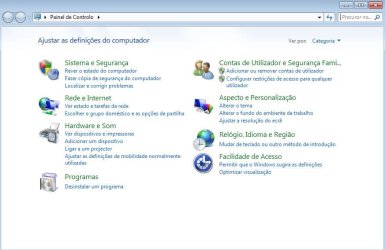
  • CP.JPG
    CP.JPG
    75.5 KB · Views: 51
Last edited:

My Computer

Computer Manufacturer/Model Number
Emachine eME442
OS
Windows 7 Home Premium 64bit
CPU
AMD V160 2.4GHz
Memory
2Gb
Graphics Card(s)
ATI Mobility Radeon HD 4250
Sound Card
ATI High Definition Audio Device Realtek High Definition Aud
Screen Resolution
1366x768
Hello FlorinSabin,

Sorry, but only the Windows 7 Ultimate and Enterprise editions allow you to change the display language from the original language it was installed as. :(
 
Last edited:

My Computer

Computer type
PC/Desktop
Computer Manufacturer/Model Number
Self built custom
OS
64-bit Windows 11 Pro for Workstations
CPU
Intel i7-8700K OC'd to 5 GHz
Motherboard
ASUS ROG Maximus XI Formula Z390
Memory
64 GB (4x16GB) G.SKILL TridentZ RGB DDR4 3600 MHz
Graphics Card(s)
ASUS ROG-STRIX-GTX1080TI-O11G-GAMING
Sound Card
Integrated
Monitor(s) Displays
2 x Samsung Odyssey G7 27"
Screen Resolution
2560x1440
Hard Drives
1TB Samsung 990 PRO M.2,
4TB Samsung 990 PRO PRO M.2,
TerraMaster F8 SSD Plus NAS
PSU
Seasonic Prime Titanium 850W
Case
Thermaltake Core P3
Cooling
Corsair Hydro H115i
Keyboard
Logitech wireless K800
Mouse
Logitech MX Master 4
Internet Speed
2 Gb/s Download and 100 Mb/s Upload
Antivirus
Malwarebyte Anti-Malware Premium
Browser
Google Chrome
Other Info
Logitech Z625 speaker system,
Logitech BRIO 4K Pro webcam,
HP Color LaserJet Pro MFP M477fdn,
APC SMART-UPS RT 1000 XL - SURT1000XLI,
Galaxy S23 Plus phone
You could get a Home Premium installation dvd that is already in your chosen language - you can install that using the product key stickered on your machine.

Snag is - you may need to install some drivers specific to your machine - you can get them from the manufacturer website.

You will also need to download and install a bunch of updates, and install all your programs.
 

My Computers

System One System Two

  • Computer type
    PC/Desktop
    OS
    7 X64
    CPU
    i5 8400
    Motherboard
    gigabyte b365m ds3h
    Memory
    2x8gb 3200mhz
    Hard Drives
    various
    PSU
    pure power 11 400w cm
    Case
    Coolermaster
    Cooling
    cryorig m9i
  • Computer type
    PC/Desktop
    OS
    7x64
    CPU
    g5400
    Motherboard
    ga b365m ds3h
    Memory
    8gb ddr4 2400
    PSU
    xfx pro 450w
So I'm stuck up with Portuguese language. Anyway i was thinking, is it possible to put my current Windows on a USB stick? I would like to try to re-install my Windows. But when i bought my laptop, it didn't came up with any installation CD. When i first turned it on it took me trough installation steps.
 

My Computer

Computer Manufacturer/Model Number
Emachine eME442
OS
Windows 7 Home Premium 64bit
CPU
AMD V160 2.4GHz
Memory
2Gb
Graphics Card(s)
ATI Mobility Radeon HD 4250
Sound Card
ATI High Definition Audio Device Realtek High Definition Aud
Screen Resolution
1366x768
You already have a legitimate OEM product key, so you could download a Windows 7 ISO (English) and use that, as this excellent tutorial explains.

http://www.sevenforums.com/tutorials/219487-clean-reinstall-factory-oem-windows-7-a.html#post1839164

In your case you need the Windows 7 Home Premium 64-bit ISO - it's most important you choose the one that is the same version as your curreny system i.e. Home Premium 64-bit.

Just make sure you backup your personal data, you at least have a driver for your network adapter backed up, and that you have backup discs for any applications you have installed.

I would also create a set of factory recovery discs so that you can put your computer back to its factory state should the need arise. You need to do this before you do anything else. Your computer documentation or support site should have information on how to create your recovery discs.
 

My Computer

Computer Manufacturer/Model Number
HP Pavilion Elite 495UK
OS
Windows 7 Ultimate SP1 64-Bit
CPU
Intel Core i7 870 @ 2.93GHz
Motherboard
MSI 2A9C (CPU1)
Memory
8Gb Dual-Channel DDR3 @ 664MHz
Graphics Card(s)
nVidia GeForce GTX 460 1024MB dedicated RAM
Sound Card
Realtek HD Audio
Monitor(s) Displays
HP2310i
Screen Resolution
1920 x 1080
Hard Drives
1x1954GB Hitachi HDS22020ALA 330 (RAID), 1x1954GB Hitachi External for backup and storage
PSU
460W
Case
HP Elite
Cooling
Air cooled
Keyboard
Logitech K750 solar-powered keyboard
Mouse
Logitech Wireless M180 mouse
Internet Speed
2Mb
Other Info
Pure Avanti Flow Internet Radio with iPod Dock, 64Gb iPod, HP USB Speakers, Sony MDR-V500 Headphones, Sony Vaio F-Series Laptop
at least have a driver for your network adapter backed up, and that you have backup discs for any applications you have installed.

I would also create a set of factory recovery discs so that you can put your computer back to its factory state should the need arise.

Wow. That is a lot of things i have never heard or did before :D
 

My Computer

Computer Manufacturer/Model Number
Emachine eME442
OS
Windows 7 Home Premium 64bit
CPU
AMD V160 2.4GHz
Memory
2Gb
Graphics Card(s)
ATI Mobility Radeon HD 4250
Sound Card
ATI High Definition Audio Device Realtek High Definition Aud
Screen Resolution
1366x768
at least have a driver for your network adapter backed up, and that you have backup discs for any applications you have installed.

I would also create a set of factory recovery discs so that you can put your computer back to its factory state should the need arise.

Wow. That is a lot of things i have never heard or did before :D

We're here to help. :)

If there's anything you're not sure of, just ask.
 

My Computer

Computer Manufacturer/Model Number
HP Pavilion Elite 495UK
OS
Windows 7 Ultimate SP1 64-Bit
CPU
Intel Core i7 870 @ 2.93GHz
Motherboard
MSI 2A9C (CPU1)
Memory
8Gb Dual-Channel DDR3 @ 664MHz
Graphics Card(s)
nVidia GeForce GTX 460 1024MB dedicated RAM
Sound Card
Realtek HD Audio
Monitor(s) Displays
HP2310i
Screen Resolution
1920 x 1080
Hard Drives
1x1954GB Hitachi HDS22020ALA 330 (RAID), 1x1954GB Hitachi External for backup and storage
PSU
460W
Case
HP Elite
Cooling
Air cooled
Keyboard
Logitech K750 solar-powered keyboard
Mouse
Logitech Wireless M180 mouse
Internet Speed
2Mb
Other Info
Pure Avanti Flow Internet Radio with iPod Dock, 64Gb iPod, HP USB Speakers, Sony MDR-V500 Headphones, Sony Vaio F-Series Laptop
Ok. First I'm gonna try to understand what exactly the terms mean and how everything is done.
 

My Computer

Computer Manufacturer/Model Number
Emachine eME442
OS
Windows 7 Home Premium 64bit
CPU
AMD V160 2.4GHz
Memory
2Gb
Graphics Card(s)
ATI Mobility Radeon HD 4250
Sound Card
ATI High Definition Audio Device Realtek High Definition Aud
Screen Resolution
1366x768
OK.

Read through the tutorial, take notes and if you look on the right of you screen when you have the tutorial open, you should see a link for the print version that you can print off it it helps.

Anything you're not sure of, just ask.
 

My Computer

Computer Manufacturer/Model Number
HP Pavilion Elite 495UK
OS
Windows 7 Ultimate SP1 64-Bit
CPU
Intel Core i7 870 @ 2.93GHz
Motherboard
MSI 2A9C (CPU1)
Memory
8Gb Dual-Channel DDR3 @ 664MHz
Graphics Card(s)
nVidia GeForce GTX 460 1024MB dedicated RAM
Sound Card
Realtek HD Audio
Monitor(s) Displays
HP2310i
Screen Resolution
1920 x 1080
Hard Drives
1x1954GB Hitachi HDS22020ALA 330 (RAID), 1x1954GB Hitachi External for backup and storage
PSU
460W
Case
HP Elite
Cooling
Air cooled
Keyboard
Logitech K750 solar-powered keyboard
Mouse
Logitech Wireless M180 mouse
Internet Speed
2Mb
Other Info
Pure Avanti Flow Internet Radio with iPod Dock, 64Gb iPod, HP USB Speakers, Sony MDR-V500 Headphones, Sony Vaio F-Series Laptop
That is bad advice. Besides the risk of potentially turning your computer into an expensive doorstop should the flashing process fail, changing the BIOS language would only affect the language you see when making changes to the CMOS and the POST screen. It will make no difference whatsoever to the language of the OS, as this is selected when the OS is installed (if your version of the OS permits you to do so).
 

My Computer

Computer type
PC/Desktop
Computer Manufacturer/Model Number
Dwarf Dwf/11/2012 r09/2013
OS
Windows 8.1 Pro RTM x64
CPU
Intel Core-i5-3570K 4-core @ 3.4GHz (Ivy Bridge) (OC 4.4GHz)
Motherboard
ASRock Z77 Extreme4-M
Memory
4 x 4GB DDR3-1600 Corsair Vengeance CMZ8GX3M2A1600C9B (16GB)
Graphics Card(s)
MSI GeForce GTX770 Gaming OC 2GB
Sound Card
Realtek High Definition on board solution (ALC 898)
Monitor(s) Displays
ViewSonic VA1912w Widescreen (VGA)
Screen Resolution
1440x900
Hard Drives
OCZ Agility 3 SSD 120GB SATA III x2 (RAID 0)
Samsung HD501LJ 500GB SATA II x2
Hitachi HDS721010CLA332 1TB SATA II
Iomega 1.5TB Ext USB 2.0
WD 2.0TB Ext USB 3.0
PSU
XFX Pro Series 850W Semi-Modular
Case
Gigabyte IF233
Cooling
1 x 120mm Front Inlet 1 x 120mm Rear Exhaust
Keyboard
Microsoft Comfort Curve Keyboard 3000 (USB)
Mouse
Microsoft Comfort Mouse 3000 for Business (USB)
Internet Speed
NetGear DG834Gv3 ADSL Modem/Router (Ethernet) ~4.0 Mb/s (O2)
Antivirus
Avast! 8.0.1497
Browser
IE 11
Other Info
Optical Drive: HL-DT-ST BD-RE BH10LS30 SATA Bluray
Lexmark S305 Printer/Scanner/Copier (USB)
WEI Score: 8.1/8.1/8.5/8.5/8.25
Asus Eee PC 1011PX Netbook (Windows 7 x86 Starter)
Yes! ... but there is a better solution.... u can flash the computer's bios ...and use a bios language to suit the user, opt to apply a same bios version or a newer bios version for the computer and if possible overide the whole system with the preferred language of the new bios... iT would be quite trouble~some, (this is a good idea if u plan to be able to read and have everything on the computer the same language or else some things will still be in the manufacturing language right^> but it wont cost anything besides time and some help on how to do a 100% problem free bios flash.

This is the best way to do a language swap!... somebody here might want to try it and see how a installed version of Windows 7 32bit reacts to this major system change and then report back... many of us want to do this...some more input is needed...>

This is not good advice.

By the OP's own admission, he is a new computer user and for that reason alone, I'd advise against flashing the BIOS as you can soon render your computer unbootable.

Yes, a reinstall is more time-consuming, but there's far less risk attached to it.

Do you have a source for this so-called BIOS fix?
 

My Computer

Computer Manufacturer/Model Number
HP Pavilion Elite 495UK
OS
Windows 7 Ultimate SP1 64-Bit
CPU
Intel Core i7 870 @ 2.93GHz
Motherboard
MSI 2A9C (CPU1)
Memory
8Gb Dual-Channel DDR3 @ 664MHz
Graphics Card(s)
nVidia GeForce GTX 460 1024MB dedicated RAM
Sound Card
Realtek HD Audio
Monitor(s) Displays
HP2310i
Screen Resolution
1920 x 1080
Hard Drives
1x1954GB Hitachi HDS22020ALA 330 (RAID), 1x1954GB Hitachi External for backup and storage
PSU
460W
Case
HP Elite
Cooling
Air cooled
Keyboard
Logitech K750 solar-powered keyboard
Mouse
Logitech Wireless M180 mouse
Internet Speed
2Mb
Other Info
Pure Avanti Flow Internet Radio with iPod Dock, 64Gb iPod, HP USB Speakers, Sony MDR-V500 Headphones, Sony Vaio F-Series Laptop
...
 
Last edited:

My Computer

OS
[Genuine Custom DOS 5.0] & [Genuine Custom Windows 7 Home Premium 64Bit SP1]
By the OP's own admission, he is a new computer user and for that reason alone, I'd advise against flashing the BIOS as you can soon render your computer unbootable.

Yes, a reinstall is more time-consuming, but there's far less risk attached to it.

Thumbs up. :D So let's take it step by step. When you say network adapter you refer to device i use to connect my laptop to internet? Just in case, i attached my USB and the card it use to connect to internet :) Do i need to do a backup for it?
 

Attachments

  • penusb.jpg
    penusb.jpg
    2.6 KB · Views: 117
  • cks.jpg
    cks.jpg
    1.9 KB · Views: 117
Last edited:

My Computer

Computer Manufacturer/Model Number
Emachine eME442
OS
Windows 7 Home Premium 64bit
CPU
AMD V160 2.4GHz
Memory
2Gb
Graphics Card(s)
ATI Mobility Radeon HD 4250
Sound Card
ATI High Definition Audio Device Realtek High Definition Aud
Screen Resolution
1366x768
I'm not familiar with the dongle you've posted, but in any event you'll need drivers for the USB port you plug it into.

Some computers use a wired (ethernet) network adapter, which is connected to the router with an ethernet cable.

Others (mainly laptops) use a wireless adapter.

Some even have both.

If you use either a wired or a wireless adapter you need drivers for it.

It'll probably pay you to download and save all your drivers anyway, which you can get from your manufacturer's website. You need them for the chipset, graphics, audio etc. although Windows 7 may provide drivers anyway.
 

My Computer

Computer Manufacturer/Model Number
HP Pavilion Elite 495UK
OS
Windows 7 Ultimate SP1 64-Bit
CPU
Intel Core i7 870 @ 2.93GHz
Motherboard
MSI 2A9C (CPU1)
Memory
8Gb Dual-Channel DDR3 @ 664MHz
Graphics Card(s)
nVidia GeForce GTX 460 1024MB dedicated RAM
Sound Card
Realtek HD Audio
Monitor(s) Displays
HP2310i
Screen Resolution
1920 x 1080
Hard Drives
1x1954GB Hitachi HDS22020ALA 330 (RAID), 1x1954GB Hitachi External for backup and storage
PSU
460W
Case
HP Elite
Cooling
Air cooled
Keyboard
Logitech K750 solar-powered keyboard
Mouse
Logitech Wireless M180 mouse
Internet Speed
2Mb
Other Info
Pure Avanti Flow Internet Radio with iPod Dock, 64Gb iPod, HP USB Speakers, Sony MDR-V500 Headphones, Sony Vaio F-Series Laptop
So how do i do a backup for my network adapter? Also, can i save backups on my laptop or can i save on a memory stick?
 

My Computer

Computer Manufacturer/Model Number
Emachine eME442
OS
Windows 7 Home Premium 64bit
CPU
AMD V160 2.4GHz
Memory
2Gb
Graphics Card(s)
ATI Mobility Radeon HD 4250
Sound Card
ATI High Definition Audio Device Realtek High Definition Aud
Screen Resolution
1366x768
When you download any software you should see a download bar at the bottom of your screen.

Click the down arrow on the right and choose Save As, then choose the location where you want to save it.

As for backups, it's best to have an external drive for them. If you try and save the backup to your internal drive you'll lose everything if the drive fails.
 

My Computer

Computer Manufacturer/Model Number
HP Pavilion Elite 495UK
OS
Windows 7 Ultimate SP1 64-Bit
CPU
Intel Core i7 870 @ 2.93GHz
Motherboard
MSI 2A9C (CPU1)
Memory
8Gb Dual-Channel DDR3 @ 664MHz
Graphics Card(s)
nVidia GeForce GTX 460 1024MB dedicated RAM
Sound Card
Realtek HD Audio
Monitor(s) Displays
HP2310i
Screen Resolution
1920 x 1080
Hard Drives
1x1954GB Hitachi HDS22020ALA 330 (RAID), 1x1954GB Hitachi External for backup and storage
PSU
460W
Case
HP Elite
Cooling
Air cooled
Keyboard
Logitech K750 solar-powered keyboard
Mouse
Logitech Wireless M180 mouse
Internet Speed
2Mb
Other Info
Pure Avanti Flow Internet Radio with iPod Dock, 64Gb iPod, HP USB Speakers, Sony MDR-V500 Headphones, Sony Vaio F-Series Laptop
Ok. This week i should receive the last salary from where i last worked. So I was thinking to buy 2 memory sticks, 16GB each (16 euro each). That should be enough, right? I was thinking in buying memory cards (MicroSD) but after i lost all my data from one i quit. Also Cd's are not a option. Both CD and Memory Cards require special attention :(
 

My Computer

Computer Manufacturer/Model Number
Emachine eME442
OS
Windows 7 Home Premium 64bit
CPU
AMD V160 2.4GHz
Memory
2Gb
Graphics Card(s)
ATI Mobility Radeon HD 4250
Sound Card
ATI High Definition Audio Device Realtek High Definition Aud
Screen Resolution
1366x768
If you want to carry out a system image backup you really need an external hard drive for that.

As for personal data, it depends how muh you've got, but you can use an external hard drive, flash drives, card reader drives or blank discs. The choice is yours.
 

My Computer

Computer Manufacturer/Model Number
HP Pavilion Elite 495UK
OS
Windows 7 Ultimate SP1 64-Bit
CPU
Intel Core i7 870 @ 2.93GHz
Motherboard
MSI 2A9C (CPU1)
Memory
8Gb Dual-Channel DDR3 @ 664MHz
Graphics Card(s)
nVidia GeForce GTX 460 1024MB dedicated RAM
Sound Card
Realtek HD Audio
Monitor(s) Displays
HP2310i
Screen Resolution
1920 x 1080
Hard Drives
1x1954GB Hitachi HDS22020ALA 330 (RAID), 1x1954GB Hitachi External for backup and storage
PSU
460W
Case
HP Elite
Cooling
Air cooled
Keyboard
Logitech K750 solar-powered keyboard
Mouse
Logitech Wireless M180 mouse
Internet Speed
2Mb
Other Info
Pure Avanti Flow Internet Radio with iPod Dock, 64Gb iPod, HP USB Speakers, Sony MDR-V500 Headphones, Sony Vaio F-Series Laptop
As we talk about it, it gets more confusing. :) What kind of backup do i need to do, so i can restore my system in case i fail to install new OS, or something goes wrong? Backing up just the files would not be enough? Do i need to make system image backup so i could restore my OS? I just had a look in CP and only option is to make an image backup, and as you said it suggest that i use an external disc to save it. Until this moment i never backed up my pc. The only back ups where made automatic by OS before installing new updates. And by Norton 360.
 

My Computer

Computer Manufacturer/Model Number
Emachine eME442
OS
Windows 7 Home Premium 64bit
CPU
AMD V160 2.4GHz
Memory
2Gb
Graphics Card(s)
ATI Mobility Radeon HD 4250
Sound Card
ATI High Definition Audio Device Realtek High Definition Aud
Screen Resolution
1366x768
Back
Top