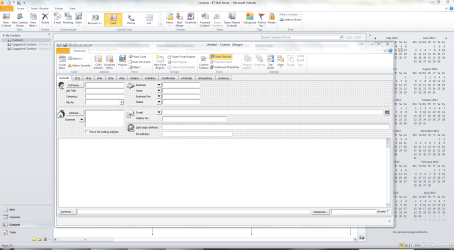
How to change the default address display in Outlook 2007 contact list

WimYogya

New member
Member
VIP
Local time
4:53 AM
Messages
104
In the CONTACTS section of Outlook 2007 there are various default settings that I don't like. But I don't find options to change them.
1.
The main one is that the address box LOOKS as ONE field, but is in fact a collection of invisible fields: Street, City, State, Zip, Country. What you type in that big box is sometimes unclear to Outlook, then it pops up an edit box with all the separate fields. Sometimes there WAS already a (default) Country/Region in the box and then the result of a printed address could be: John Johnson, 1st Street 1, LA, CA 98765, USA, The Netherlands.
I would prefer to see the 'split' address view by default. How?
And if it is not possible, how can I force Outlook to show the split box when I need it?
2.
The same address box has two options, business and home. Business is shown by default, so often I type private addresses in the wrong box - with confusing results when grouping, printing etc.
Can BOTH the Home AND the Business address box be displayed at the same time?
If not possible, then can I instruct Outlook to display the Home box by default?
3.
Similar problem with the Email box. I always have to use the dropdownlist to see/edit/use a 2nd or 3rd email. In this time where many people have several email addresses, at least 2 of them should be visible by default in the standard view.

I know that I can customize my Outlook Contact page completely to my own needs. I gave it a few attempts, but the result was a bewildering mess. Lots worse than the original.

If 2007 does not offer solutions for my display problems, does Office 2010 do?
Anyone experienced with 2010 who can tell me two or three major differences (improvements!) with 2007?

Thanks.
 

My Computer My Computer

At a glance

windows 7Genuine Intel u23004Gb?
Computer Manufacturer/Model Number
AcerAspire 1410 Netbook with external CD/DVD-RW
OS
windows 7
CPU
Genuine Intel u2300
Motherboard
?
Memory
4Gb
Graphics Card(s)
?
Sound Card
?
Monitor(s) Displays
?
Hard Drives
Hitachi HTS
various WD external hard drives
PSU
?
Case
?
Cooling
?

My Computer My Computer

At a glance

Windows 7 Home Premium 64bitIntel(R) Core(TM) i3-2120 CPU @ 3.30GHz3.00 GB(1) Intel(R) HD Graphics (2) VNC Mirror Driver
Computer type
PC/Desktop
Computer Manufacturer/Model Number
Packard Bell
OS
Windows 7 Home Premium 64bit
CPU
Intel(R) Core(TM) i3-2120 CPU @ 3.30GHz
Motherboard
Packard Bell IPISB-AG
Memory
3.00 GB
Graphics Card(s)
(1) Intel(R) HD Graphics (2) VNC Mirror Driver
Sound Card
Realtek High Definition Audio
Monitor(s) Displays
AIO LCD
Screen Resolution
1920 x 1080
Hard Drives
WDC WD10EADX-22TDHB0 ATA Device
Fixed hard disk media
4 partitions
931.51 GB
Keyboard
Wireless
Mouse
Wireless
Antivirus
Microsoft Security Essentials
Browser
IE; Firefox
Other Info
Also:
Samsung N220 Plus Netbook - Windows 7 Home
HP laptop
iPad 5
Not my point...

Hi Irene,
Sorry again: you didn't address my problem.
I did and do know how to change Custom Views in Contact LISTS, but I am referring to the default display of a COMPLETE, INDIVIDUAL contact RECORD.
The usual place to fill in all the details of a contact.
THERE I wish to see:

  • The Address Box split in separate fields for Street, City, State, Zip, Country
  • The HOME Address box as the default one
  • Not only Email 1 but also Email 2-3 open by default
The ONLY option I can find there, in that record, is to use the developer. But as said: that is too head-braking for me. More for programmers/designers than for users.

Any other option?
Or any user who already DID modify his default record display as described and can share it with me?
Thanks.
 

My Computer My Computer

At a glance

windows 7Genuine Intel u23004Gb?
Computer Manufacturer/Model Number
AcerAspire 1410 Netbook with external CD/DVD-RW
OS
windows 7
CPU
Genuine Intel u2300
Motherboard
?
Memory
4Gb
Graphics Card(s)
?
Sound Card
?
Monitor(s) Displays
?
Hard Drives
Hitachi HTS
various WD external hard drives
PSU
?
Case
?
Cooling
?
I think I will leave you in the hands of others, WimYogya - my voluntary time will be best applied to others who I can help.
 

My Computer My Computer

At a glance

Windows 7 Home Premium 64bitIntel(R) Core(TM) i3-2120 CPU @ 3.30GHz3.00 GB(1) Intel(R) HD Graphics (2) VNC Mirror Driver
Computer type
PC/Desktop
Computer Manufacturer/Model Number
Packard Bell
OS
Windows 7 Home Premium 64bit
CPU
Intel(R) Core(TM) i3-2120 CPU @ 3.30GHz
Motherboard
Packard Bell IPISB-AG
Memory
3.00 GB
Graphics Card(s)
(1) Intel(R) HD Graphics (2) VNC Mirror Driver
Sound Card
Realtek High Definition Audio
Monitor(s) Displays
AIO LCD
Screen Resolution
1920 x 1080
Hard Drives
WDC WD10EADX-22TDHB0 ATA Device
Fixed hard disk media
4 partitions
931.51 GB
Keyboard
Wireless
Mouse
Wireless
Antivirus
Microsoft Security Essentials
Browser
IE; Firefox
Other Info
Also:
Samsung N220 Plus Netbook - Windows 7 Home
HP laptop
iPad 5
Hi Irene,
I don't want to be unfriendly or disrespectful, but a few times I got help to solve problems that I didn't have ;)
Especially when the request/problem is not standard, the answer cannot be standard either, then it must be more taior-made, after reading the problem carefully.
Thanks anyhow for the times you were of real great help!
 

My Computer My Computer

At a glance

windows 7Genuine Intel u23004Gb?
Computer Manufacturer/Model Number
AcerAspire 1410 Netbook with external CD/DVD-RW
OS
windows 7
CPU
Genuine Intel u2300
Motherboard
?
Memory
4Gb
Graphics Card(s)
?
Sound Card
?
Monitor(s) Displays
?
Hard Drives
Hitachi HTS
various WD external hard drives
PSU
?
Case
?
Cooling
?
Same problem with Outlook 2010 & BCM

Hi WimYogya,
I understand that it was long time ago,
but did you figure out how resolve the issues with address recognition issues.
I have the same problem and its just annoying, I checked everything and tried to find some commercial plugins. No results.

Much appreciate if you share your info about it
Thanks
Nick
 

My Computer My Computer

At a glance

Windows 7 pro 32
OS
Windows 7 pro 32
Nope, found no answers or assistance at all. Hoped that Outlook 2010 would have better flexible options, but none...
Sorry for you and me...
 

My Computer My Computer

At a glance

windows 7Genuine Intel u23004Gb?
Computer Manufacturer/Model Number
AcerAspire 1410 Netbook with external CD/DVD-RW
OS
windows 7
CPU
Genuine Intel u2300
Motherboard
?
Memory
4Gb
Graphics Card(s)
?
Sound Card
?
Monitor(s) Displays
?
Hard Drives
Hitachi HTS
various WD external hard drives
PSU
?
Case
?
Cooling
?
The best answer but not solution!!

Outlook 2007/2010 displays postal code after city in address data for contact


Check this answer

Just to eliminate any (or at least as much) confusion as possible and ensure that we're both on the same page regarding this
The format of <Address Block> (Home/Business/Other) shown on the main contact detail screen is governed by the country associated with the address to correspond to that country's formatting option
Ergo, if the all the underlying details are correct where each individual field has the correct data
Street Address
City
State/Prov
Zip/Postal Code
Country
Then it sounds like the issue is coming from the country for that address. Outlook does have it's own formatting rules for phone numbers and addresses which has always been the case but can't speak to what OWA displays.
Take any North American Address (i.e. Canada/US) that displays as
123 AnyStreet
SomeCity, SomeProv, PostCode
Country
change the country for the address to Netherlands (as a for instance) - the very same data would then display the full address as:
123 AnyStreet
PostCode SomeCity SomeProv
Country
Change the address country to "Kyrgyzstan" as another for instance, and the format of the full displayed address is
PostCode SomeCity SomeProv
123 AnyStreet
Country
The full Address in Outlook is one of those "derived" fields (FullName / FileAs / Email DisplayAs being some others) that are based on the content of otherunderlying indivdual fields and default format settings (in the case of FullName and FileAs)
One caveat to the above is:
If no country is specified in the <Country> field (i.e. blank or a non-standard country name) - then the display format reverts to country defined in the regional settings.
So to be specific, what are the <exact> individual field values for the original example address (including country since none appears to be included indicating that it's blank):
Streetname 123
1234 AA City
If no country is specified - what is the country selected in the Regional Settings?
Karl Timmermans - The Claxton Group
Outlook Import/Export Hints/Tips
Contact import/export/data management tools for Outlook '2000/2010 - ContactGenie.com

So for me or better to say for my client who is really worried about this i recommend to click the button ( Business) and start filled the separated form cause no rules can work with this especially when you start using two words cities and states.

Good luck.
Techfriend
 

My Computer My Computer

At a glance

Windows 7 pro 32
OS
Windows 7 pro 32
Thanks for the explanation. It is sort of impressive that Outlook automatically adjusts the address format to the country of that address. But I need different flexibility. I want to change the WHOLE layout of the contact sheet (e.g. with 2 or 3 email addresses always visible, not in drop down lists) and with the HOME address and BUSINESS address both visible (and the HOME address being the standard). All my attempts to change the default layout created a terrible mess.
And I cannot find someone who can do it for me.
Thanks for your reply, anyhow.
 

My Computer My Computer

At a glance

windows 7Genuine Intel u23004Gb?
Computer Manufacturer/Model Number
AcerAspire 1410 Netbook with external CD/DVD-RW
OS
windows 7
CPU
Genuine Intel u2300
Motherboard
?
Memory
4Gb
Graphics Card(s)
?
Sound Card
?
Monitor(s) Displays
?
Hard Drives
Hitachi HTS
various WD external hard drives
PSU
?
Case
?
Cooling
?
Customizing Contacts

Hi there,

I have had the same problem with contacts in Windows 7 Office 2010. Have a look at this link, it worked for me by using http://www.slipstick.com/outlook/contacts/change-business-card-layout/

It works and you don't need to buy any special software.
Why Microsoft do not tell you how to do it defeats me!

Good luck

John
 
Last edited:

My Computer My Computer

At a glance

Windows 7
OS
Windows 7
Seems too complicated

Hi John,
Thanks for your suggestion, but it seems way too complicated for me.
Maybe I would still be able to change the new default card for new contacts.
But the script for existing ones: no clue how to handle that.
Scared the result will be a mess.
Wim
 

My Computer My Computer

At a glance

windows 7Genuine Intel u23004Gb?
Computer Manufacturer/Model Number
AcerAspire 1410 Netbook with external CD/DVD-RW
OS
windows 7
CPU
Genuine Intel u2300
Motherboard
?
Memory
4Gb
Graphics Card(s)
?
Sound Card
?
Monitor(s) Displays
?
Hard Drives
Hitachi HTS
various WD external hard drives
PSU
?
Case
?
Cooling
?
Hi WimYogya,

In Windows 7/ Outlook 2010 it is easy to do:

1) Open up a contact
2) Click on the 'Business Card' icon on the top ribbon
3) Edit the Business card by adding fields or removing them, change the order is you want
4) Save and you are done.

....at least with that one, I have not found out yet how to copy the format from that one to your other cards.

John
 

My Computer My Computer

At a glance

Windows 7
OS
Windows 7
But that is exactly what I want: create ONE default view for ALL contacts, existing and new ones.
I have 900+ contacts, so I do not want to change the views one by one.
Wim
 

My Computer My Computer

At a glance

windows 7Genuine Intel u23004Gb?
Computer Manufacturer/Model Number
AcerAspire 1410 Netbook with external CD/DVD-RW
OS
windows 7
CPU
Genuine Intel u2300
Motherboard
?
Memory
4Gb
Graphics Card(s)
?
Sound Card
?
Monitor(s) Displays
?
Hard Drives
Hitachi HTS
various WD external hard drives
PSU
?
Case
?
Cooling
?
You can use Outlook's Form Designer, but it needs Visual Basic knowledge.

Form.PNG
 

My Computer My Computer

At a glance

Windows 7 Ultimate SP1 64-BitIntel Core i7 870 @ 2.93GHz8Gb Dual-Channel DDR3 @ 664MHznVidia GeForce GTX 460 1024MB dedicated RAM
Computer Manufacturer/Model Number
HP Pavilion Elite 495UK
OS
Windows 7 Ultimate SP1 64-Bit
CPU
Intel Core i7 870 @ 2.93GHz
Motherboard
MSI 2A9C (CPU1)
Memory
8Gb Dual-Channel DDR3 @ 664MHz
Graphics Card(s)
nVidia GeForce GTX 460 1024MB dedicated RAM
Sound Card
Realtek HD Audio
Monitor(s) Displays
HP2310i
Screen Resolution
1920 x 1080
Hard Drives
1x1954GB Hitachi HDS22020ALA 330 (RAID), 1x1954GB Hitachi External for backup and storage
PSU
460W
Case
HP Elite
Cooling
Air cooled
Keyboard
Logitech K750 solar-powered keyboard
Mouse
Logitech Wireless M180 mouse
Internet Speed
2Mb
Other Info
Pure Avanti Flow Internet Radio with iPod Dock, 64Gb iPod, HP USB Speakers, Sony MDR-V500 Headphones, Sony Vaio F-Series Laptop

My Computer My Computer

At a glance

Windows 7 Professional x32
OS
Windows 7 Professional x32
Back
Top