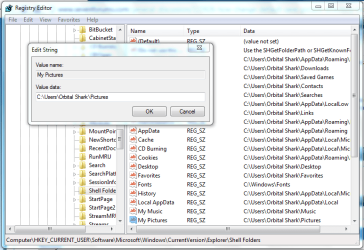
How to change the default "Save Picture as" directory for IntExp 8?
When I load a web page with embedded images, then right click on one of these images and select "Save picture as..." then as default save directory
libraries->pictures
is presented in the file open dialog. Ok, I can manually change this to another folder in the file open dialog. But how can I change this default directory (permanently even after a restart) to lets say D:\work?
Peter
When I load a web page with embedded images, then right click on one of these images and select "Save picture as..." then as default save directory
libraries->pictures
is presented in the file open dialog. Ok, I can manually change this to another folder in the file open dialog. But how can I change this default directory (permanently even after a restart) to lets say D:\work?
Peter
My Computer
At a glance
win7pro 64bit
- Computer type
- PC/Desktop
- OS
- win7pro 64bit