
How to change the network type?

SKJoy2001

New member
Local time
6:23 PM
Messages
5
Location
Dhaka, Bangladesh.
Connecting to my Access Point (WEP, Shared Key) works fine, but the network type becomes PUBLIC in the Network and Sharing Center and I cannot change it, it is read only there! My computer is not part of a domain but a member of a workgroup.

I need to change the network type for the above WiFi connection to WORK/HoME.

Please help. Thank you in advance.
 

Attachments
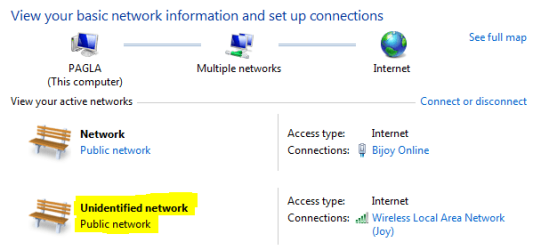
  • Capture.PNG
    Capture.PNG
    11.2 KB · Views: 52

My Computer

Computer Manufacturer/Model Number
Custom
OS
Microsoft Windows 7 Ultimate x64
CPU
Intel Core i7 920 @ 3 GHz
Motherboard
Gigabyte GA-EX58-UD3R
Memory
Twinmos aXe RAM @ 1800 MHz, 2x3 GB DDR III
Graphics Card(s)
nVidia GeForce 8600 GT with 1 GB DDR II
Sound Card
Built in high definition audio device with Azaila codec
Monitor(s) Displays
BenQ T22IW, 22" LCD
Screen Resolution
1680 x 1050
Hard Drives
MAXTOR STM3160813AS ATA
SAMSUNG HD102UJ ATA
SAMSUNG HD322HJ ATA
Maxtor 6 V160E0 USB
PSU
ThermalTake 750 Watt
Case
ThermalTake Aguila Black
Cooling
Stock
Keyboard
A4Tech RF Wireless
Mouse
A4Tech RF Wireless
Internet Speed
DL: 1 Mbps, UL: 1 Mbps
Other Info
Sony DVD RW DRU-830A ATA, Bluetooth, WiFi, Lenovo Q350 Webcam with 6 LED flash, AverMedia M135-A TV Tuner with FM receiver, Creative 2:1 with XBase woofer, Online UPS 2000 VA with data communication.
Yea m having the same problem...
any help anyone!!!
 

My Computer

Computer Manufacturer/Model Number
Custom Built
OS
Windows 7 Ultimate 64-bit
CPU
Intel Core i7 920
Motherboard
Intel DX58SO Black Edition
Memory
Kingston DDR3 1333MHz 2GB
Graphics Card(s)
ATI Radeon 4350 DDR3 512MB
Sound Card
Onbord Realtek 10-channel (7.1) Realtek ALC889 audio driver
Monitor(s) Displays
AOD 19"WIDESCREEN
Hard Drives
Redinston SATA 500GB 7200, 16MB-HDD
PSU
i-ball 600Watt PSU
Case
i-ball
Cooling
Intel stock cooler

My Computer

Computer type
PC/Desktop
Computer Manufacturer/Model Number
Self built custom
OS
64-bit Windows 11 Pro for Workstations
CPU
Intel i7-8700K OC'd to 5 GHz
Motherboard
ASUS ROG Maximus XI Formula Z390
Memory
64 GB (4x16GB) G.SKILL TridentZ RGB DDR4 3600 MHz
Graphics Card(s)
ASUS ROG-STRIX-GTX1080TI-O11G-GAMING
Sound Card
Integrated
Monitor(s) Displays
2 x Samsung Odyssey G7 27"
Screen Resolution
2560x1440
Hard Drives
1TB Samsung 990 PRO M.2,
4TB Samsung 990 PRO PRO M.2,
TerraMaster F8 SSD Plus NAS
PSU
Seasonic Prime Titanium 850W
Case
Thermaltake Core P3
Cooling
Corsair Hydro H115i
Keyboard
Logitech wireless K800
Mouse
Logitech MX Master 4
Internet Speed
2 Gb/s Download and 100 Mb/s Upload
Antivirus
Malwarebyte Anti-Malware Premium
Browser
Google Chrome
Other Info
Logitech Z625 speaker system,
Logitech BRIO 4K Pro webcam,
HP Color LaserJet Pro MFP M477fdn,
APC SMART-UPS RT 1000 XL - SURT1000XLI,
Galaxy S23 Plus phone
Connecting to my Access Point (WEP, Shared Key) works fine, but the network type becomes PUBLIC in the Network and Sharing Center and I cannot change it, it is read only there! My computer is not part of a domain but a member of a workgroup.

I need to change the network type for the above WiFi connection to WORK/HoME.

Please help. Thank you in advance.
Try using WAP2-PSK (or Personal shared key) instead of WEP and see if Windows will allow for the less secure "Home Network" location?

Cheers!
Robert
 

My Computer

OS
...
Back
Top