
You are using an out of date browser. It may not display this or other websites correctly.
You should upgrade or use an alternative browser.
You should upgrade or use an alternative browser.
How to change the selection color in WLM
- Thread starter Win7rap
- Start date

windowsapple
New member
- Local time
- 5:01 AM
- Messages
- 150
WLM is Windows Live Mail, right? If so, go to Options near the top - right. Change the theme.
Post a screen shot if possible...
Post a screen shot if possible...
My Computer
At a glance
Mc Donald OS Version BetaAwesome Beef PattyPro 1 KB MemoryTomato FX10
- Computer Manufacturer/Model Number
- Mc Donald's
- OS
- Mc Donald OS Version Beta
- CPU
- Awesome Beef Patty
- Motherboard
- Lettuce (It's green!)
- Memory
- Pro 1 KB Memory
- Graphics Card(s)
- Tomato FX10
- Sound Card
- The Box
- Monitor(s) Displays
- Yummy 5-D Touch
- Screen Resolution
- 20 x 20
- Hard Drives
- The Top Bun and the Bottom Buns
- PSU
- Um.
- Case
- The Box With Pics!
- Cooling
- That's Why i Have a Refrigerator
- Keyboard
- N/A
- Mouse
- N/A
- Internet Speed
- Same as McDonald's Wi-fi
- Other Info
- Note : This is not real. (Hope You Knew That)
Yes, WLM is Windows Live Mail. Do you mean the 'options' from the 'drop-down' at the top right?
If so, unfortunately, there is nothing there that seems to be related to themes. (It's the same as choosing
TOOLS -> OPTIONS from the toolbar at the top. Checked tabs again - umpteenth time - nothing in General, Send, Read, ...)
What screen shot do you want?
Have attempted to change themes from Windows Live Control but it does NOTHING to the background color of selected items.
Thank you - but I'm still stuck.
If so, unfortunately, there is nothing there that seems to be related to themes. (It's the same as choosing
TOOLS -> OPTIONS from the toolbar at the top. Checked tabs again - umpteenth time - nothing in General, Send, Read, ...)
What screen shot do you want?
Have attempted to change themes from Windows Live Control but it does NOTHING to the background color of selected items.
Thank you - but I'm still stuck.
My Computer
At a glance
Win 7
- OS
- Win 7
windowsapple
New member
- Local time
- 5:01 AM
- Messages
- 150
Yes, WLM is Windows Live Mail. Do you mean the 'options' from the 'drop-down' at the top right?
If so, unfortunately, there is nothing there that seems to be related to themes. (It's the same as choosing
TOOLS -> OPTIONS from the toolbar at the top. Checked tabs again - umpteenth time - nothing in General, Send, Read, ...)
What screen shot do you want?
Have attempted to change themes from Windows Live Control but it does NOTHING to the background color of selected items.
Thank you - but I'm still stuck.
I just want a screenshot of what part you're referring to. (Note: Cross out any confedential stuff with paint or something.)
My Computer
At a glance
Mc Donald OS Version BetaAwesome Beef PattyPro 1 KB MemoryTomato FX10
- Computer Manufacturer/Model Number
- Mc Donald's
- OS
- Mc Donald OS Version Beta
- CPU
- Awesome Beef Patty
- Motherboard
- Lettuce (It's green!)
- Memory
- Pro 1 KB Memory
- Graphics Card(s)
- Tomato FX10
- Sound Card
- The Box
- Monitor(s) Displays
- Yummy 5-D Touch
- Screen Resolution
- 20 x 20
- Hard Drives
- The Top Bun and the Bottom Buns
- PSU
- Um.
- Case
- The Box With Pics!
- Cooling
- That's Why i Have a Refrigerator
- Keyboard
- N/A
- Mouse
- N/A
- Internet Speed
- Same as McDonald's Wi-fi
- Other Info
- Note : This is not real. (Hope You Knew That)
Faint blue text on win 7 LM and status bar.
I am having the same problem,very difficult and at times unable to read e-mail address/subject details with faint blue text.Status bar blue text also very faint.Have tried adjusting personalization colours and transparency etc also resolution with no improvement.I have a Win XP working along side my Win 7 Home Premium, all XP text is easily read ,Win 7 is hardly readable.
Is an option or update available to improve text appearance?.
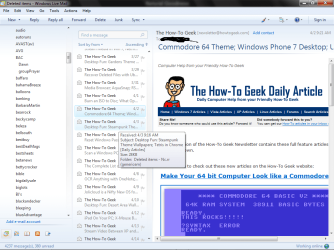
Current selections are light blue ... very difficult to see (differentiate) - can this be changed (using win7)?
I am having the same problem,very difficult and at times unable to read e-mail address/subject details with faint blue text.Status bar blue text also very faint.Have tried adjusting personalization colours and transparency etc also resolution with no improvement.I have a Win XP working along side my Win 7 Home Premium, all XP text is easily read ,Win 7 is hardly readable.
Is an option or update available to improve text appearance?.
My Computer
At a glance
Win 7 Home Premium3Gig
- Computer Manufacturer/Model Number
- Custom Built
- OS
- Win 7 Home Premium
- Motherboard
- AMD
- Memory
- 3Gig
- Monitor(s) Displays
- Acer
- Screen Resolution
- 1600x1024
- Keyboard
- Logitech
- Mouse
- Logitech
- Internet Speed
- High (Shaw)

- Local time
- 3:01 AM
- Messages
- 2,066
Current selections are light blue ... very difficult to see (differentiate) - can this be changed (using win7)?
I am having the same problem,very difficult and at times unable to read e-mail address/subject details with faint blue text.Status bar blue text also very faint....Is an option or update available to improve text appearance?.
I had the same problem as we all do. The best I could do was change the text color from blue to grey: Use Colorizer/More colors... and choose the basic color white (box in lower right corner).
My Computer
At a glance
Windows 8 Pro w/MC 32-bitIntel Atom 1.86 GHz2 GBIntel GMA 500
- Computer type
- PC/Desktop
- Computer Manufacturer/Model Number
- OQO 2+
- OS
- Windows 8 Pro w/MC 32-bit
- CPU
- Intel Atom 1.86 GHz
- Motherboard
- OQO 2+
- Memory
- 2 GB
- Graphics Card(s)
- Intel GMA 500
- Sound Card
- IDT
- Monitor(s) Displays
- LCD
- Screen Resolution
- 800 x 480 (portable) 1280 x 1024 (docked)
- Hard Drives
- 64 GB SSD
- PSU
- 9 Ah Battery (portable) or OQO Brick (docked)
- Case
- Shirt Pocket Sized
- Cooling
- Tiny Fan
- Keyboard
- Slide out (portable) DiNovo Edge (docked)
- Mouse
- Eraser head (portable) Logitech Bluetooth (docked)
- Internet Speed
- WWAN or 802.11G (portable) T1 (docked)
- Browser
- IE 10
- Other Info
- DVD-RW OQO Docking Station
windowsapple
New member
- Local time
- 5:01 AM
- Messages
- 150
OHHHH I get what you're saying now. XD Srry.Um.. That is NOT possible until Microsoft allows customization of that.
My Computer
At a glance
Mc Donald OS Version BetaAwesome Beef PattyPro 1 KB MemoryTomato FX10
- Computer Manufacturer/Model Number
- Mc Donald's
- OS
- Mc Donald OS Version Beta
- CPU
- Awesome Beef Patty
- Motherboard
- Lettuce (It's green!)
- Memory
- Pro 1 KB Memory
- Graphics Card(s)
- Tomato FX10
- Sound Card
- The Box
- Monitor(s) Displays
- Yummy 5-D Touch
- Screen Resolution
- 20 x 20
- Hard Drives
- The Top Bun and the Bottom Buns
- PSU
- Um.
- Case
- The Box With Pics!
- Cooling
- That's Why i Have a Refrigerator
- Keyboard
- N/A
- Mouse
- N/A
- Internet Speed
- Same as McDonald's Wi-fi
- Other Info
- Note : This is not real. (Hope You Knew That)
Faint text in WLM and status bar.
I fully agree this faint text issue is a Massive Downer for Win7 LM and an big upper for eye doctors and optometrists
I have searched Microsoft's Win 7 remedial and update files for a solution to the faint text issue.It appears Microsoft do not consider this to be a problem for users with 3 sets of 20+/20+ vision eyes, users who need corrective eye glasses,too bad,they will just have to look harder.
As i find it more difficult to read WLM inbox etc pages,I have reverted back to using Hotmail,Shaw Webmail for OE and Gmail which are not in WLM,I can now easily read Sender,Subject and other details without having to squint or further impair my eye sight.
I still have my XP working and when I compare it's e-mail formats with Win 7 LM I would not of purchased the existing version of Win 7.
Thank you ... another downer for WLM .... oh to have OE6 back
I fully agree this faint text issue is a Massive Downer for Win7 LM and an big upper for eye doctors and optometrists
I have searched Microsoft's Win 7 remedial and update files for a solution to the faint text issue.It appears Microsoft do not consider this to be a problem for users with 3 sets of 20+/20+ vision eyes, users who need corrective eye glasses,too bad,they will just have to look harder.
As i find it more difficult to read WLM inbox etc pages,I have reverted back to using Hotmail,Shaw Webmail for OE and Gmail which are not in WLM,I can now easily read Sender,Subject and other details without having to squint or further impair my eye sight.
I still have my XP working and when I compare it's e-mail formats with Win 7 LM I would not of purchased the existing version of Win 7.
My Computer
At a glance
Win 7 Home Premium3Gig
- Computer Manufacturer/Model Number
- Custom Built
- OS
- Win 7 Home Premium
- Motherboard
- AMD
- Memory
- 3Gig
- Monitor(s) Displays
- Acer
- Screen Resolution
- 1600x1024
- Keyboard
- Logitech
- Mouse
- Logitech
- Internet Speed
- High (Shaw)
- Local time
- 3:01 AM
- Messages
- 2,066
I've given up trying to get by with one prescription. I use one for long distance and another for arm length distance (computer monitor).I fully agree this faint text issue is a Massive Downer for Win7 LM and an big upper for eye doctors and optometrists.
My Computer
At a glance
Windows 8 Pro w/MC 32-bitIntel Atom 1.86 GHz2 GBIntel GMA 500
- Computer type
- PC/Desktop
- Computer Manufacturer/Model Number
- OQO 2+
- OS
- Windows 8 Pro w/MC 32-bit
- CPU
- Intel Atom 1.86 GHz
- Motherboard
- OQO 2+
- Memory
- 2 GB
- Graphics Card(s)
- Intel GMA 500
- Sound Card
- IDT
- Monitor(s) Displays
- LCD
- Screen Resolution
- 800 x 480 (portable) 1280 x 1024 (docked)
- Hard Drives
- 64 GB SSD
- PSU
- 9 Ah Battery (portable) or OQO Brick (docked)
- Case
- Shirt Pocket Sized
- Cooling
- Tiny Fan
- Keyboard
- Slide out (portable) DiNovo Edge (docked)
- Mouse
- Eraser head (portable) Logitech Bluetooth (docked)
- Internet Speed
- WWAN or 802.11G (portable) T1 (docked)
- Browser
- IE 10
- Other Info
- DVD-RW OQO Docking Station
windowsapple
New member
- Local time
- 5:01 AM
- Messages
- 150
-_- MS needs to update it's customization.
My Computer
At a glance
Mc Donald OS Version BetaAwesome Beef PattyPro 1 KB MemoryTomato FX10
- Computer Manufacturer/Model Number
- Mc Donald's
- OS
- Mc Donald OS Version Beta
- CPU
- Awesome Beef Patty
- Motherboard
- Lettuce (It's green!)
- Memory
- Pro 1 KB Memory
- Graphics Card(s)
- Tomato FX10
- Sound Card
- The Box
- Monitor(s) Displays
- Yummy 5-D Touch
- Screen Resolution
- 20 x 20
- Hard Drives
- The Top Bun and the Bottom Buns
- PSU
- Um.
- Case
- The Box With Pics!
- Cooling
- That's Why i Have a Refrigerator
- Keyboard
- N/A
- Mouse
- N/A
- Internet Speed
- Same as McDonald's Wi-fi
- Other Info
- Note : This is not real. (Hope You Knew That)

I found no solution so far.guess we all just have to stick with it. 
My Computer
At a glance
window's 7core 2 quad2gb corsairati hd4850
- OS
- window's 7
- CPU
- core 2 quad
- Motherboard
- gigabyte
- Memory
- 2gb corsair
- Graphics Card(s)
- ati hd4850
- Monitor(s) Displays
- lg
- Screen Resolution
- 1600 X 900
- Case
- power logic
- Other Info
- none of the spec above is accurate
This is 2164 days old but it's still the same question.
I did search and came to this link and found no resolve.
I had been goofing with some of my email addresses and see why I hadn't been using WLM. It's so bad a color for contrast.
So I had come to WSFs many times but ? seems I never registered. So did all that just to make this comment.
I had been using outlook as my prime and gmail and on outlook I was using spamfighter to make it usable.
Well spamfighter expired and I wanted a deal and they said no deal. So I went looking and it brought me to
Thunderbird.
Which brings us to the answer to the display problem. Just add the WLM account to the Thunderbird and you can control the display colors and fonts all you want.
It's said TB is no longer supported but that is not what I have found. It works really good.
I did search and came to this link and found no resolve.
I had been goofing with some of my email addresses and see why I hadn't been using WLM. It's so bad a color for contrast.
So I had come to WSFs many times but ? seems I never registered. So did all that just to make this comment.
I had been using outlook as my prime and gmail and on outlook I was using spamfighter to make it usable.
Well spamfighter expired and I wanted a deal and they said no deal. So I went looking and it brought me to
Thunderbird.
Which brings us to the answer to the display problem. Just add the WLM account to the Thunderbird and you can control the display colors and fonts all you want.
It's said TB is no longer supported but that is not what I have found. It works really good.
My Computer
At a glance
win7 pro 64P8600*GBnvidia nvs 160m
- Computer type
- Laptop
- Computer Manufacturer/Model Number
- dell E6500
- OS
- win7 pro 64
- CPU
- P8600
- Memory
- *GB
- Graphics Card(s)
- nvidia nvs 160m
- Hard Drives
- Samsung ssd 840 250GB
- Antivirus
- Comodo
- Browser
- Firefox Chrome IE 11
Similar threads
- Replies
- 7
- Views
- 6K

- Replies
- 2
- Views
- 3K
- Replies
- 5
- Views
- 19K
- Replies
- 25
- Views
- 30K

