
You are using an out of date browser. It may not display this or other websites correctly.
You should upgrade or use an alternative browser.
You should upgrade or use an alternative browser.
How to change this in windows xp
- Thread starter Russhimi
- Start date


- Local time
- 1:06 PM
- Messages
- 1,258
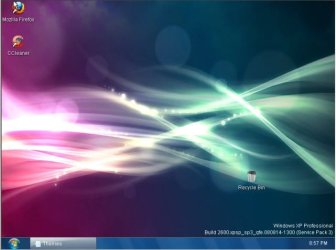
What, excatly, do you want to change? The Desktop background?
Just right-click the desktop, then select "Personalize" (in Windows 7), or "Properties" in Windows XP...
Just right-click the desktop, then select "Personalize" (in Windows 7), or "Properties" in Windows XP...
My Computer
- Computer type
- PC/Desktop
- Computer Manufacturer/Model Number
- Virtual Machine
- OS
- Windows 7 Professional 32-bit SP1
- CPU
- AMD A4/A6
- Motherboard
- Intel Corporation 440BX Desktop Reference Platform
- Memory
- 3.00GB EDO
- Graphics Card(s)
- VMware SVGA 3D
- Sound Card
- High Definition Audio Device
- Monitor(s) Displays
- Generic Non-PnP Monitor on VMware SVGA 3D
- Screen Resolution
- 1440x900
- Hard Drives
- 1 x 60GB VMware Virtual SATA Hard Drive ATA Device
- Antivirus
- Kaspersky Total Security

- Local time
- 4:36 PM
- Messages
- 35,002
For your first shot ... http://sid-crafty.deviantart.com/art/Windows7-RTM-Aero-theme-for-XP-105582529 , read the directions carefully.
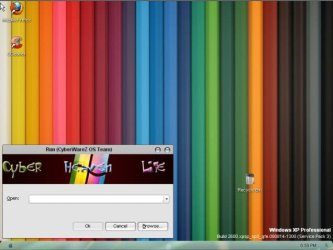
Anything is not clear from the second one.
In case of the third shot, Leopard XP Visual Style by ~nobodyuse on deviantART .
Any box tweaking is described here ... just search as per your need : Technology News, Internet, Tips-n-Tricks, Tutorials, Software Reviews, Themes, Skins, Wallpapers
BTW .... for xp, Windowblinds gives best approximation to other os's guis .
Anything is not clear from the second one.
In case of the third shot, Leopard XP Visual Style by ~nobodyuse on deviantART .
Any box tweaking is described here ... just search as per your need : Technology News, Internet, Tips-n-Tricks, Tutorials, Software Reviews, Themes, Skins, Wallpapers
BTW .... for xp, Windowblinds gives best approximation to other os's guis .
My Computer
- Computer type
- PC/Desktop
- Computer Manufacturer/Model Number
- Self Assembled
- OS
- Microsoft Windows 10 Pro Insider Preview 64-bit
- CPU
- Intel(R) Core(TM) i3-4130 CPU @ 3.40GHz
- Motherboard
- Gigabyte Technology Co., Ltd. B85M-D3H
- Memory
- Corsair Vengence 4GB x2 (8.00GB Dual-Channel DDR3 @ 798MHz)
- Graphics Card(s)
- 2047MB GeForce GTS 450 (ZOTAC International)
- Sound Card
- Onboard (Realtek High Definition Audio)
- Monitor(s) Displays
- LG Flatron E2040T
- Screen Resolution
- 1600x900
- Hard Drives
- Western Digital 1 TB
Seagate 500 GB
- PSU
- Corsair VS550
- Case
- Cooler Master K380
- Cooling
- Cooler Master Seidon 120V Plus
- Keyboard
- Logitech MK260r
- Mouse
- Logitech MK260r
- Internet Speed
- PMPL Broadband
- Antivirus
- Windows Defender + MBAM
- Browser
- Firefox
- Other Info
- Dell Studio 15" Laptop

Why not just install Windows 7, lose the XP.
My Computer
- Computer Manufacturer/Model Number
- Home build.
- OS
- Vista Ultimate 32 bit, Win 7 Pro 32 bit, Win 7 Pro 64 bit
- CPU
- Intel i5 CPU 750 @ 2.67 GHZ, OC 3.7 GHZ
- Motherboard
- Asus P7P55D
- Memory
- 4 Gig
- Graphics Card(s)
- Nvidia GeForce GTS450
- Monitor(s) Displays
- Acer 24"
- Screen Resolution
- 1440 x 900
- Hard Drives
- 1000 GIG
1000 GIG
- PSU
- 650
- Case
- Antec Nine Hundred Two
- Internet Speed
- 14 MB (APPROX)
This is not theme guys, I already use windows 7 enterprise.
I want to know how to customizing windows xp OS.
Like this image
http://www.sevenforums.com/attachme...7d1280987686-how-change-windows-xp-1htdza.jpg
I want to chg it while we do formatting, where to change that image in setup?
I want to know how to customizing windows xp OS.
Like this image
http://www.sevenforums.com/attachme...7d1280987686-how-change-windows-xp-1htdza.jpg

I want to chg it while we do formatting, where to change that image in setup?
My Computer
- OS
- Windows 7
- Local time
- 1:06 PM
- Messages
- 1,258
This is not theme guys, I already use windows 7 enterprise.
I want to know how to customizing windows xp OS.
Like this image
http://www.sevenforums.com/attachme...7d1280987686-how-change-windows-xp-1htdza.jpg
I want to chg it while we do formatting, where to change that image in setup?
Might I suggest you locate a Windows XP Forum for information on this? The image shown in the screenshot is obviously from a slipstreamed Windows XP installer, and this IS a Windows 7 forum.
You'll have far more success finding out how to customize a Windows XP Slipstream install in a Windows XP forum.
I just have one question, though. WHY whould you want to customize the Windows XP Installer Image? You see it for like 30 minutes or less, and then never again. Not unless you're into installing junk that kills the XP installation and you need to re-install every couple of days.
It's really not worth your time, because XP itself is dead, and belongs in the history books, nowhere else.
My Computer
- Computer type
- PC/Desktop
- Computer Manufacturer/Model Number
- Virtual Machine
- OS
- Windows 7 Professional 32-bit SP1
- CPU
- AMD A4/A6
- Motherboard
- Intel Corporation 440BX Desktop Reference Platform
- Memory
- 3.00GB EDO
- Graphics Card(s)
- VMware SVGA 3D
- Sound Card
- High Definition Audio Device
- Monitor(s) Displays
- Generic Non-PnP Monitor on VMware SVGA 3D
- Screen Resolution
- 1440x900
- Hard Drives
- 1 x 60GB VMware Virtual SATA Hard Drive ATA Device
- Antivirus
- Kaspersky Total Security
- Local time
- 4:36 PM
- Messages
- 35,002
Understood at last. 
To do this you are to make a custom xp cd, and there you are to change the default blue setup screen to whatever of your choice. You may get some idea here : Make your own Windows XP CD. - dslreports.com ; and here : How To Make A Custom XP CD/DVD | KtecK Tech Blog .
But if it is downloaded (that must be either a rapidshare or a torrent download) , I strongly recommend to not use it. Such customized OS downloads (pre-activated and with bundled paid apps) always contain spy programs. If you use such a downloaded OS, you are a ready victim of schemer. So please beware .
To do this you are to make a custom xp cd, and there you are to change the default blue setup screen to whatever of your choice. You may get some idea here : Make your own Windows XP CD. - dslreports.com ; and here : How To Make A Custom XP CD/DVD | KtecK Tech Blog .
But if it is downloaded (that must be either a rapidshare or a torrent download) , I strongly recommend to not use it. Such customized OS downloads (pre-activated and with bundled paid apps) always contain spy programs. If you use such a downloaded OS, you are a ready victim of schemer. So please beware .
My Computer
- Computer type
- PC/Desktop
- Computer Manufacturer/Model Number
- Self Assembled
- OS
- Microsoft Windows 10 Pro Insider Preview 64-bit
- CPU
- Intel(R) Core(TM) i3-4130 CPU @ 3.40GHz
- Motherboard
- Gigabyte Technology Co., Ltd. B85M-D3H
- Memory
- Corsair Vengence 4GB x2 (8.00GB Dual-Channel DDR3 @ 798MHz)
- Graphics Card(s)
- 2047MB GeForce GTS 450 (ZOTAC International)
- Sound Card
- Onboard (Realtek High Definition Audio)
- Monitor(s) Displays
- LG Flatron E2040T
- Screen Resolution
- 1600x900
- Hard Drives
- Western Digital 1 TB
Seagate 500 GB
- PSU
- Corsair VS550
- Case
- Cooler Master K380
- Cooling
- Cooler Master Seidon 120V Plus
- Keyboard
- Logitech MK260r
- Mouse
- Logitech MK260r
- Internet Speed
- PMPL Broadband
- Antivirus
- Windows Defender + MBAM
- Browser
- Firefox
- Other Info
- Dell Studio 15" Laptop