How to change windows folder bg

Sedesikus

New member
Local time
12:15 PM
Messages
5
Location
Wrocław, Poland
Hi

I have a problem with changing bg color of every folder in win7 from standard white.

I tried personalize->..-> advanced settings -> window (from dropdawn menu), but that doesnt change that. Actually it changes bg of ex. blank page in firefox and simillar aplications, so not what i want.

I have searched this forum for a solution, with no luck.

I dont want to use paid software for that(like Blinds and such). And i dont want to edit any existing theme. I could be playing with hex, but why do it the hard way? If they did it, so can I:)

Is there a way to change that in the registry? Like in the tutorial for changing icons of folders in one of the tutorials found on this forum. Actually is there a tutorial about using windows registry to change the GUI of windows, like colors of search bar, nav bar, preview bar? Like, how to change color of EVERYTHING in an open folder? There are themes with changed colors, like this one:
Dynamic Black ::: by ~DjabyTown on deviantART

And a bet that every color change in here can be changed with the registry, right?
 

My Computer

OS
Windows 7 Proffesional
CPU
AMD Athlon 64 x2 Dual Core 4200
Memory
3 gb
Graphics Card(s)
GF 8600
Internet Speed
1 MB/s
Welcome!

Unfortunately, in Windows 7, it is not as easy to change the background color as it was in earlier versions.

What you will need to do is create an image yourself, filled with the color you desire.

Then right-click in a folder, and select Customize this folder. Under Folder Pictures, select the image you just created.

If you want to make all folders be the same by default, see Brinks's helpful tutorial http://www.sevenforums.com/tutorials/15699-folder-template-default.html

Hope this helps,
~JK
 

My Computer

Computer Manufacturer/Model Number
Custom
OS
Windows 7 Professional x64
CPU
Intel i7 2600K OC'd @ 4620 MHz
Motherboard
Asus P8Z68-V Pro
Memory
16GB GSkill Sniper 2133 Mhz (4x4GB)
Graphics Card(s)
EVGA GeForce GTX 480 SuperClocked+
Sound Card
Realtek High Definition Audio
Monitor(s) Displays
2x Acer S273HLbmii 27"
Screen Resolution
2 x 1920x1080
Hard Drives
64GB Crucial M4 SSD

Storage: Hitachi 1TB 5400RPM, Samsung 1.5TB 5400RPM
PSU
Corsair HW Series 750w (modular)
Case
Cooler Master HAF 932 Advanced Blue Edition
Cooling
CM Hyper 212+ CPU cooler, 3x 230mm + 1x 140mm case fans
Keyboard
Logitech MK320 (wireless)
Mouse
Logitech MK320 (wireless)
Internet Speed
30 Mb/s : 2 Mb/s
If you mean the background of windows explorer in general, then here's a way to get it done failry easy :

1.Make sure the right aerotheme is saved and active (personalization page).

2. Open C:\Users\[username]\AppData\Local\Microsoft\Windows\Themes\[themename].theme in notepad.
3. Scroll to the bottom where there should be a section called [Control Panel\Colors].
4. Modify the Window=255 255 255 line to whatever colour you want (the values are red green blue (RGB) from 0 to 255). 200 200 200 will be gray for example. You can look up a list of values through google.


If you mean the color of the folder icons, then check out the method described in this thread :

http://www.sevenforums.com/customization/35024-change-folder-background-color-free.html

post #4 gives you a very good app for colorizing the folder icons.

When you have the colors changed with that app, and saved, all you need to do is replace them in imageres.dll and shell32.dll (located in system32 folder) with a resource hacker like restorator or anolis resourcer (you can find those apps through google easily).


My Computer

OS
win7 x64

My Computer

OS
Windows 7 Proffesional
CPU
AMD Athlon 64 x2 Dual Core 4200
Memory
3 gb
Graphics Card(s)
GF 8600
Internet Speed
1 MB/s
Did you see my suggestion above?
 

My Computer

Computer Manufacturer/Model Number
Custom
OS
Windows 7 Professional x64
CPU
Intel i7 2600K OC'd @ 4620 MHz
Motherboard
Asus P8Z68-V Pro
Memory
16GB GSkill Sniper 2133 Mhz (4x4GB)
Graphics Card(s)
EVGA GeForce GTX 480 SuperClocked+
Sound Card
Realtek High Definition Audio
Monitor(s) Displays
2x Acer S273HLbmii 27"
Screen Resolution
2 x 1920x1080
Hard Drives
64GB Crucial M4 SSD

Storage: Hitachi 1TB 5400RPM, Samsung 1.5TB 5400RPM
PSU
Corsair HW Series 750w (modular)
Case
Cooler Master HAF 932 Advanced Blue Edition
Cooling
CM Hyper 212+ CPU cooler, 3x 230mm + 1x 140mm case fans
Keyboard
Logitech MK320 (wireless)
Mouse
Logitech MK320 (wireless)
Internet Speed
30 Mb/s : 2 Mb/s
Yes, i saw it and it's not the solution. I want to change the color of the background, not the way content is shown. Also I want to change all folders at once, not only one. But thanks anyway:)

Right now im playing with restorator, and searching inside msstyles files. I i will post the solution, if found.
 

My Computer

OS
Windows 7 Proffesional
CPU
AMD Athlon 64 x2 Dual Core 4200
Memory
3 gb
Graphics Card(s)
GF 8600
Internet Speed
1 MB/s
Again, if you want to change the explorer background, you're looking in the wrong place. You won't find it in any of the images inside aero.msstyles.
It's tucked away in the hex codes.

It can only be done through aero.msstyles if you know how to find the right colorcodes in the hexes, and change them with a hex editor, OR use VistaStyleBuilder.
That app WILL do the trick if you know how to use it.

If it's the folder icons you want to change colors, then as I said, they are located in imageres.dll and shell32.dll, no where else.
 

My Computer

OS
win7 x64
I'm trying to do the same thing and not having any luck. Tired of staring at the glaring white background to every folder I open. Modifying the theme file in the AppData folder didn't work for me either.

I made sure I was running the correct Theme, I even changed Themes to make sure it was loading it. I may try to restart in case the data is cached.

Current setting:

[Control Panel\Colors]
Background=186 186 186

Default setting:

[Control Panel\Colors]
Background=0 0 0


EDIT:
Still no luck after reboot.
 

My Computer

Computer Manufacturer/Model Number
HP
OS
Windows 7 64bit
CPU
Intel Core2 Duo 3ghz
Memory
3gb
Graphics Card(s)
Nvidia
Sound Card
Geforce 8800 GT 512mb
Monitor(s) Displays
2 x 24" HP LP2465
Screen Resolution
1920x1200 x 2
Mouse
Wacom Intuos3 Tablet Pen
Internet Speed
horrible... for corporate
Here's what I'm looking to do.

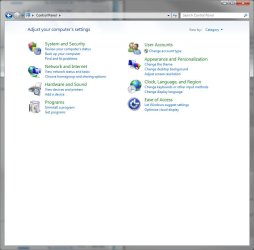
Currently I have this:

UnmodifiedCP.jpg

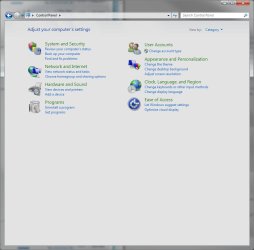
And I want to have this (edited in Photoshop):

ModifiedCP.jpg
 

My Computer

Computer Manufacturer/Model Number
HP
OS
Windows 7 64bit
CPU
Intel Core2 Duo 3ghz
Memory
3gb
Graphics Card(s)
Nvidia
Sound Card
Geforce 8800 GT 512mb
Monitor(s) Displays
2 x 24" HP LP2465
Screen Resolution
1920x1200 x 2
Mouse
Wacom Intuos3 Tablet Pen
Internet Speed
horrible... for corporate
Here's what I'm looking to do.

Currently I have this:

View attachment 51912

And I want to have this (edited in Photoshop):

View attachment 51913

Then look at this :

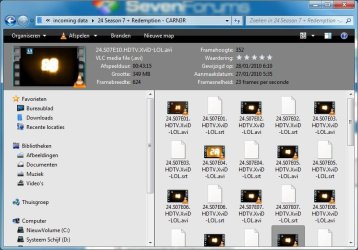
grey.jpg

Done with VSB.

At first I had the SAME backgroundcolor, done through the themefile by changing the rgb value, just like I described previous.
Once I began using VSB, I redid it through aero.msstyles, using that app.

So if it doesn't work for you, then you must be doing something wrong, that's a certainty.
 

My Computer

OS
win7 x64
Ok, i did it. I was using info found on this forum and • View forum - Windows 7 msstyle modifications

Links to posts on this forum:
POST #24

post 1 - hex adress for parts of explorer

Now almost everything that is written here can be found in those posts, and forums. I just gathered the info in one post.

Software used:
Restorator
EF Commander free
Hex Editor XVI32
Any graphic editor(like photoshop, used only for number of color in hex(like white is FC FC FC)

Steps:
1) Open restorator, load aero.msstyles go to VARIANT and click on NORMAL and extract as NORMAL.res
2) Open NORMAL.res in Hex Editor. GO TO adress posted in Six9siX's post (2c180 and similar). They might to be different, but will not be far from that adress, just search for FC FC FC.
3) Change to chosen color(in hex so for eg. 55 72 70)
4) save file(overwrite NORMAL.res)
5) Go back/open Restorator and drag NORMAL.res to NORMAL in restorator. There should be a little arrow on the NORMAL file within Restorator after this.
6) Save file
7) Ctrl+Ald+del to open manager
8) Right click on desktop choose Personalize and choose basic windows.
9) open EF Commander Free and browse to the aero folder in windows/resources, and to aero file you just modded.
10) Turn off process Explorer.exe in the manager
11) Copy modified aero.msstyles to windows/resources(overwrite)
12) in the manager clik File>...new... and enter explorer.exe.
13) Apply the earo style in Personalize.


Sorry for bad names of windows and stuff to open, but i dont have english language in my system.
Also if you have truble overwriting files in windows/resources/ you will have to use little software called TakeOwnership.

Tell me If you find something from here not clear or confusing. Will edit for better understanding.

Sorry for my english.
 

My Computer

OS
Windows 7 Proffesional
CPU
AMD Athlon 64 x2 Dual Core 4200
Memory
3 gb
Graphics Card(s)
GF 8600
Internet Speed
1 MB/s
Here you go, I made a Gray theme for you, just put it in the themes folder, put the msstyles in the aero Folder and the theme file in the theme folder and it will be under your installed themes, if you haven't patched your system files then you will have to do so to run the theme, I use VistaGlazz for this task which can patch and restore the files you need to change. Aero Gray.zip
 

My Computer

Computer Manufacturer/Model Number
Home Brew
OS
Windows 7 Ultimate Vista Ultimate x64
CPU
Core 2 Duo E8500 3.16Ghz @ 3.8Ghz
Motherboard
eVGA 750i FTW
Memory
2x2Gigs Patriot PC2-6400 LL
Graphics Card(s)
Inno3D GeForce GTX260 216 SP
Monitor(s) Displays
ASUS VW222U 22" 2ms Response time
Screen Resolution
1680x1050
Hard Drives
SATA 150GB
SATA II 250GB
USB IDE 750GB Ext.
PSU
HYTEC 600W & Thermaltake 650W Toughpower Power Exp
Case
Thermaltake Armor LCS (Liquid Cooling System)
Cooling
Liquid Cooling System
Keyboard
Logitech G15 Gaming Keyboard
Mouse
Logitech G9 Gaming Mouse
Wow, I spent hours doing this theme for you and I don't even get a reply :shock:
 

My Computer

Computer Manufacturer/Model Number
Home Brew
OS
Windows 7 Ultimate Vista Ultimate x64
CPU
Core 2 Duo E8500 3.16Ghz @ 3.8Ghz
Motherboard
eVGA 750i FTW
Memory
2x2Gigs Patriot PC2-6400 LL
Graphics Card(s)
Inno3D GeForce GTX260 216 SP
Monitor(s) Displays
ASUS VW222U 22" 2ms Response time
Screen Resolution
1680x1050
Hard Drives
SATA 150GB
SATA II 250GB
USB IDE 750GB Ext.
PSU
HYTEC 600W & Thermaltake 650W Toughpower Power Exp
Case
Thermaltake Armor LCS (Liquid Cooling System)
Cooling
Liquid Cooling System
Keyboard
Logitech G15 Gaming Keyboard
Mouse
Logitech G9 Gaming Mouse
Fantastic, Mr. Grim! I've been looking for this forever it seems. Thanks.
 

My Computer

Computer type
PC/Desktop
Computer Manufacturer/Model Number
Self build
OS
Windows 10 Home
CPU
Intel Core i5 3550
Motherboard
ASUS P8Z77-V LX (LGA1155)
Memory
Corsair Vengeance DDR3 16GB
Graphics Card(s)
Nvidia GEForce GTX 970 SSC
Monitor(s) Displays
Hanns-G 23.6", Acer 17"
Screen Resolution
1920x1080, 1440x900
Hard Drives
Sandisk SSD 256 GB
WD500GB
WD640GB
Seagage Ultra + 1TB ext.
BWD 800GB
WD 1TB ext
PSU
Antec 650w
Case
Cooler Master Centurion 534
Cooling
COOLER MASTER GeminII S524, 3 120 mm case fans.
Keyboard
Logitech MK300
Mouse
Logitech MK300
Internet Speed
Cable
Antivirus
MSSE, Malwarebytes
Browser
IE 10, Chrome
Fantastic, Mr. Grim! I've been looking for this forever it seems. Thanks.

Your welcome, I'm glad someone can appreciate my efforts :)
 

My Computer

Computer Manufacturer/Model Number
Home Brew
OS
Windows 7 Ultimate Vista Ultimate x64
CPU
Core 2 Duo E8500 3.16Ghz @ 3.8Ghz
Motherboard
eVGA 750i FTW
Memory
2x2Gigs Patriot PC2-6400 LL
Graphics Card(s)
Inno3D GeForce GTX260 216 SP
Monitor(s) Displays
ASUS VW222U 22" 2ms Response time
Screen Resolution
1680x1050
Hard Drives
SATA 150GB
SATA II 250GB
USB IDE 750GB Ext.
PSU
HYTEC 600W & Thermaltake 650W Toughpower Power Exp
Case
Thermaltake Armor LCS (Liquid Cooling System)
Cooling
Liquid Cooling System
Keyboard
Logitech G15 Gaming Keyboard
Mouse
Logitech G9 Gaming Mouse
Wow, I spent hours doing this theme for you and I don't even get a reply :shock:

Sorry for the late reply, I haven't been on my computer since I last posted. However, I did just try to install your theme and unfortunately I lose all Aero aspects of the windows when I install it. The bg of windows explorer is indeed grey, but so is much of the rest of the windows components.

For now, I've just been living with the white bg.

I haven't tried Vistaglazz yet, but I assumed that I didn't need to use that because my system is up to date (or so I believe...since my OS was installed last week).
 

My Computer

Computer Manufacturer/Model Number
HP
OS
Windows 7 64bit
CPU
Intel Core2 Duo 3ghz
Memory
3gb
Graphics Card(s)
Nvidia
Sound Card
Geforce 8800 GT 512mb
Monitor(s) Displays
2 x 24" HP LP2465
Screen Resolution
1920x1200 x 2
Mouse
Wacom Intuos3 Tablet Pen
Internet Speed
horrible... for corporate
Wow, I spent hours doing this theme for you and I don't even get a reply :shock:

Sorry for the late reply, I haven't been on my computer since I last posted. However, I did just try to install your theme and unfortunately I lose all Aero aspects of the windows when I install it. The bg of windows explorer is indeed grey, but so is much of the rest of the windows components.

For now, I've just been living with the white bg.

I haven't tried Vistaglazz yet, but I assumed that I didn't need to use that because my system is up to date (or so I believe...since my OS was installed last week).

VistaGlazz was for patching the system files to allow custom themes, if you don't use that or something similar custom themes wont work.

52551d1265485086-themes-windows-7-aero-gray.jpg


This is how it was meant to look, I coloured a few other bits Gray as well so they all matched the theme because I thought you might like it that way but if all you want is the main treeview and details pane coloured then I can do that easy enough.
 

My Computer

Computer Manufacturer/Model Number
Home Brew
OS
Windows 7 Ultimate Vista Ultimate x64
CPU
Core 2 Duo E8500 3.16Ghz @ 3.8Ghz
Motherboard
eVGA 750i FTW
Memory
2x2Gigs Patriot PC2-6400 LL
Graphics Card(s)
Inno3D GeForce GTX260 216 SP
Monitor(s) Displays
ASUS VW222U 22" 2ms Response time
Screen Resolution
1680x1050
Hard Drives
SATA 150GB
SATA II 250GB
USB IDE 750GB Ext.
PSU
HYTEC 600W & Thermaltake 650W Toughpower Power Exp
Case
Thermaltake Armor LCS (Liquid Cooling System)
Cooling
Liquid Cooling System
Keyboard
Logitech G15 Gaming Keyboard
Mouse
Logitech G9 Gaming Mouse
This is how it was meant to look, I coloured a few other bits Gray as well so they all matched the theme because I thought you might like it that way but if all you want is the main treeview and details pane coloured then I can do that easy enough.

Perfect!!! I love it!!! You da' man!!!

Vistaglazz did the trick.
 

My Computer

Computer Manufacturer/Model Number
HP
OS
Windows 7 64bit
CPU
Intel Core2 Duo 3ghz
Memory
3gb
Graphics Card(s)
Nvidia
Sound Card
Geforce 8800 GT 512mb
Monitor(s) Displays
2 x 24" HP LP2465
Screen Resolution
1920x1200 x 2
Mouse
Wacom Intuos3 Tablet Pen
Internet Speed
horrible... for corporate
Back
Top