I upgraded to Windows 7 couple of days ago and so far I am loving every aspect of it. I had been reading an article about the WMP12 on Arstechnica.com website. In that article there was a Now Playing screen, which I liked very much and wanted to make my WMP12 look just like that, but so far I cant find how to do it. Here is the link to screenshots from Arstechnica's website that i am talking about:
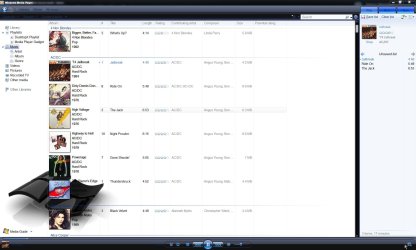
WMP12 Screenshot 1 (Notice how album-art is in upper-left corner with song metadata right above it, and gray color of list pane)
WMP12 Screenshot 2 (Album art same place but visualization playing in the background)
Now this is what my respective screenshots look like:
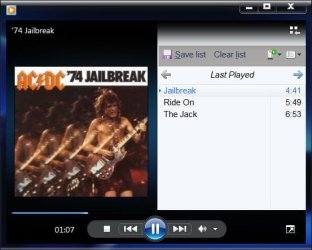
Screenshot1 (My album art is big and centered and song metadata is in small fonts, at very top of screen, and white color of list pane )
)
Screenshot2 (I cant even display album art while visualization is on )
)
Any ideas on what setting to change to change the background color of list pane to gray, display albumart in upper-left corner with song metadata and how to display albumart when visualization is playing?
WMP12 Screenshot 1 (Notice how album-art is in upper-left corner with song metadata right above it, and gray color of list pane)
WMP12 Screenshot 2 (Album art same place but visualization playing in the background)
Now this is what my respective screenshots look like:
Screenshot1 (My album art is big and centered and song metadata is in small fonts, at very top of screen, and white color of list pane
)Screenshot2 (I cant even display album art while visualization is on
)Any ideas on what setting to change to change the background color of list pane to gray, display albumart in upper-left corner with song metadata and how to display albumart when visualization is playing?
My Computer
At a glance
Windows 7T75003GBNvidia 8400M GS
- Computer Manufacturer/Model Number
- HP dv6700t
- OS
- Windows 7
- CPU
- T7500
- Memory
- 3GB
- Graphics Card(s)
- Nvidia 8400M GS
- Sound Card
- Realtek HD Audio
- Hard Drives
- 250GB